
Microsoft 365 Integration
MySummitKeep connects to Microsoft 365 in four distinct ways, and it is worth being precise about each because they have very different privilege levels. Every account signs in through Microsoft Entra. On top of that, a unit can opt in to two-way Outlook Calendar sync, route its outbound email through its own Office 365 tenant, or simply publish a low-privilege iCal feed. The first is always on; the other three are off until a leader turns them on.
Sign-in (Microsoft Entra External ID)
Section titled “Sign-in (Microsoft Entra External ID)”Every MySummitKeep account signs in through Microsoft Entra External ID at mysummitkeep.ciamlogin.com. The platform never sees your password — credentials are handled end-to-end by Microsoft. We receive only the Microsoft-issued OID (Object ID) for each user, plus the name and email on the profile.
Why OID? It is immutable. If a parent later changes the email on their Microsoft account, MySummitKeep still recognizes them by OID and never loses the link to their Scout’s records. Sign-in itself requests no Microsoft Graph data access — it is identity only.
Outlook Calendar sync (opt-in, two-way)
Section titled “Outlook Calendar sync (opt-in, two-way)”Under Settings → Calendar, the Outlook Calendar card lets a leader connect the unit’s events to Microsoft Outlook / Microsoft 365 Calendar. This is a real OAuth connection — not just a feed.
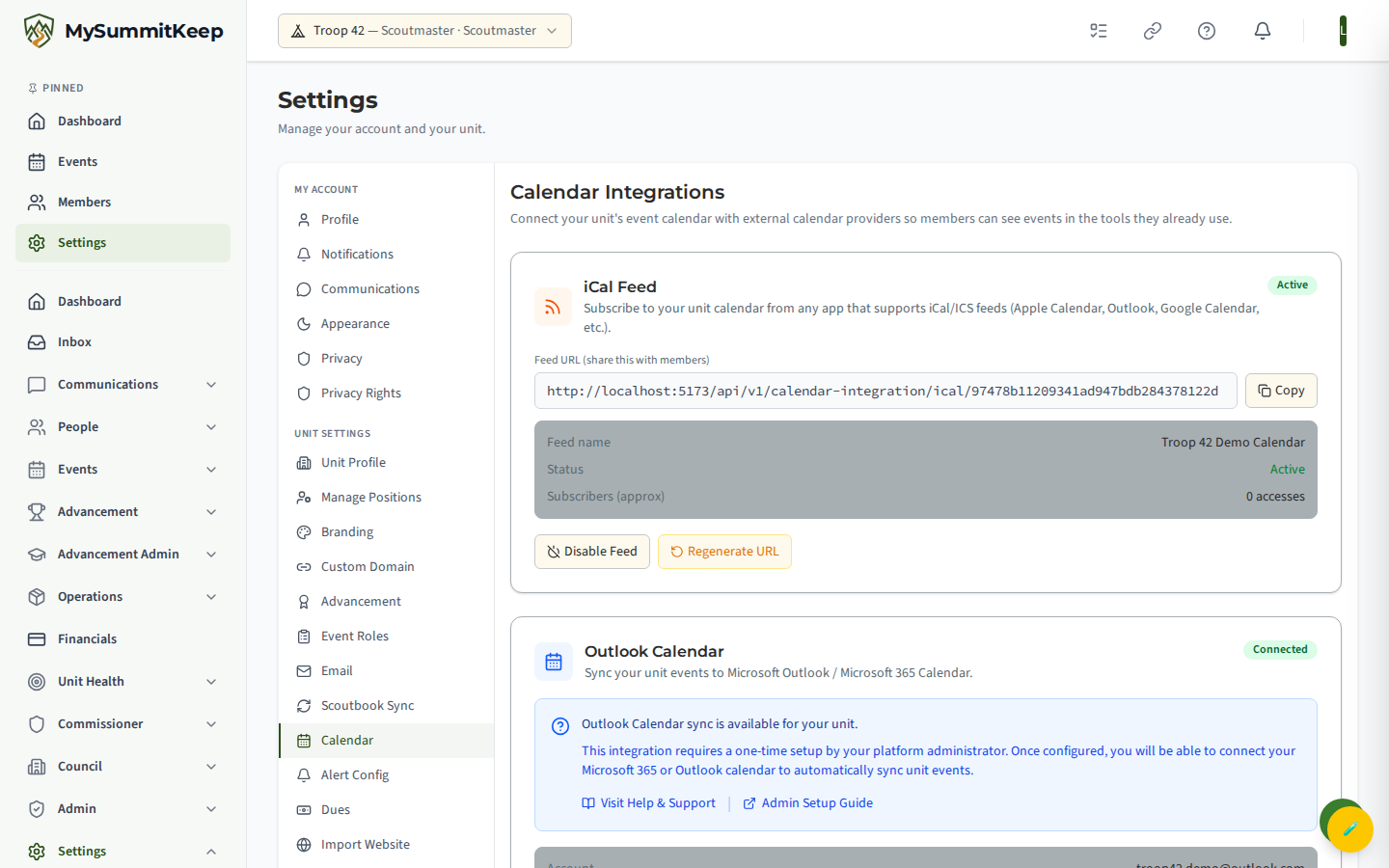
Here is exactly what happens:
- Connect Outlook Calendar sends you to Microsoft to sign in and consent. MySummitKeep requests only
Calendars.ReadWriteandoffline_accesson Microsoft Graph — permission to read and write calendar events, plus a refresh token so sync can run in the background. It does not request mail, files, contacts, Teams, or directory access. - Microsoft returns you to
/settings/calendar/outlook/callback, which exchanges the one-time authorization code for tokens. You see “Connected!” and land back on the calendar settings page. - Once connected, two buttons appear: Sync to Outlook pushes your MySummitKeep unit events into Outlook, and Pull from Outlook imports Outlook events back into MySummitKeep. The card shows the connected account, sync status, and last-synced time.
- Disconnect revokes the stored tokens and stops all sync. The card returns to “Not connected.”
A Google Calendar card sits right alongside the Outlook card on the same page and works the same way (OAuth connect, sync, disconnect). See Outlook Calendar Setup for the step-by-step, including the matching Google flow.
Office 365 outbound email (optional, your tenant)
Section titled “Office 365 outbound email (optional, your tenant)”Under Settings → Email, the Email Configuration card lets a unit choose how its outgoing email is sent: the MySummitKeep Default (Azure Communication Services, noreply@mysummitkeep.com, no setup), Office 365 (your own tenant), or SendGrid (bulk/marketing).
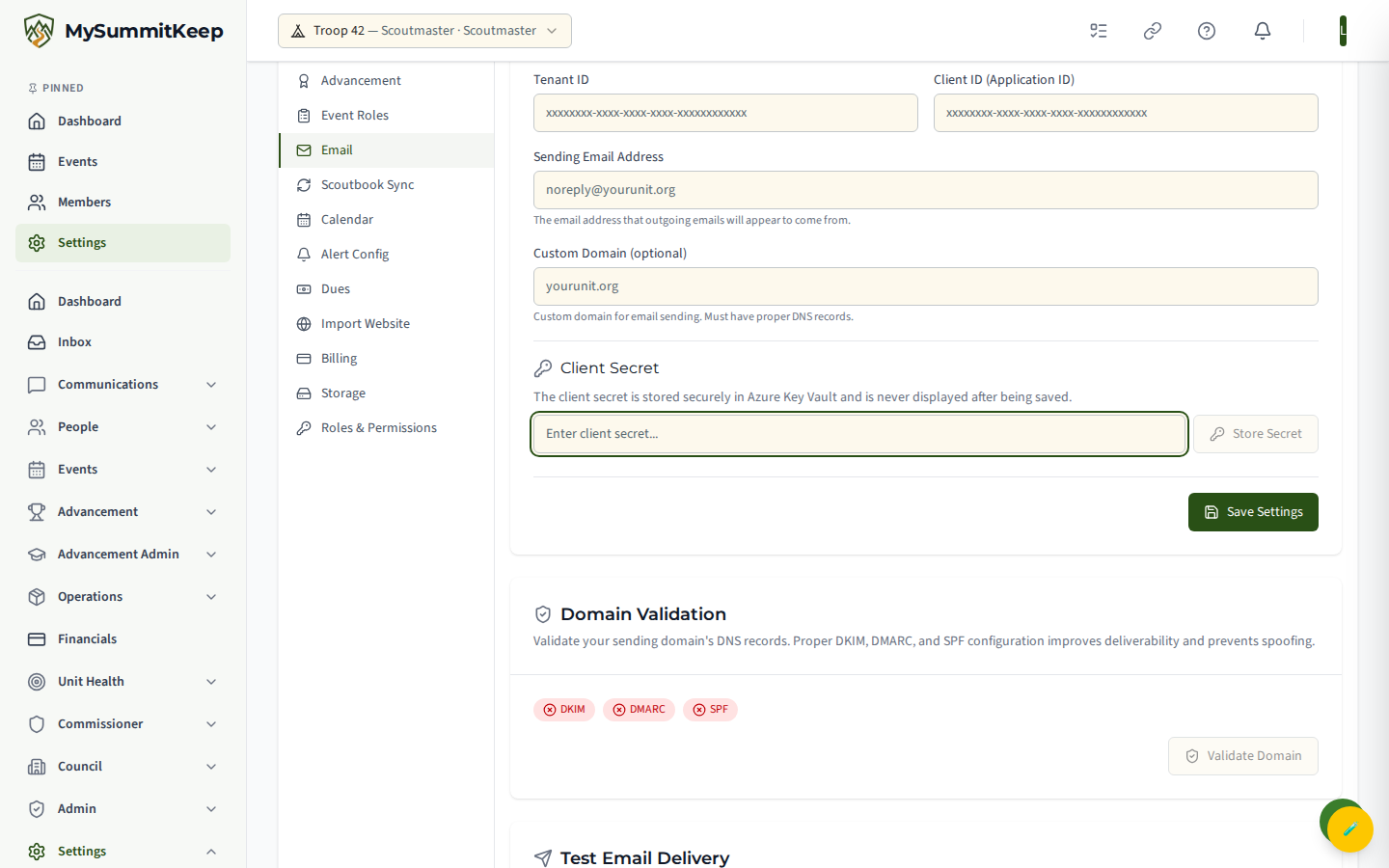
Choosing Office 365 sends unit email through your Microsoft 365 tenant, so messages come from your own domain. To set this up, your tenant administrator creates an app registration in Entra with permission to send mail on the unit’s behalf, then a leader enters:
- Tenant ID — your Microsoft 365 directory ID.
- Client ID (Application ID) — the app registration’s ID.
- Sending Email Address — the address outgoing email appears to come from (for example,
noreply@yourunit.org). - Custom Domain (optional) — the domain to validate for sending.
- Client Secret — pasted into the Client Secret field and saved with Store Secret.
Domain validation and a test send
Section titled “Domain validation and a test send”Before Office 365 mail can go out, MySummitKeep validates the sending domain’s DNS. The Domain Validation panel runs a Validate Domain check and shows green/red badges for DKIM, DMARC, and SPF, plus any specific errors. Proper records improve deliverability and prevent spoofing.
Once the domain is verified, use Test Email Delivery to confirm everything works end to end.
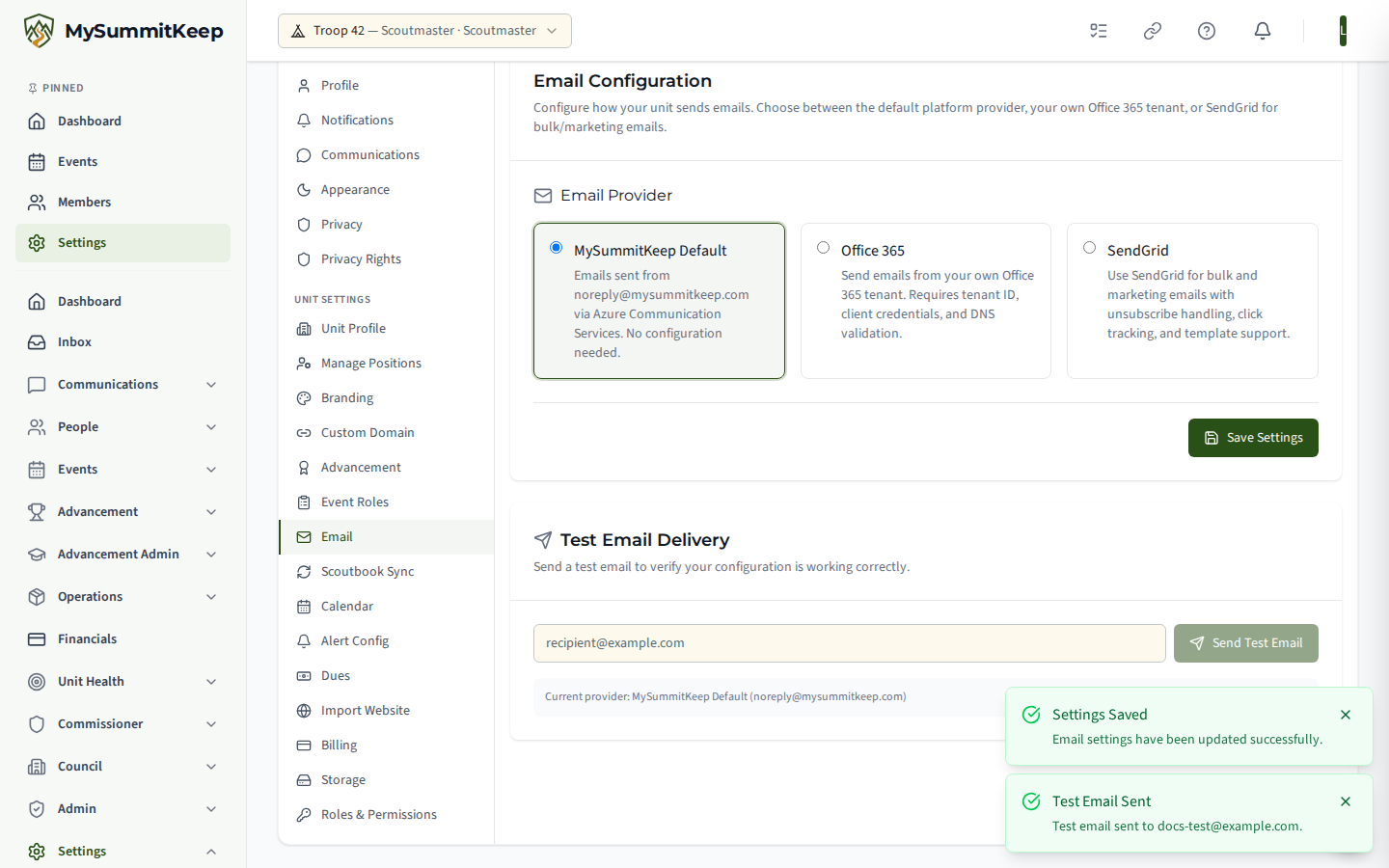
Enter a recipient and Send Test Email. Note that for the Office 365 provider, the test send is blocked until the domain validates — you will see a prompt to run Validate Domain first.
The iCal feed (low-privilege fallback)
Section titled “The iCal feed (low-privilege fallback)”Also on Settings → Calendar, the iCal Feed card generates a shareable subscription URL. This is the original, lowest-privilege option:
- It is a read-only
.icsfeed of your unit’s events, protected by a per-unit secret token in the URL. - It involves no OAuth grant, no Microsoft tokens, and no Graph permissions — members simply subscribe to the URL in Apple Calendar, Outlook, Google Calendar, or any iCal-capable app.
- You can Disable the feed, or Regenerate URL to rotate the token (which invalidates existing subscriptions — share the new URL afterward).
If you do not want any Microsoft credential involved in calendaring at all, this is the option to use.
What your tenant administrator may want to know
Section titled “What your tenant administrator may want to know”If your unit belongs to a larger organization (school, faith group, council) that runs Microsoft 365, the tenant administrator may ask:
- Does MySummitKeep get any access to our tenant? Only if a leader connects something. With just sign-in or the iCal feed, there is no OAuth grant and no service principal acting on your data. If a leader connects Outlook Calendar sync, MySummitKeep holds a token scoped to
Calendars.ReadWritefor that connecting user only. If a leader configures Office 365 outbound mail, you create an app registration in your tenant with mail-send permission, and you control its lifetime, secret, and revocation. - Where does the client secret live? In MySummitKeep’s Azure Key Vault, never in its database, and never shown again after it is saved.
- How do we revoke access? Disconnect Outlook Calendar from Settings → Calendar (revokes the calendar token), and/or delete the app registration / rotate its secret in Entra (cuts off Office 365 mail). For the iCal feed, disable or regenerate it.
- Can users be auto-provisioned? Not currently — each user signs in interactively the first time. If your council needs SCIM-based provisioning, contact us.
What we do not integrate with
Section titled “What we do not integrate with”- Teams — no integration today.
- OneDrive / SharePoint — no file or list integration; MySummitKeep stores its own files.
- Exchange mailboxes — we send through Office 365 (if you configure it) but do not read your mailbox. The only mailbox-adjacent access is the calendar scope you explicitly grant for sync.
If your council has a use case beyond these, open a feature request from inside the app.
Related
Section titled “Related”MySummitKeep is an independent product and is not affiliated with, endorsed by, or sponsored by Scouting America (formerly the Boy Scouts of America). Scouting America, Scouts BSA, Cub Scouts, Venturing, Sea Scouts, and the Order of the Arrow are trademarks of Scouting America. Official program content shown in screenshots and examples is © Scouting America; always confirm current requirements atscouting.org. SeeTerms § 7.3.