
Using the AI Assistant
MySummitKeep includes a built-in AI Assistant that answers questions about Scouting, BSA advancement, and how to get things done in the platform. It is a friendly chat helper for leaders, parents, and Scouts — not a replacement for official BSA resources, but a fast way to find an answer or remember which menu a feature lives under.
Opening the AI Assistant
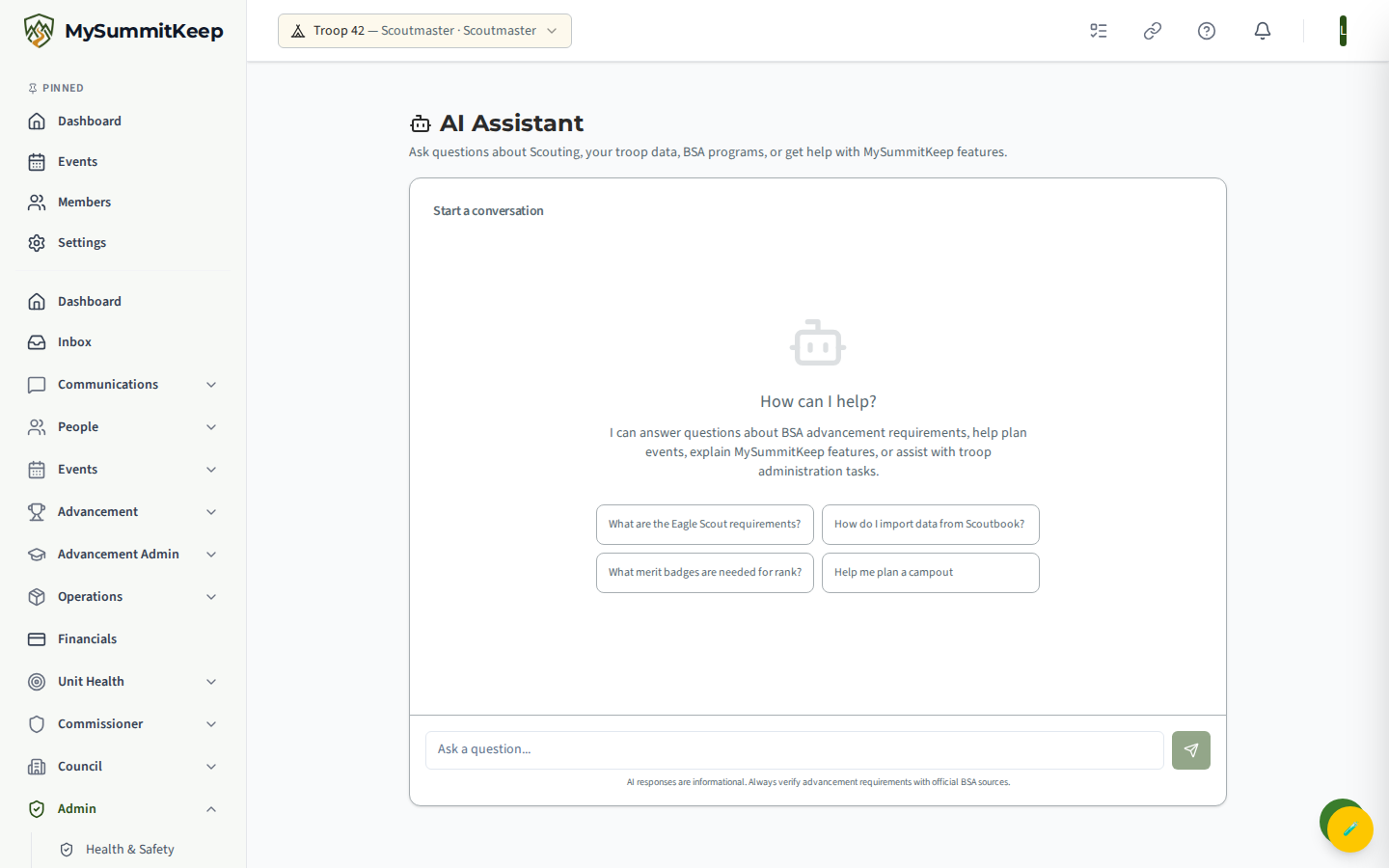
Section titled “Opening the AI Assistant”Leaders and admins open the AI Assistant from the AI Assistant link in the sidebar; anyone signed in can also go directly to /ai. You will see a chat screen titled AI Assistant with a short prompt: “Ask questions about Scouting, your troop data, BSA programs, or get help with MySummitKeep features.”
Type your question in the box at the bottom and press Enter to send (use Shift+Enter to add a line break without sending). You can also click the send button to the right of the input. While the assistant is thinking, a spinner appears and the input is briefly disabled.
What you can ask
Section titled “What you can ask”The assistant is tuned specifically for Scouting and MySummitKeep. Good questions include:
- Advancement — Eagle Scout and rank requirements, which merit badges count toward a rank, service-hour expectations.
- Event planning — help thinking through a campout, meeting, or service project.
- Platform how-tos — “How do I import data from Scoutbook?”, “Where is the Document Vault?”, “How do I link a trail to an event?”
- Administration — questions about roster, patrols and dens, health forms, food inventory, communication tools, and billing settings.
It understands BSA terminology — Troop, Pack, Crew, and Ship; Scoutmaster and Cubmaster; SYT (Safeguarding Youth Training); two-deep leadership; and Eagle Scout as the highest rank in Scouts BSA. It will tailor answers to your role when it can.
Suggested starter prompts
Section titled “Suggested starter prompts”On a fresh conversation, the assistant shows a grid of one-click starter prompts so you do not have to think of a question from scratch:
- What are the Eagle Scout requirements?
- How do I import data from Scoutbook?
- What merit badges are needed for rank?
- Help me plan a campout
Click any of these to drop it into the message box, then edit it or send it as-is.
What the assistant can see (and limits)
Section titled “What the assistant can see (and limits)”This is the important part, so read it before you rely on an answer.
- It knows the platform and BSA basics. The assistant is briefed on MySummitKeep’s features (Document Vault, Trail Library, Food Inventory, IA2/Scoutbook Plus export, and more) and on BSA program structure, so it can explain how things work and where to find them.
- It knows your role. Your role (such as Leader, Parent, or Scout) is passed along so answers can be tailored to you.
- It does not read your live unit records. The assistant is not connected to your roster, advancement records, calendar, or finances. If you ask “When is our next campout?” it cannot look that up — it can only explain how you would find it. For real data, use the actual feature pages.
- Sensitive details are stripped before processing. Before your message leaves the platform, MySummitKeep automatically redacts personal data — things like dates of birth, BSA member IDs, email addresses, phone numbers, and similar — so they are not sent to the AI provider.
Transcripts and history
Section titled “Transcripts and history”Your conversations are saved so there is a record of what was asked and answered. Within a single chat session the assistant remembers the recent back-and-forth, so you can ask follow-up questions naturally without repeating yourself.
Parents and guardians can review the chat transcripts of a Scout in their own household. This visibility is intentional — it keeps the assistant transparent for families and supports youth protection. A guardian can only see transcripts for a child they are actually linked to in the same household; no one can see another family’s conversations.
Ask-the-docs search (public)
Section titled “Ask-the-docs search (public)”Separate from the in-app assistant, this documentation site has its own Ask the docs AI search box. It lets anyone — including people who are not signed in — ask a plain-language question and get pointed to the right help article.
This documentation search is independent of your unit data and the in-app assistant: it only searches these public help pages. While the AI answer feature is being finished, the box will suggest you press Cmd+K (or Ctrl+K) for fast keyword search across the docs instead.
Accuracy and disclaimers
Section titled “Accuracy and disclaimers”AI answers are informational and can be wrong or out of date. The assistant itself reminds you of this at the bottom of every chat: “AI responses are informational. Always verify advancement requirements with official BSA sources.”
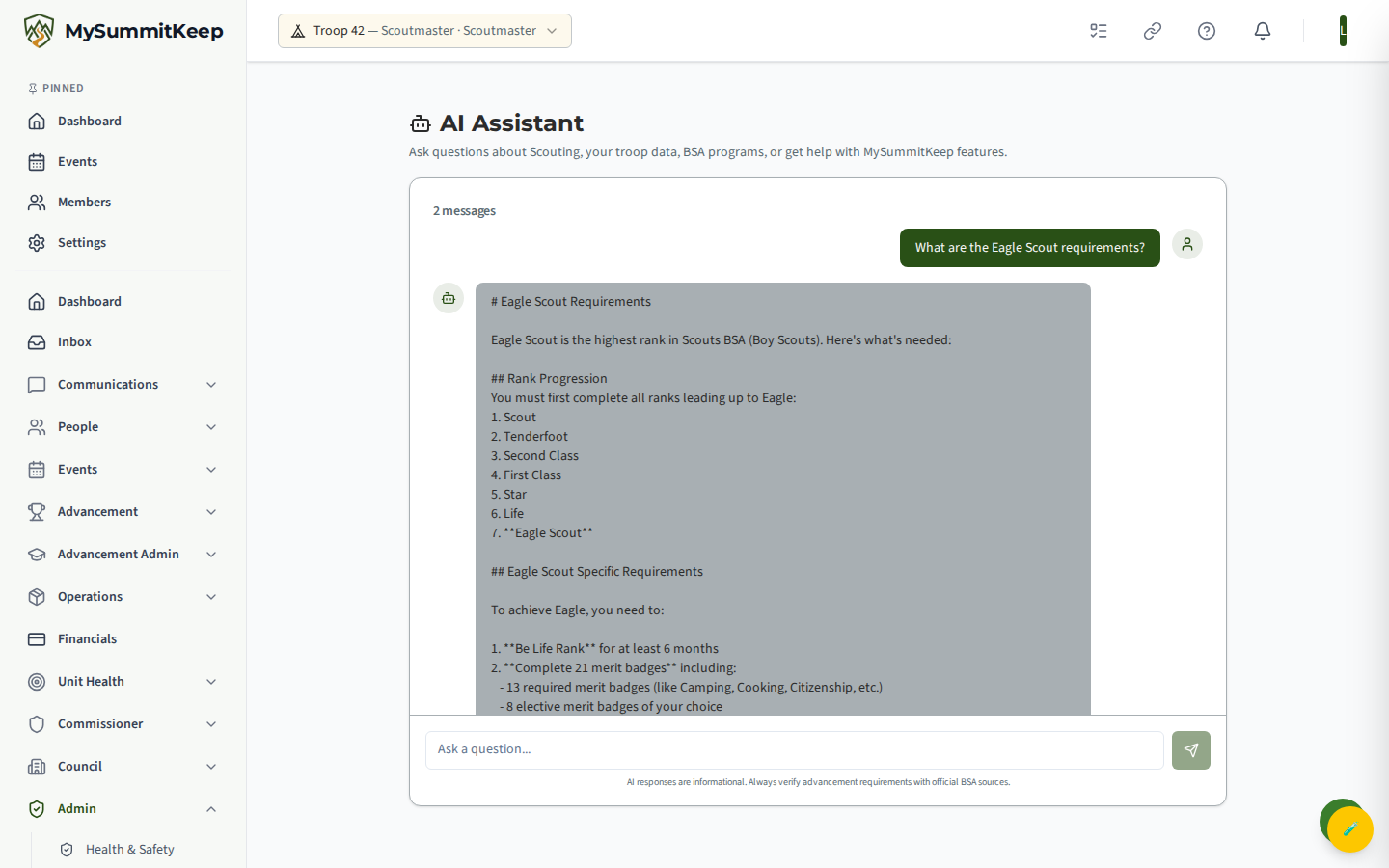
Please treat the assistant as a helpful first stop, not the final word:
- Verify advancement and policy answers against official Scouting America sources and your unit’s leadership.
- Follow the BSA Guide to Safe Scouting for any safety question — the assistant will point you there too.
- When in doubt, ask a human. If the assistant is not sure, it will suggest contacting your unit leader or emailing support@mysummitkeep.com.
For deeper, task-by-task instructions, the rest of this help site has you covered — for example Member Import, Event Planning, and the Advancement Workflow.
MySummitKeep is an independent product and is not affiliated with, endorsed by, or sponsored by Scouting America (formerly the Boy Scouts of America). Scouting America, Scouts BSA, Cub Scouts, Venturing, Sea Scouts, and the Order of the Arrow are trademarks of Scouting America. Official program content shown in screenshots and examples is © Scouting America; always confirm current requirements atscouting.org. SeeTerms § 7.3.