
Admin Dashboard and Tools
The Admin Center is the home base for the people who keep your unit running. It pulls the most common leader and admin chores into one place — approving new members, managing roles, reviewing reported messages, configuring automated alerts, and checking compliance — and gives you a quick snapshot of where the unit stands. Everything here is gated to leaders and admins.
Opening the Admin Dashboard
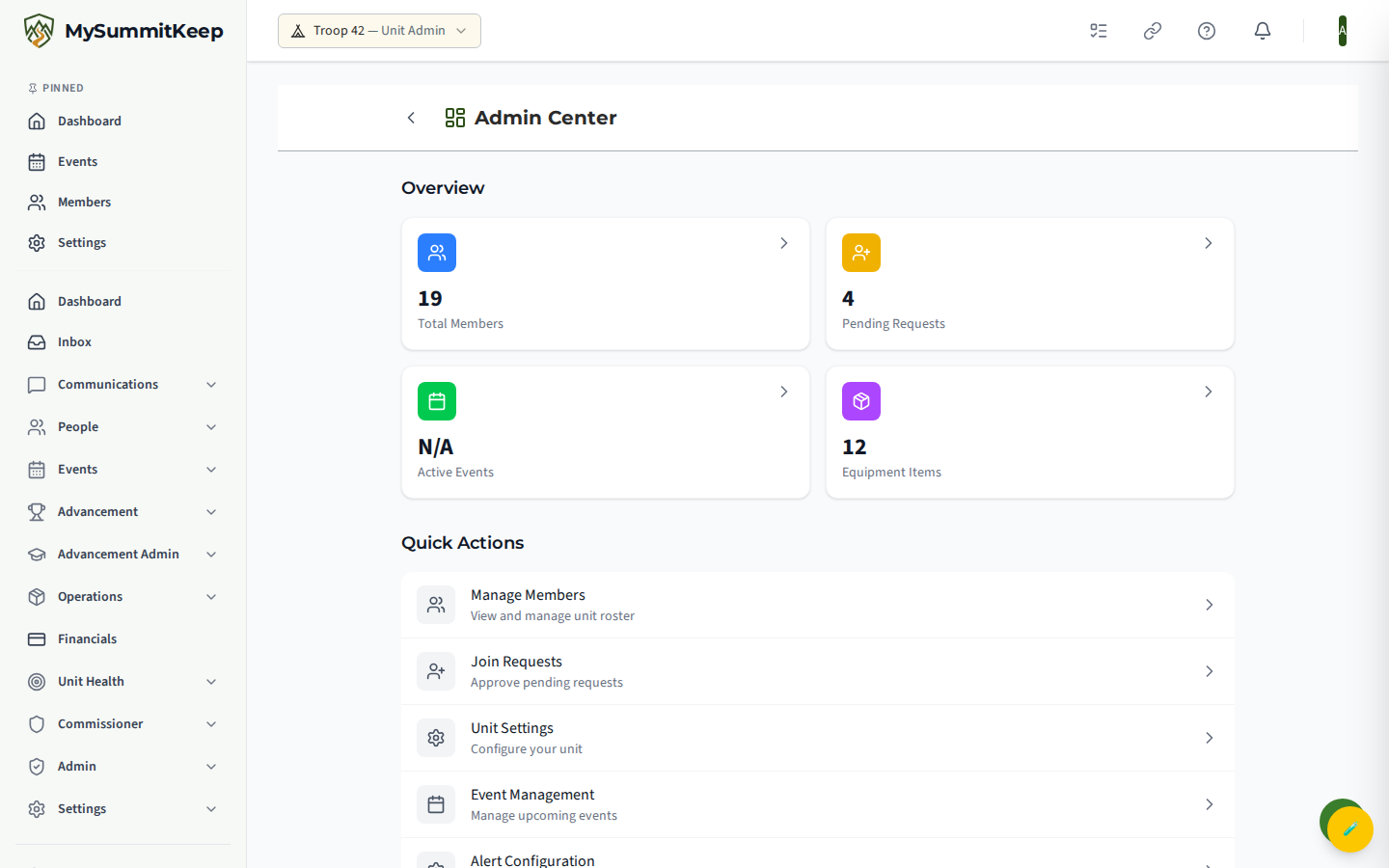
Section titled “Opening the Admin Dashboard”Open the account menu (your picture or initials at the top right of any page) and choose Admin Center. The page lives at /admin and is split into two parts: an Overview with stat cards, and a Quick Actions list that links out to each tool.
At-a-glance stats
Section titled “At-a-glance stats”The Overview shows four cards: Total Members, Pending Requests, Active Events, and Equipment Items. Each card is a shortcut — tap Total Members to jump to the roster, Pending Requests to open join requests, Active Events for the calendar, or Equipment Items for the quartermaster page. The numbers refresh on their own, so a non-zero “Pending Requests” count is your cue that someone is waiting to be let in.
Quick actions
Section titled “Quick actions”Below the stats, the Quick Actions list links to Manage Members, Join Requests, Unit Settings, Event Management, Alert Configuration, Merge Members, and Recipe Review. Think of it as a shortcut menu — the same pages are reachable elsewhere, but this is the fastest path from a standing start.
Join requests and account claims
Section titled “Join requests and account claims”MySummitKeep has three distinct review queues. They sound similar, so here is what each one is for.
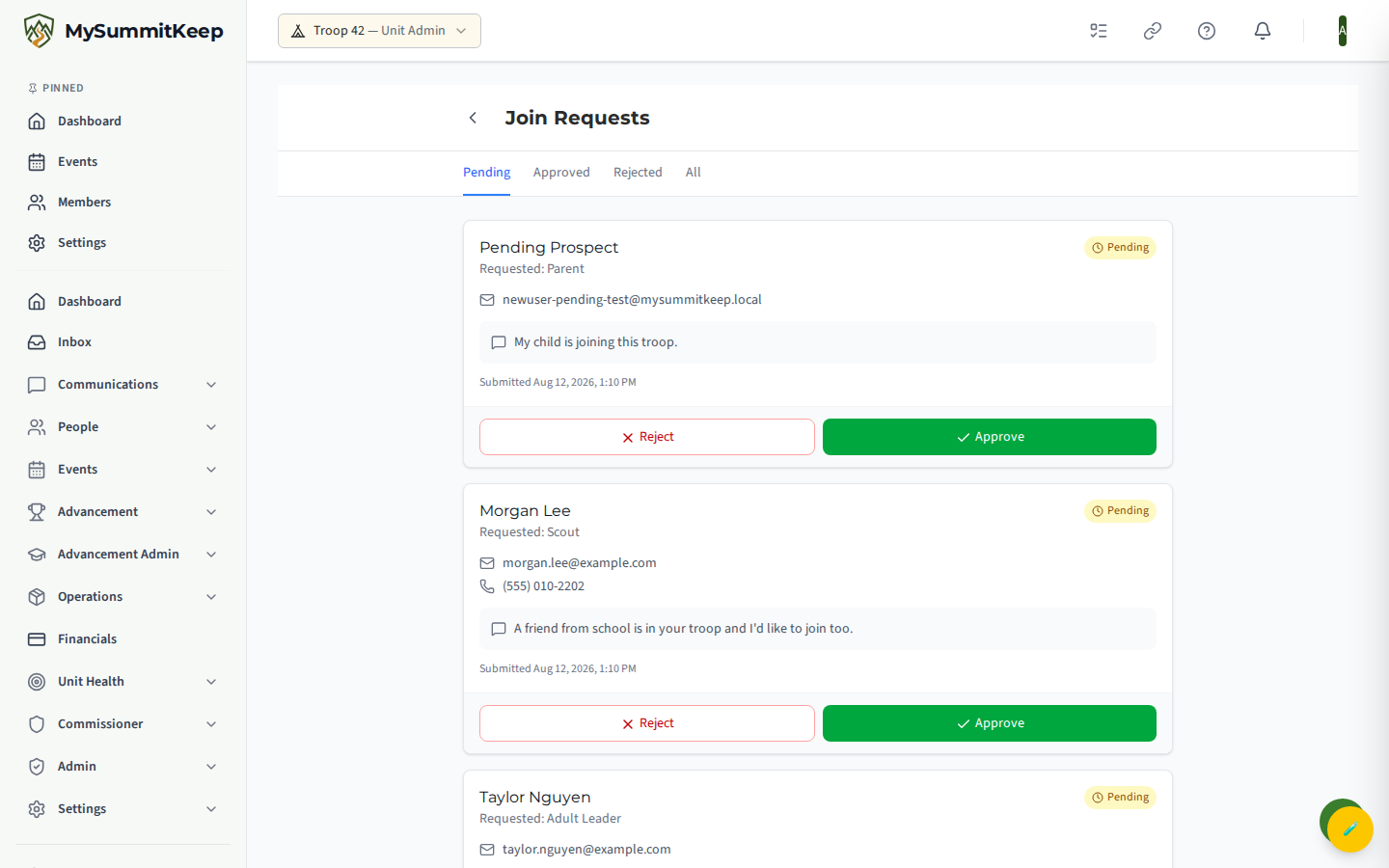
Join Requests (/admin/join-requests) is where people who asked to join your unit wait for a decision. Tabs let you filter by Pending, Approved, Rejected, or All. Approving a request adds that person to your unit immediately; rejecting it lets you record an optional reason.
Account Verifications (/admin/claim-queue; find it under Admin → Account Verifications) handles a different case: someone signed up on their own and the system matched them to a member record you already imported. Each card shows the requester, the member they want to claim, and proof chips (email verified, email matches on file, BSA ID matches, name matches) plus a confidence rating. Approve to grant access, or reject if the requester is not the real person. Both actions are logged for audit.
Unit Claim Verification (/admin/claim-verification) is the queue for unit adoption claims — a new admin asserting they lead a unit. You review the claimant, the position they claim, their justification, BSA Member ID, and any charter documents, then approve or reject with optional reviewer notes.
User management
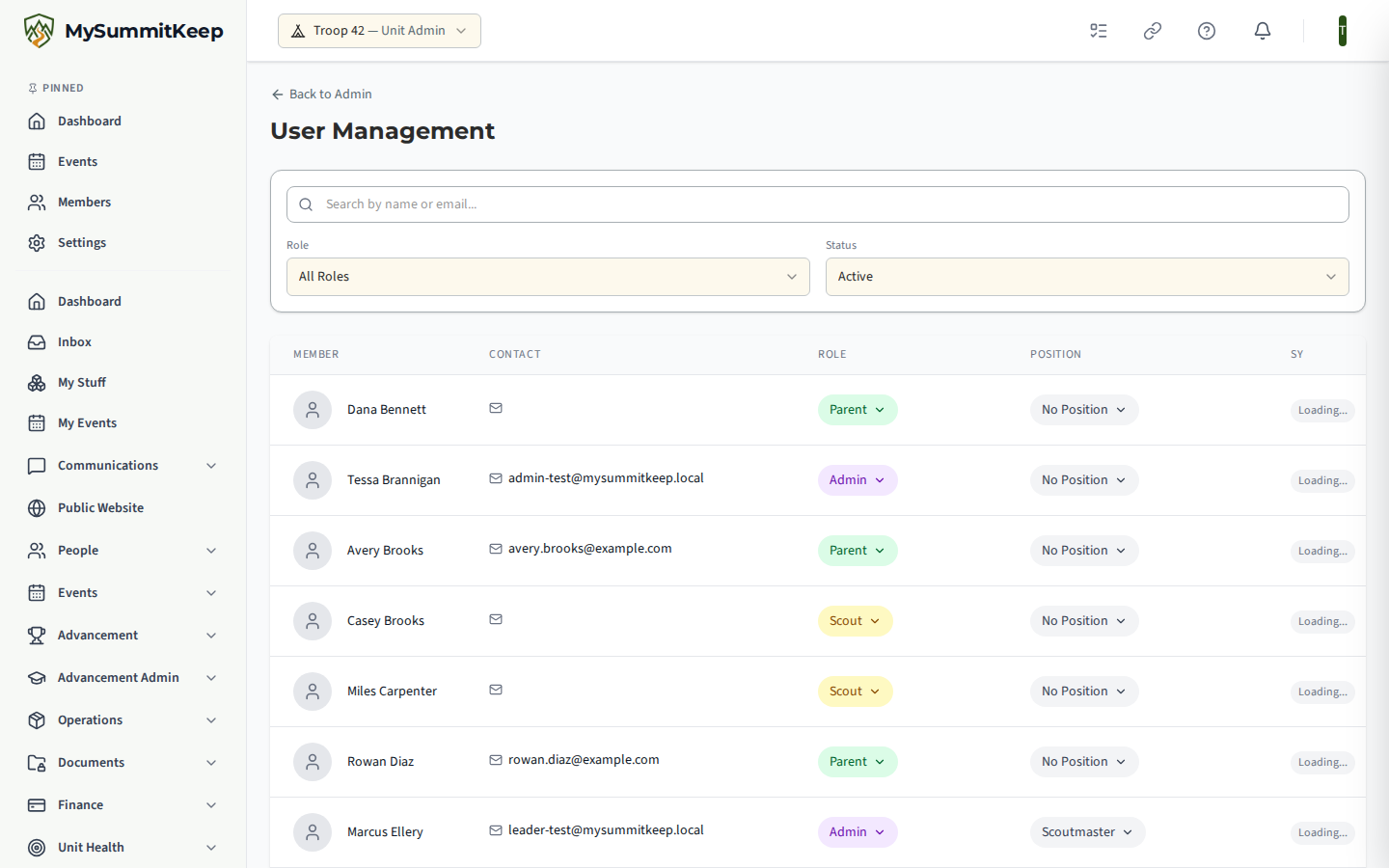
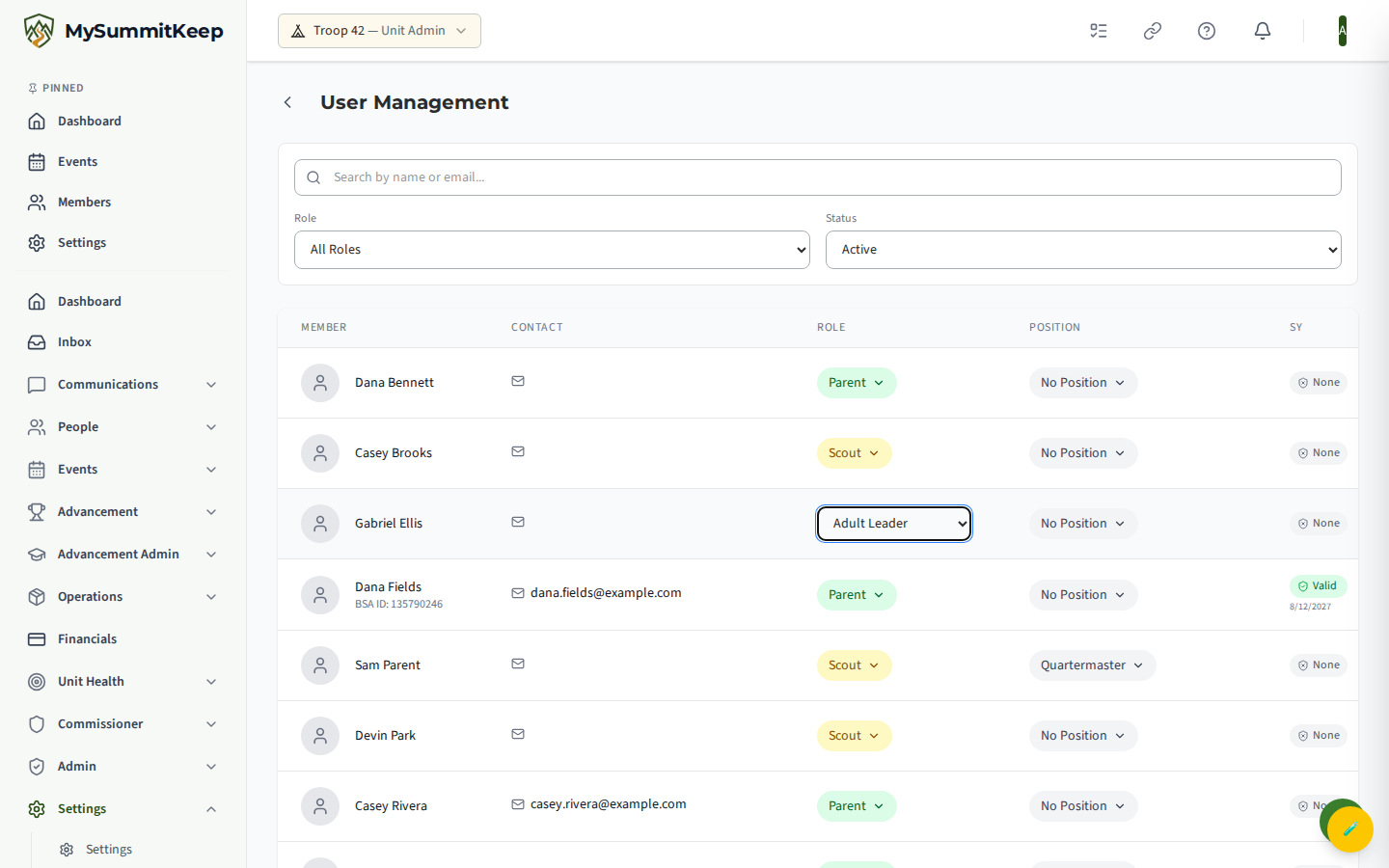
Section titled “User management”User Management (/admin/users; find it under Settings → User Management) is the roster control panel. Search by name or email and filter by Role or Status (it defaults to Active members). For each person you can change their role inline — Scout, Parent, Adult Leader, Historian, Quartermaster, Treasurer, or Admin — assign a position of responsibility, see their Safeguarding Youth training status and a Trained badge, and flip the active/inactive toggle.
Picking a role in the filter narrows the list further:
Member merge and prospects
Section titled “Member merge and prospects”Merge Members (/admin/member-merge) cleans up duplicates — for example when an imported stub and a real account are the same person. Pick a Primary Record (Keep) and a Duplicate Record, and the preview shows a field-by-field comparison plus a count of everything that will transfer: merit badges, advancements, ranks, event registrations, attendance, service hours, training, household links, and more. After you confirm, the duplicate is deactivated. This cannot be undone, so review the preview carefully. You can’t merge your own record, and a merge that would move a current position of responsibility, or a role only a unit administrator gives, from one person to another needs a leader who manages roles; the preview says so in place of the comparison. If you’re a parent or guardian of either record, or have a pending invitation for either record or into a household the record you keep belongs to, the preview says so in place of the comparison, and another leader must merge them (see Member Import). A pending invitation into a household that only the duplicate belongs to doesn’t stop the merge: the Scout you keep just isn’t placed in that household, and another leader or the Scout’s parent must add them there.
Unit Prospects (/admin/unit-prospects; find it under Events → Unit Prospects) lists guests who opted in through event RSVPs and chose to stay in touch. You can page through them and toggle Include unsubscribed to see people who later opted out. Because these are the names and email addresses of people outside your unit, the page requires the adult-only Event.ViewGuests permission — Scoutmasters, Assistant Scoutmasters, and unit admins hold it. Youth officers do not, and see an access-denied notice instead of the list (see What youth leaders can and cannot see).
Message reports and moderation
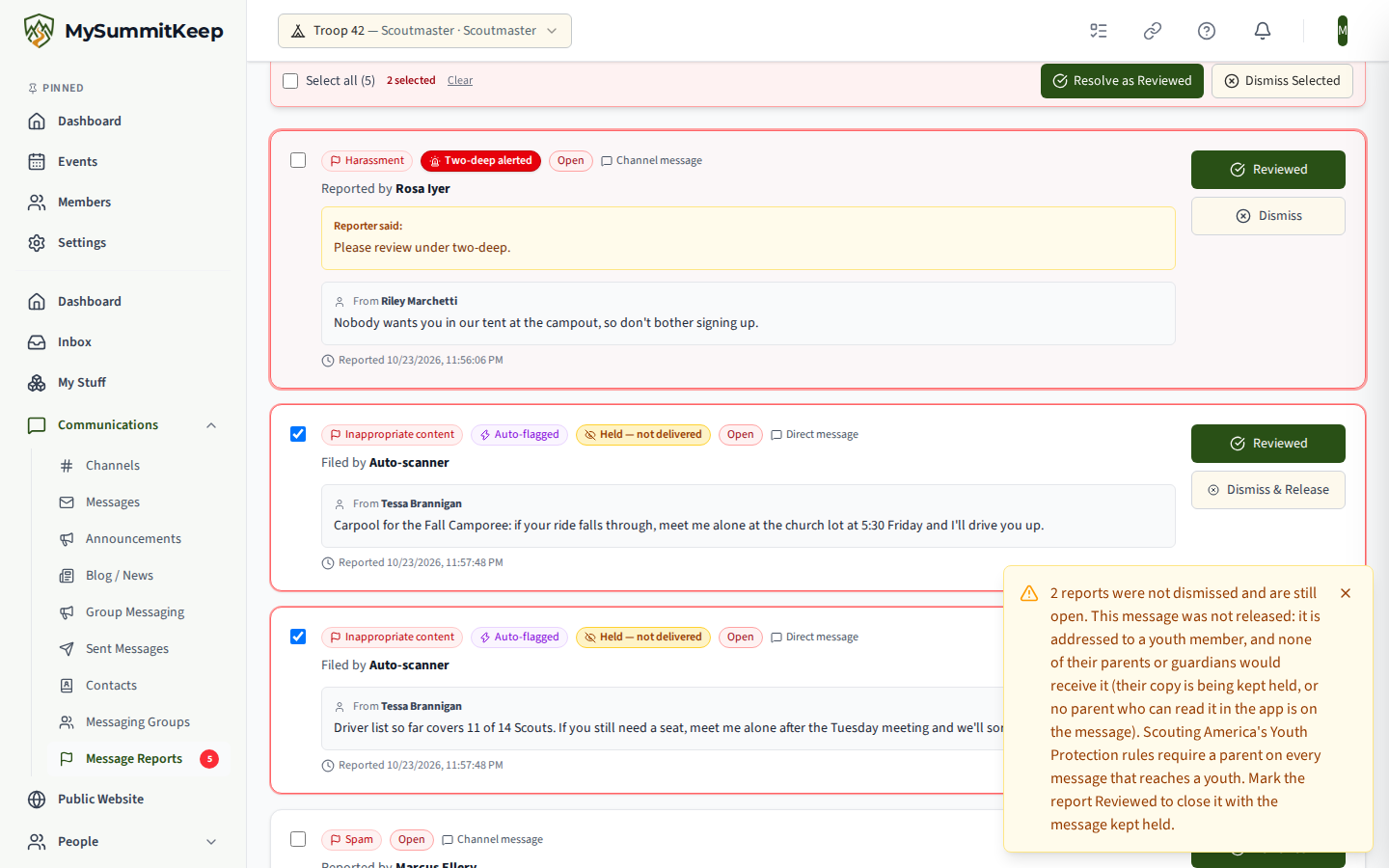
Section titled “Message reports and moderation”Message Reports (/admin/message-reports; find it under Communications → Message Reports) is the leader review queue for messages members flag, plus anything the content scanner auto-files. Reports are grouped into Open, Reviewed, and Dismissed tabs. Mark a report Reviewed when you took action, or Dismiss it when it does not meet the threshold; you can add a resolution note (logged for audit) and resolve several at once. Reports tied to a youth-safety signal are highlighted and labelled Two-deep alerted, meaning every unit leader was emailed.
Dismissing a report on a held message delivers that message, so Youth Protection can refuse a dismissal. If the message is addressed to a Scout and none of the Scout’s parents or guardians would receive it, or the Scout is under 13, the report stays Open, a warning says how many reports weren’t dismissed and why, and those reports stay selected. Mark them Reviewed to close them with the message kept held.
The Content Rules tab lets you add your unit’s own keyword or regex patterns that auto-file a report when matched, each with a severity and optional label. These run alongside the built-in scanner. For the full picture, see Content Moderation.
Activity log (audit trail)
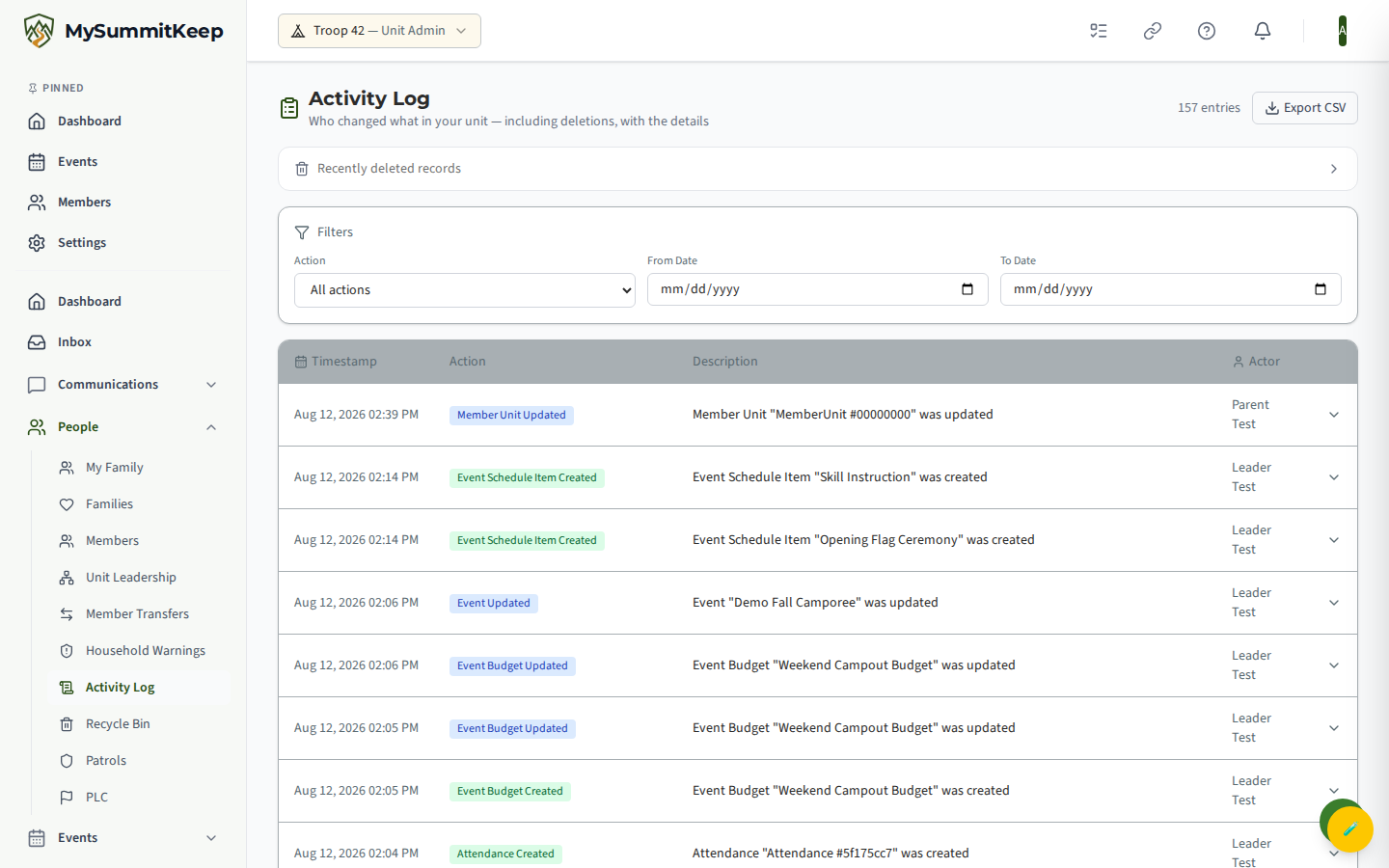
Section titled “Activity log (audit trail)”Activity Log (/admin/activity-log; find it under People → Activity Log) is your unit’s audit trail — a newest-first record of significant actions: events created, updated, or deleted; members added or removed; merit badges and rank advancements recorded; announcements published; and budgets created. Filter by Action Type and a From/To date range. Each row shows the timestamp, the action, a description, and the actor (or “System”). It is restricted to leaders and admins.
Automated alert configuration
Section titled “Automated alert configuration”Alert Configuration (/admin/alert-config; find it under Settings → Alert Config, the card on the Settings page) controls the reminders MySummitKeep sends on a daily schedule, grouped into Events, Advancement, Compliance & Safety, Financial, and Other. Toggle each alert on or off. For time-based ones — event reminders, Safeguarding Youth Training and BSA registration expirations, health-form Parts A/B/C, training certifications, and payment due dates — set how many days before to notify (for example 30, 14, 7), who receives it (All Members, Leaders Only, or Parents Only), and the channels (Email, In-App, SMS). Remember to Save Changes. Each alert also shows when it last ran and how many notifications it sent. For the registration, health-form, and Safeguarding Youth Training expirations, only In-App sends, and a Scout is never alerted without their parent. See Unit-wide automated reminders for who gets each alert under each Recipients choice.
GtSS compliance
Section titled “GtSS compliance”GtSS Compliance (/admin/gtss-compliance; find it under Admin → GtSS Compliance) tracks every adult against the BSA Guide to Safe Scouting: BSA registration status and expiry, and Safeguarding Youth Training status and expiry. Summary cards count adults who are fully compliant, missing registration or SYT, or missing both, and non-compliant rows are highlighted.
You can toggle enforcement. With enforcement off (the default), violations are logged but nothing is blocked. With it on, adults without current registration and SYT are blocked from GtSS-covered actions: messaging unrelated youth, event leadership roles, advancement sign-offs, and health-form access.
Two more tools live under the admin section for specific roles:
- Recipe Review (
/admin/recipe-review) — approve or reject recipes submitted to the shared community library, with an optional rejection reason. - BSA Commissioner Tools Import (
/admin/commissioner-import) — for Corporate Admins and council-level commissioners only, refreshes unit health scores from theUnitMetricsStatusXLSX export with a preview-then-confirm flow.
MySummitKeep is an independent product and is not affiliated with, endorsed by, or sponsored by Scouting America (formerly the Boy Scouts of America). Scouting America, Scouts BSA, Cub Scouts, Venturing, Sea Scouts, and the Order of the Arrow are trademarks of Scouting America. Official program content shown in screenshots and examples is © Scouting America; always confirm current requirements atscouting.org. SeeTerms § 7.3.