
Unit Health Scores
The Commissioner Dashboard gives you one number per unit, the composite health score, plus five sub-metrics that show where a unit is strong and where it is slipping. Use it to decide which units in your district need a visit first.
The dashboard appears for anyone with an active commissioner role (Unit, Roundtable, District, Assistant District, or Council Commissioner, or a Scout Executive). If you don’t see it, you don’t yet hold one of those roles, or your District Commissioner hasn’t assigned units to you.
Reading the roster
Section titled “Reading the roster”Open Commissioner → Commissioner Dashboard in the left menu. The landing tab is Units, the roster of every unit you serve.
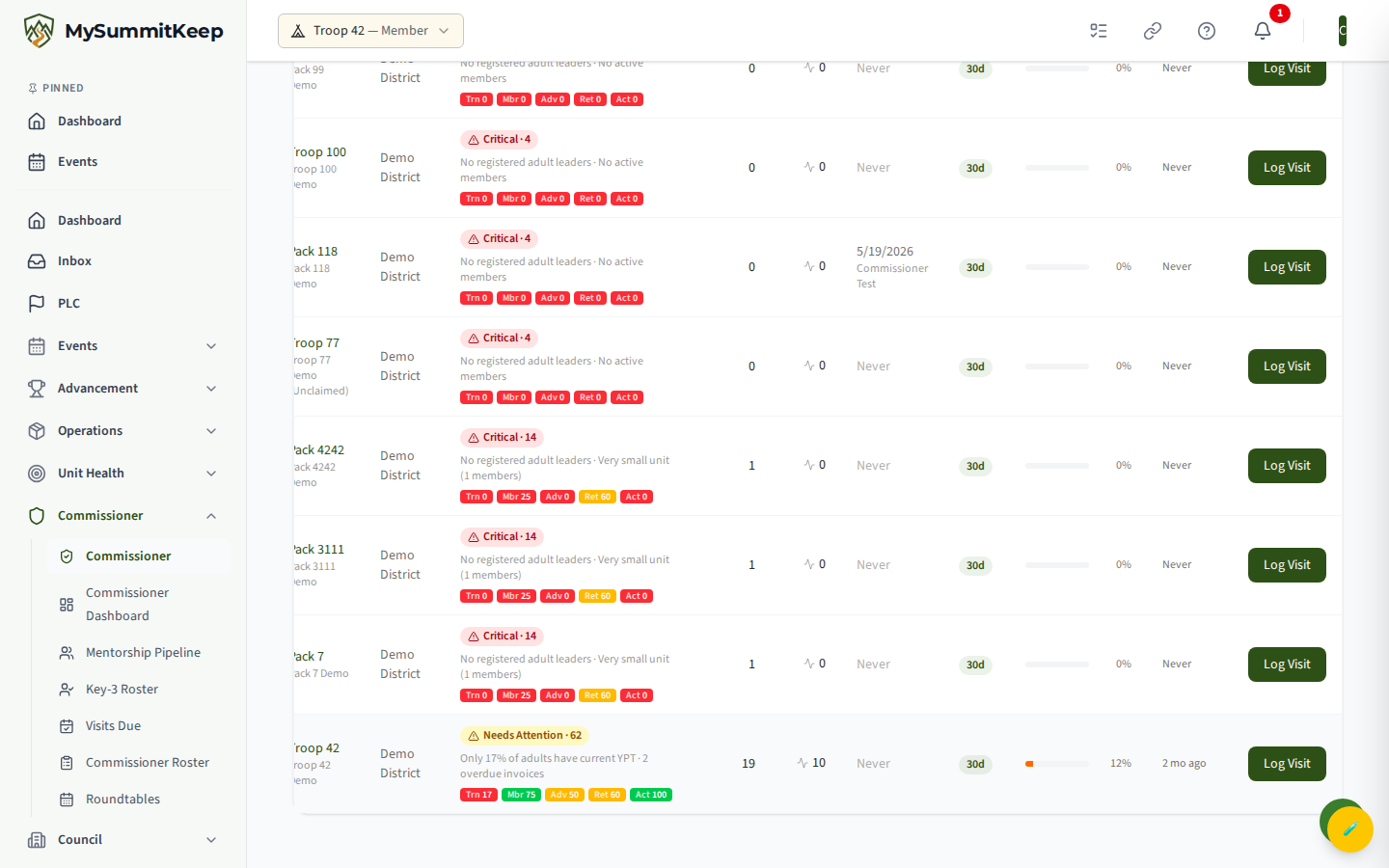
Each row shows:
- Health — a colored band badge and the composite score (0-100), followed by the five sub-metric bars (Trn, Mbr, Adv, Ret, Act). Hover any bar to see its full label and value, for example “Training: 62/100”.
- District, Members (active count), and Events (30d).
- Last Visit — the date and commissioner name, or “Never”.
- Stage, Plan %, and Last Assessed — lifecycle and Success Plan progress for units that have started one.
- A Log Visit button that opens the visit form pre-filled for that unit.
The roster is sorted worst-first automatically: the lowest composite scores float to the top so the units that need you most are the first thing you see.
The five sub-metrics
Section titled “The five sub-metrics”The composite score is a weighted blend of several signals, and the dashboard surfaces the five that matter most for a visit conversation. Each is scored 0-100 from your unit’s own data:
- Training (Trn) — the share of registered adult leaders with current Youth Protection Training (YPT). A unit with no registered adults scores 0 and is flagged.
- Membership (Mbr) — total active members. Larger, stable units score higher; very small units (under five members) are flagged.
- Advancement (Adv) — rank and requirement completions per youth over the last 90 days. Little or no recent advancement is flagged.
- Retention (Ret) — current active members compared to last year’s recharter roster. Holding or growing the roster scores highest; a sharp drop, or an expired or soon-to-expire charter, pulls it down. A brand-new unit with no recharter history gets a neutral score.
- Activity (Act) — events held in the last 90 days. Roughly weekly meetings score near the top; no events at all scores 0 and is flagged.
The metric bars are color-coded the same way everywhere: green at 70 and above, amber from 40 to 69, and red below 40.
What the four bands mean
Section titled “What the four bands mean”The composite score rolls up to one of four health bands. These thresholds are built into the platform and are the same for every council:
- Healthy (green) — composite 70-100. The unit is in good shape. Visits are check-ins, not interventions.
- Needs Attention (yellow) — composite 50-69. One or two soft spots. A good coaching opportunity.
- At Risk (orange) — composite 30-49. Multiple metrics are struggling. Plan a visit soon.
- Critical (red) — composite below 30. The unit may fold without support. Visit first and loop in your District Commissioner.
Drilling into a unit
Section titled “Drilling into a unit”Click a unit’s name to open its detail page at /commissioner/units/:unitId. This is the screen most commissioners pull up before a visit. It is a sanitized rollup — it shows the unit’s operational picture but no member-level personal information.
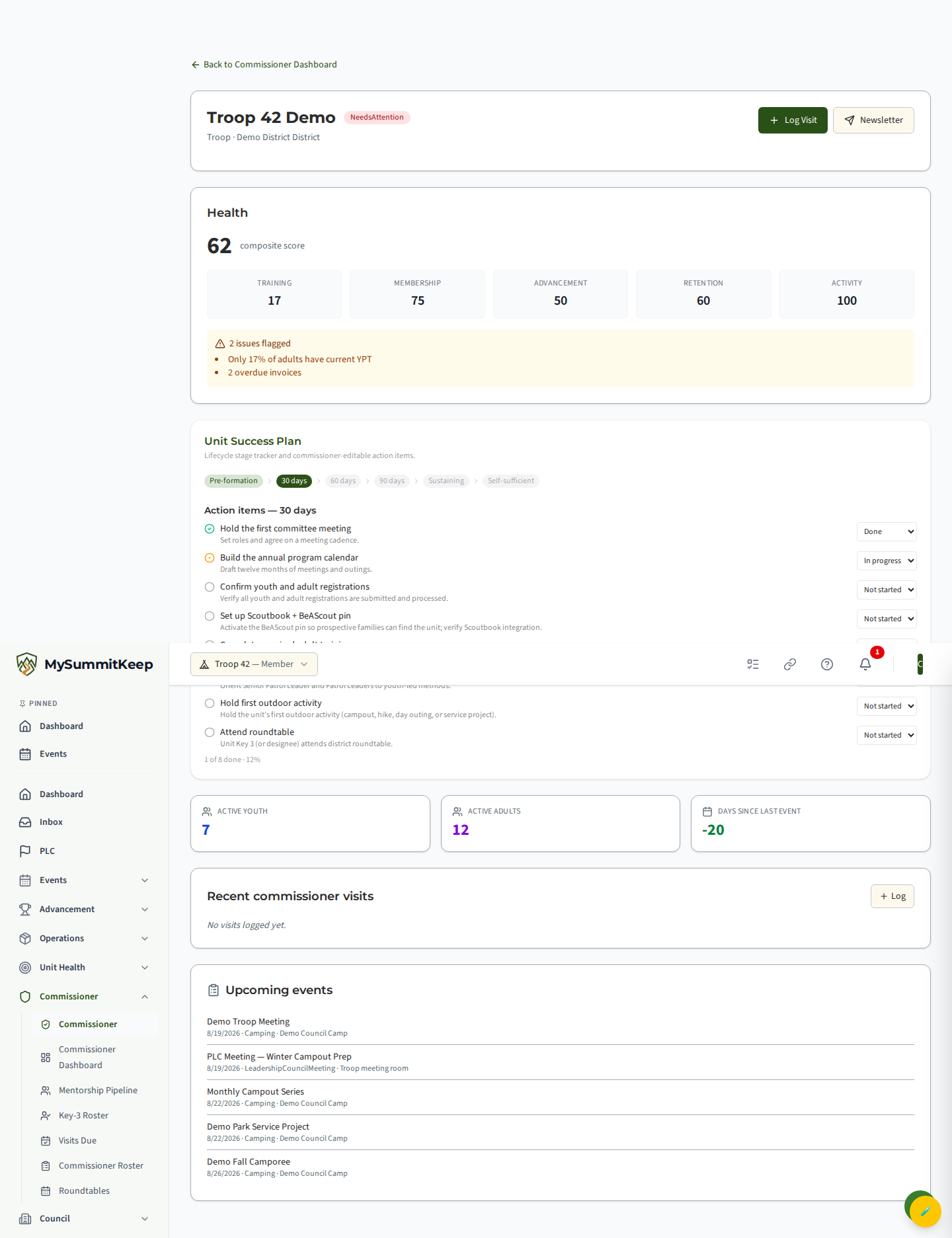
The detail page gives you:
- The unit name, health band badge, charter organization, and district.
- Contact details — meeting schedule, address, the unit’s contact email and phone, and website (when the unit has provided them).
- The large composite score plus the five sub-metric cards (Training, Membership, Advancement, Retention, Activity).
- A flagged issues list spelling out exactly what dragged the score down.
- Quick stats: active youth, active adults, and days since the last event (highlighted amber once it passes 30 days).
- Recent Commissioner Visits (up to the last ten), with contact type, who was met, notes, assessed health level, and any open follow-up due date.
- Upcoming Events scheduled for the unit.
From here you can Log Visit for this unit or open Newsletter to message its leaders.
If you are one of the unit’s commissioners (its assigned Unit Commissioner, the District Commissioner or an Assistant District Commissioner of its district, or the Council Commissioner of its council), a Key 3 meetings button also appears here. See Key 3 meetings below.
Key 3 meetings
Section titled “Key 3 meetings”The unit’s Key 3 (unit leader, Committee Chair and Chartered Organization Representative) can record its meetings in MySummitKeep. As one of the unit’s commissioners you can read them: click Key 3 meetings on the unit’s detail page to open /commissioner/units/:unitId/key-3.
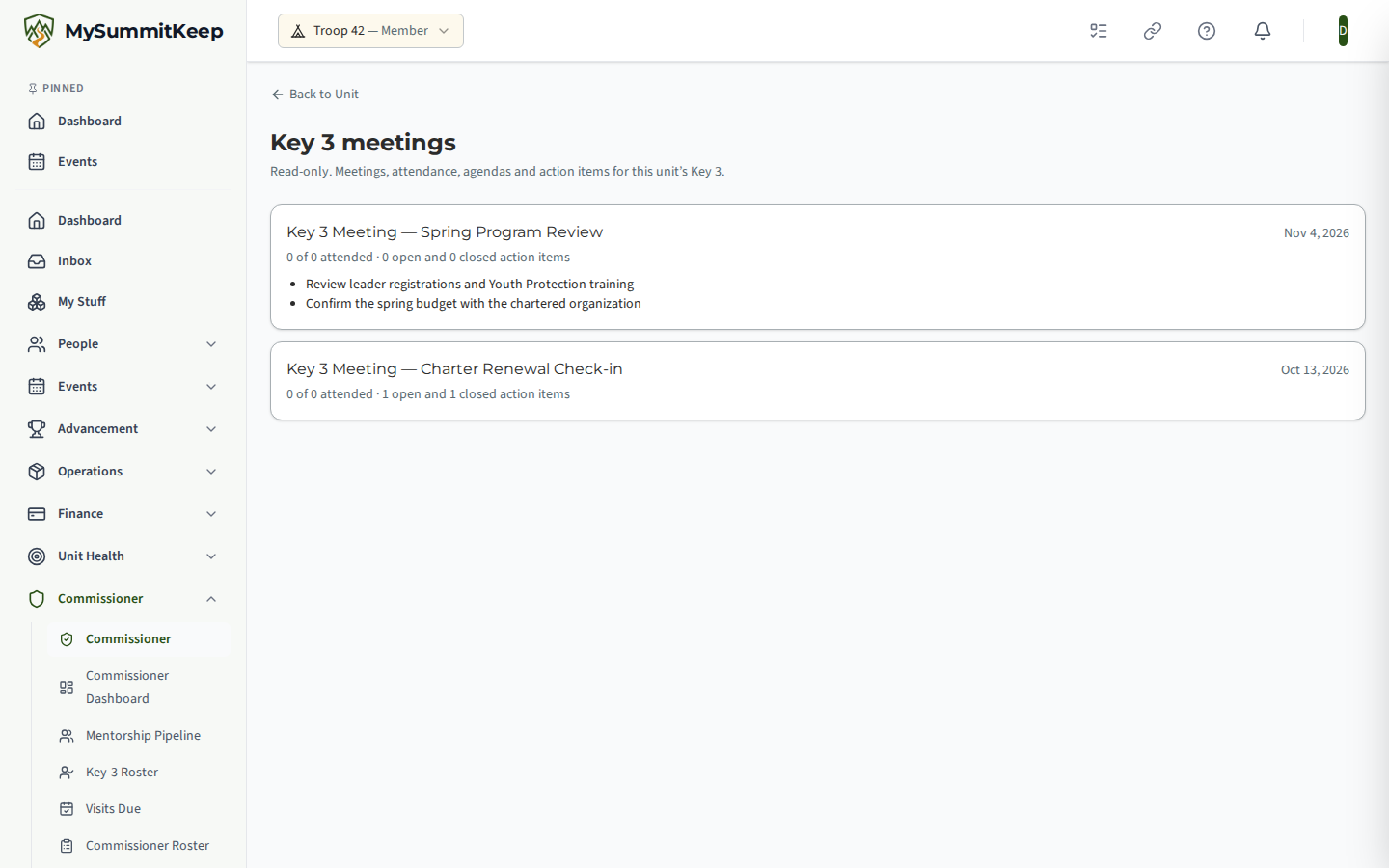
The page is read-only. It lists the unit’s Key 3 meetings, newest first, and for each one shows:
- The meeting title and date.
- How many of those invited attended, for example “3 of 3 attended”.
- How many action items from that meeting are open and how many are closed.
- The agenda item titles.
You cannot add, edit or record anything here; the unit’s Key 3 runs its meetings on its own Key 3 Meetings page. If the unit has not recorded any Key 3 meetings, the page says so.
The button and the page are only for the unit’s own commissioner chain: the assigned Unit Commissioner, the District Commissioner and Assistant District Commissioners of the unit’s district, and the Council Commissioner of its council. A commissioner of another district or council, or a Unit Commissioner not assigned to this unit, does not see the button, and opening the address directly shows that Key 3 meetings are not available to you for this unit.
Using the score to prioritize visits
Section titled “Using the score to prioritize visits”Because the roster already sorts worst-first, your day-one plan is simple: start at the top. The units there carry the lowest composite scores and usually the most flagged issues.
A few practical habits:
- Read the bars, not just the band. A unit can sit at “Needs Attention” because a single metric (often Training) is dragging an otherwise solid unit. Fixing one YPT gap can move the whole score.
- Cross-check the flagged issues. They tell you the conversation to have before you arrive, an expiring charter, a stalled advancement program, or a quiet calendar.
- Watch “Last Visit” and “Last Assessed.” A struggling unit that hasn’t had a visit in months is your highest-leverage stop.
The score is operational, not relational. A unit at 90 can still have a leader conflict the numbers can’t see; a unit at 50 can have a strong culture that just shows up poorly in data. Let the score point your attention, then trust your conversations on the visit.
Related pages
Section titled “Related pages”- Commissioner Visits — log a visit and track follow-ups.
- Coverage Gaps — find units with no assigned commissioner.
- Recharter Dashboard — track charter renewal readiness across your units.
- Key 3 Meetings — how a unit’s Key 3 schedules and records the meetings you read here.
Need help? Contact support — we usually respond within 1 business day.
MySummitKeep is an independent product and is not affiliated with, endorsed by, or sponsored by Scouting America (formerly the Boy Scouts of America). Scouting America, Scouts BSA, Cub Scouts, Venturing, Sea Scouts, and the Order of the Arrow are trademarks of Scouting America. Official program content shown in screenshots and examples is © Scouting America; always confirm current requirements atscouting.org. SeeTerms § 7.3.