
Roundtables: Import & Attendance
Roundtables are the monthly district commissioner meetings where unit leaders gather for program help, announcements, and training. MySummitKeep keeps a record of each meeting and which units showed up, so you can see attendance trends across your district at a glance. In this first version the data comes in through a CSV import — there is no manual create or edit yet — so this page is part reference, part import guide.
The whole feature lives under Commissioner → Roundtables (/commissioner/roundtables) and is visible to active commissioners only. Roundtables are district-scoped: if your active unit has no district assigned and none of your commissioner scopes carry a district, the page will ask you to pick a district context first.
What roundtables track in MySummitKeep
Section titled “What roundtables track in MySummitKeep”Each roundtable record captures the meeting itself plus a roll-up of who attended:
- Date and time the meeting was scheduled (
ScheduledAt). The CSV import supplies only the month (the record is dated to the first of that month at midnight UTC), so the date shown is the meeting’s month, not an exact day, and the time is a placeholder. - Program track — which audience the meeting served: Combined, Cub Scouts, Scouts BSA, Venturing, or Sea Scouts. When the CSV omits a track, the meeting is recorded as Combined.
- Location — where it was held (optional).
- Agenda and Commissioner Notes — the detail page renders these whenever a roundtable has them. In this CSV-import-only version there is no field for them in the import, so they stay empty until manual editing arrives in a later release.
- Per-unit attendance — one row per unit, with the attendee count that unit sent. The roll-up totals (units represented and total attendees) are computed for you. The detail page also has Representative and Notes columns, but the CSV import does not populate them, so they show a dash for imported data.
The roundtables list
Section titled “The roundtables list”Open Commissioner → Roundtables to see every meeting in the selected district. The list is sorted newest first (by scheduled date), so the most recent roundtable is at the top.
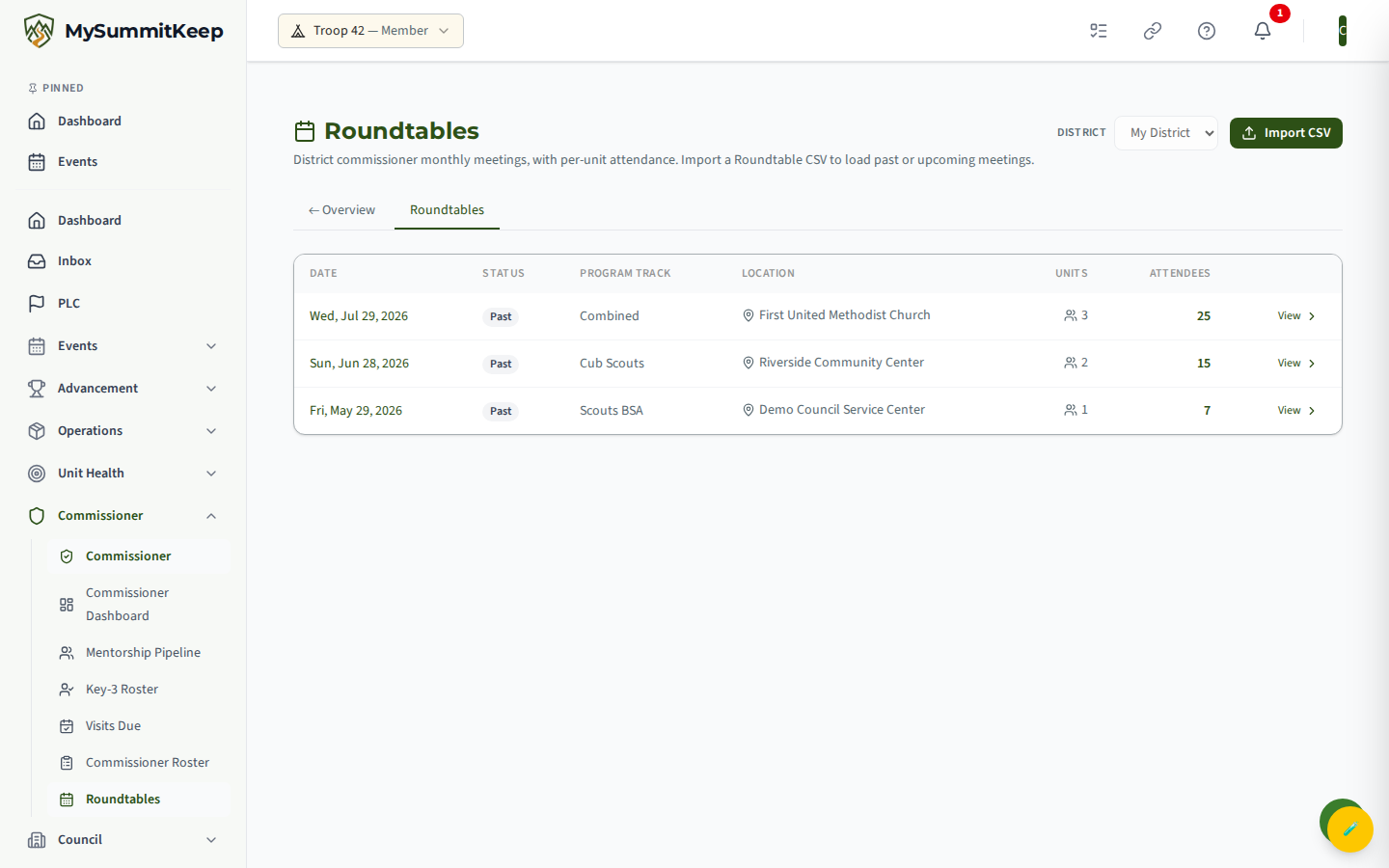
Each row shows the Date, a Status badge, the Program Track, the Location, the number of Units represented, and the total Attendees. The status badge classifies the date relative to today:
- Upcoming (blue) — the meeting is in the future.
- Today (green) — the meeting is scheduled for today.
- Past (gray) — the meeting has already happened.
If you serve more than one district, use the District dropdown in the header to switch. Click any row’s date or its View link to open the detail page. The Import CSV button in the header jumps straight to the upload flow.
Roundtable detail and per-unit attendance
Section titled “Roundtable detail and per-unit attendance”Clicking a roundtable opens its detail page. The header shows the meeting date, program track, time, location, and the headline totals (units represented and total attendees). If a roundtable has an Agenda or Commissioner Notes, those appear in their own sections below the header — but because the CSV import never sets them, they only show up for roundtables that were given those fields some other way (a capability planned for a later release).
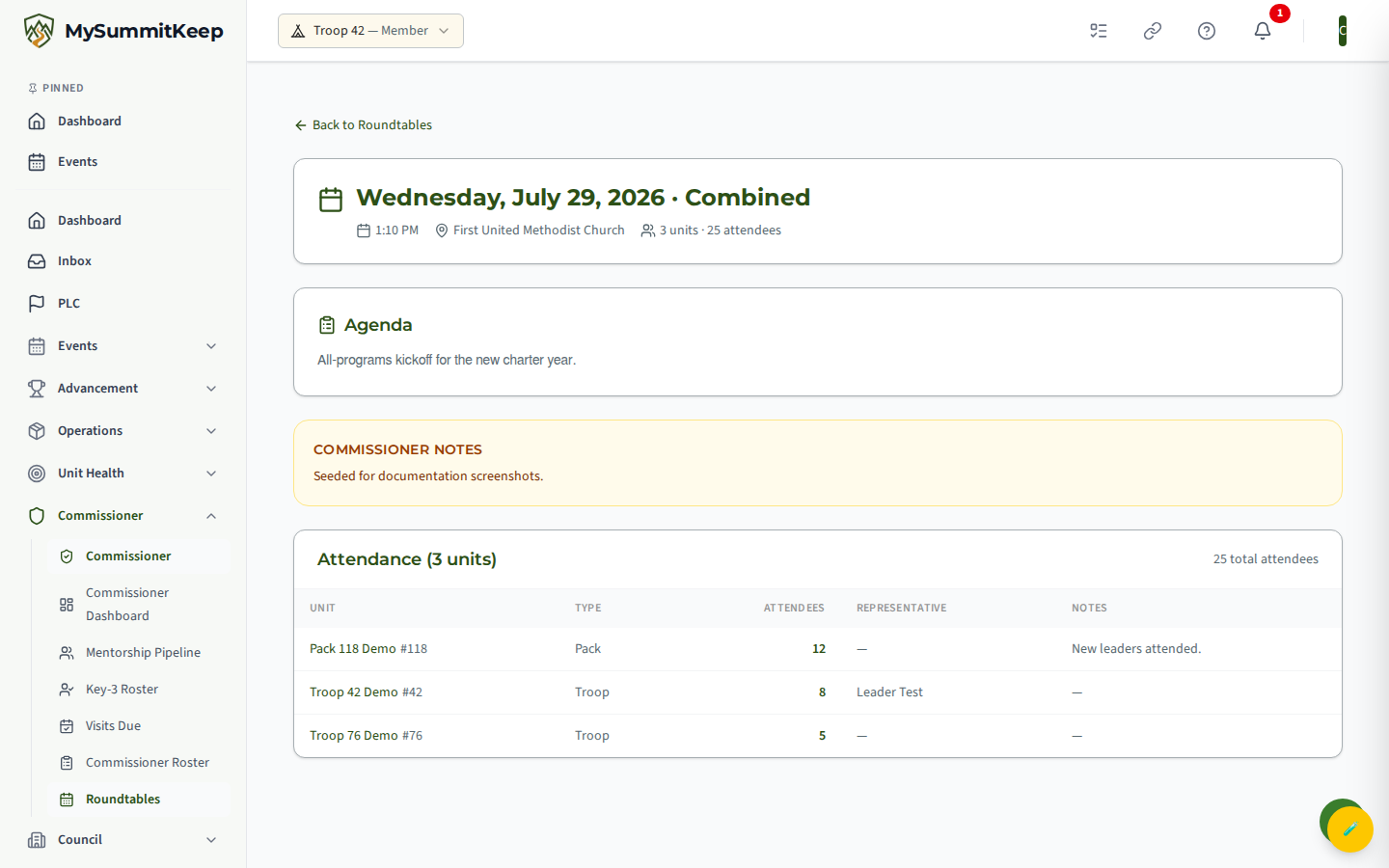
The Attendance table lists one row per unit, sorted by unit name, with:
- Unit name and number (e.g. Troop #42)
- Type of unit (pack, troop, crew, ship)
- Attendees from that unit
- Representative — the member who attended on the unit’s behalf, when recorded. The CSV import doesn’t set this, so it shows a dash for imported attendance.
- Notes — a per-unit note column. The CSV import doesn’t set this either, so it also shows a dash for imported attendance.
Use Back to Roundtables at the top to return to the list. If a roundtable has no attendance rows yet, the page tells you to import the next CSV to add them.
Importing attendance from CSV
Section titled “Importing attendance from CSV”Attendance loads through a two-step parse, then commit upload at /commissioner/roundtables/import (the Import CSV button). The parse step is a safe dry run — nothing is written until you confirm.
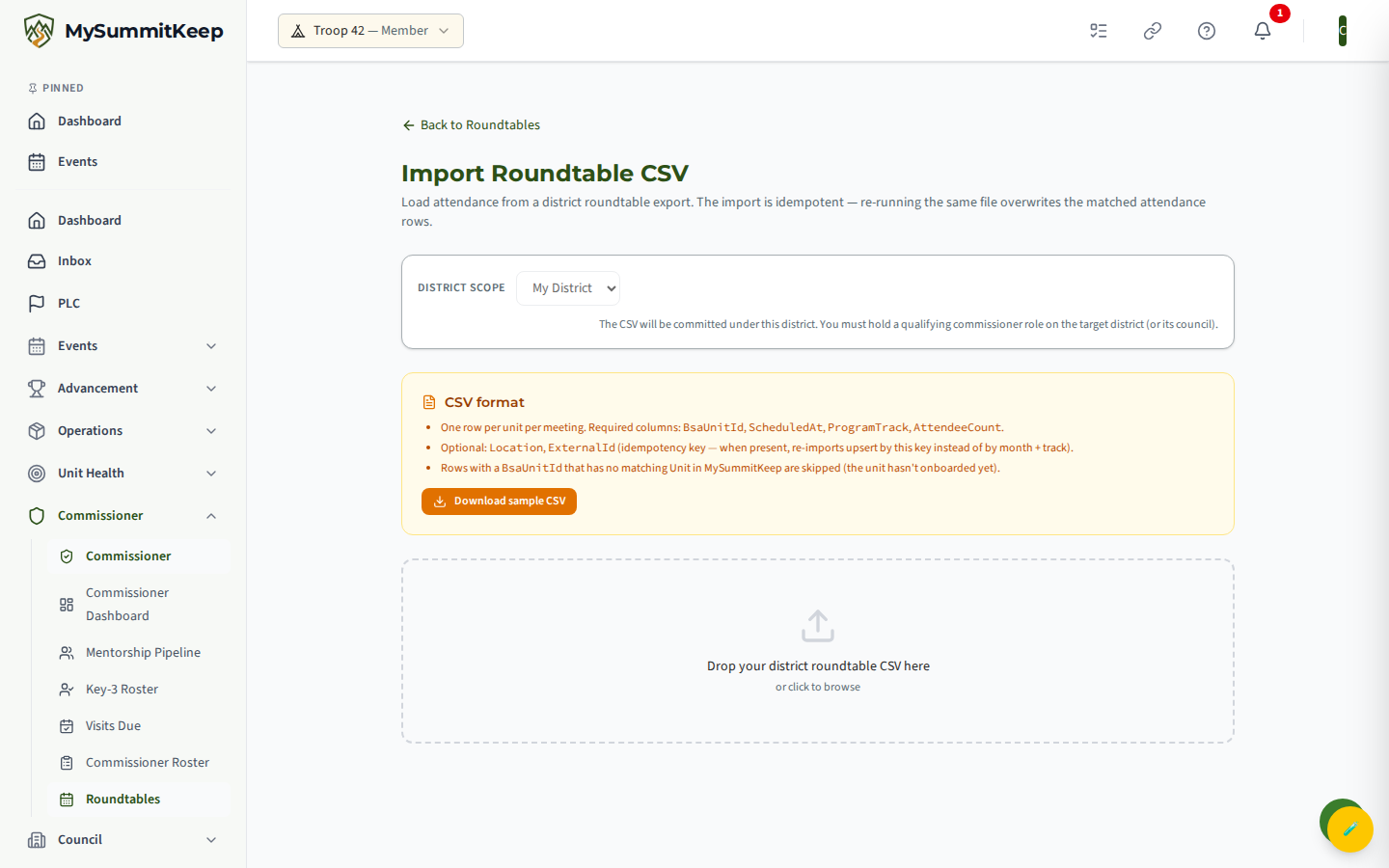
1. Pick the district scope. The CSV is committed under the district selected at the top. You must hold a qualifying commissioner role on that district (or a council-level role on its parent council).
2. Drop in your CSV. Drag the file onto the drop zone or click to browse. The file must end in .csv. The import expects the standard district wide format — one row per unit, with twelve month columns holding the attendance count for each month:
- Required:
BsaUnitId(orUnitId) to identify the unit, plus at least one month column. Month headers are matched flexibly: full names (January…December), three-letter abbreviations (Jan…Dec), plain numbers (1…12), ormonth1…month12. The number in each month cell is that unit’s attendee count for that month; blank cells and zeros are ignored. - Optional:
Location;ProgramTrack(also acceptsTrackorProgram— when omitted the meeting defaults to Combined);ScheduledYear(orYear); andExternalId. The meeting’s date comes from the month column the count sits in. WhenScheduledYearis given it is used as-is; otherwise the year is inferred from the current program year. WhenExternalIdis present it acts as the idempotency key, so re-imports update by that key instead of matching on month plus program track.
3. Review the preview. As soon as the file is read, the parser pivots those month columns into one row per unit per month, and a preview appears showing the row count, distinct units, and distinct months, plus the first 20 pivoted rows and any parser warnings. Nothing has been saved at this point — check that the dates, tracks, and counts look right.
4. Confirm and import. Click Confirm and Import to commit. When it finishes you get a summary: rows parsed, attendance rows ingested, new roundtables created, roundtables matched (updated), and rows skipped — with the first skipped rows listed individually.
Note: v1 is import-only (no manual create or edit)
Section titled “Note: v1 is import-only (no manual create or edit)”This first version is read-and-import only. You can browse roundtables and their attendance, and load data via CSV, but you cannot create, edit, or delete a roundtable by hand in the app. To change what’s shown, fix the source CSV and re-import — the idempotent upsert keeps things in sync. Manual editing and a richer cross-tab attendance view are planned follow-ups.
MySummitKeep is an independent product and is not affiliated with, endorsed by, or sponsored by Scouting America (formerly the Boy Scouts of America). Scouting America, Scouts BSA, Cub Scouts, Venturing, Sea Scouts, and the Order of the Arrow are trademarks of Scouting America. Official program content shown in screenshots and examples is © Scouting America; always confirm current requirements atscouting.org. SeeTerms § 7.3.