
Order of the Arrow Elections & Membership
The Order of the Arrow (OA) is Scouting’s national honor society. MySummitKeep helps your unit run the whole cycle: figure out who is eligible, hold the election, record who was called out, and keep a tidy record of every member’s OA honors. This page is for unit leaders and admins — these tools require leader or admin access.
There are two related areas. The Order of the Arrow page (under Advancement) is your record-keeping home for eligibility, membership, and honors. The Elections & Polls module is where you actually run a live vote with real-time counting. This article covers both and how they fit together.
OA in the platform: an overview
Section titled “OA in the platform: an overview”Open the Order of the Arrow page from Advancement → Order of Arrow (/advancement/order-of-arrow). It has four tabs:
- Eligible Members — every member with their rank, camping nights, tenure, and an eligibility verdict.
- Election — create and record traditional unit OA elections, including per-candidate vote tallies.
- Members — your roster of inducted OA members and their honor levels.
- Events — a quick reference to OA event types and a link to your council calendar.
The separate Elections & Polls page (/elections) is a real-time voting tool that can run an OA election as a live ballot. Use whichever fits how your election night works: record-after-the-fact on the OA Election tab, or live on-screen voting in Elections.
Eligible members
Section titled “Eligible members”The Eligible Members tab pulls every member in your unit and checks them against the BSA youth requirements, so you never have to tally camping logs by hand.
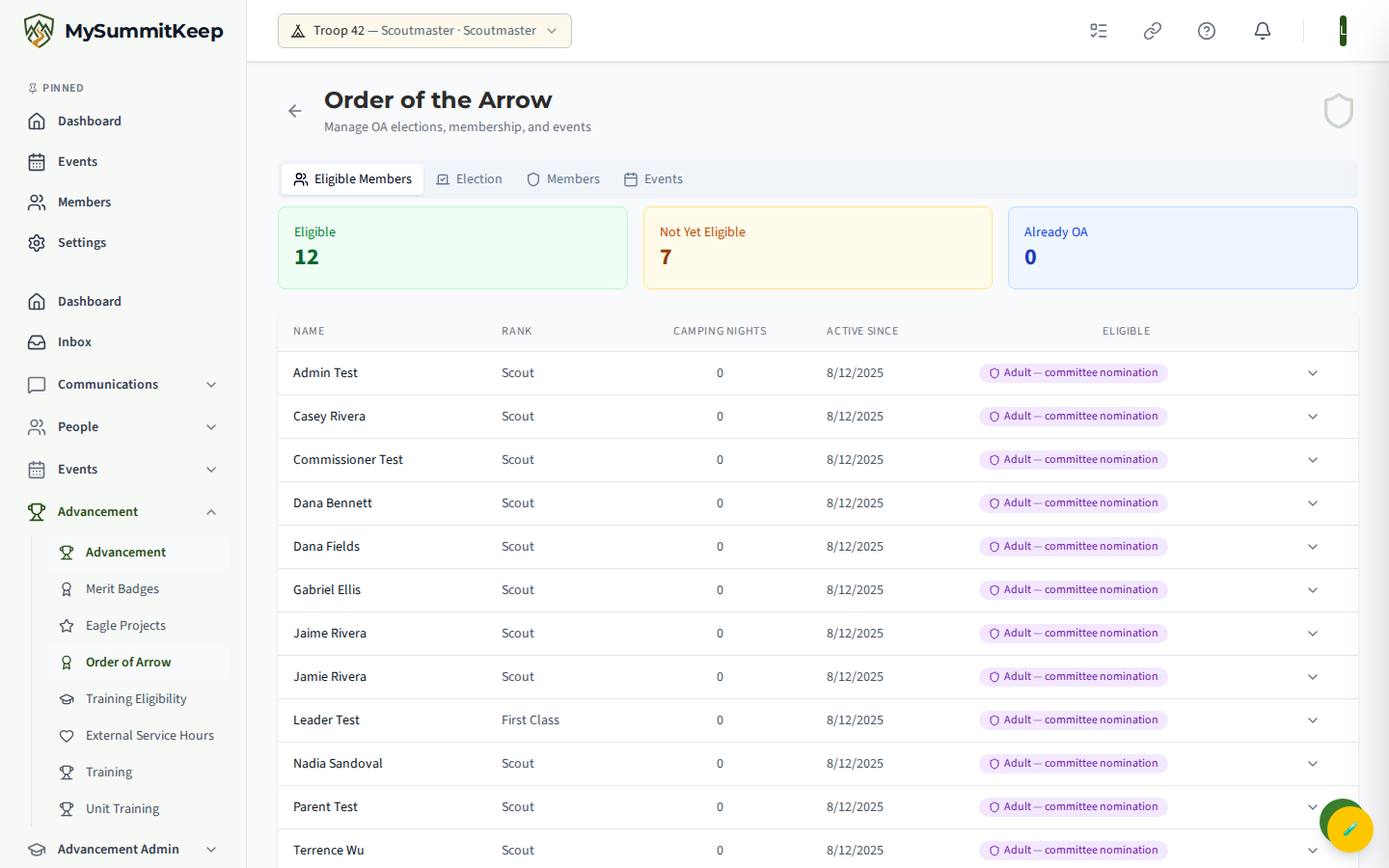
Three summary cards at the top count how many members are Eligible, Not Yet Eligible, and Already OA. The table below lists each member with their current rank, camping nights, active-since date, and an eligibility badge. Click any row to expand the full breakdown.
For youth, the platform checks three requirements:
- First Class or higher — current rank
- 15+ camping nights — rolled up from your unit’s attendance and participation records
- 6+ months active — tenure since they joined
Camping nights come from the data you already track. The more consistently your unit logs attendance and outings, the more accurate this eligibility roster will be.
Creating and running an OA election
Section titled “Creating and running an OA election”You can run your election two ways. The choice depends on whether you want to record a tally after a paper/show-of-hands vote, or run voting live on screen.
Option A — Record on the OA Election tab
Section titled “Option A — Record on the OA Election tab”On the Election tab, click New Election. Fill in:
- Total Eligible Voters — the number of voters present (required)
- Conducted By — the OA team representative running the election (optional)
- Notes — anything you want on the record (optional)
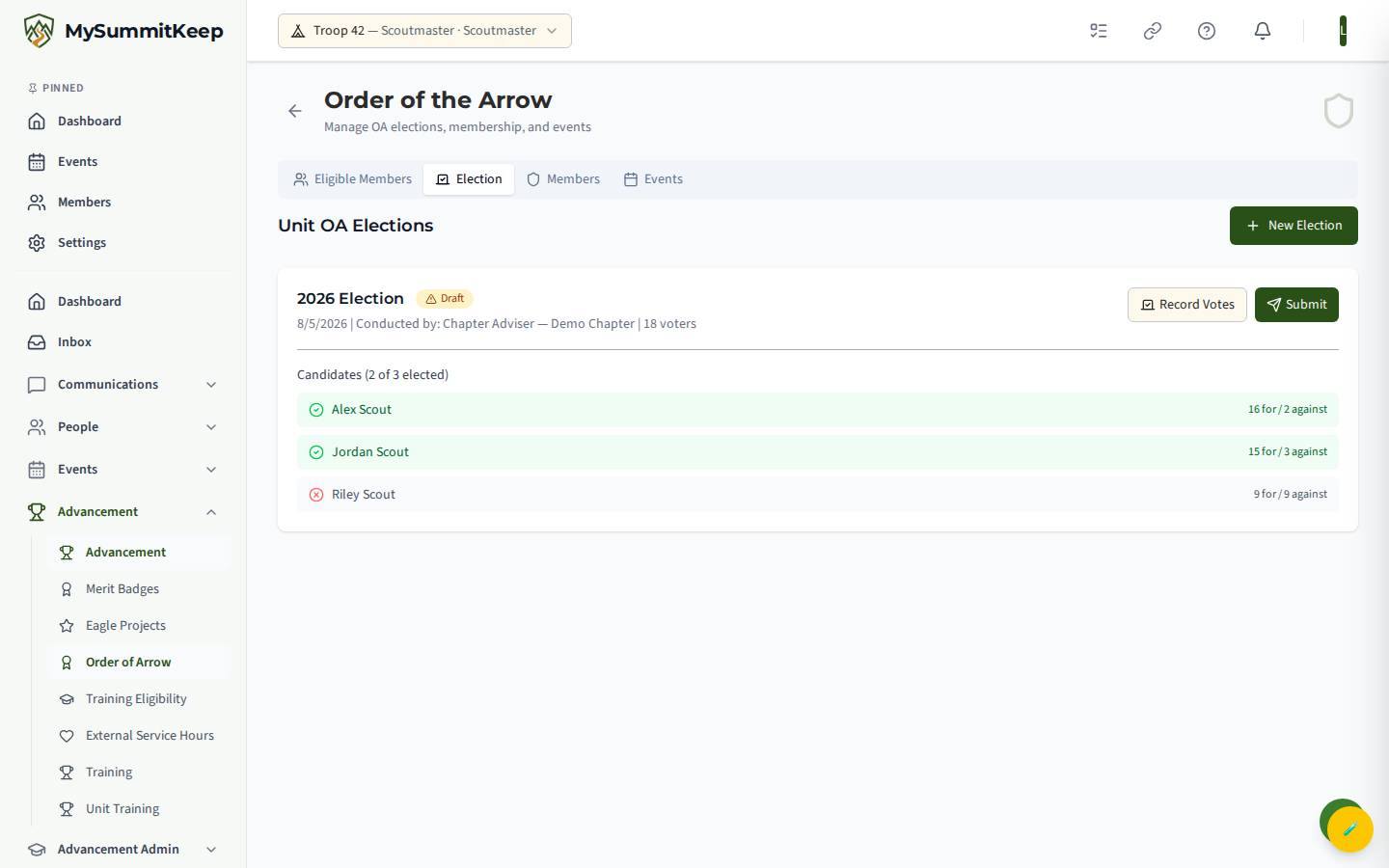
The election is created as a Draft. Use Record Votes to enter each eligible candidate’s “for” and “against” counts. Once at least one candidate has results, the Submit button appears — submitting marks the election final (it locks the record so you can hand clean results to the lodge). Each election shows its status badge (Draft / Submitted), the conductor, voter count, and a candidate list marking who was elected.
Option B — Run a live election in Elections & Polls
Section titled “Option B — Run a live election in Elections & Polls”For on-screen, real-time voting, go to Elections & Polls (/elections) and click New Election. In the dialog, choose the OA Election type, give it a title (for example, “2026 OA Election”), and optionally add positions and toggle:
- Secret Ballot — hides live counts while voting is open
- Single Choice — one vote per person
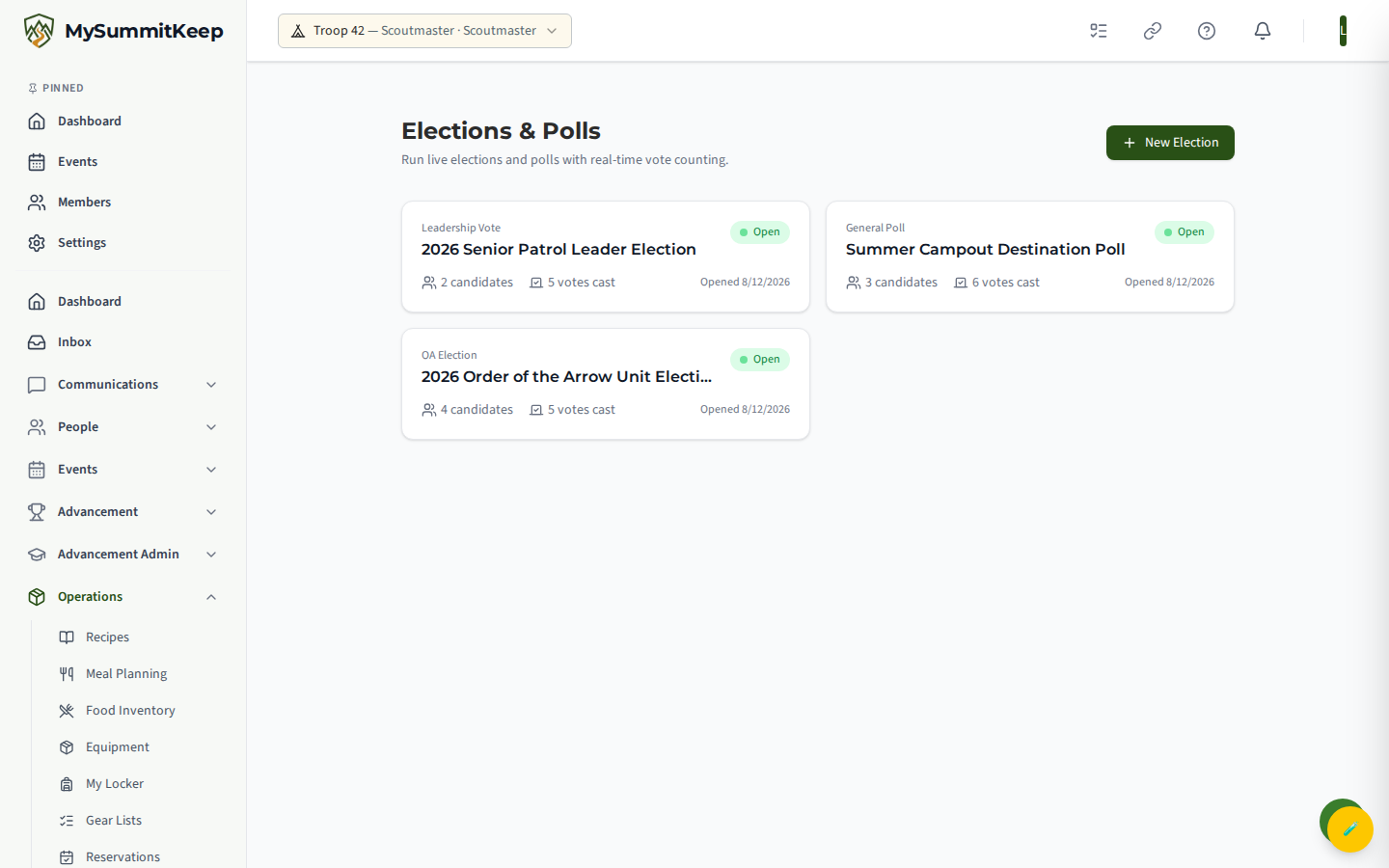
The Elections list shows every election and poll as a card with its type, status badge (Draft, Open, Closed, Approved), candidate count, and votes cast.
Real-time voting and approving results
Section titled “Real-time voting and approving results”Open an election from the list to reach its detail page (/elections/:electionId). What you see depends on its status:
- Draft — add candidates before opening. Use Add Candidate to build the ballot, then Open Election.
- Open — the live voting booth. Each candidate is a card with a Vote button, and a “Live” indicator confirms the real-time connection is active.
- Closed / Approved — final results, sorted by vote count.
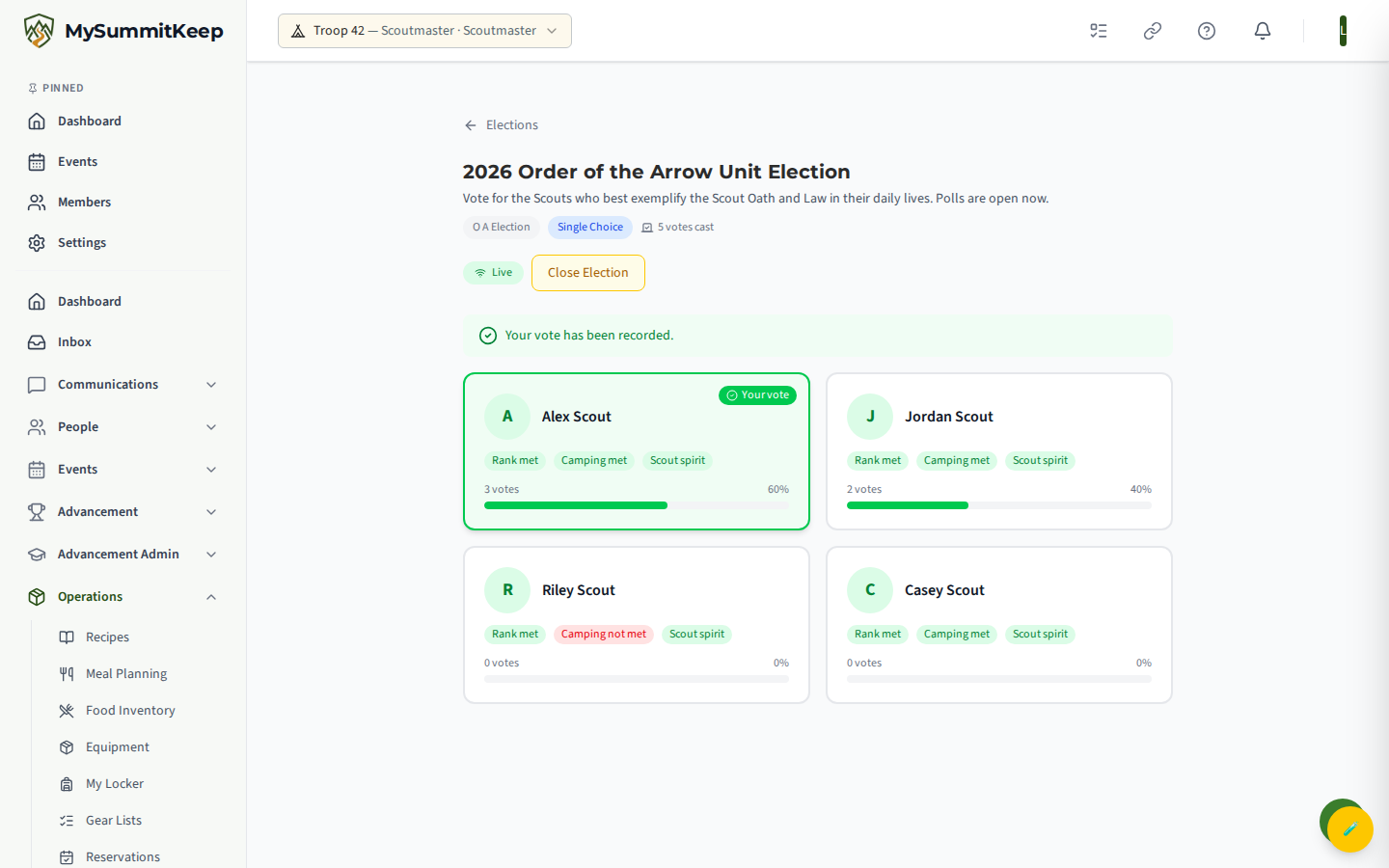
While an election is Open, votes update on every connected screen in real time — no refresh needed. If you turned on Secret Ballot, counts stay hidden until you close the election. For OA elections, each candidate card can also show eligibility flags (rank met, camping met, Scout spirit) drawn from the eligibility check.
When voting is done, click Close Election. If the election has positions, you then assign a winner to each from the candidates and click Approve Results to finalize. Approved elections display the elected members under “Elected to Positions.”
Approving results also puts each winner into the unit’s matching youth position, such as Senior Patrol Leader or Patrol Leader. An election never fills an adult position such as Treasurer or Scoutmaster. Assign those on Manage Positions.
Tracking OA membership
Section titled “Tracking OA membership”The Members tab on the Order of the Arrow page is the durable record of who in your unit has been inducted. Click Add OA Member to record one:
- Member and Honor Level (Ordeal, Brotherhood, or Vigil) are required.
- Ordeal Date records the induction.
- Choosing Brotherhood reveals a Brotherhood date; choosing Vigil adds Vigil date, Vigil Name, and its meaning.
- Notes holds anything else, such as lodge leadership positions.
The roster lists each member with an honor-level badge, induction date, lodge and chapter, and an active/inactive status. Recording membership here keeps OA honors alongside the rest of the member’s record in the member directory.
OA events
Section titled “OA events”The Events tab is a quick reference for the common OA event types — Ordeal Weekends, Lodge Fellowships, and Section Conclaves — with a short description of each. Because most OA events are run at the lodge or council level, the tab links to your Council Events calendar, where OA-related dates from your local council appear. Use that calendar to find and promote upcoming Ordeals and fellowships to your members.
MySummitKeep is an independent product and is not affiliated with, endorsed by, or sponsored by Scouting America (formerly the Boy Scouts of America). Scouting America, Scouts BSA, Cub Scouts, Venturing, Sea Scouts, and the Order of the Arrow are trademarks of Scouting America. Official program content shown in screenshots and examples is © Scouting America; always confirm current requirements atscouting.org. SeeTerms § 7.3.