
Parental Consent for Scouts Under 18
When a young Scout joins a unit, their MySummitKeep account does not switch on right away. Federal children’s privacy law (COPPA) requires a parent or legal guardian to give consent before any of a child’s information is collected or displayed. MySummitKeep handles this automatically: it emails the parent a secure consent link, and the Scout’s account activates the moment that consent is recorded. This page walks both Scouts and parents through every step.
Why parental consent is required
Section titled “Why parental consent is required”MySummitKeep stores real information about a Scout — name, date of birth, advancement progress, event attendance, and any health notes a family provides. The law says a platform that knowingly collects this kind of data about a child must get a parent’s permission first. Rather than ask families to mail in a paper form, MySummitKeep collects that permission online through a single, secure link tied to one Scout.
Until consent is recorded, the Scout’s profile stays inactive (IsActive = false behind the scenes). No advancement, attendance, or other data is surfaced for that Scout, and they cannot use the account.
What the Scout sees while waiting
Section titled “What the Scout sees while waiting”A youth joining as a Scout enters their date of birth during onboarding. When consent is needed, the wizard also asks for a parent or guardian’s first name and email, then sends the consent request and shows the “Your parent must complete this step” screen. The email has to be the parent’s own address: the one the Scout signs in with isn’t accepted, because the consent link must reach a parent.
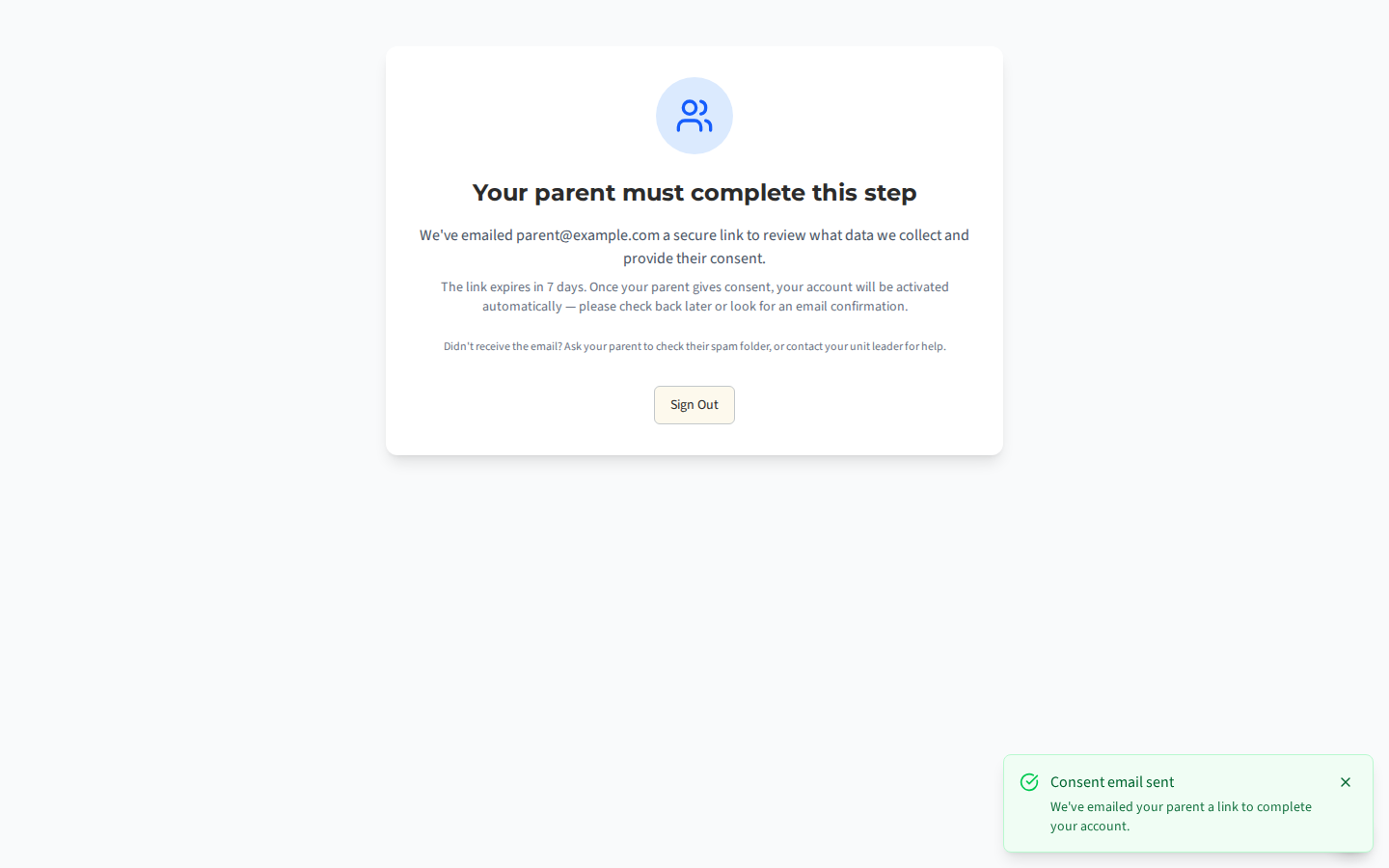
This screen confirms the email address the consent link was sent to and explains that:
- The link expires in 7 days.
- The account activates automatically once the parent gives consent — the Scout does not need to do anything else.
- If the email didn’t arrive, the parent should check their spam folder, or the Scout can ask their unit leader for help.
The Scout can sign out and check back later, or simply watch for a confirmation email.
The parent’s consent email and link
Section titled “The parent’s consent email and link”The parent receives an email with the subject “Action required: Consent needed for your Scout’s MySummitKeep account”. It explains that an account has been created for the Scout and which unit it’s in, lists the data MySummitKeep collects for the child, and includes a Review and Provide Consent button. That button (and the plain-text fallback link) opens the consent page at /invite/parent with a one-time secure token.
Signing in to grant consent
Section titled “Signing in to grant consent”Opening the link lands the parent on the consent page. It shows the Scout’s name and unit, a short summary of the data collected (name and date of birth, advancement records, event attendance, and any health information the family provides), and a clear note that the data is used only to manage that child’s Scouting and is never sold.
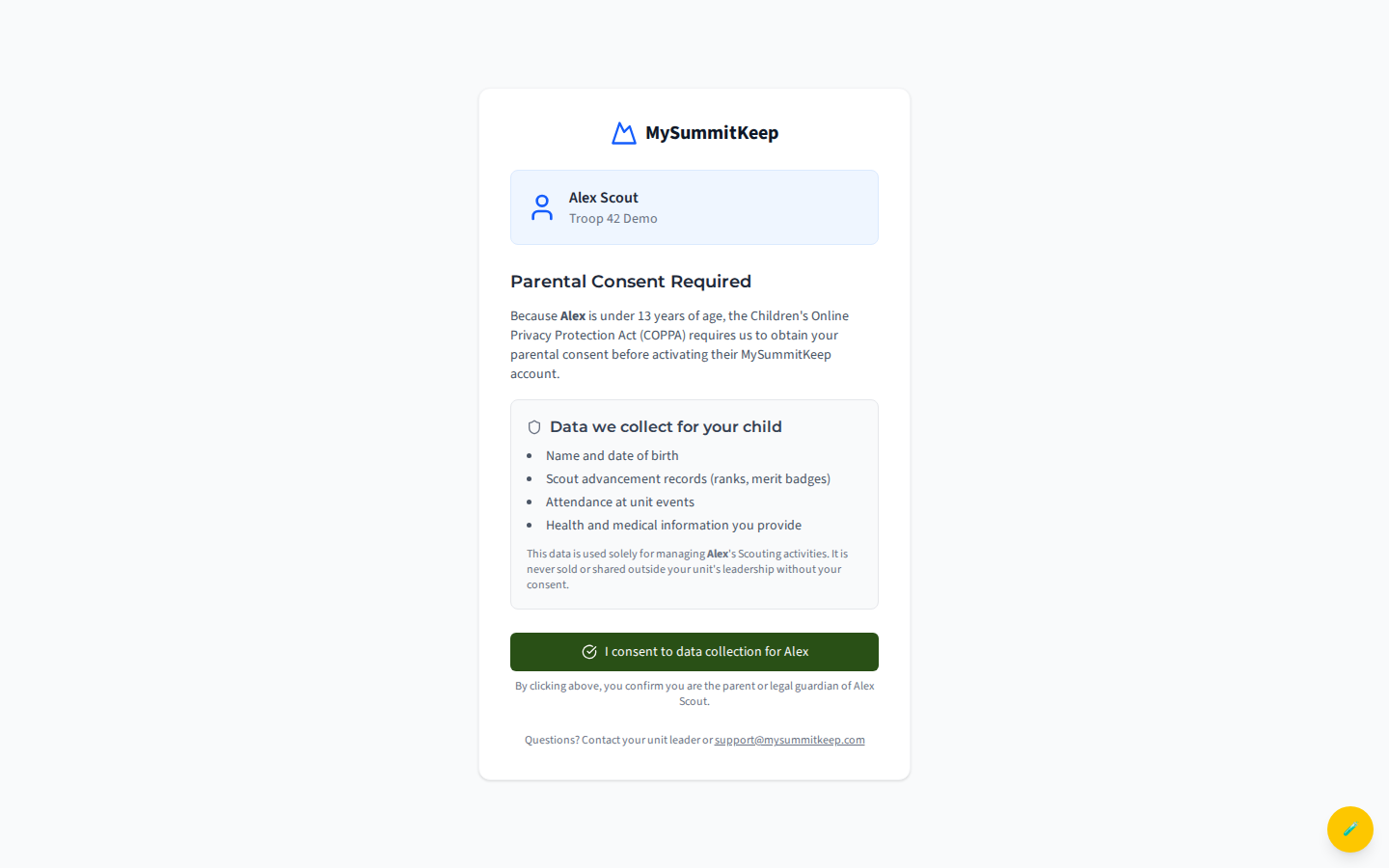
To record consent, the parent must be signed in to a MySummitKeep account. If they aren’t, the page shows a Sign in or create account to consent button — creating an account is free, and after signing in they’re returned to this same page automatically. Once signed in, the button reads “I consent to data collection for your Scout.” Clicking it confirms they are the child’s parent or legal guardian. Consent can’t be given from the Scout’s own account or from another young person’s account; if the page says so, sign in as the parent or guardian and open the link again.
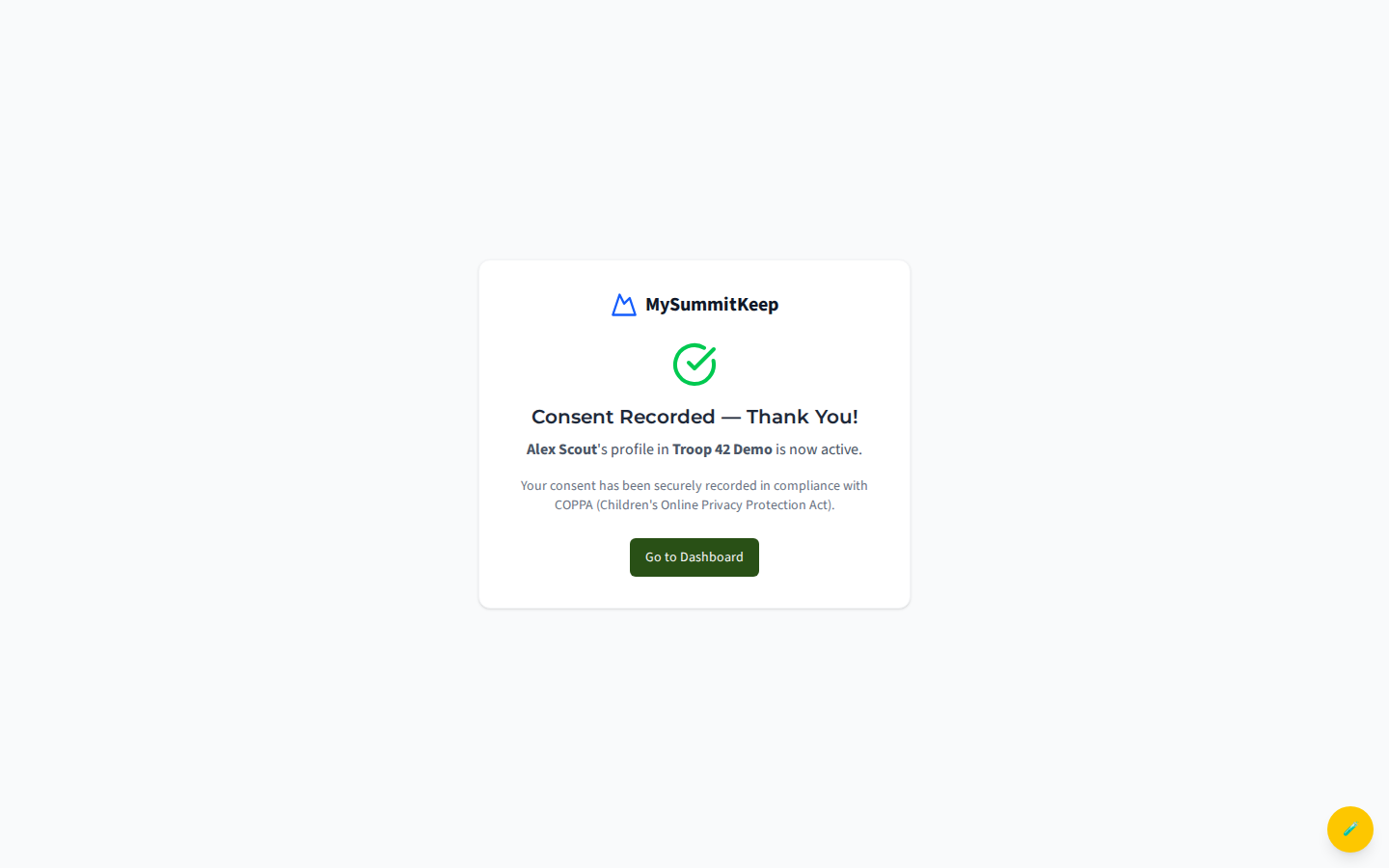
The moment consent is recorded, the Scout’s profile becomes active in the unit, and the parent is linked to the Scout’s household so they can see and manage that information going forward. The page confirms the consent was securely recorded in compliance with COPPA.
What consent records and the Children’s Privacy Policy
Section titled “What consent records and the Children’s Privacy Policy”MySummitKeep keeps an audit trail of the consent: the exact date and time, the version of the Children’s Privacy Policy that was in effect, and the IP address it was given from. This is what proves the unit followed the law, so it matters that it’s captured cleanly.
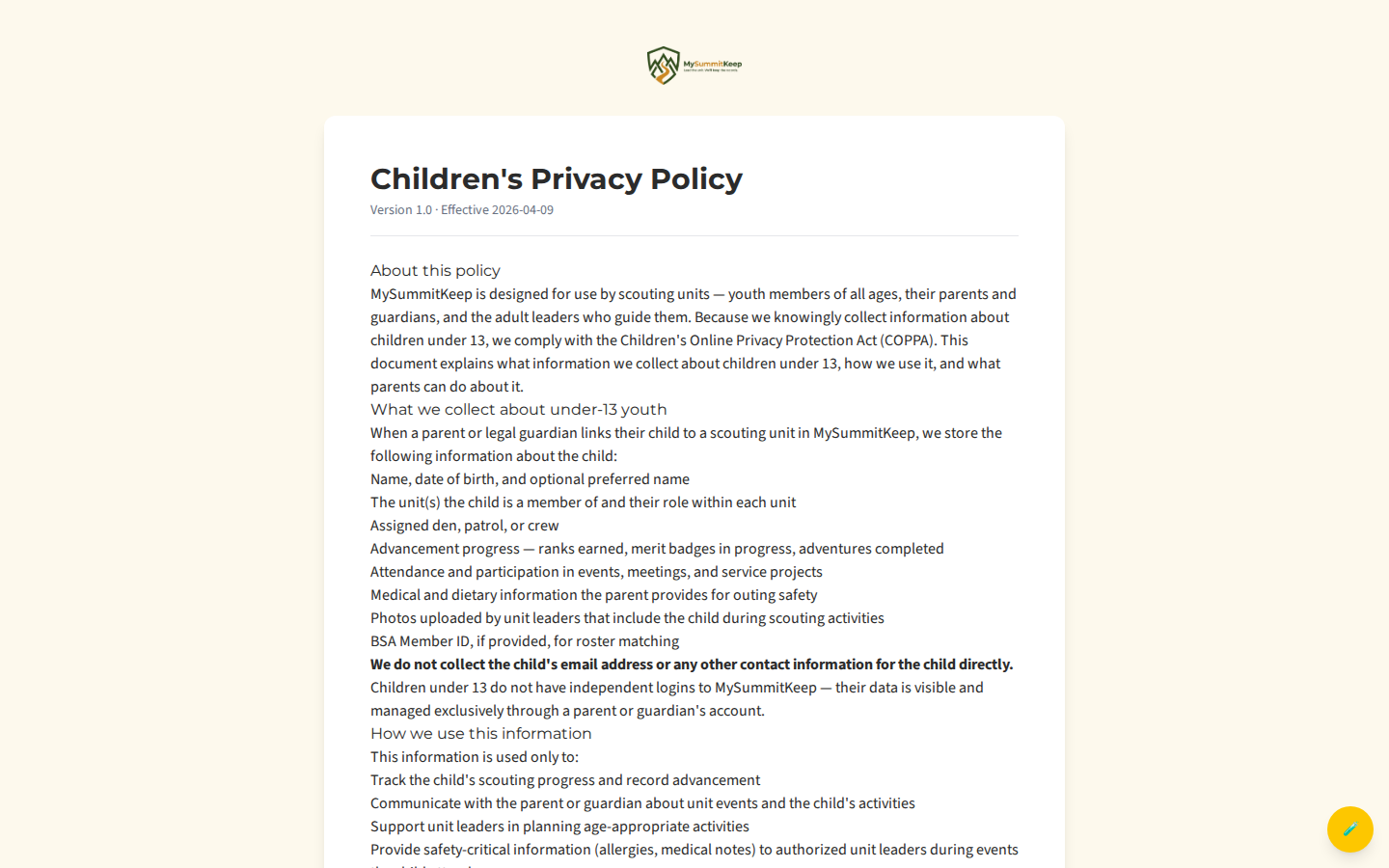
The full policy the parent is consenting to lives at the Children’s Privacy Policy page. It carries a version number and effective date in its header and spells out exactly what’s collected, who can see it, and a parent’s rights to review, correct, transfer, or revoke and delete their child’s data.
If the link expired or was already used
Section titled “If the link expired or was already used”The consent link is single-use and time-limited, so the page may show one of these instead of the consent form:
- Invitation Expired — more than 7 days passed. Contact your unit leader and ask them to send a new invitation. A fresh link is generated; the old one stops working.
- Consent Already Provided — consent was recorded earlier (often by another parent or in a previous session). The Scout’s profile is already active, so there’s nothing more to do.
- Invitation Not Found — the token in the URL is missing or invalid, usually from a copied-and-truncated link. Reopen the link directly from the email, or ask your unit leader to resend it.
When a leader resends the invitation and the new email goes out, MySummitKeep invalidates the previous unconsumed link and issues a new one — always click the link from the most recent email. If MySummitKeep holds a resend back (for example, because the address entered is on a Scout’s record rather than a parent’s), the link the parent already has keeps working.
Troubleshooting (email not received)
Section titled “Troubleshooting (email not received)”If the consent email never arrives:
- Check spam and promotions folders. The email comes from
noreply@mysummitkeep.com— add it to your contacts so future messages land in the inbox. - Confirm the parent’s email address. During onboarding the Scout typed in the parent’s email; a typo there sends the link to the wrong place. The unit leader can correct it and resend.
- Ask the unit leader to resend. A new invitation generates a fresh link and resets the 7-day clock. The leader manages the Scout’s record from Members (see Member Import for how leaders add and manage Scouts).
- Still stuck? Email support@mysummitkeep.com and we’ll help track down the invitation.
Once consent is in place, the Scout’s account is fully active. Parents can then explore the family experience — see Viewing Scout Progress and the Family Page Tour to get started.
MySummitKeep is an independent product and is not affiliated with, endorsed by, or sponsored by Scouting America (formerly the Boy Scouts of America). Scouting America, Scouts BSA, Cub Scouts, Venturing, Sea Scouts, and the Order of the Arrow are trademarks of Scouting America. Official program content shown in screenshots and examples is © Scouting America; always confirm current requirements atscouting.org. SeeTerms § 7.3.