
Recharter Tracking
Recharter is the once-a-year process where every unit re-registers with the Scouting America council. MySummitKeep gives you two ways to watch it happen: a commissioner readiness tracker for keeping an eye on the units you serve, and a separate Scout-Executive command center for council staff who load charter dates and work the full unit list. This page covers both, and is honest about which one does what — they look similar but are different surfaces with different data.
The commissioner readiness tracker
Section titled “The commissioner readiness tracker”Open Commissioner → Commissioner Dashboard and choose the Recharter tab. This page is available to Council Commissioner and above — if you only have a narrower scope, you’ll see a “Council access required” message instead.
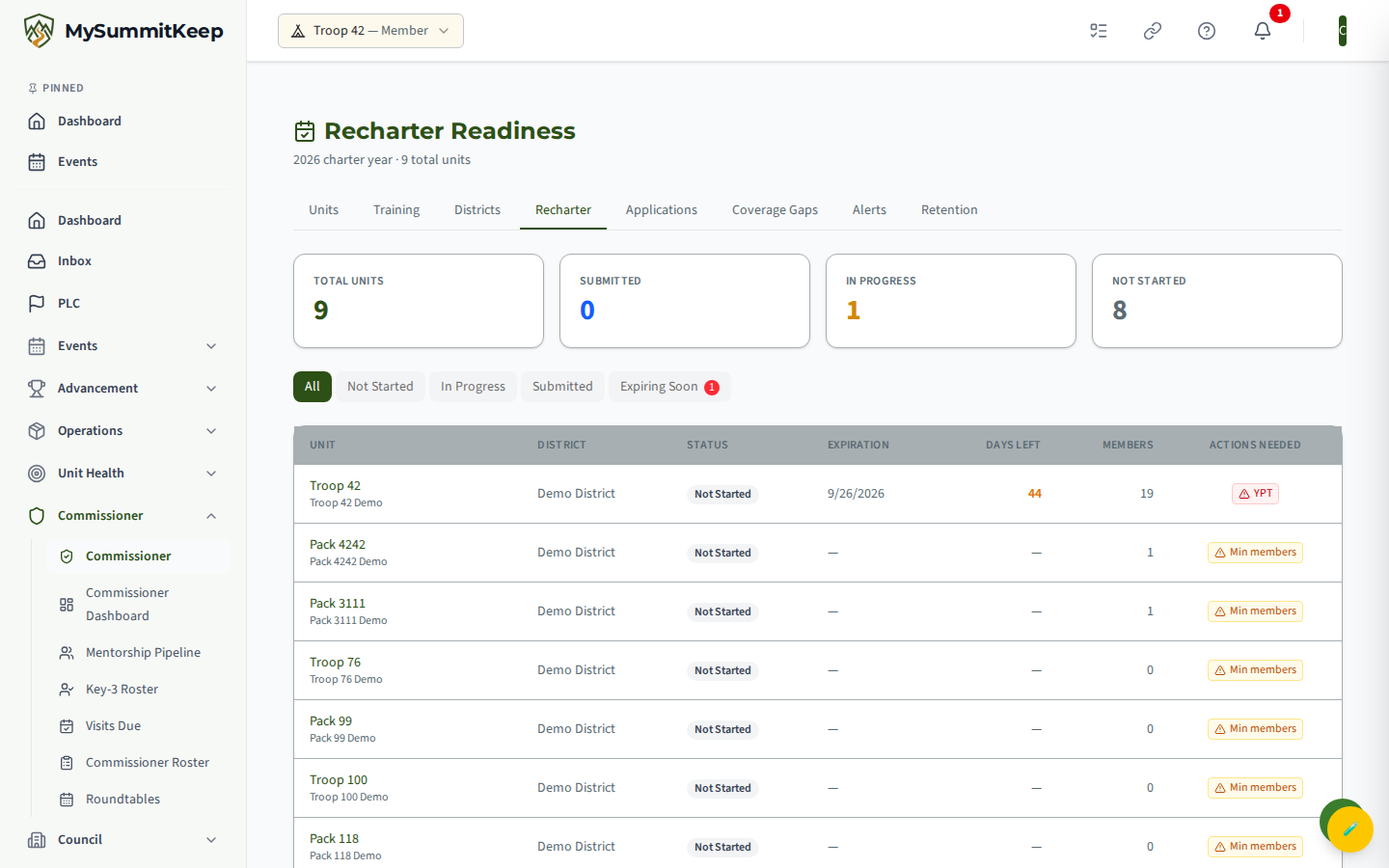
At the top you get four stat cards for the current charter year: Total Units, Submitted, In Progress, and Not Started. The cards count by submission status — Submitted rolls up both submitted and approved recharters, and In Progress rolls up units whose recharter is in draft or under review. Below the cards is a row of filter tabs, then the unit table sorted by urgency (soonest charter expiration first).
Statuses you’ll see
Section titled “Statuses you’ll see”The status badge on each row reflects the unit’s recharter submission, and in practice you’ll see one of three:
- Not Started — no recharter submission on record yet. Units that have only started a draft or sent it for internal review also fall under this badge until they’re actually submitted to the council.
- Submitted — the unit has submitted its recharter to the council (the submitted date is shown beneath the badge).
- Approved — the council has approved the recharter.
Charter expiration is shown separately, not as a status: a unit that has blown past its expiration date without submitting gets a red PAST DUE badge next to its status, and its Days Left number turns red. (A unit that has already submitted or been approved won’t be flagged PAST DUE even if the old charter date has passed.)
Filter tabs
Section titled “Filter tabs”The tabs across the top are All, Not Started, In Progress, Submitted, and Expiring Soon. The first four filter on submission status; Expiring Soon ignores status entirely and shows every unit whose charter expires in fewer than 60 days (including units already past due), carrying a small red count badge so you can spot the size of the problem at a glance.
Reading the table
Section titled “Reading the table”The columns are Unit, District, Status, Expiration (charter expiration date), Days Left, Members (active count, with adults/youth in the tooltip), and Actions Needed.
The Days Left number is color-coded by urgency so triage is fast:
- Red — fewer than 30 days to expiration
- Amber — 30 to 60 days
- Green — more than 60 days
Actions Needed flags two specific readiness blockers the council cares about:
- Min members (amber) — the unit is below the minimum member count to recharter
- SYT (red) — one or more registered adult leaders have Safeguarding Youth Training that runs out before the new charter term ends (or no SYT record at all)
If a unit is clear on both, the column shows a dash. Each unit name links to its unit detail page so you can dig into the full picture before you reach out.
Recharter alerts
Section titled “Recharter alerts”You don’t have to keep this page open to catch a slipping unit. The Alerts tab of the Commissioner Dashboard generates a RECHARTER_DUE alert for any unit whose charter expires within 60 days. Severity rises as the deadline approaches:
- Info — more than 30 days out (31 to 60 days)
- Warning — between 1 and 30 days out
- Critical — the charter expires today or has already expired
The alert message names the unit and the exact days remaining (or how many days ago the charter expired), and alerts are sorted Critical-first. Check the Coverage Gaps and Alerts pages alongside this tracker during recharter season.
The Scout-Executive command center
Section titled “The Scout-Executive command center”Council staff have a separate, more detailed page at /council/recharter — the Recharter Command Center. It requires Scout-Executive (council staff) access and is where charter-date data actually gets loaded into the platform.
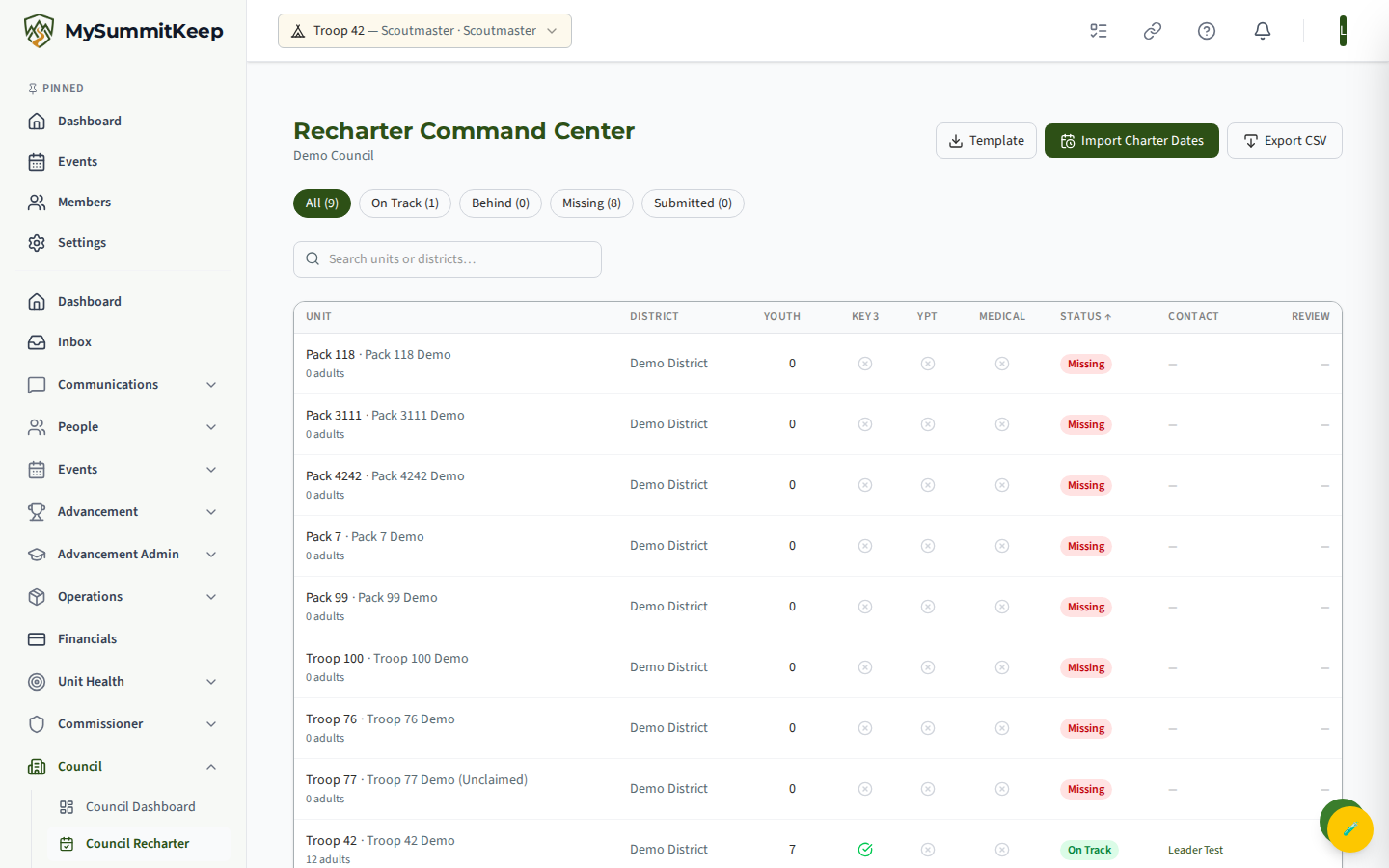
This page uses its own status set — On Track, Behind, Missing, and Submitted — shown as filter chips with live counts. You can search by unit name, unit number, or district, sort by unit, district, youth count, or status, and the table adds readiness checkmarks for Key 3 (three distinct key-leadership positions filled on the unit) and SYT (every registered adult leader’s Safeguarding Youth Training valid through the new charter term end), plus a click-to-email contact for each unit. There is also a Medical column, but the platform does not yet track medical-form readiness, so it always shows a grey X as a placeholder — don’t read it as “no medical forms on file.”
Importing charter dates
Section titled “Importing charter dates”This import bulk-sets each unit’s charter-expiration date, which is what powers the RECHARTER_DUE alerts on the Alerts page and the automated charter-renewal reminder emails, so getting it loaded is an important council-staff task. (The Days Left and status columns on the two recharter pages themselves are driven by each unit’s recharter submission record, not by this CSV.) Three buttons sit in the header:
- Template — downloads a
charter-dates-template.csvwith the expected columns:UnitType,UnitNumber,CharterExpirationDate(dates asYYYY-MM-DD). - Import Charter Dates — pick your filled-in CSV. The platform reports how many rows were updated, how many were skipped, and lists any per-line errors with the offending row, so you can fix and re-import.
- Export CSV — downloads the current filtered unit list (status, Key 3, SYT through new term, medical, contact) for sharing in council meetings.
Intervening with a slow unit
Section titled “Intervening with a slow unit”The tracker tells you who is behind; the conversation is where it gets fixed. A practical sequence:
- Start at the top of the readiness table. It’s already sorted by urgency (soonest expiration first), so the red rows are right there.
- Check the Actions Needed flags. An “SYT” or “Min members” flag is often the whole blocker. An adult whose Safeguarding Youth Training runs out before the new term can renew it in well under an hour; a unit below minimum membership needs a recruiting push.
- Look at recent contact. Review your visit notes — did the Key 3 already mention a recharter blocker?
- Reach out directly. On the command center the contact link opens an email to the unit’s primary contact; for everyone else, a phone call beats another reminder email.
- Log the conversation as a commissioner visit so the next person to look at this unit has the context.
Need help? Contact support — we usually respond within 1 business day.
MySummitKeep is an independent product and is not affiliated with, endorsed by, or sponsored by Scouting America (formerly the Boy Scouts of America). Scouting America, Scouts BSA, Cub Scouts, Venturing, Sea Scouts, and the Order of the Arrow are trademarks of Scouting America. Official program content shown in screenshots and examples is © Scouting America; always confirm current requirements atscouting.org. SeeTerms § 7.3.