
Getting Started for Unit Leaders
Welcome to MySummitKeep. This guide covers the first hour as a new unit leader: getting your troop, pack, crew, ship, or post onto the platform, inviting your committee, and importing your roster so your families see a real dashboard the next time they log in.
Have these handy
Section titled “Have these handy”- Your unit’s BSA charter/unit number and (if you have it) BSA Unit ID
- Your council and district names
- The chartered organization’s name and city/state
- The Committee Chair and Chartered Organization Representative names + email addresses
- A current roster export from Scoutbook (CSV) — see Member Import
Step 1 — Get your unit onto MySummitKeep
Section titled “Step 1 — Get your unit onto MySummitKeep”There is no generic “pick your unit from a list and claim it” flow. How you start depends on whether you already have a MySummitKeep login and whether your unit already exists in the system. There are three real paths.
Path A — Public self-service registration (/register-unit)
Section titled “Path A — Public self-service registration (/register-unit)”Use this when nobody at your unit has an account yet and you want to sign up from the public site. It is anonymous — no login required — and it is the only path that goes through a manual approval queue.
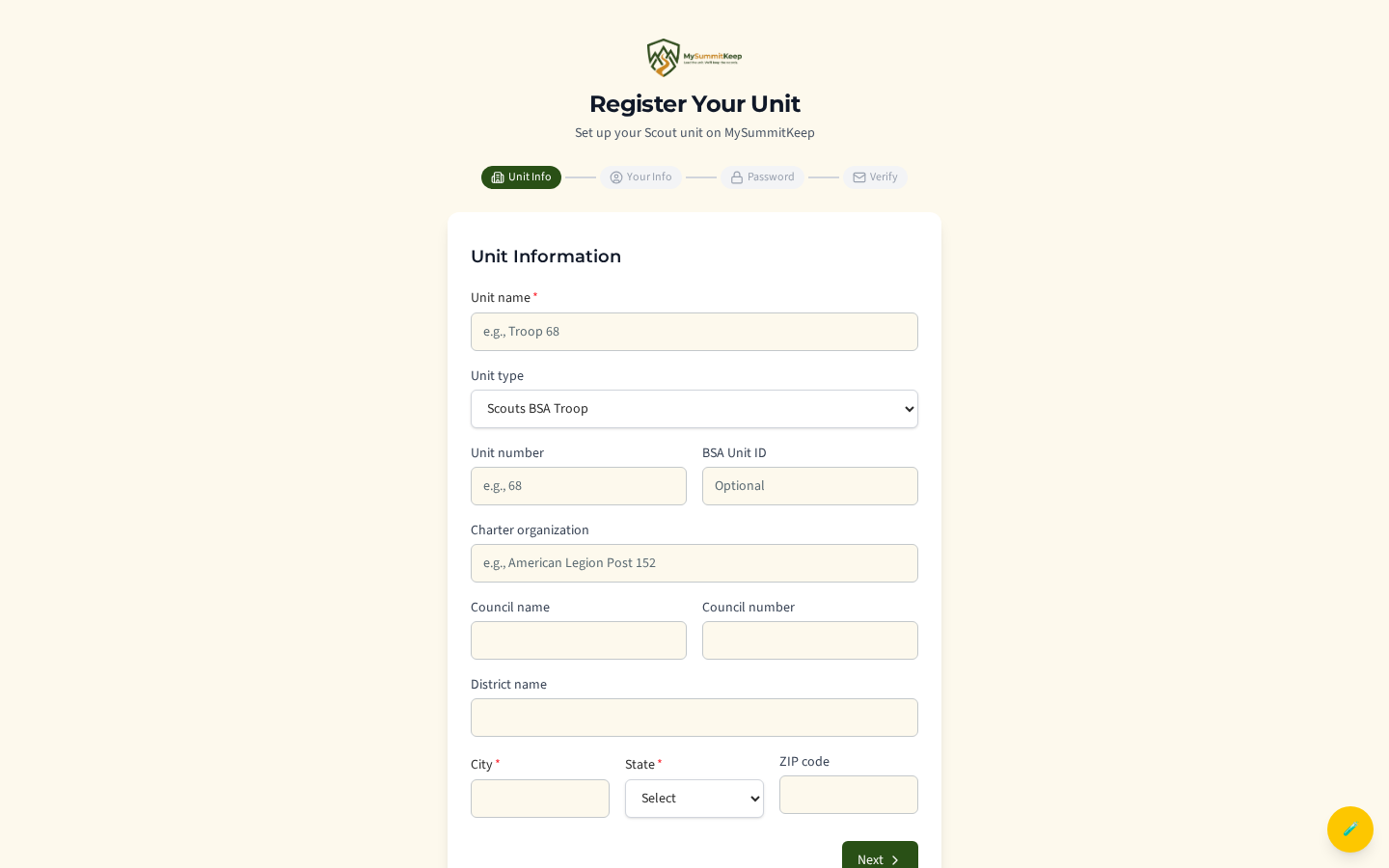
It’s a four-step form: Unit Info → Your Info → Password → Verify.
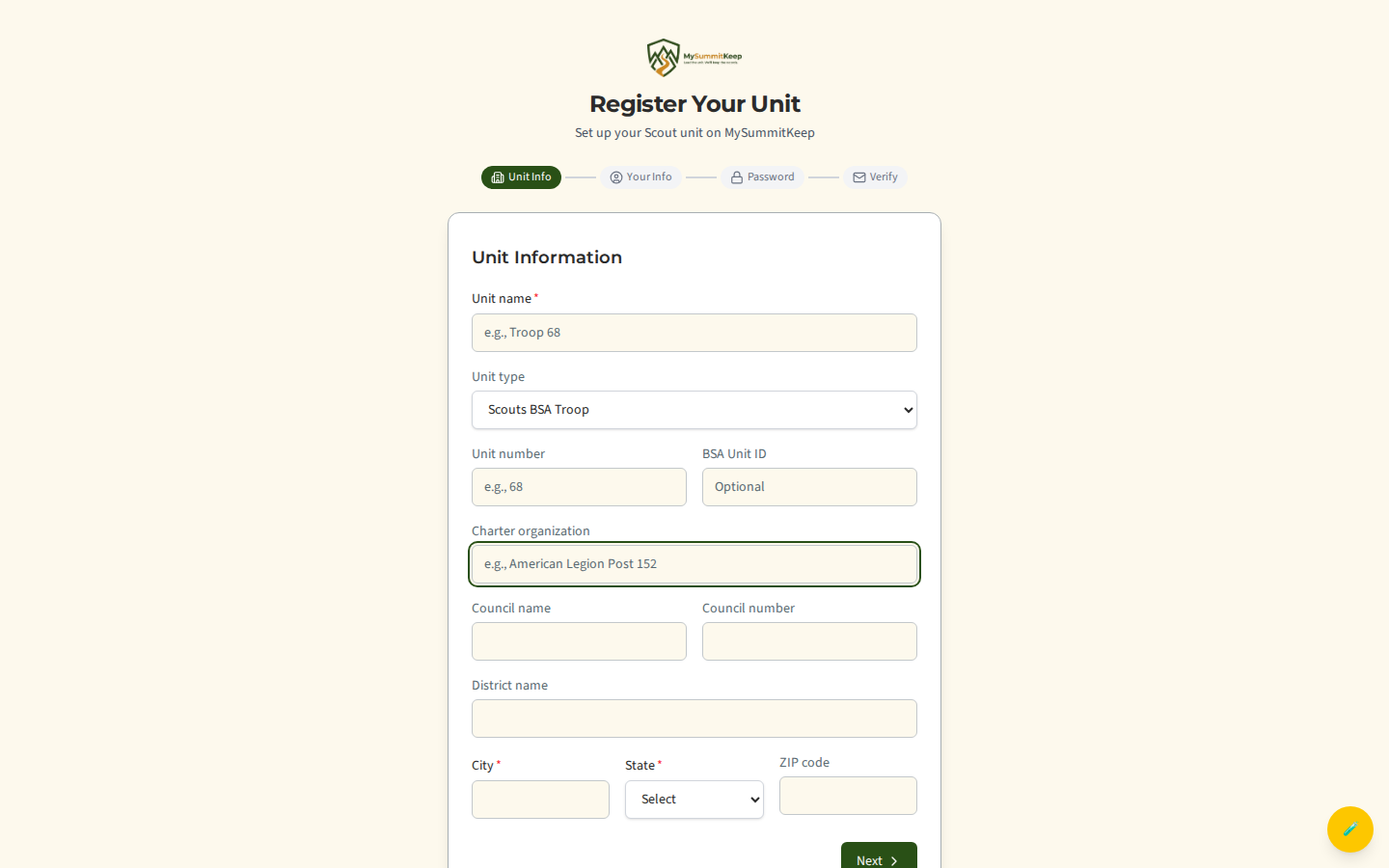
On the first step, enter your unit name (e.g. “Troop 68”), pick the unit type (Cub Scout Pack, Scouts BSA Troop, Venturing Crew, Sea Scout Ship, or Exploring Post), and fill in your number, BSA Unit ID, charter organization, council, district, and city/state/ZIP. Unit name, city, and state are required; the rest are optional but help us match you to BSA records.
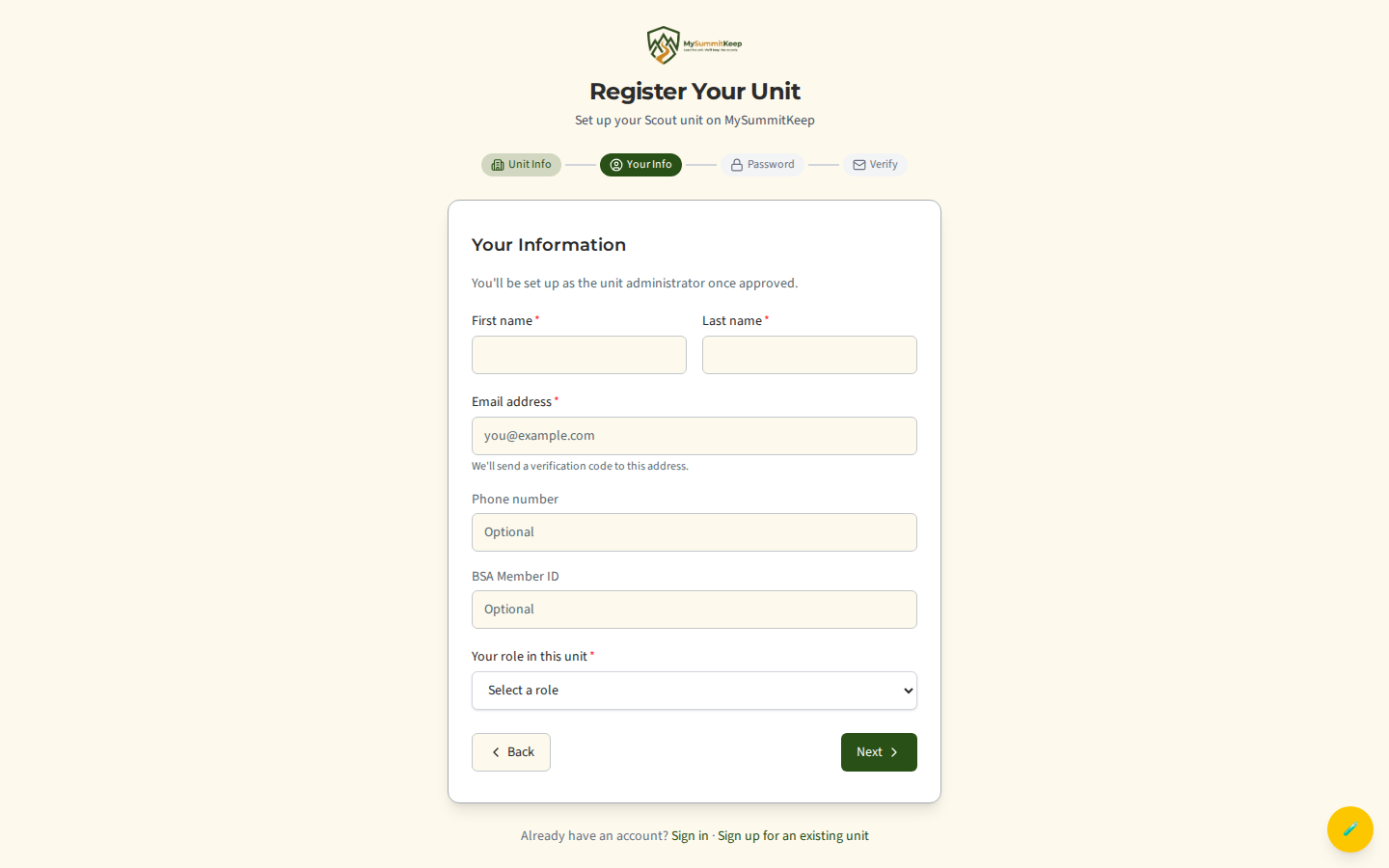
Next, enter your name, email, optional phone and BSA Member ID, and select your role (Scoutmaster, Cubmaster, Committee Chair, Crew Advisor, Skipper, and so on). You’ll be set up as the unit administrator once approved. Then you create a password (at least 8 characters with an uppercase letter, a number, and a symbol).
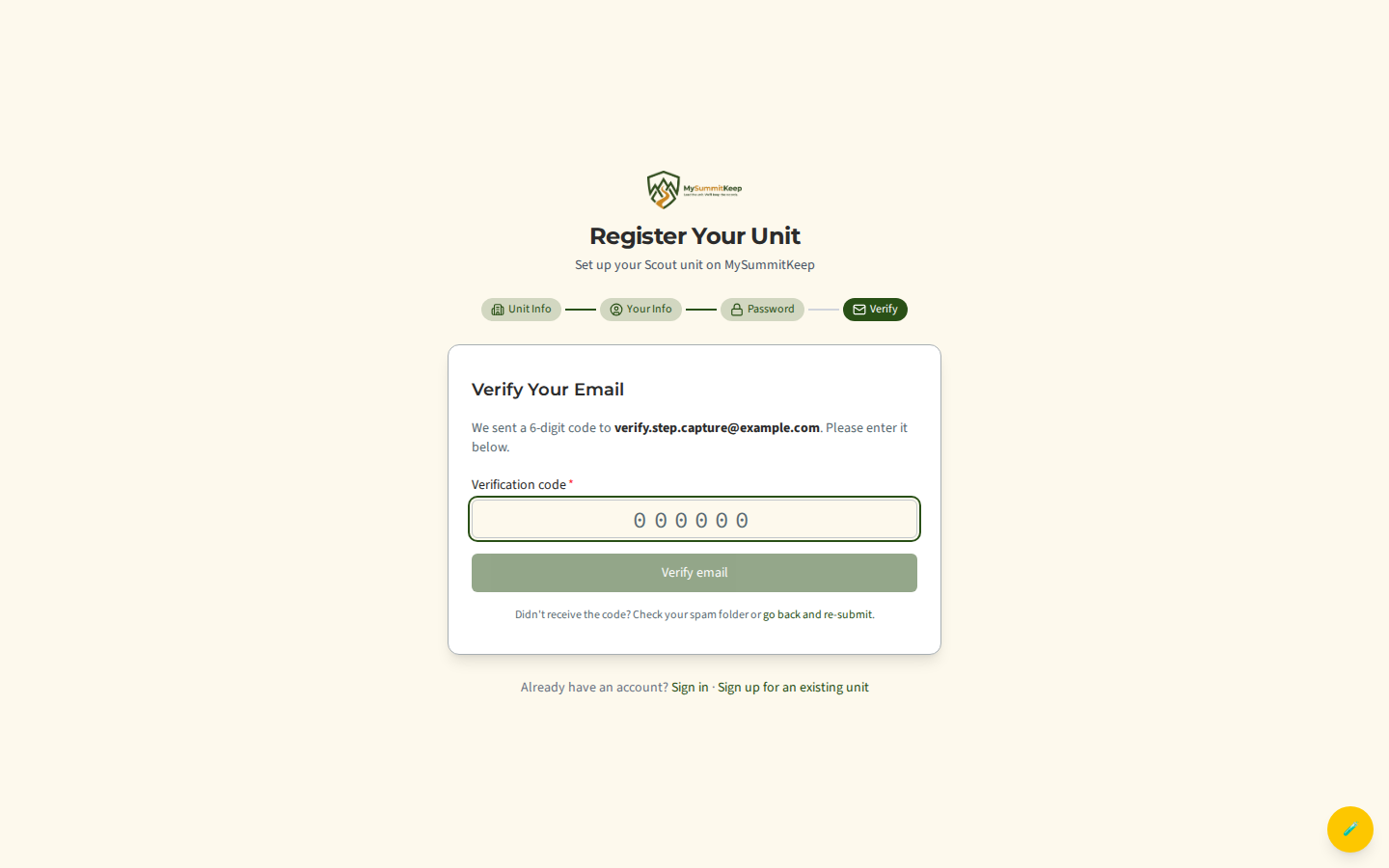
We email a 6-digit code to the address you entered. Type it in to verify the email on the request.
Path B — Create a new unit from the onboarding wizard (/onboarding)
Section titled “Path B — Create a new unit from the onboarding wizard (/onboarding)”Use this when you already have a MySummitKeep login (for example, you just signed up or subscribed) and you need to provision your unit. After login, new users land on the onboarding wizard: Welcome → Find Your Council → Select Your Unit → Your Information.
On the Select Your Unit step, switch the toggle from Join Existing Unit to Create New Unit, then enter the unit type, unit number, and an optional charter organization.
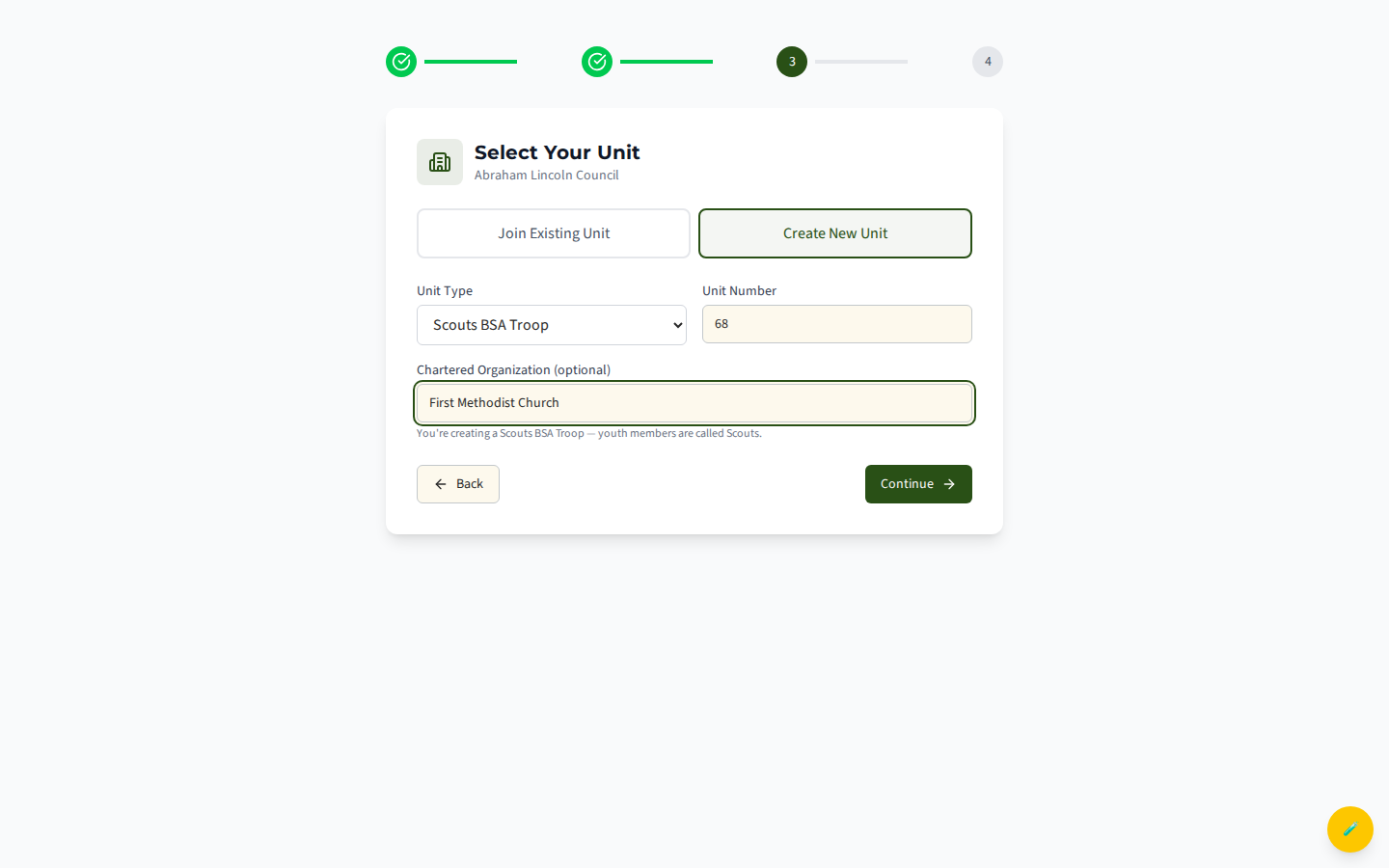
Fill in your name and phone on the next step and click Create Unit. Unlike Path A, this is atomic and instant — there is no approval queue. The unit is created, default leadership positions are set up, and you are added as the administrator right away.
Path C — Claim an orphaned unit (/onboarding)
Section titled “Path C — Claim an orphaned unit (/onboarding)”Sometimes your unit already exists on MySummitKeep (a council imported it, or a previous leader created it) but has no active administrators. In that case, keep the toggle on Join Existing Unit, search your council, and select your unit. If it has no admins, the Your Information step shows a banner:
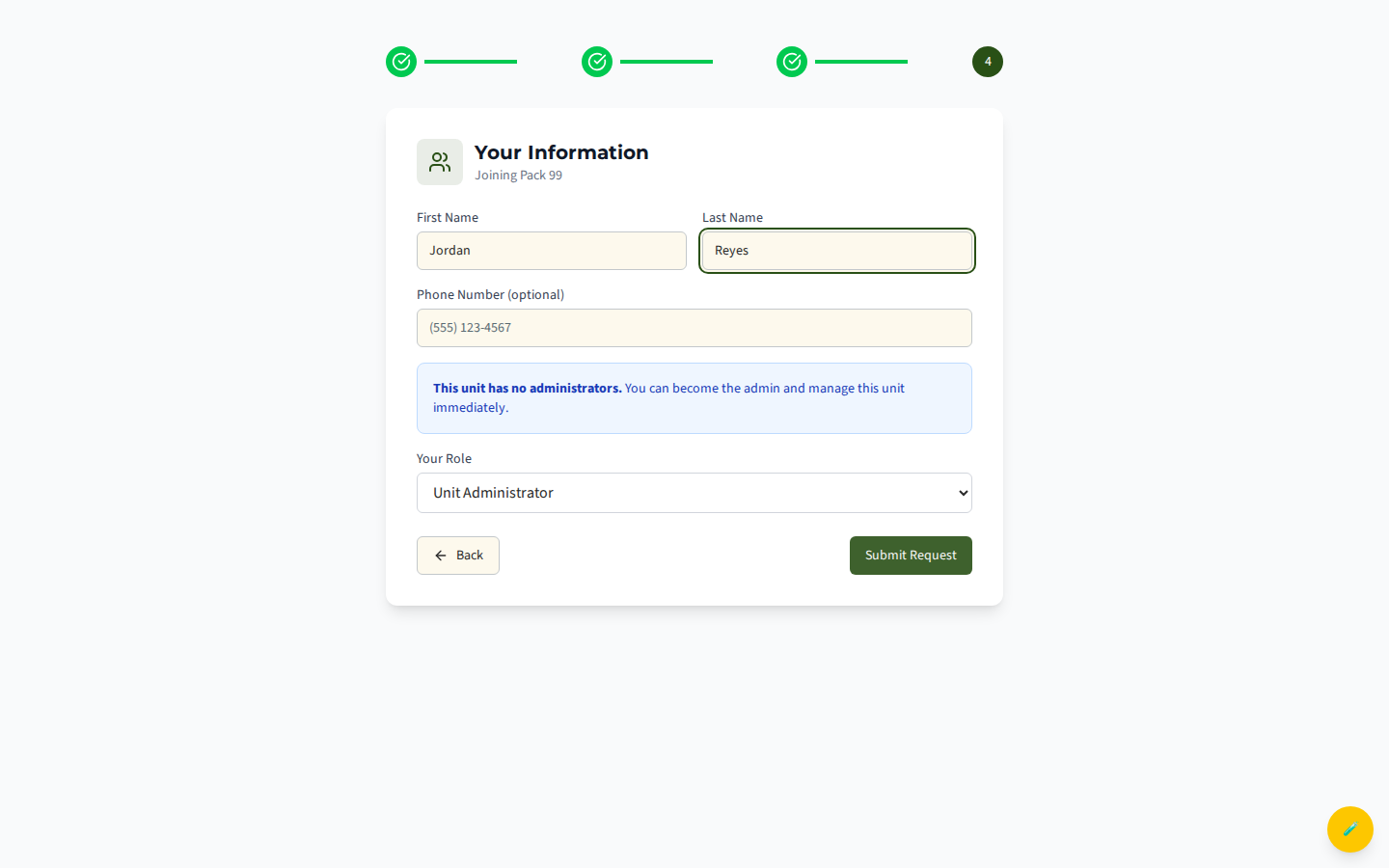
When you see “This unit has no administrators. You can become the admin and manage this unit immediately,” the Your Role dropdown defaults to Unit Administrator. Confirm your name and submit — you become the admin immediately, no approval needed.
Councils: request onboarding at the council level
Section titled “Councils: request onboarding at the council level”If you are a Scout Executive or council staff bringing an entire council onto MySummitKeep (not a single unit), use /request-council instead. It’s a short form — council details, your contact info, and rough size estimates. Every council request is reviewed manually (typically within 2 business days). Council licenses are sold separately and we will contact you.
Step 2 — Invite your Key 3
Section titled “Step 2 — Invite your Key 3”A unit’s Key 3 — Unit Leader, Committee Chair, and Chartered Organization Representative — should all have logins on day one so attendance, advancement, and finance don’t funnel through one person.
Open the Members page from the sidebar. You have two invite options:
- Invite Member opens a quick modal to invite one person by email and role.
- Bulk Invite (the button next to it, at
/members/bulk-invite) lets you paste or upload a list and invite everyone at once.
Each invited leader gets an email with a link to set their password and join your unit.
Step 3 — Import your roster
Section titled “Step 3 — Import your roster”Go to Settings → Import / Export in the left menu (or open the Import step inside Unit Setup). The import wizard walks you through exporting from Scoutbook and uploading the CSV. It deduplicates by BSA Member ID and writes everyone into your roster. Imported members start as Unclaimed until each parent or Scout signs up and links their account.
The full walkthrough — including exactly which Scoutbook reports to run — lives at Member Import.
Step 4 — Set up communications
Section titled “Step 4 — Set up communications”Open Group Messaging under Communications to send your first announcement. Email is always available; you can also enable SMS (opt-in) and web push. See Communications for channels, audiences, and templates.
Step 5 — Schedule your first event
Section titled “Step 5 — Schedule your first event”Open Events and create your next den meeting, troop meeting, or outing. RSVPs collect automatically once members have claimed their accounts. The Event Planning guide covers recurring meetings and an annual calendar.
Step 6 — Work the Unit Setup checklist
Section titled “Step 6 — Work the Unit Setup checklist”The most durable first-week to-do list is the in-app Unit Setup page (/unit-setup, under the Settings section of the sidebar). It tracks your progress through four phases — Import Your Roster, Structure Your Unit (set up dens or patrols), Configure Your Unit (meeting schedule + invite your leadership team + Add an SYT date for your unit’s leaders), and Import Historical Data (previous-platform data + advancement records) — and each step updates automatically as you complete it. It even has built-in “How do I get this?” guides for each Scoutbook export.
The SYT step matters for messaging: a Scout aged 13–17 with no parent linked can only be messaged when another registered leader with a current Safeguarding Youth Training date is copied. Choose Add my SYT date on that step to open the Training page with the form ready, and see Adding your unit’s SYT dates.
What to do this week
Section titled “What to do this week”- Configure unit settings — meeting cadence, dues, attendance rules
- Plan an annual calendar — recurring meetings + outings
- Review the advancement workflow — how requirements, ranks, and merit badges flow through the platform
- Set up health forms — Annual Health & Medical Record storage
What to do this month
Section titled “What to do this month”- Run your first recharter check
- Review training records for adult volunteers
Need help? Contact support — we usually respond within 1 business day.
MySummitKeep is an independent product and is not affiliated with, endorsed by, or sponsored by Scouting America (formerly the Boy Scouts of America). Scouting America, Scouts BSA, Cub Scouts, Venturing, Sea Scouts, and the Order of the Arrow are trademarks of Scouting America. Official program content shown in screenshots and examples is © Scouting America; always confirm current requirements atscouting.org. SeeTerms § 7.3.