
Commissioner Alerts
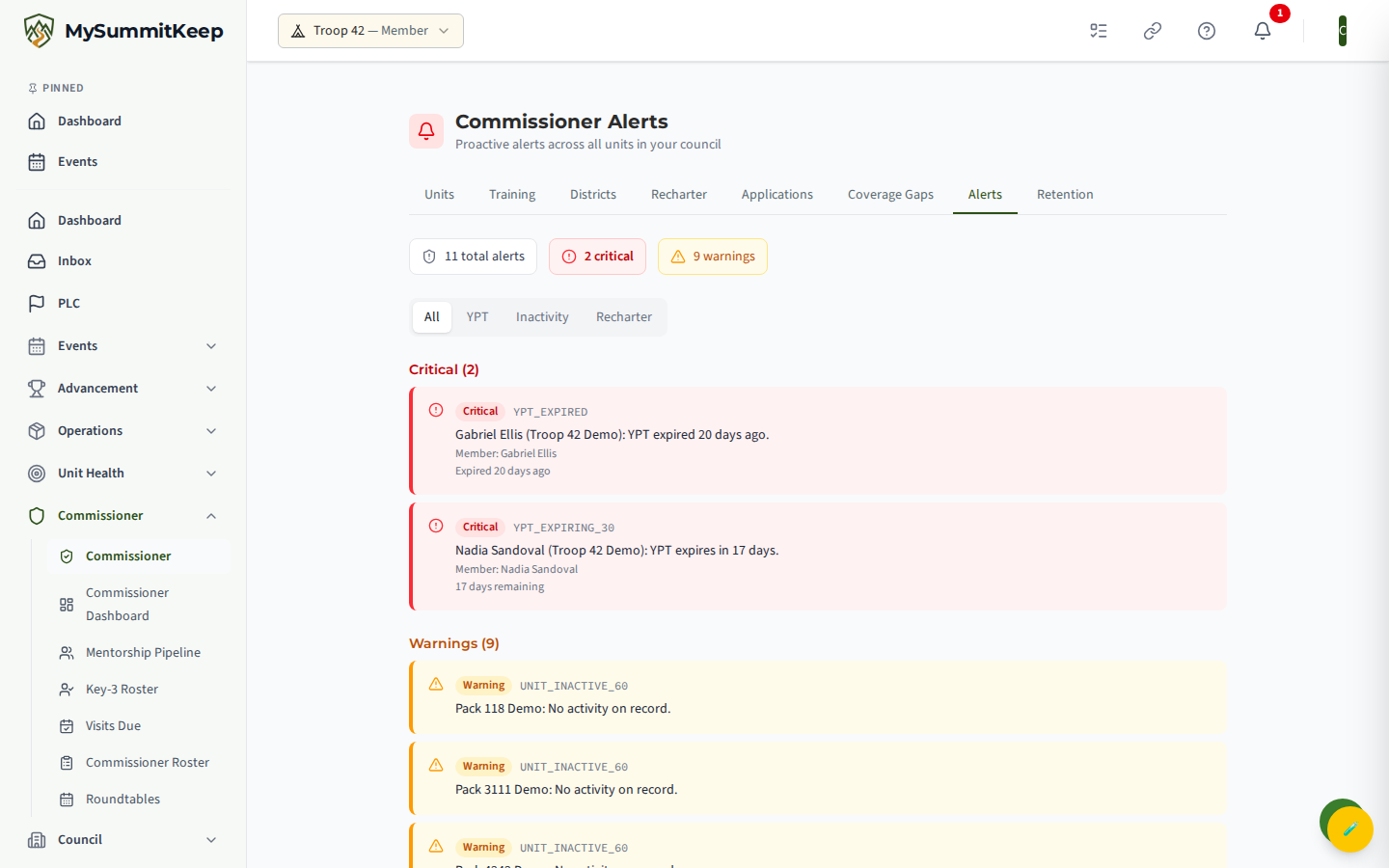
The Commissioner Alerts feed is your early-warning system. Instead of opening each unit one at a time to check whether a leader’s Youth Protection Training has lapsed or a charter is about to expire, the feed pulls those problems together into one severity-ranked list across every unit in your commissioner portfolio. Open it from the Alerts tab on the commissioner navigation, or go straight to /commissioner/alerts.
The feed only includes units you are actually responsible for. A council-wide commissioner (or council executive) sees alerts for every unit in the council; a unit commissioner with a 3-5 unit portfolio sees alerts only for the units assigned to them. If you do not hold a commissioner role, the page lets you know rather than showing an empty feed.
Alert types
Section titled “Alert types”The feed watches three kinds of risk. Each alert card shows the alert type, the unit it affects, and a plain-language message.
- YPT - Youth Protection Training expiry for adult leaders and admins. The system reads each adult’s most recent YPT completion (from training records, or from a Scoutbook-imported expiry date) and flags it as it approaches its expiration. You will see four variations as the date gets closer: expires within 90 days, within 60 days, within 30 days, and already expired. When an alert is about a person, the card also names the member and shows how many days remain (or how many days ago it lapsed).
- Inactivity - a unit with no recorded activity in 60 or more days. “Activity” means event registrations or scheduled events on the unit’s calendar. A unit with nothing on record at all is also flagged. This is a useful nudge to check in with a unit that may be quietly going dormant.
- Recharter - a unit whose charter expiration date is within the next 60 days (or has already passed). The card tells you exactly how many days are left before the charter lapses.
Severity levels
Section titled “Severity levels”Every alert is ranked into one of three severity levels, and the feed groups them so the most urgent items are always at the top.
- Critical (red) - act now. This covers YPT that has already expired, YPT expiring within 30 days, and charters that have already lapsed. These are compliance gaps that can stop a unit from operating safely or legally.
- Warning (amber) - act soon. This covers YPT expiring within 60 days, units inactive for 60+ days, and charters due within the next 30 days.
- Info (blue) - keep an eye on it. This covers YPT expiring within 90 days and charters that are due but still more than 30 days out - enough lead time to plan rather than scramble.
At the top of the page, summary chips show your total alert count, the number of Critical alerts, and the number of Warnings, so you can size up the workload before you start reading individual cards.
Filtering the feed
Section titled “Filtering the feed”Above the alert groups, a filter control lets you narrow the list to a single category:
- All - everything (the default).
- YPT - only the Youth Protection Training alerts.
- Inactivity - only the 60-day unit-inactivity alerts.
- Recharter - only the charter-due alerts.
Filtering is instant and only changes what you see - it does not dismiss or resolve anything. If a filter has no matching alerts, the feed tells you so; if your whole portfolio is clean, you will see a friendly “All units are in good standing” message instead of an empty page.
Escalations queue
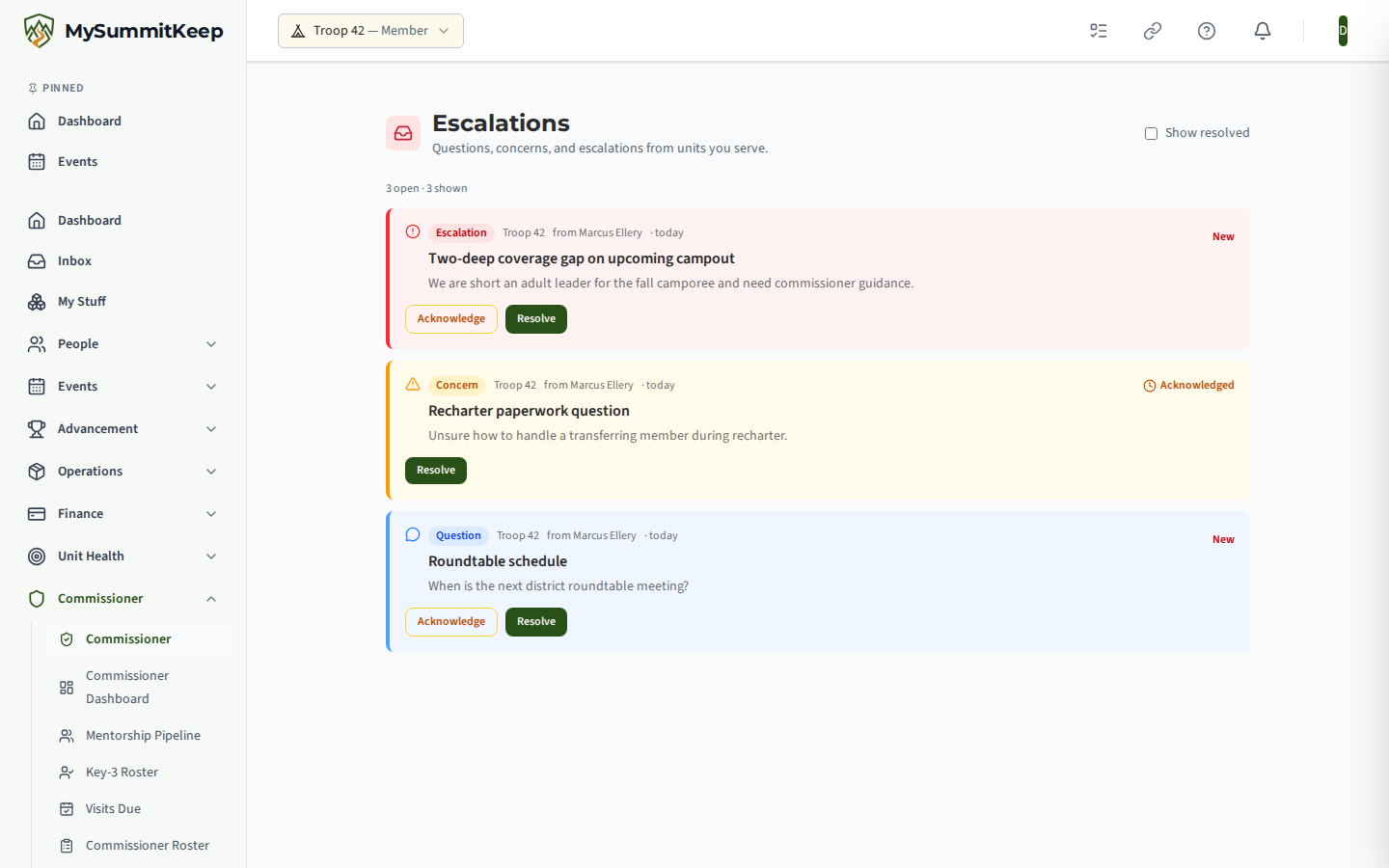
Section titled “Escalations queue”An alert that a commissioner cannot resolve at the unit level is escalated. Escalations
(/commissioner/escalations) is the queue of those cases: each row carries the unit, the issue type,
a severity, and its current status and assignee, so nothing quietly stalls between the commissioner
who raised it and the council staff who can act on it.
Acting on an alert
Section titled “Acting on an alert”The alerts feed is a read-only watchlist - it surfaces problems but does not fix them in place. Each alert points you to where the work actually happens:
- For a YPT alert, reach out to the named leader and ask them to retake Youth Protection Training at the BSA training site. Once they complete it and the new date reaches the unit’s records, the alert clears on its own the next time the feed loads.
- For an inactivity alert, contact the unit’s Key Three to confirm the unit is still operating and encourage them to schedule and record activity. Check the unit on the Commissioner Dashboard for a fuller health picture.
- For a recharter alert, work the renewal with the unit before the deadline. The Recharter Dashboard breaks down each unit’s recharter readiness in detail.
The main Commissioner Dashboard also shows an at-a-glance alerts panel, so you get a heads-up the moment you log in - but that panel is a separate, lighter-weight summary derived from each unit’s health scores (training compliance, overall health, and a 90-day no-events check), not the same feed. The full, filterable YPT / inactivity / recharter list with member names and exact day counts lives here on the Alerts page. For a wider view of where your district needs help, pair this with Coverage Gaps and your unit visit schedule.
MySummitKeep is an independent product and is not affiliated with, endorsed by, or sponsored by Scouting America (formerly the Boy Scouts of America). Scouting America, Scouts BSA, Cub Scouts, Venturing, Sea Scouts, and the Order of the Arrow are trademarks of Scouting America. Official program content shown in screenshots and examples is © Scouting America; always confirm current requirements atscouting.org. SeeTerms § 7.3.