
Coverage Gaps
Spot units in your district that have no active Unit Commissioner assigned, so no one falls through the cracks. Read the guide →
Welcome to the Commissioners section. These guides cover the tools MySummitKeep gives Unit, District, and Council Commissioners — the people whose job is keeping units healthy, served, and on the path to a strong recharter.
Everything here lives under the Commissioner menu, which only appears once you hold an active commissioner role. Your starting point is the Commissioner Dashboard at /commissioner. If you serve in more than one capacity, all of your roles and scopes show at the top of the dashboard.
To work in a council or district, open the unit switcher at the top of the left menu and pick it under Councils & Districts. Picking one opens the Council Dashboard, and the council and commissioner pages then use that choice. If you are not a member of any unit, the switcher button reads Select Scope instead.
/commissioner opens the Commissioner Dashboard — an operations roster of every unit you serve, sorted worst-first so the units that need you most are at the top. Each row shows the unit’s overall health badge (Critical / At Risk / Needs Attention / Healthy) with its composite score, plus five metric bars — Training, Membership, Advancement, Retention, and Activity — color-coded red, amber, or green.
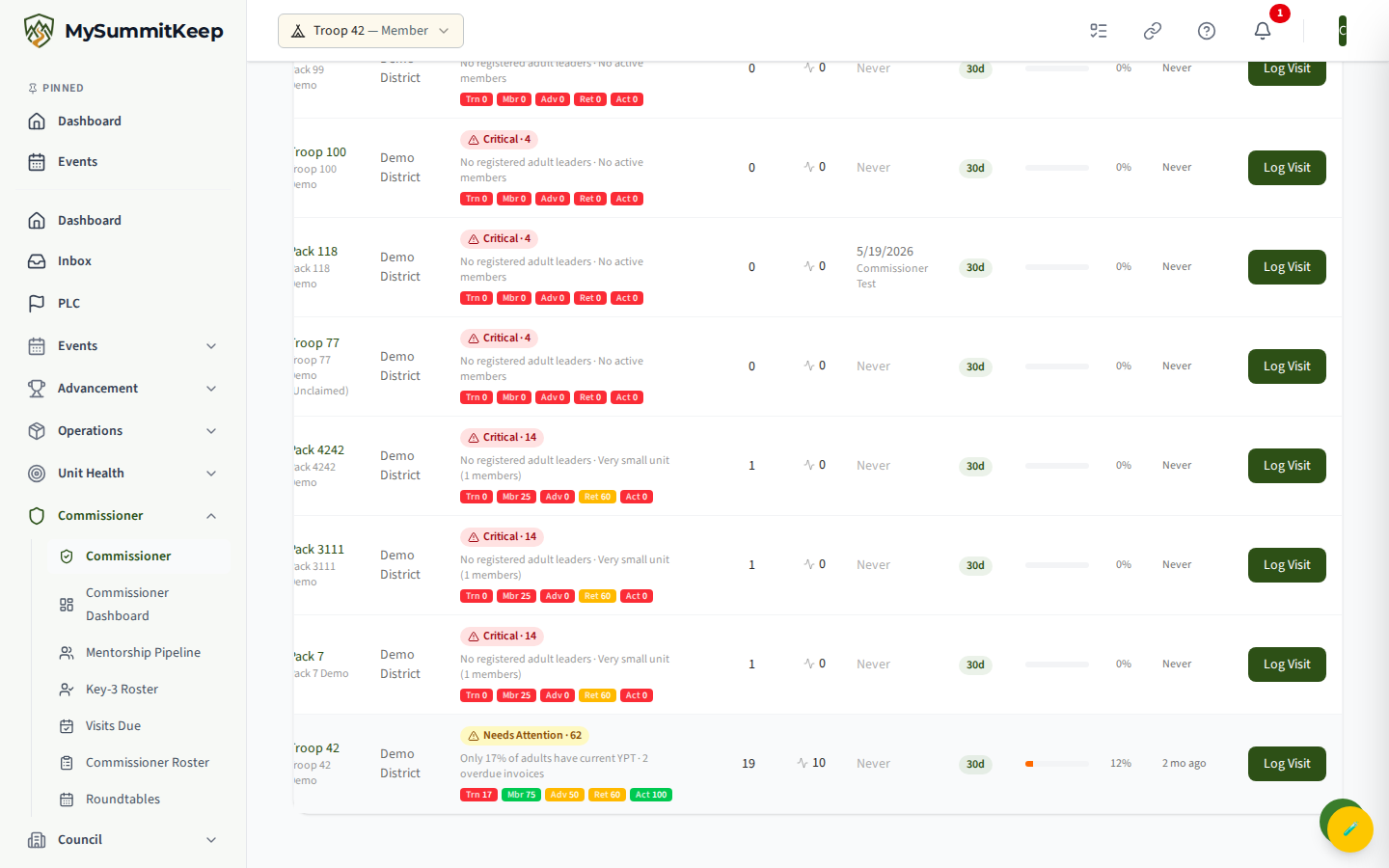
You also get member count, recent events (last 30 days), the unit’s last visit and who logged it, its lifecycle stage, success-plan completion percentage, and when the unit last self-assessed. A Log Visit button on each row jumps straight into a new visit pre-filled for that unit. Across the top, Compose Newsletter and History let active commissioners broadcast to unit leaders. A tab bar links to the rest of the toolkit: Training, Districts, Recharter, Applications, Coverage Gaps, Alerts, and Retention.
Coverage Gaps
Spot units in your district that have no active Unit Commissioner assigned, so no one falls through the cracks. Read the guide →
Unit Health Scores
Understand how the composite score and the five metric bars are calculated, and drill into a single unit’s detail page. Read the guide →
Commissioner Visits
Log a unit visit, record observations, and track follow-up actions over time. Read the guide →
Visits Due
See which assigned units are overdue for a visit, prioritized so you can plan your month.
Recharter Dashboard
Monitor recharter readiness across all your units and catch blockers early. Read the guide →
Renewal Readiness
See which units can renew for the new term: Key 3 filled and trained, the adult leaders whose Safeguarding Youth Training runs out first, and risk-ranked units with CSV and PDF export. Read the guide →
Training Compliance
The Training Compliance Matrix shows position-required training status for leaders across your units at a glance.
Council Analytics
For council and district staff — how many youth renewed, were lost or are new, with the commissioner, organization and growth views behind the numbers. Read the guide →
Retention Pipeline
Track members at risk of not returning and the units working their re-registration.
Mentorship Pipeline
For District Commissioners — track new commissioners and leaders through the onboarding funnel: pair a mentor and advance each mentee’s stage right from the row, district-scoped. Read the guide →
Key-3 Roster & Freshness
A snapshot of each unit’s Key-3 leaders and how current that information is, so you know who to contact.
Commissioner Alerts
A running feed of health changes and events that need a commissioner’s attention.
Commissioner Applications
Review and act on people applying to serve as commissioners in your scope.
Shooting Sports Instructors
See certified shooting sports instructors across your assigned units for activity planning and safety.
Roundtables
Review your district’s roundtable meetings and per-unit attendance. In this first version the data comes in through a CSV import — there is no manual create or edit yet. Read the guide →
District Newsletter
Broadcast announcements to unit leaders. Choose from four audiences: all units you serve, all units in your district, all units in your council, or hand-picked specific units. Read the guide →
District Committee
The District Committee roster lives under Council → District Committee — see committee members and their roles for your district.
Add Unit Commissioners
Step-by-step: assign the Unit Commissioner role and connect a UC to the units they will mentor. Read the guide →
MySummitKeep is an independent product and is not affiliated with, endorsed by, or sponsored by Scouting America (formerly the Boy Scouts of America). Scouting America, Scouts BSA, Cub Scouts, Venturing, Sea Scouts, and the Order of the Arrow are trademarks of Scouting America. Official program content shown in screenshots and examples is © Scouting America; always confirm current requirements atscouting.org. SeeTerms § 7.3.