
Key-3 Roster Freshness & Snapshots
The Key-3 Roster page gives district commissioners one place to see who is on file as each unit’s Committee Chair, Unit Leader, and Chartered Org Rep — and, just as importantly, how recently you confirmed that information. A quick weekly glance tells you which units need a check-in before recharter season catches you off guard.
You’ll find it at Commissioner → Key-3 Roster (/commissioner/key-three). The page is scoped to your district, so you only see the units you serve.
Why Key-3 snapshot freshness matters
Section titled “Why Key-3 snapshot freshness matters”A “snapshot” is a point-in-time record of who held each Key-3 role and when you last verified it. People rotate through unit leadership constantly, and an out-of-date Key-3 is the root cause of most recharter surprises — the wrong person gets the renewal packet, signatures stall, or a Chartered Org Rep nobody can reach turns out to have moved on months ago.
MySummitKeep treats a snapshot as stale once it is older than 365 days. That cadence is deliberate: BSA charters renew annually, so a yearly refresh keeps your roster honest without nagging you constantly. A unit that has never had a snapshot captured is also flagged so it doesn’t quietly fall through the cracks.
The four cards at the top of the page summarize your district at a glance:
- Units in district — total active units in your roll-up
- Stale (> 365d) — units with a snapshot older than a year
- Never captured — units with no snapshot on file yet
- Current — units verified within the last year
Reading the staleness badges
Section titled “Reading the staleness badges”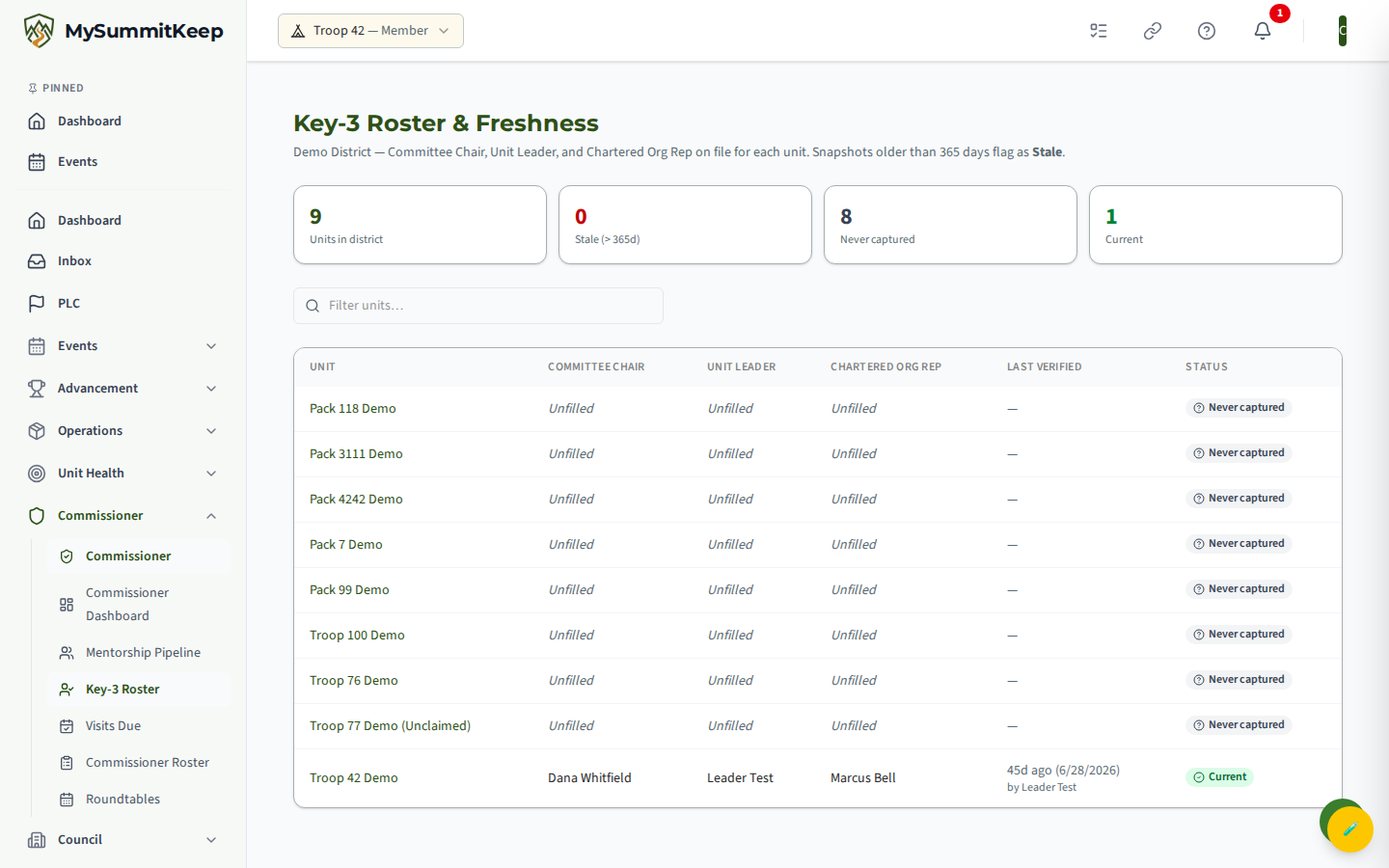
The table lists one row per unit with its current Key-3 names, a Last Verified column, and a status badge. There are three badge states:
- Current (green) — verified within the last 365 days. Nothing to do.
- Stale (red) — a snapshot exists but is over a year old. Time for a refresh.
- Never captured (gray) — no snapshot has ever been taken for this unit.
Rows are sorted to put your work first: stale units appear at the top, never-captured units next, and current units last. Within the stale group, the oldest snapshots float to the top so the most overdue units are the first thing you see.
The Last Verified column shows relative timing (“Today”, “Yesterday”, or “Nd ago”) alongside the actual date, and notes who captured it (“by Jane Smith”). Any role with no name on file reads Unfilled in italics — a useful prompt that the unit may have a vacancy to chase down.
Capturing a snapshot with the member picker
Section titled “Capturing a snapshot with the member picker”Click any row to open the Capture Key-3 Snapshot modal for that unit.
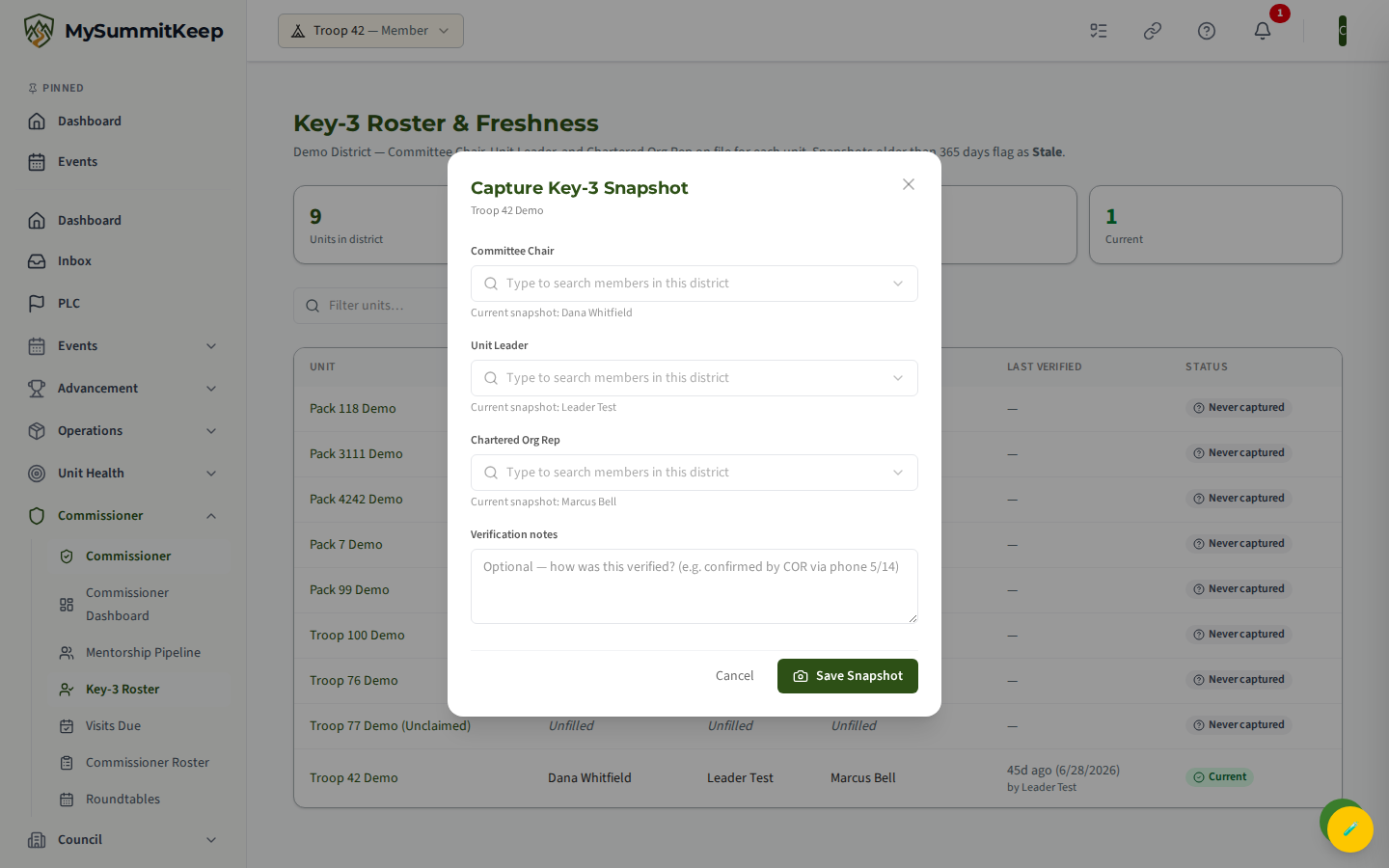
The modal has a member-picker combobox for each of the three Key-3 roles, plus an optional Verification notes field. To fill a role, click into its box and type at least two characters — the picker searches the members your commissioner role can reach and shows matches with the units they belong to underneath each name. Click a match to select it; click the X on the chip to clear it.
If the unit already has a snapshot, you’ll see a “Current snapshot: …” line under each picker showing who is on file now, so you can confirm or correct each name.
The Verification notes field is free text (up to 1,000 characters) — a good place to record how you confirmed the roster, for example “confirmed by COR by phone 5/14”. When you’re ready, click Save Snapshot.
A few things worth knowing about how the save works:
- You must pick at least one Key-3 member before saving. A note on its own is not enough — the server rejects a capture that has no Committee Chair, Unit Leader, or Chartered Org Rep selected.
- Saving a new snapshot becomes the unit’s current one and automatically retires the previous snapshot. You don’t manage versions by hand; the history is kept behind the scenes.
- The page refreshes immediately, so the row’s badge flips to Current and the freshness clock resets the moment you save.
Handling cross-unit Key-3 designees
Section titled “Handling cross-unit Key-3 designees”Real Key-3 designees are not always registered to the unit they sign for. The most common case is the Chartered Org Rep, who is appointed by the chartering organization and frequently covers several units without being a member of any of them. Committee Chairs borrowed from a sibling unit run into the same problem.
For that reason the member picker is not locked to the selected unit’s roster — it searches the whole pool your commissioner role can reach (your district, or your entire council if your role is council-scoped). That means you can pick a Chartered Org Rep — or any cross-unit designee — who would otherwise be invisible if the search were limited to a single unit’s members.
If the right person genuinely isn’t in your district yet (for example a brand-new COR who hasn’t been added), they’ll need to be added to a unit or district roster first. See Add Unit Commissioners and District Roster for getting people on file, then return here to capture the snapshot.
Key 3 meetings
Section titled “Key 3 meetings”The current snapshot also decides who is on a unit’s Key 3 Meetings roster and who is invited to those meetings. Commissioners who serve the unit can read its Key 3 meetings from the unit’s detail page; see Unit Health Scores.
MySummitKeep is an independent product and is not affiliated with, endorsed by, or sponsored by Scouting America (formerly the Boy Scouts of America). Scouting America, Scouts BSA, Cub Scouts, Venturing, Sea Scouts, and the Order of the Arrow are trademarks of Scouting America. Official program content shown in screenshots and examples is © Scouting America; always confirm current requirements atscouting.org. SeeTerms § 7.3.