
Commissioner Visits
A commissioner visit is the most important thing a unit commissioner does. MySummitKeep gives you two tools: a Log Commissioner Visit form that captures what happened in a structured way, and a Visits Due tracker that tells you which units are overdue or coming due so nothing slips through the cracks.
Logging a visit
Section titled “Logging a visit”Open the Visits Due page (Commissioner → Visits Due in the left menu, or the Visits Due card on the commissioner overview) and click any unit row to start a log pre-filled with that unit. You land on the Log Commissioner Visit form at /commissioner/visits/new.
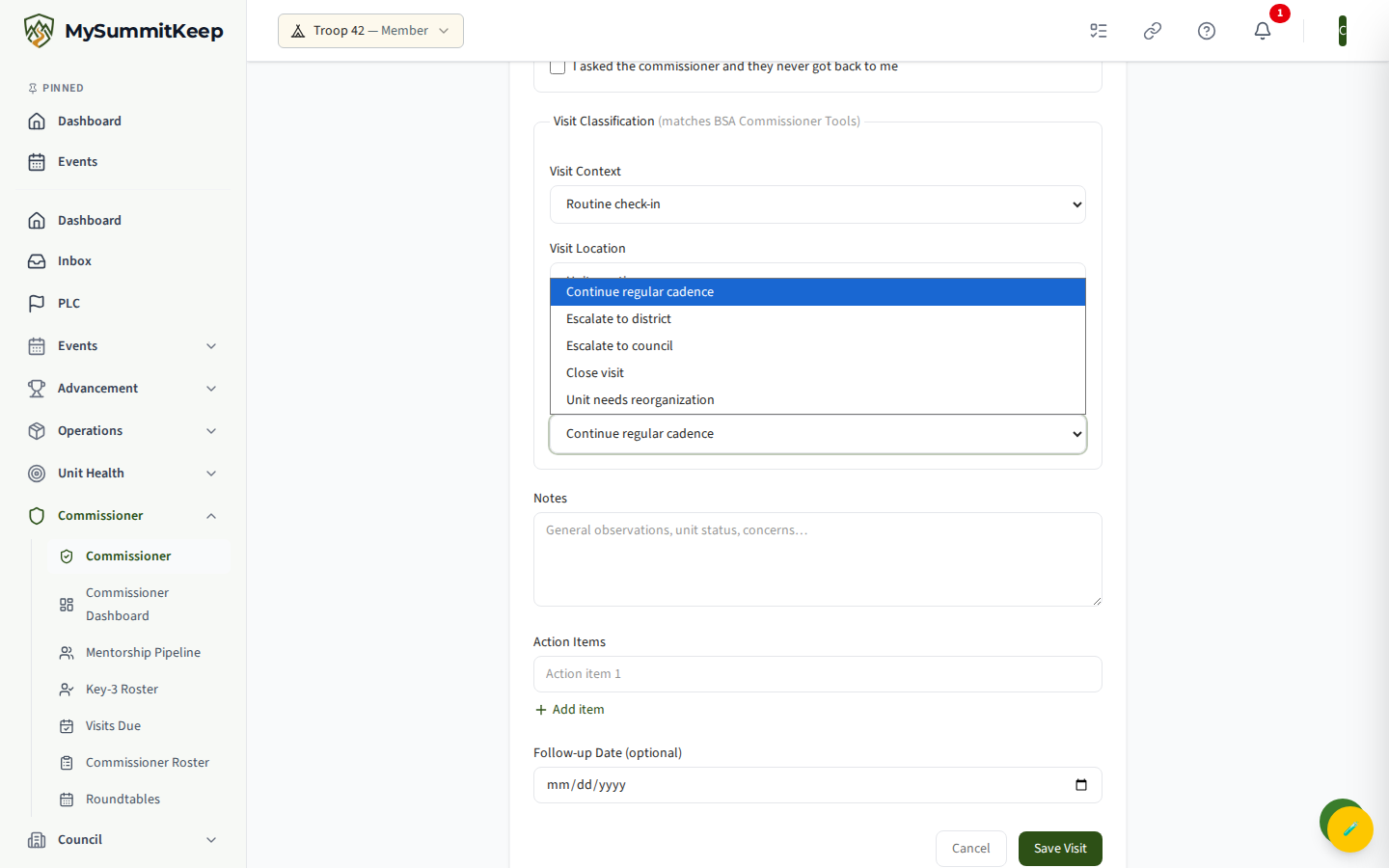
The form records one contact and saves it to the unit’s history. Here is every field:
- Contact Type (required) — how you reached the unit. Choose In-Person Visit, Phone Call, Email, or Video Call. Not every “visit” is a meeting; a meaningful phone call counts.
- Visit Date (required) — defaults to today. This date is what the Visits Due cadence measures against.
- Met With — free text for who you spoke with, e.g. “Scoutmaster Jane Doe.”
- Assessed Health Level — your read on the unit, on a five-step scale: Critical, AtRisk, Developing, Healthy, or Thriving. Leaving it blank is fine if you don’t want to commit to a rating this time.
- Observed Risk Signs — a checklist of canonical BSA risk signals (grouped by category). Check all that apply; these feed the unit’s risk picture for district and council.
Visit Classification
Section titled “Visit Classification”A grouped section labelled Visit Classification (matches BSA Commissioner Tools) captures structured detail that keeps your records aligned with BSA reporting:
- Visit Context — Routine check-in, Annual prep visit (pre-recharter), Quarterly health check, Post-incident follow-up, Initial / new-unit visit, or Other. Defaults to Routine.
- Visit Location — Unit meeting, Virtual / video call, Phone call, Email exchange, Council office, or Other. Defaults to Unit meeting.
- Duration (minutes) — optional, 1 to 480.
- Outcome — your disposition for the unit: Continue regular cadence, Escalate to district, Escalate to council, Close visit, or Unit needs reorganization. Defaults to Continue regular cadence.
Notes, action items, and follow-up
Section titled “Notes, action items, and follow-up”- Notes — a free-text summary. Capture the gist; you don’t need polished prose.
- Action Items — add one row per commitment with Add Item, and remove rows with the X button. These become the unit’s open follow-ups.
- Follow-up Date — optional date for the next touch.
Click Save Visit to submit. You’ll see a confirmation and return to the commissioner dashboard.
Visits-due cadence (SLA)
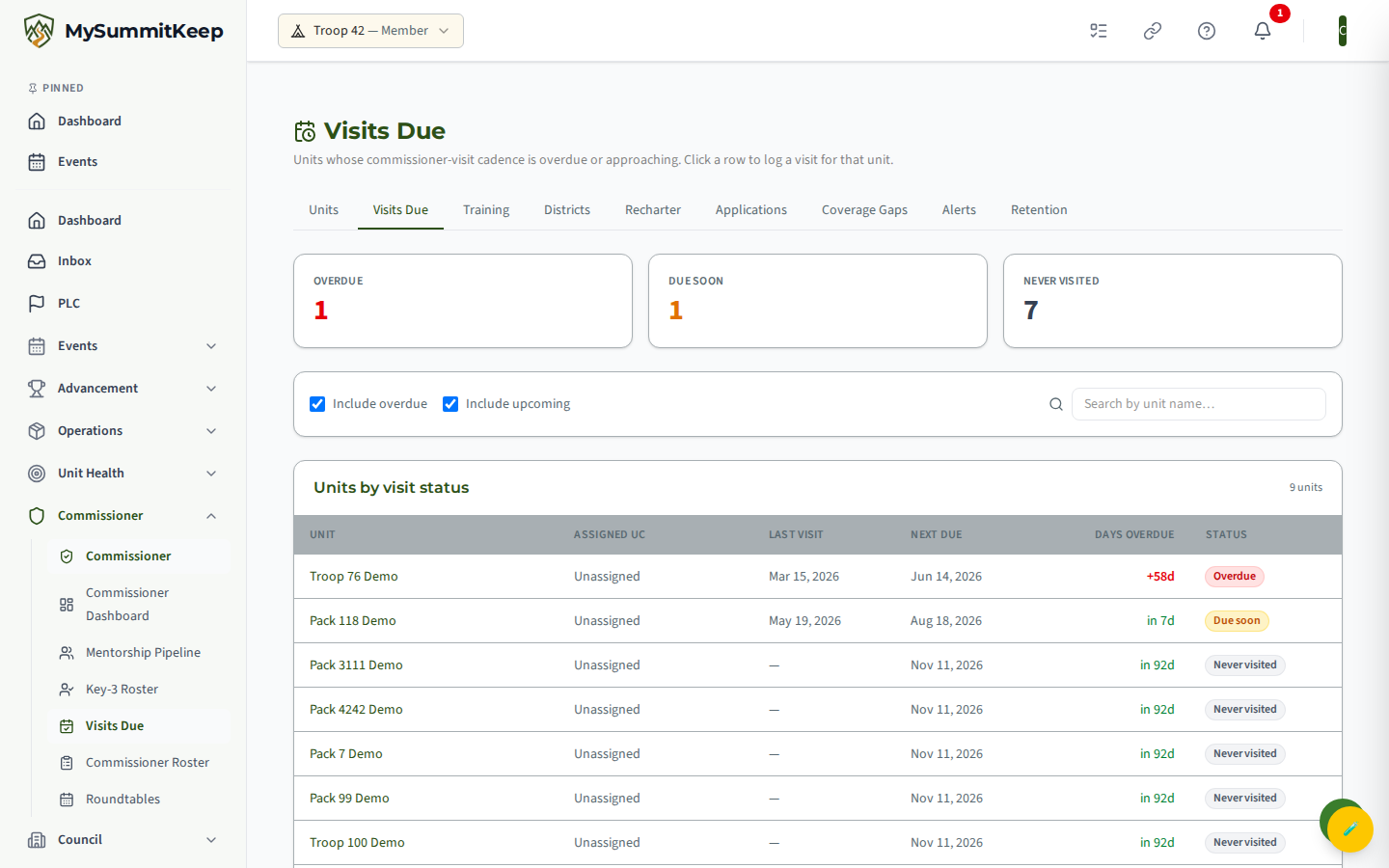
Section titled “Visits-due cadence (SLA)”The Visits Due page at /commissioner/visits-due is your worklist: every unit in your scope, sorted so the units that need attention float to the top.
How the cadence works
Section titled “How the cadence works”MySummitKeep follows BSA’s published target of 4 commissioner visits per unit per year. That target sets the maximum gap between visits — roughly 91 days (365 ÷ 4). The platform measures the gap from a unit’s last logged visit (or, for a unit never visited, its new-unit / charter date) and assigns one of four statuses:
- Overdue (red) — the last visit is older than the cadence target. The Days Overdue column shows how far past due, e.g.
+30d. - Due soon (amber) — the unit falls inside the reminder window (the last two weeks before it comes due). The day counter reads
in 9dorToday. - Current (green) — visited recently enough that no action is needed. These rows are always hidden from the worklist so you can focus on what’s outstanding.
- Never visited (gray) — no visit has ever been logged. Priority is driven by how long the unit has existed.
The three cards at the top tally Overdue, Due soon, and Never visited so you can see your workload at a glance.
Filtering and acting on the list
Section titled “Filtering and acting on the list”- Toggle Include overdue and Include upcoming to widen or narrow the worklist. (Current units stay hidden either way.)
- Search by unit name to jump to a specific unit.
- The table shows the assigned unit commissioner, last visit date, next-due date, and status. Unassigned means no UC is attached yet — see Add Unit Commissioners.
- Click any row to open the Log Commissioner Visit form pre-filled for that unit.
The assigned commissioner also receives a reminder before each unit comes due, so you can schedule ahead instead of discovering the gap on this page.
Related
Section titled “Related”- Unit Health Scores — how the platform scores unit health independently of your assessment.
- Coverage Gaps — units with no assigned commissioner.
- Add Unit Commissioners — assign yourself or others to units.
Need help? Contact support — we usually respond within one business day.
MySummitKeep is an independent product and is not affiliated with, endorsed by, or sponsored by Scouting America (formerly the Boy Scouts of America). Scouting America, Scouts BSA, Cub Scouts, Venturing, Sea Scouts, and the Order of the Arrow are trademarks of Scouting America. Official program content shown in screenshots and examples is © Scouting America; always confirm current requirements atscouting.org. SeeTerms § 7.3.