
Privacy and Your Data
MySummitKeep is built for Scout units, where almost every record involves a youth member or a guardian. We take that seriously. This page explains the three different privacy surfaces in the app and exactly what each one does, so you can find the right place for what you want to accomplish.
There are three distinct things people often lump together:
- Profile visibility — what other members of your unit can see about you. Lives at Settings → Privacy.
- Your data rights — access, correction, portability, and deletion requests. Lives at Settings → Privacy Rights.
- Do Not Sell or Share — the statutory opt-out. Lives on its own public page at
/privacy/do-not-sell-or-share.
Each is covered below.
Profile visibility (Settings → Privacy)
Section titled “Profile visibility (Settings → Privacy)”The Settings → Privacy page controls one thing only: what other members of your unit can see about you. It is a set of three toggles — nothing here exercises a legal data right.
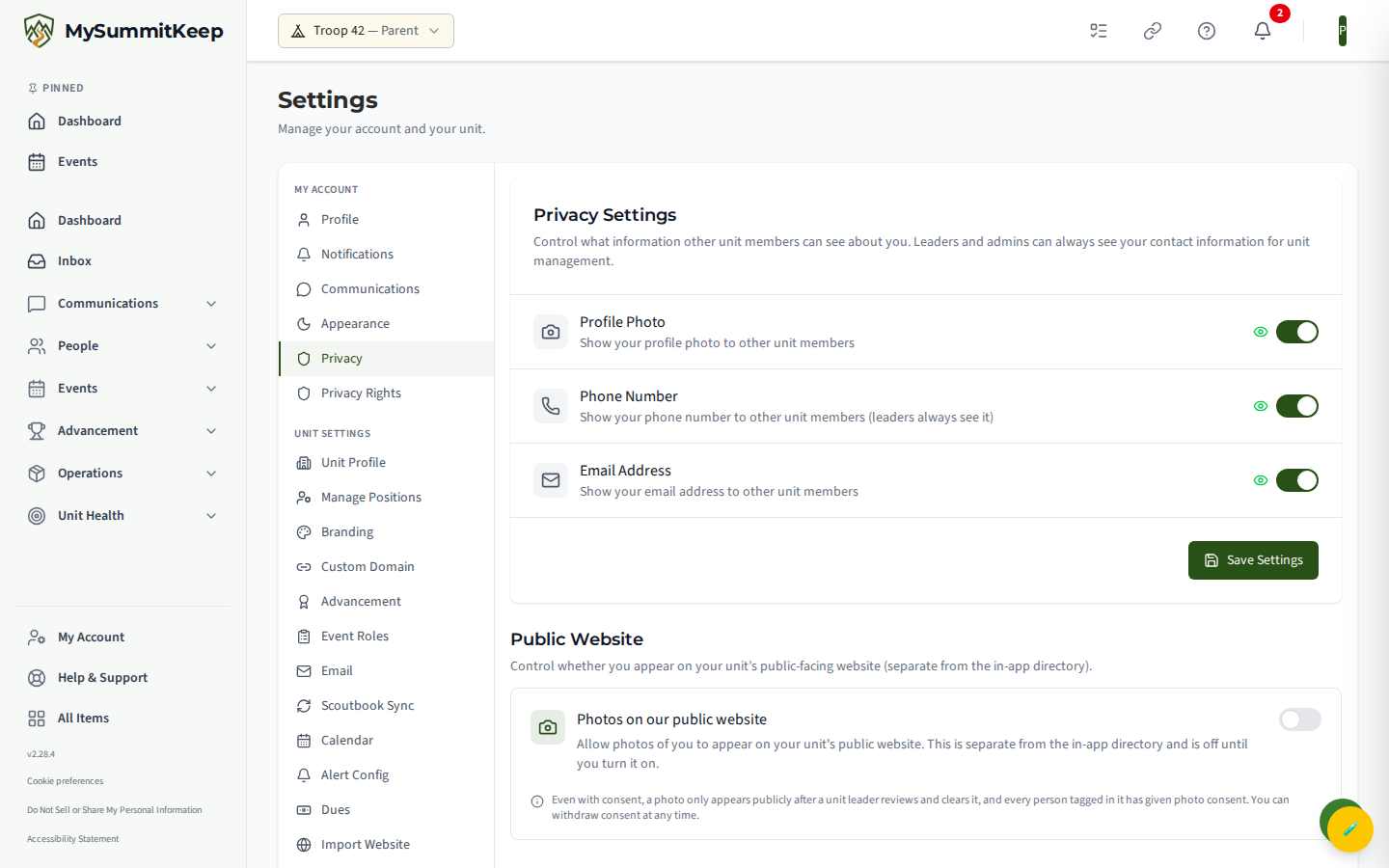
The toggles are:
- Profile Photo — show your profile photo to other unit members
- Phone Number — show your phone number to other unit members
- Email Address — show your email address to other unit members
Flip the toggles you want and click Save Settings.
Your data rights (Settings → Privacy Rights)
Section titled “Your data rights (Settings → Privacy Rights)”To exercise an actual legal right — access, correction, portability, or deletion — go to Settings → Privacy Rights (the “My Privacy Rights” page). This is separate from the visibility toggles above.
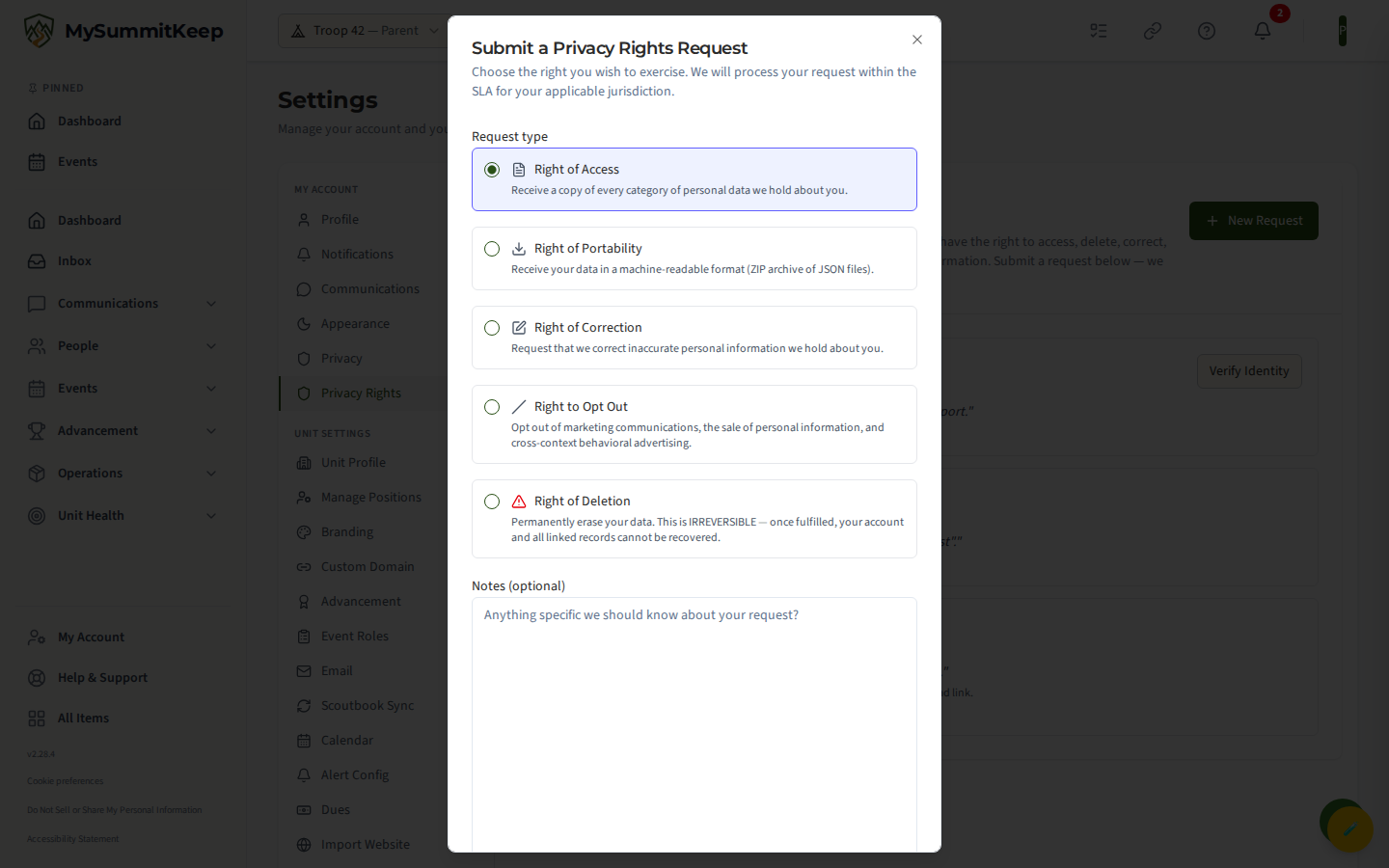
Click New Request, choose the right you want to exercise, optionally add a note, confirm you are the data subject (or the parent/legal guardian acting on their behalf), and submit. The available request types are:
- Right of Access — receive a copy of every category of personal data we hold about you
- Right of Portability — receive your data in a machine-readable format (a ZIP archive of JSON files)
- Right of Correction — ask us to fix inaccurate information
- Right to Opt Out — opt out of marketing communications and the sale/sharing of personal information
- Right of Deletion — permanently erase your data
The identity-verification step
Section titled “The identity-verification step”Access, Portability, and Deletion requests start in a Verify Identity state (internally IdentityPending). Before we fulfill them, you must complete an identity-verify step — this protects you against someone else trying to pull or erase your records. Your request will not be processed until that step clears.
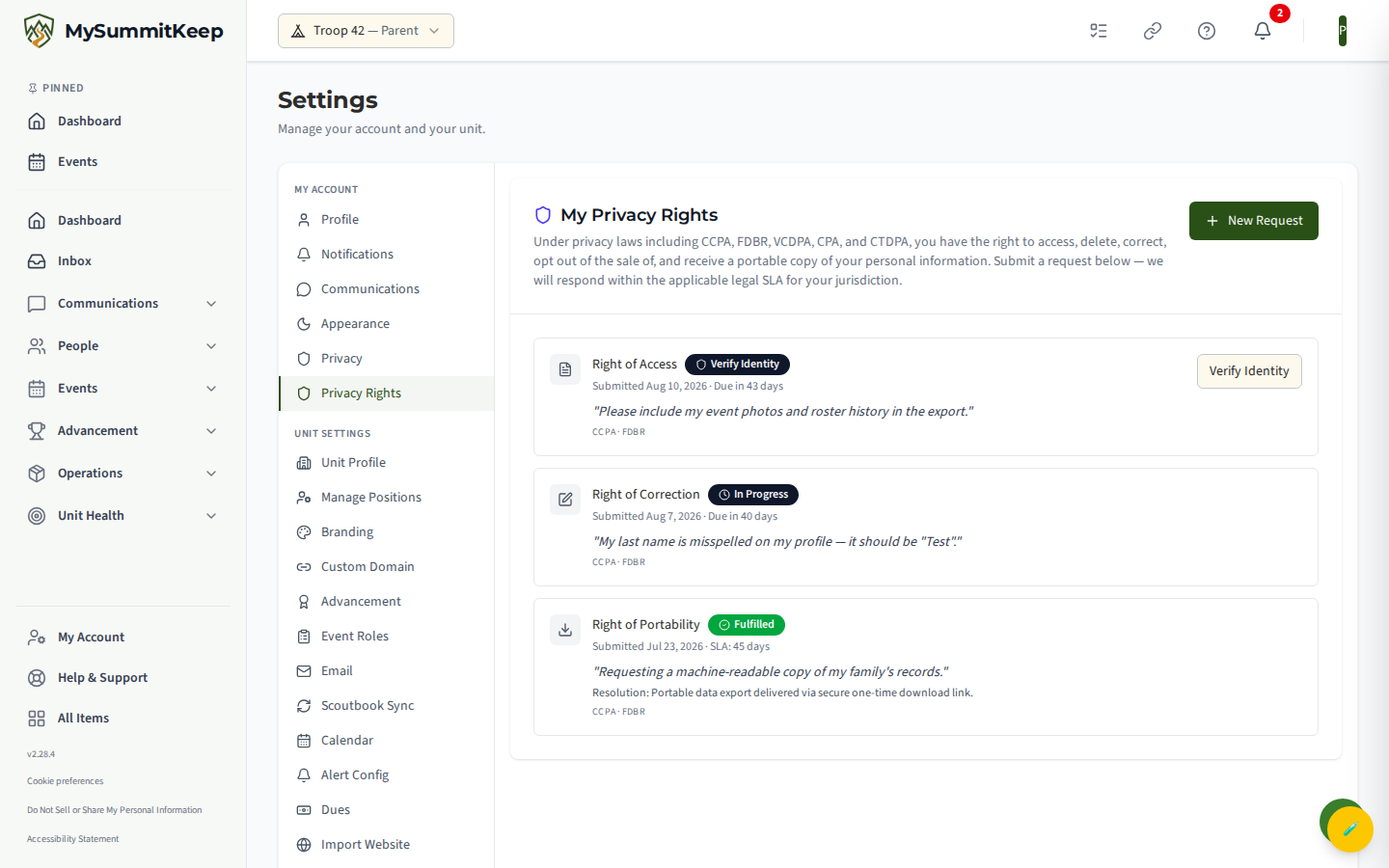
Every request you submit appears in your own list with a status badge — Submitted, Verify Identity, In Progress, Fulfilled, Rejected, or Expired — along with the response deadline for your jurisdiction. When a request needs your action, a Verify Identity button appears on that row.
Do Not Sell or Share My Personal Information
Section titled “Do Not Sell or Share My Personal Information”If you live in California, Colorado, Connecticut, Virginia, Florida, or another state with a comprehensive privacy law, you can assert your “Do Not Sell or Share My Personal Information” right on its own dedicated page at /privacy/do-not-sell-or-share — not from the Settings → Privacy toggles.
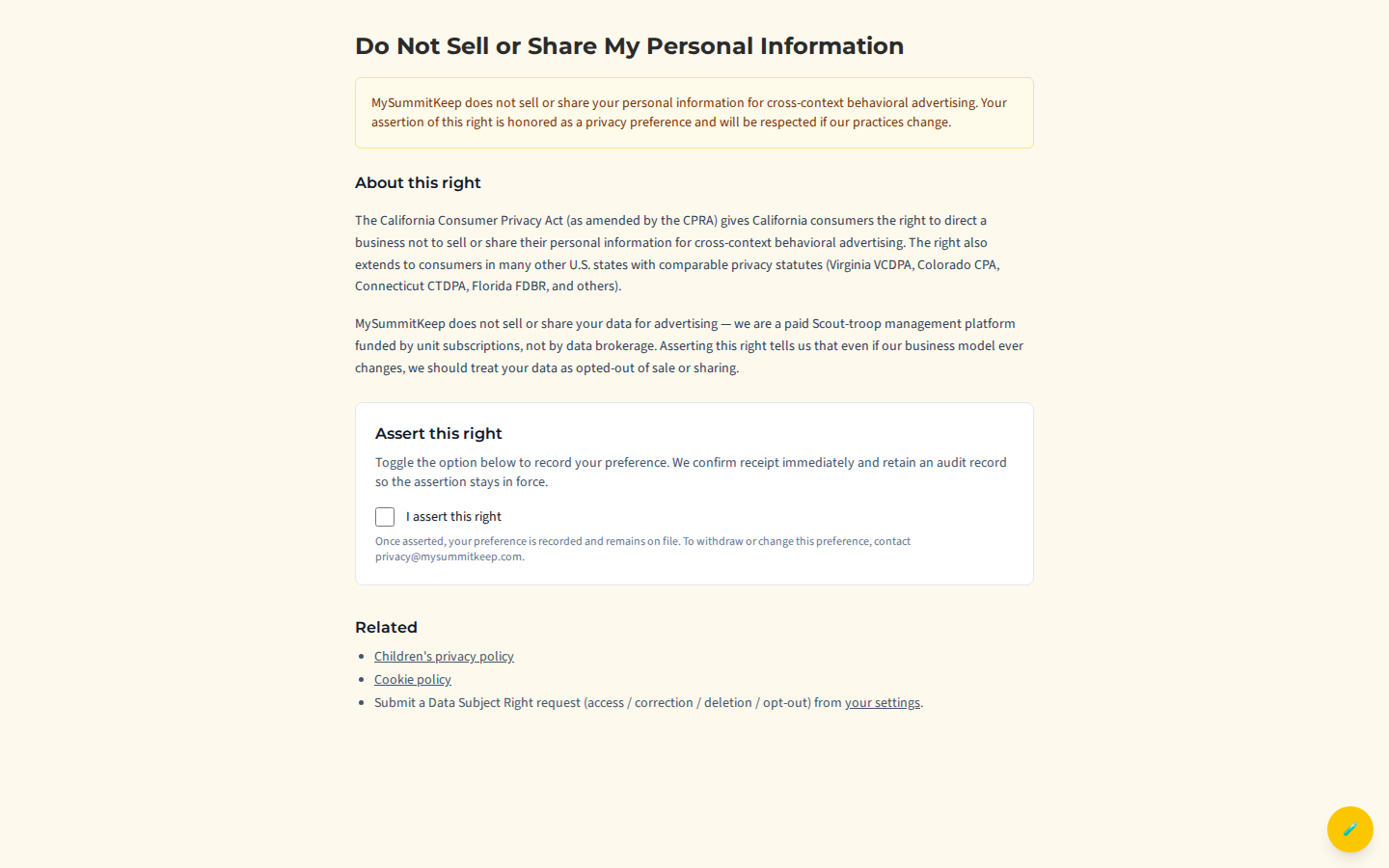
MySummitKeep does not sell or share your personal information for cross-context behavioral advertising — we are a paid Scout-management platform funded by unit subscriptions, not by data brokerage. The page exists because the disclosure is required regardless. Tick I assert this right and we record your preference immediately and keep it on file, so that even if our practices ever changed, your data would stay opted out.
Children’s privacy (COPPA)
Section titled “Children’s privacy (COPPA)”Because we knowingly store information about youth under 13, we comply with the Children’s Online Privacy Protection Act (COPPA). Children under 13 do not have independent logins — their data is managed entirely through a parent or guardian’s account, and we require explicit parental consent before any of it is collected or displayed.
The full policy — what we collect, who can see it, and your rights as a parent (review, correct, revoke and delete, transfer) — is at the Children’s Privacy Policy.
For children’s-privacy questions, email privacy@mysummitkeep.com.
Accessibility
Section titled “Accessibility”We aim for conformance with WCAG 2.1 Level AA. Automated accessibility scanning runs on every change, and critical journeys (sign-up, advancement entry, payment) get periodic manual audits. If you hit a barrier, see the Accessibility Statement and report it to accessibility@mysummitkeep.com — include the page URL, the assistive technology you use, and a short description so we can reproduce it.
Microsoft 365 and your data
Section titled “Microsoft 365 and your data”If your unit connects Microsoft 365, the data picture depends on which features you turn on:
- Sign-in is always through Microsoft Entra. We receive only the immutable OID, your email, and your name — never your password.
- Calendar sync can be a two-way OAuth connection between MySummitKeep and your members’ calendars, depending on how your unit sets it up. This is opt-in per unit.
- Outbound email can be sent through your own Office 365 tenant if your unit configures it under Settings → Email (providing a tenant ID, client ID, sending address, and a client secret stored in our Key Vault).
So for units that connect those features, calendar data is not strictly one-directional, and unit mail can flow through your own tenant. See Microsoft 365 Integration for exactly what is requested and granted, and Member Import if you are bringing a roster over.
Security and compliance FAQ
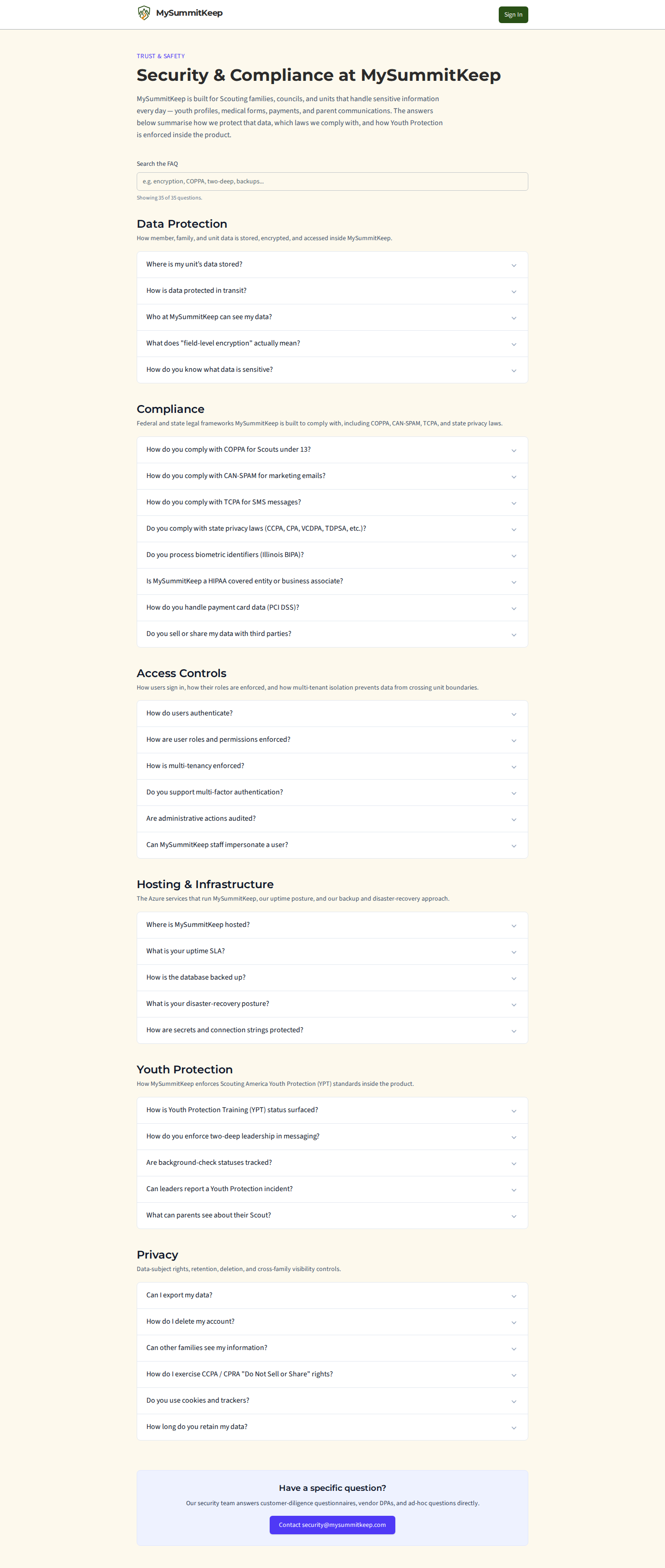
Section titled “Security and compliance FAQ”For how MySummitKeep protects data, which laws it follows and how Youth Protection is enforced, read the public Security & Compliance page at /security. It needs no sign-in, and its Search the FAQ box filters the questions as you type (try “encryption” or “two-deep”), with a count of how many questions are showing.
Reporting a concern
Section titled “Reporting a concern”- Privacy questions: open a support ticket and select category Privacy, or email
privacy@mysummitkeep.com - Children’s privacy (COPPA): email
privacy@mysummitkeep.com - Accessibility barriers: email
accessibility@mysummitkeep.com - Suspected breach: see the breach response process
MySummitKeep is an independent product and is not affiliated with, endorsed by, or sponsored by Scouting America (formerly the Boy Scouts of America). Scouting America, Scouts BSA, Cub Scouts, Venturing, Sea Scouts, and the Order of the Arrow are trademarks of Scouting America. Official program content shown in screenshots and examples is © Scouting America; always confirm current requirements atscouting.org. SeeTerms § 7.3.