
Your Data Rights (Access, Delete, Correct, Portability)
Privacy laws give you the right to see, fix, move, and erase the personal information MySummitKeep holds about you. The My Privacy Rights page — at Settings → Privacy Rights — is where you exercise those rights for your own account. Every request you submit here is lodged for you, the signed-in user.
This page is one of three privacy surfaces in the app. For an overview of how they differ — profile visibility, data rights, and the Do Not Sell or Share opt-out — see Privacy and Your Data.
Which rights you can exercise
Section titled “Which rights you can exercise”When you open Settings → Privacy Rights, the New Request button lets you lodge any of five request types:
- Right of Access — receive a copy of every category of personal data we hold about you.
- Right of Portability — receive your data in a machine-readable format (a ZIP archive of JSON files).
- Right of Correction — ask us to fix inaccurate personal information.
- Right to Opt Out — opt out of marketing communications, the sale of personal information, and cross-context behavioral advertising.
- Right of Deletion — permanently erase your data. This one is irreversible.
These rights are guaranteed under privacy regimes such as CCPA, FDBR, VCDPA, CPA, and CTDPA. The exact response deadline (SLA) depends on the laws that apply to you, and it is pinned to your request the moment you submit it.
Submitting a request
Section titled “Submitting a request”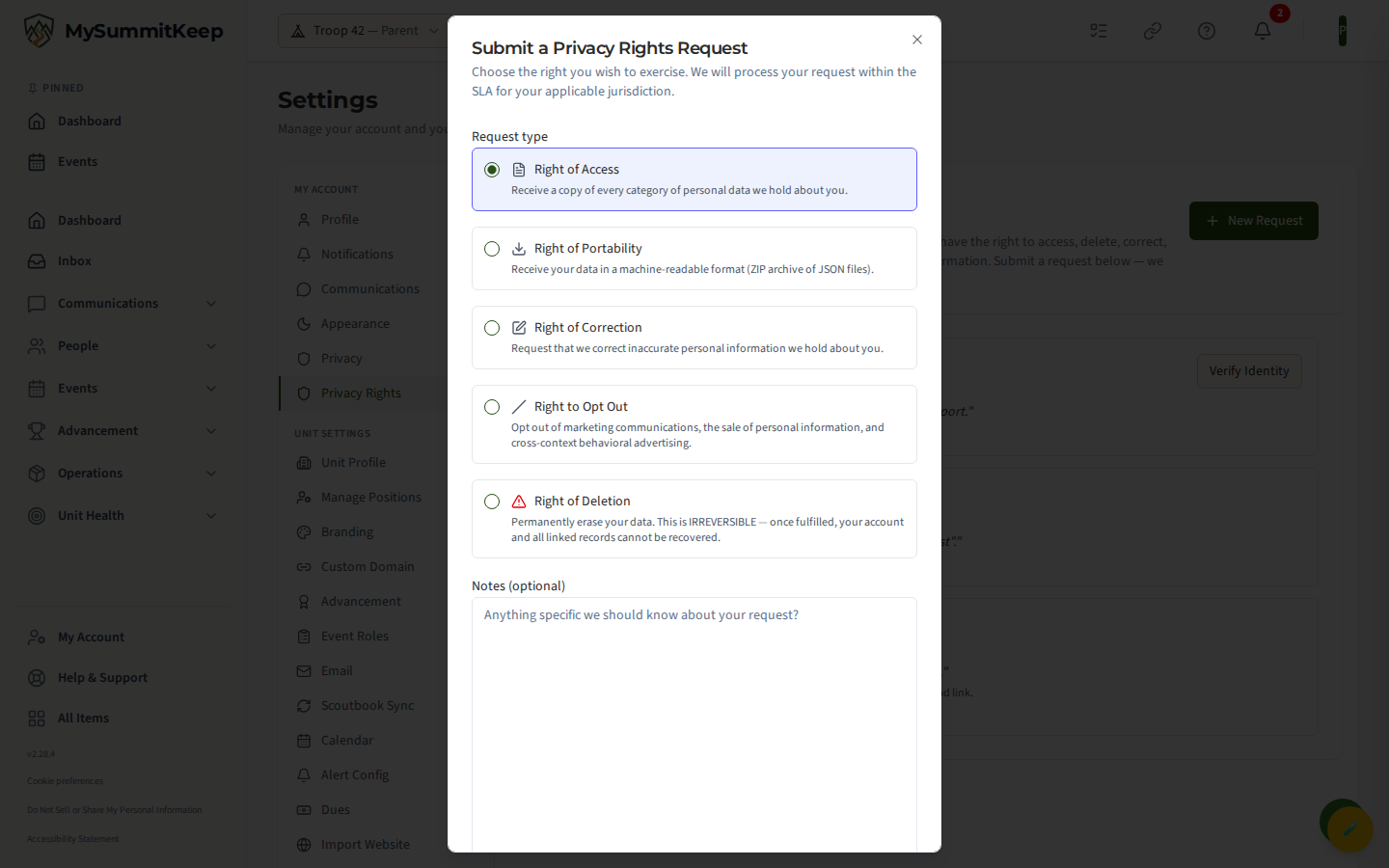
- Go to Settings → Privacy Rights.
- Click New Request in the top-right corner.
- In the dialog, choose your Request type from the five options.
- Optionally add Notes (up to 4,000 characters) — anything specific we should know about your request.
- Tick the confirmation box. It states that you are the data subject, or that you are the parent or legal guardian with authority to lodge the request.
- Click Submit Request.
You cannot submit until the confirmation box is checked. Once submitted, the request appears in your list with a status badge and a due date.
Verifying your identity
Section titled “Verifying your identity”To protect your account, the three most sensitive requests — Access, Portability, and Deletion — start in a state called Verify Identity (shown on the badge). They will not be processed until you confirm it’s really you.
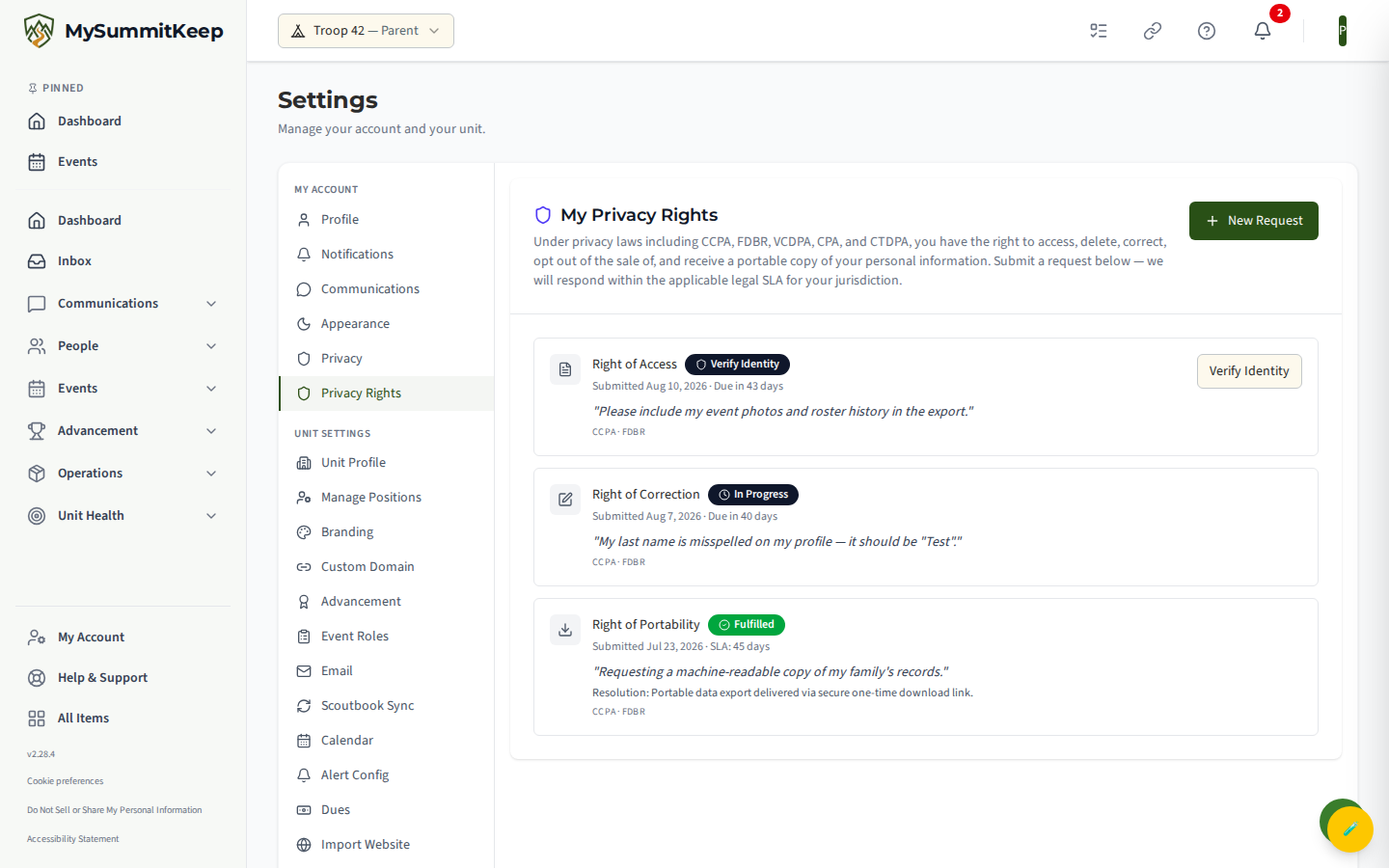
When a request needs verification, a Verify Identity button appears next to it. Click it to clear the verification step. The request then moves to In Progress and enters the queue for our team to fulfill.
Tracking request status
Section titled “Tracking request status”Every request you’ve ever lodged is listed on the page, newest first, with a colored status badge:
- Submitted — received, awaiting processing.
- Verify Identity — waiting for you to complete the identity step (see above).
- In Progress — verified and being worked on by our team.
- Fulfilled — completed. A resolution note explains what was done.
- Rejected — declined, with the reason shown in the resolution note.
- Expired — the request lapsed without being acted on.
Each open request also displays its deadline (“Due in N days”) and turns red if it becomes overdue. After a request closes, the row shows the SLA window that applied and any resolution note. There’s nothing else to do while a request is open — just check back here for the status.
What deletion does (and what is retained)
Section titled “What deletion does (and what is retained)”Because of this, the deletion option shows a prominent warning before you submit, and it requires the Verify Identity step before our team acts on it.
A few things are kept even after deletion, because the law requires it or because removing them would harm other people’s records:
- Information we are legally required to retain (for example, certain financial or compliance records) is kept for the mandated period.
- Data that belongs to other people — such as shared event history that references you — is anonymized rather than destroyed.
If you only want to correct or remove a specific piece of information rather than erase everything, use Right of Correction instead. Deletion is the all-or-nothing option.
A child’s data rights (COPPA)
Section titled “A child’s data rights (COPPA)”Under COPPA and equivalent state laws, a child’s data rights are exercised through a verified parent or guardian, never by the child directly. The confirmation checkbox on this page reflects that principle: it states that you are the data subject or the parent or legal guardian of the subject with authority to act.
The My Privacy Rights page itself lodges requests for your own account — it does not include a picker for choosing a Scout. As a parent or guardian, you manage your Scout’s personal information directly through their record. To view, correct, export, or delete a child’s data, use The Family Page, where MySummitKeep already confirms your guardian relationship to that Scout before letting you act. Those actions feed the same access, correction, portability, and deletion machinery described above.
MySummitKeep is an independent product and is not affiliated with, endorsed by, or sponsored by Scouting America (formerly the Boy Scouts of America). Scouting America, Scouts BSA, Cub Scouts, Venturing, Sea Scouts, and the Order of the Arrow are trademarks of Scouting America. Official program content shown in screenshots and examples is © Scouting America; always confirm current requirements atscouting.org. SeeTerms § 7.3.