
My Commissioners (Unit Side)
Commissioners are the volunteers your district and council appoint to help units thrive — answering questions, troubleshooting problems, and connecting you to resources. The My Commissioners page (/my-commissioners) shows you exactly who those people are for your unit, and gives you a one-click way to reach them.
Find it in the left menu: Commissioner → My Commissioners.
This page is for unit leaders. It is the “ask for help” companion to the tools commissioners themselves use elsewhere in MySummitKeep.
Who appears here
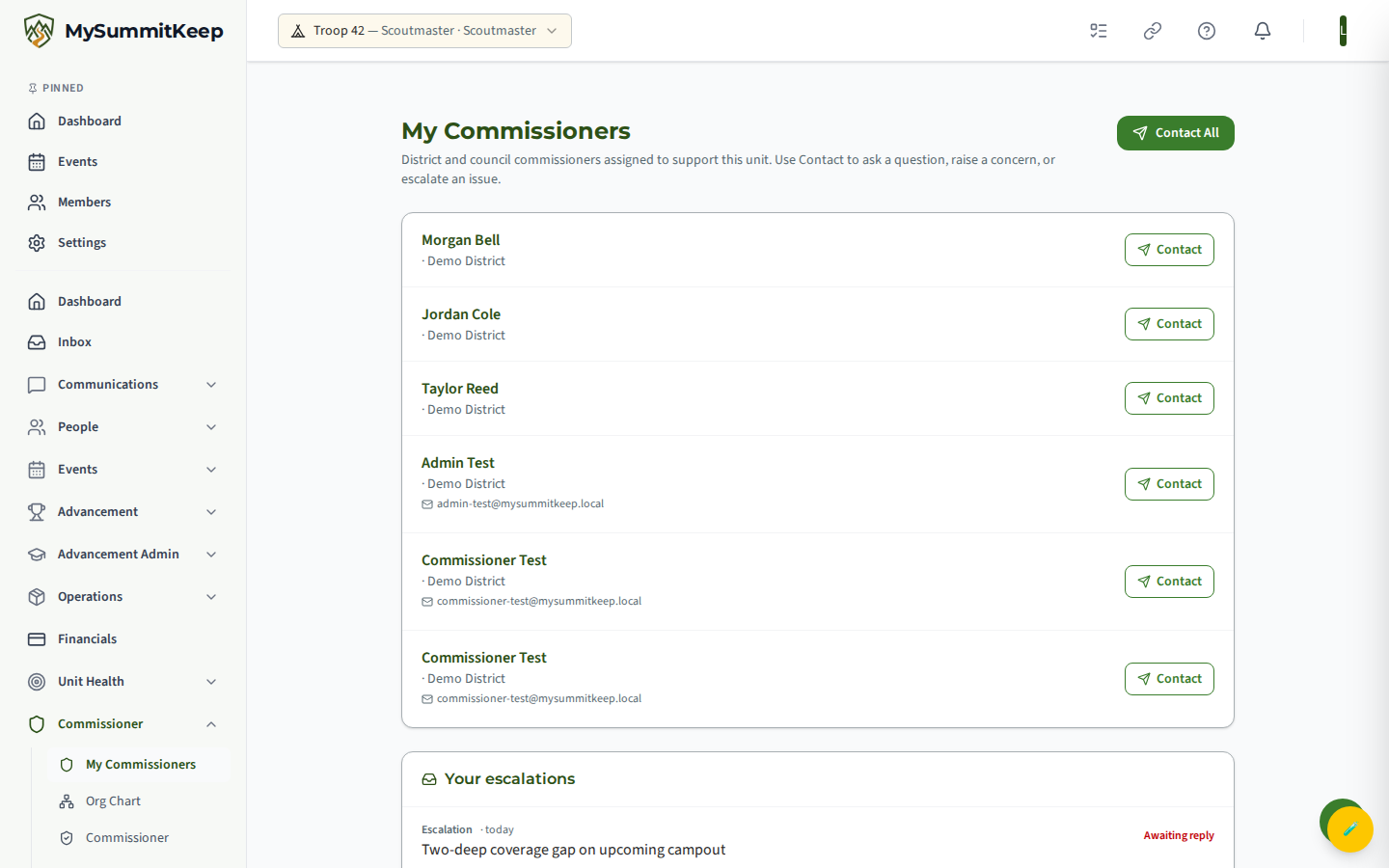
Section titled “Who appears here”The list is built automatically from the district roles your district or council has set up — you do not have to add anyone yourself. MySummitKeep looks up your unit’s district and shows every active person serving in that district. If your unit is not yet mapped to a district, it falls back to the people serving at the council level.
Each row shows the person’s name, their role, the district (or council) they serve, and — when available — their email address. The list is sorted by role first, then by last name, so the most unit-focused commissioners tend to appear near the top.
Commissioner roles explained
Section titled “Commissioner roles explained”You may see several different roles in the list. Here is what each one generally does in Scouting:
- Unit Commissioner — your unit’s primary point of contact and most frequent visitor. Start here for day-to-day questions.
- Roundtable Commissioner — runs the monthly district roundtable where leaders share ideas and program help.
- District Commissioner — leads the whole commissioner team for your district; the right person when a unit-level question needs more weight.
- Assistant District Commissioner — supports the District Commissioner, often overseeing a group of units.
- Council Commissioner — the senior commissioner for the entire council.
You may also see roles such as District Chairman, District Executive, Scout Executive, or Council President in the list for awareness.
Contacting a single commissioner
Section titled “Contacting a single commissioner”To reach one person directly, click the Contact button on their row. The Contact Commissioner window opens with that person pre-selected.
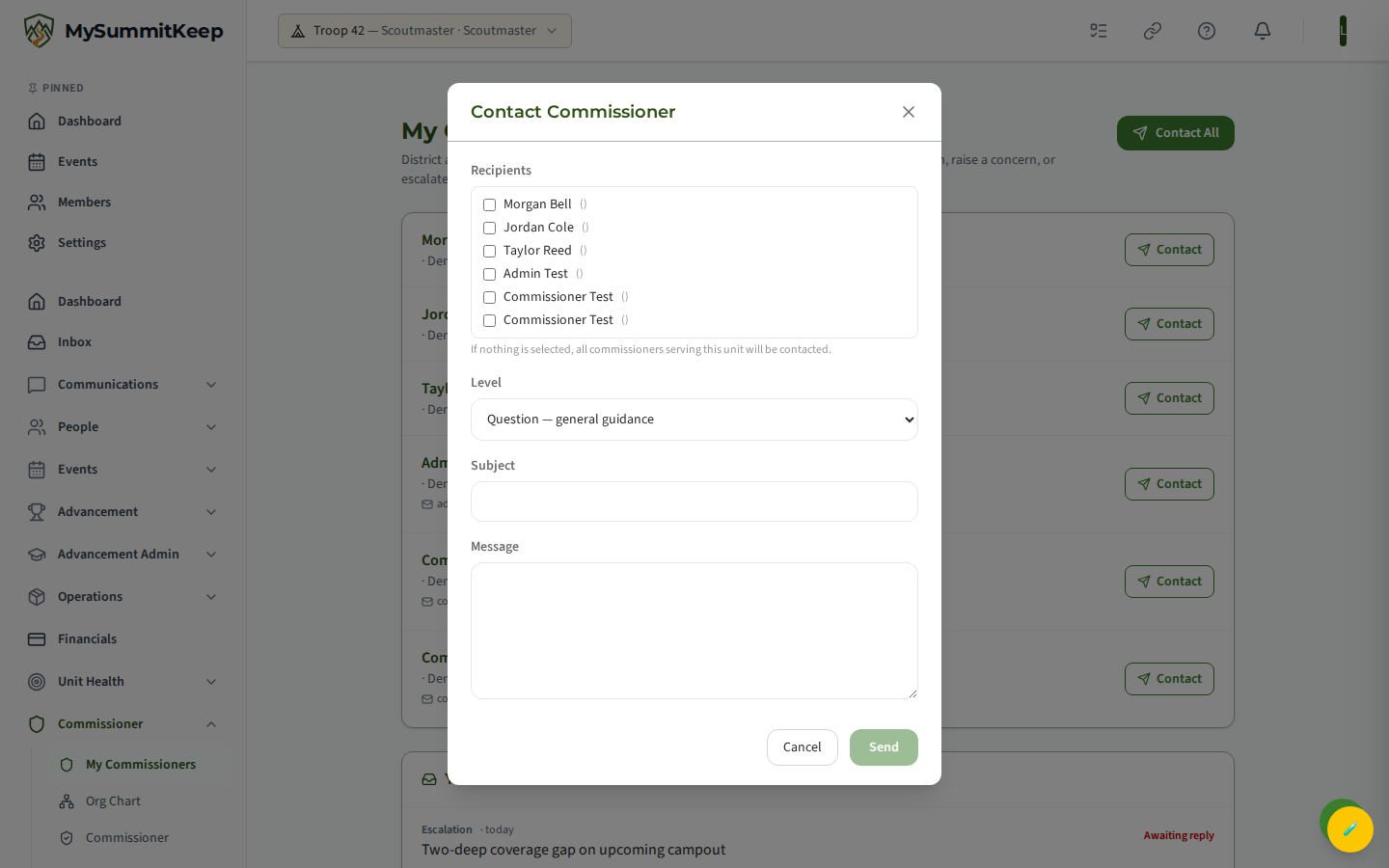
Fill in the form:
- Recipients — everyone the window was opened with starts checked. When you started from a single row, that one commissioner is checked; when you started from Contact All, the whole list is checked. Untick anyone you do not want to include. (If you untick everyone, the message falls back to all commissioners serving your unit.)
- Level — choose how the message should land: Question (general guidance), Concern (needs attention), or Escalation (urgent issue). The level is added to the email subject so the recipient sees the priority at a glance.
- Subject — a short summary (up to 200 characters).
- Message — the details of what you need (up to 4,000 characters).
Click Send. MySummitKeep emails the message to each selected commissioner from commissioners@mysummitkeep.com, with the subject formatted as [Level] Your Unit: Your subject. Your own email is set as the reply-to, so the commissioner can simply hit Reply and write straight back to you. When it succeeds, you will see a confirmation telling you how many commissioners received it.
The commissioner roster
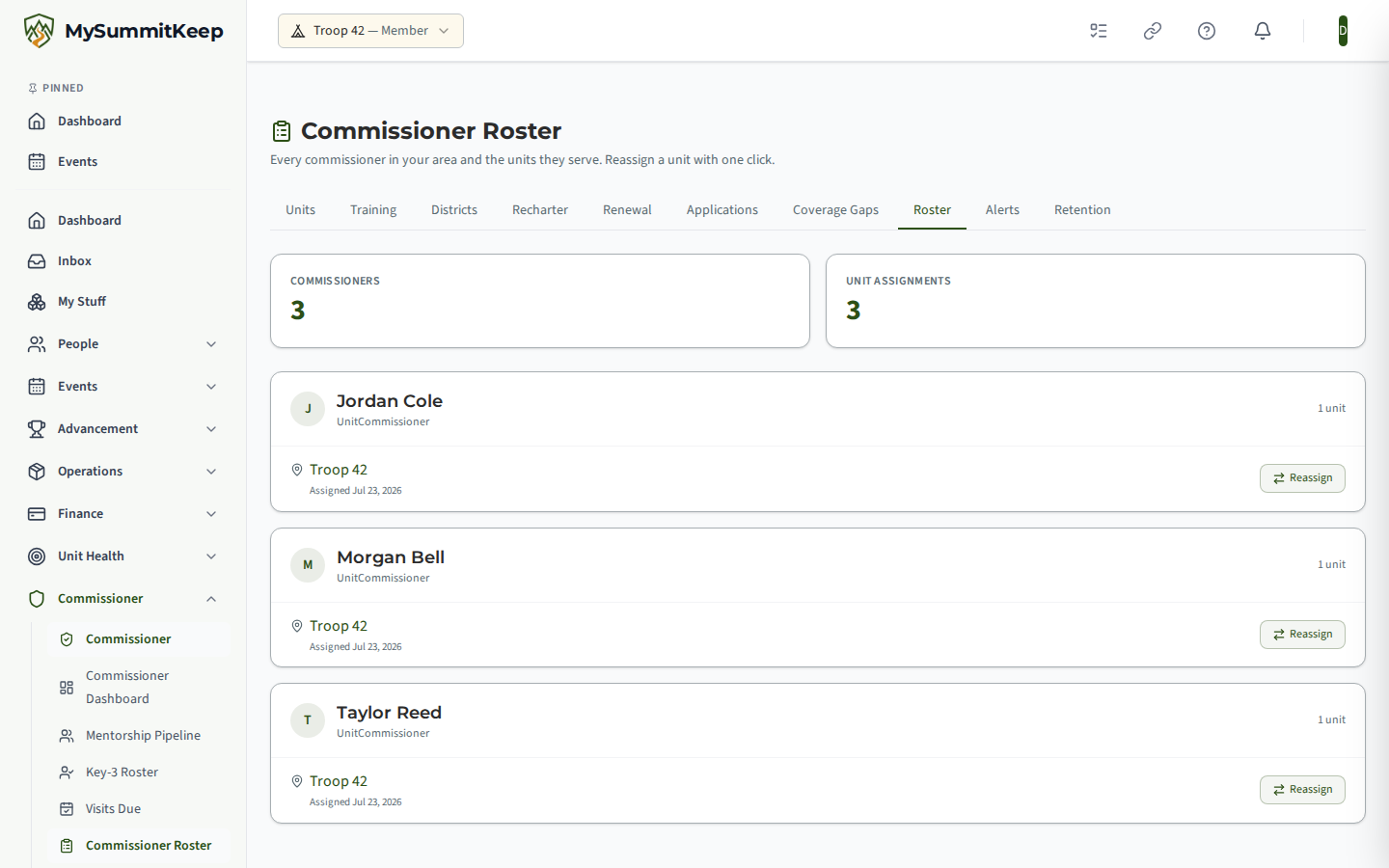
Section titled “The commissioner roster”Commissioner Roster (/commissioner/roster) is the coverage view: every commissioner beside the
units assigned to them, with a coverage status on each. When someone steps down or takes on more
units, reassignment happens here rather than by editing units one at a time.
Contact All and escalating a concern
Section titled “Contact All and escalating a concern”When something needs broader attention — or you are not sure who the right person is — use the Contact All button at the top of the page. This opens the same form with every commissioner serving your unit listed and pre-checked.
The form works the same way. By default everyone stays checked, so the message goes to the whole team; untick anyone you want to leave out, and only the people still checked are contacted. (If you untick everyone, it falls back to all commissioners serving your unit.) This is the fastest way to escalate: set the Level to Escalation, write a clear subject and message, and the whole commissioner team gets it together.
After you send, replies come back to your email inbox — the conversation continues by normal email, so check there for the commissioner’s response.
Related pages
Section titled “Related pages”- Add Unit Commissioners — how commissioners get assigned to units on the district side.
- Commissioner Visits — what to expect when a commissioner visits your unit.
- Communications — sending messages within your own unit.
MySummitKeep is an independent product and is not affiliated with, endorsed by, or sponsored by Scouting America (formerly the Boy Scouts of America). Scouting America, Scouts BSA, Cub Scouts, Venturing, Sea Scouts, and the Order of the Arrow are trademarks of Scouting America. Official program content shown in screenshots and examples is © Scouting America; always confirm current requirements atscouting.org. SeeTerms § 7.3.