
Advancement Reports & BSA Exports
Everything your Scouts earn in MySummitKeep can be pushed back to the BSA’s official systems and rolled up into reports for committee meetings, courts of honor, and recruiting for leadership training. This page covers all of the advancement reporting and export tools in one place.
If you are still recording ranks, merit badges, positions, and service hours, start with the Advancement Workflow guide. The reports below read whatever is already entered there.
BSA Internet Advancement 2.0 (IA2) CSV export
Section titled “BSA Internet Advancement 2.0 (IA2) CSV export”Open Advancement Admin → IA2 Export (route /advancement/export). The page lets you pick a format, filter what’s included, preview the exact records, and download a file you can upload to the BSA.
At the top, the Export Format card offers two choices. Pick CSV (Legacy) to produce a file in the BSA Internet Advancement 2.0 (IA2) layout: BSA Member ID, First Name, Middle Name, Last Name, Suffix, Advancement Type, Advancement Name, Date Completed, and Date Awarded.
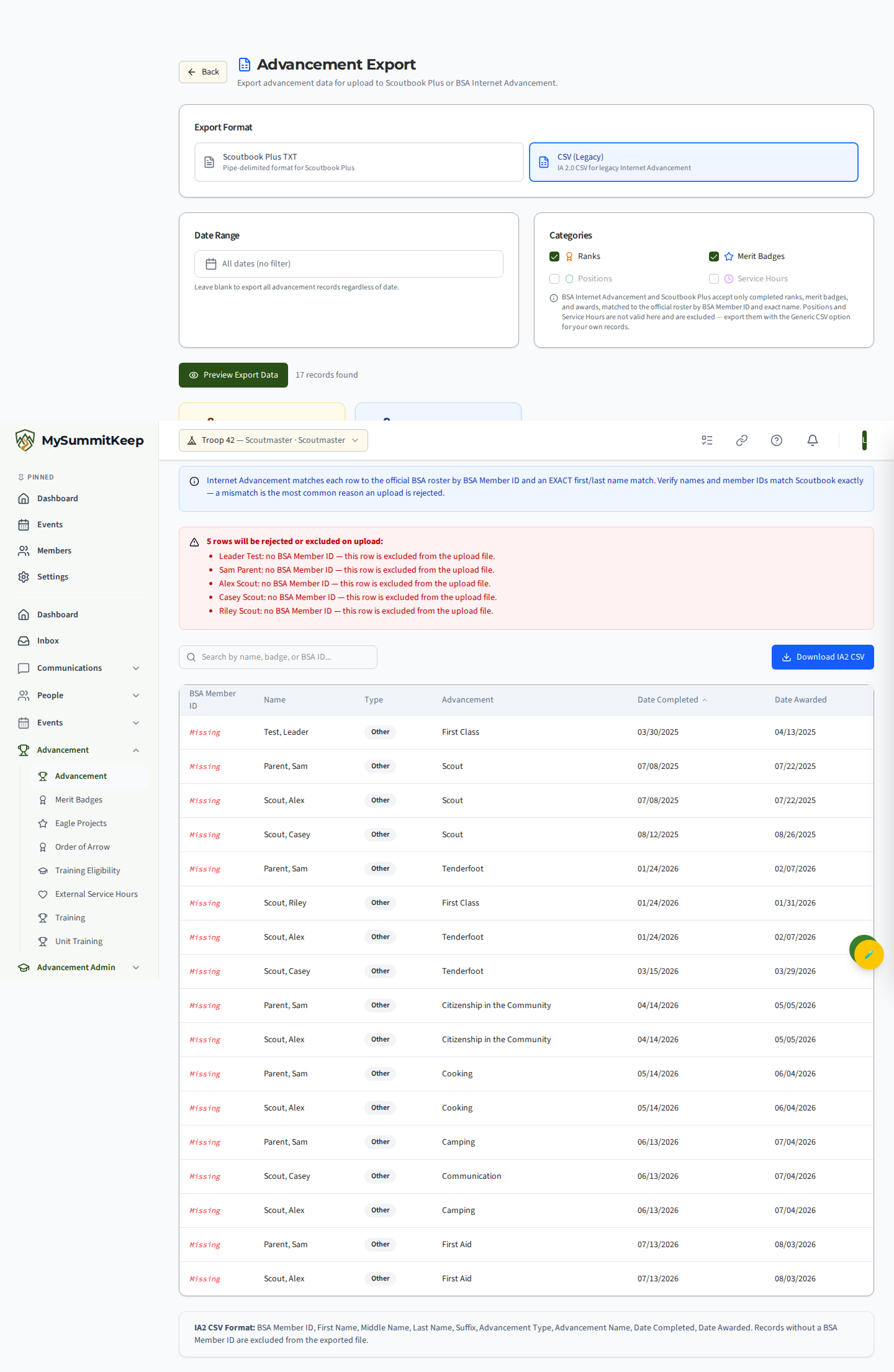
Below the format toggle you control what’s included:
- Date Range — leave it blank to export every advancement record regardless of date, or set a from/to window.
- Categories — toggle Ranks, Merit Badges, Positions, and Service Hours. At least one must be selected.
Click Preview Export Data to load a sortable, searchable table and per-category count cards before you commit. Then click Download IA2 CSV.
Scoutbook Plus TXT export
Section titled “Scoutbook Plus TXT export”On the same IA2 Export page, choose Scoutbook Plus TXT (marked Recommended) instead of the legacy CSV. This produces a pipe-delimited .txt file with the columns Scoutbook Plus expects: Unit, BSA Member ID, First Name, Middle Name, Last Name, Advancement Type, Advancement, Version, Date Completed, Approved, Awarded.
The date range, category filters, preview, and missing-BSA-ID warning all work exactly the same as the CSV export.
Track what you uploaded: submitted, recorded, rejected
Section titled “Track what you uploaded: submitted, recorded, rejected”MySummitKeep does not send anything to the BSA for you. You download a file, upload it to Scoutbook Plus or Internet Advancement yourself, and then use Export History on the same page to keep your own record of what happened to it. That record is kept per advancement, not just per file, so the next export knows what is already done.
1. Mark Submitted. After you upload a file, click Mark Submitted in the Export History row and enter the date you uploaded it. The date defaults to today; it cannot be in the future or earlier than the day the file was made. This mirrors the Pending state in Internet Advancement.
2. Mark Recorded. Once Scoutbook shows the advancements as recorded, click Mark Recorded and enter that date. Use Undo next to either date if you clicked too early. Undoing Submitted only moves rows that are still Submitted back; rows you marked Recorded or Rejected are never erased (undo Recorded first).
3. Only outstanding. Once an export is marked submitted, those advancements are left out of your next export by default. In the preview, every row has a status chip: Outstanding, Submitted, Recorded, Rejected, or Submitted (Legacy) for rows covered by an export you marked submitted before per-row tracking existed. The Only Outstanding box is ticked by default and tells you how many already-sent rows are hidden. Untick it to export everything again. Rejected rows always come back so you can send them again. Positions and service hours are never part of these files.
When BSA rejects rows
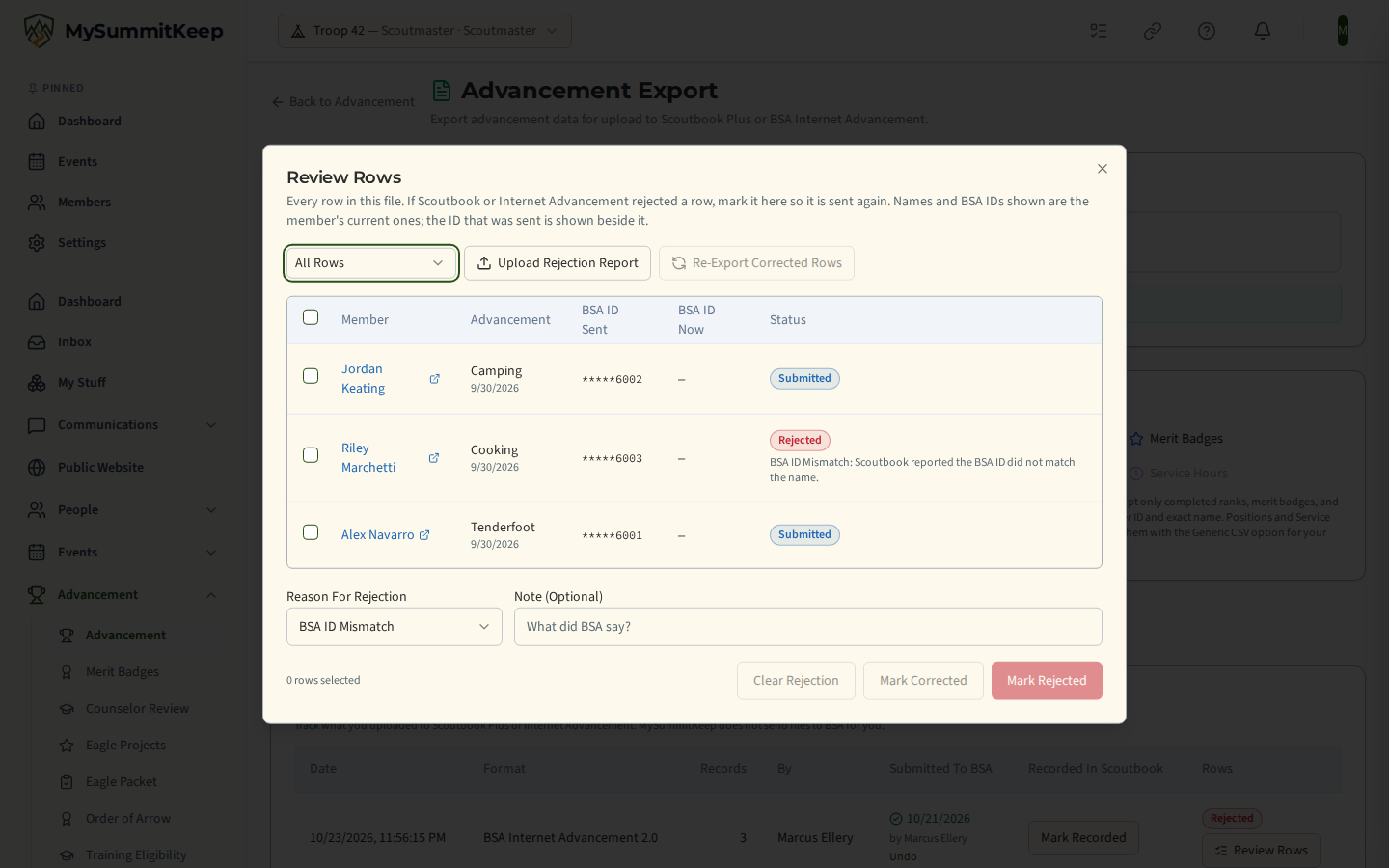
Section titled “When BSA rejects rows”Open Review Rows on the export in Export History. It lists every row in that file with its status, the BSA Member ID that was sent, and the member’s current BSA ID and name (click the name to open the member and fix it).
- Mark Rejected. Select the rows, choose a reason (BSA ID mismatch, name mismatch, unknown advancement, duplicate, other), add a note if you like, and click Mark Rejected. This always works, whatever format BSA gives you its error list in.
- Upload Rejection Report. If you have the error report as a
.csvor.txtfile (pipe, comma or tab separated, up to 1 MB), upload it. We read it here, match its rows to this export by BSA Member ID and advancement name, and show you what we found. Nothing changes until you confirm, rows we cannot match are never applied, and the file is not saved. - Mark Corrected. After you fix the cause (for example the member’s BSA ID), mark the row Corrected. A rejected row whose member’s BSA ID has changed since the export is ready to re-send automatically.
- Re-Export Corrected Rows. Builds a new file with only the corrected rows. It is linked to the original export, the old rows are marked as replaced, and the new rows start as Not Yet Uploaded until you mark that file submitted.
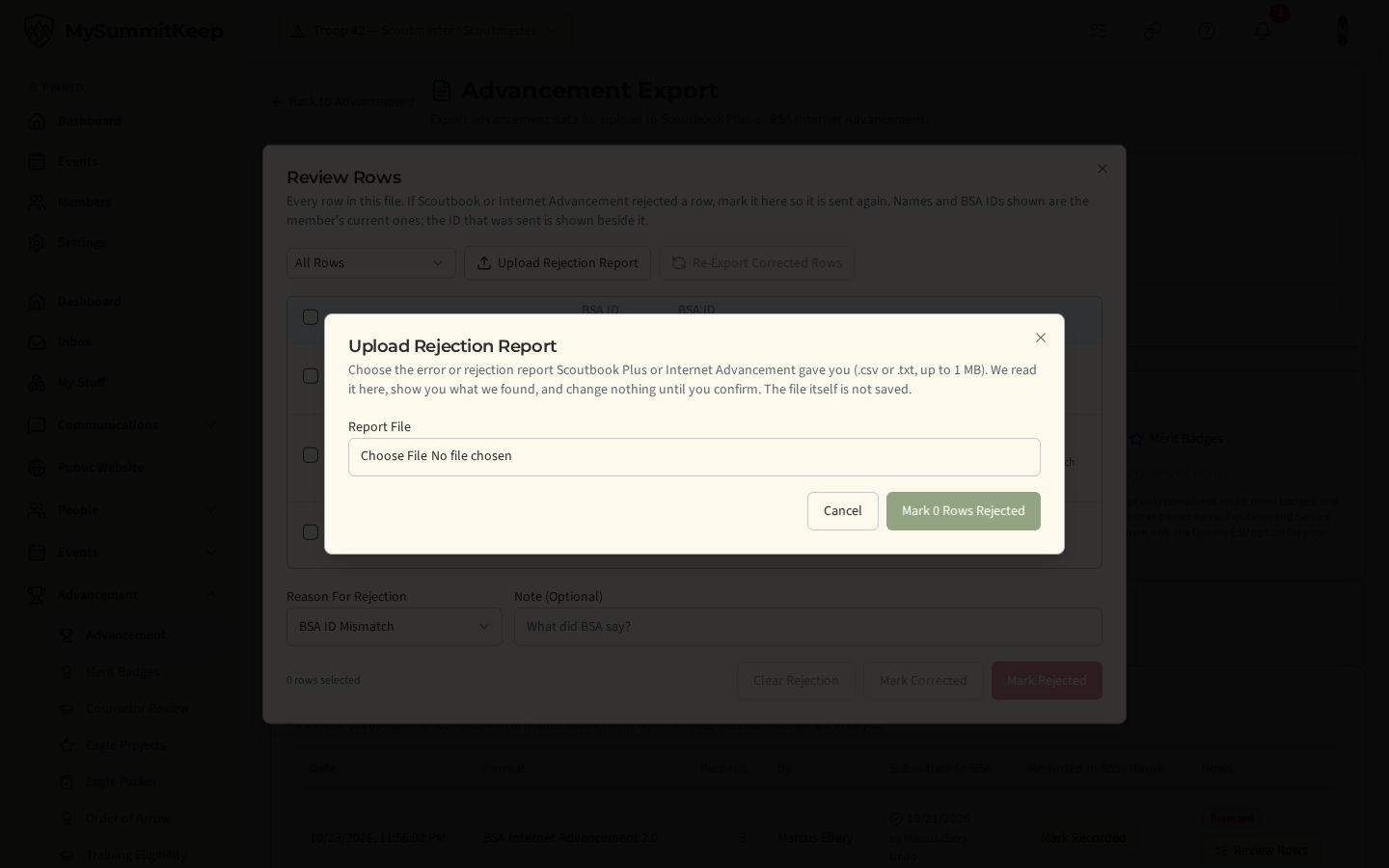
BSA has not published the layout of its error reports, so the upload is a time-saver that only proposes changes. If it cannot recognise your file it says so and changes nothing; use Review Rows instead.
The aggregated progress report (CSV)
Section titled “The aggregated progress report (CSV)”Advancement Admin → Progress Report (route /advancement/progress-report) is a unit-wide rollup rather than a BSA upload. It defaults to the current calendar year (Jan 1 to today) and the program your unit runs — a Pack sees Cub Scouts, a Troop sees Scouts BSA, and so on. You can also pick specific Scouts instead of the whole roster.
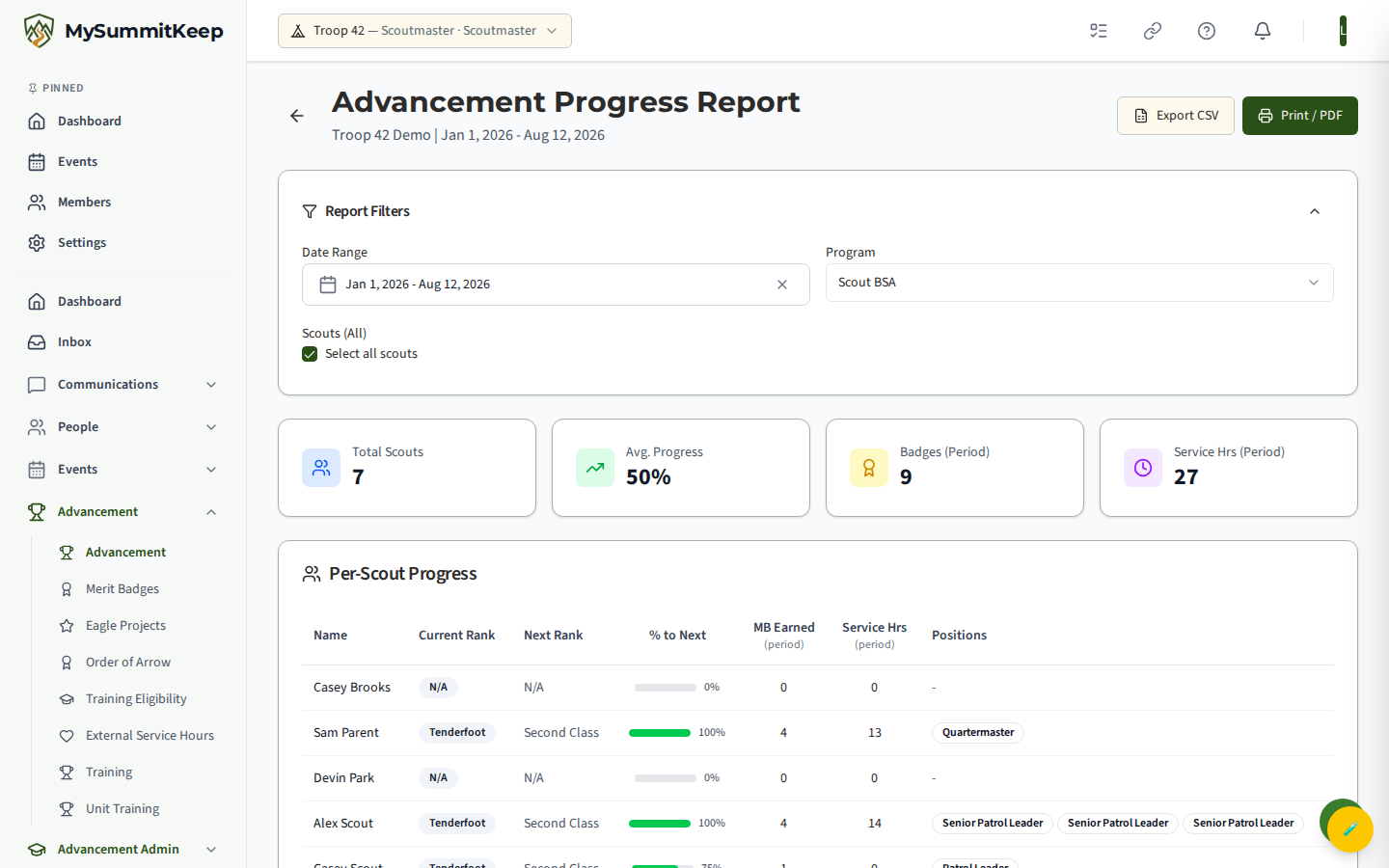
The report shows unit summary tiles (total Scouts, average progress, badges and service hours in the period), a Per-Scout Progress table, a rank distribution chart, the most popular merit badges, and a service-hours leaderboard. Each Scout’s name links straight to their advancement detail.
Use Export CSV for a spreadsheet of the per-Scout rows, or Print / PDF for a clean printable version that drops the navigation and renders just the report sections.
Per-scout printable advancement report
Section titled “Per-scout printable advancement report”Click any Scout’s name (here or anywhere in advancement) to open their detail page at /advancement/:memberId. It has tabs for rank progress, service hours, camping/hiking, activities, and history. (Merit badges and positions appear as summary tiles on the rank-progress tab and as their own sections in the printable PDF report.)
The Export PDF button opens your browser’s print dialog with a formatted, single-Scout report laid out — choose Save as PDF (or print) to hand a parent a snapshot for a board of review. There’s also a share button to copy a link to the page.
Training eligibility report (NYLT, ILST, and more)
Section titled “Training eligibility report (NYLT, ILST, and more)”Advancement → Training Eligibility (route /advancement/training-eligibility, leader-only) shows, at a glance, which Scouts qualify for a leadership-training course. Choose the course from the dropdown — the list is scoped to your unit type and includes NYLT (S80), ILST (S97), and others such as CS95, ILSC, and ILSS.
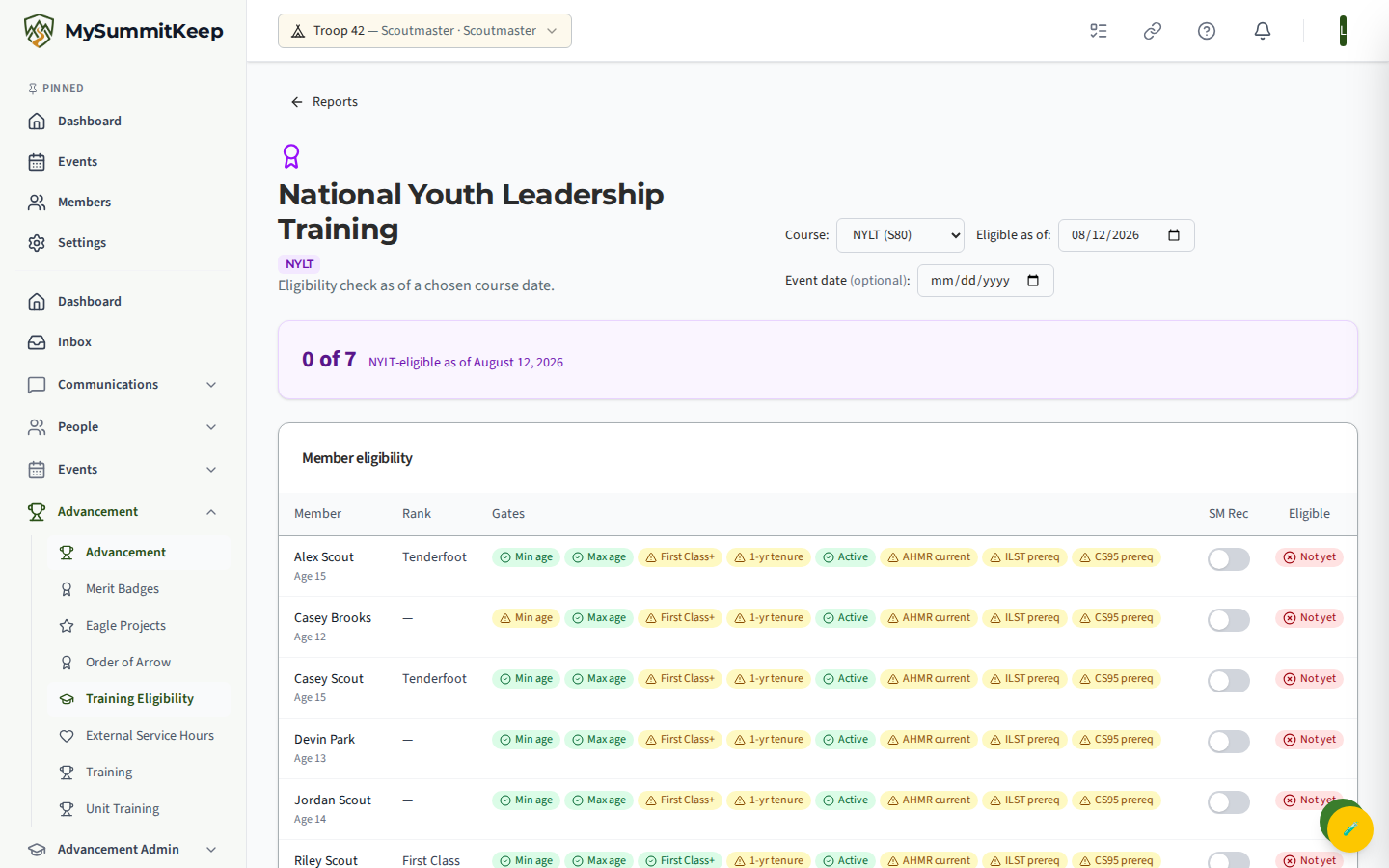
Each requirement is a gate shown as a chip: green when met, yellow when not yet (hover for the detail). Common gates include rank threshold, minimum/maximum age, one-year tenure, active membership, and Scoutmaster recommendation. The SM Rec column is a switch you flip to record (or remove) your recommendation for a Scout.
Two date controls drive the check: Eligible as of (defaults to today) recalculates every gate against that date, and an optional Event date adds a soft AHMR-readiness warning without changing whether a Scout is otherwise eligible. A counter at the top reads “X of Y” eligible.
Service hours analytics
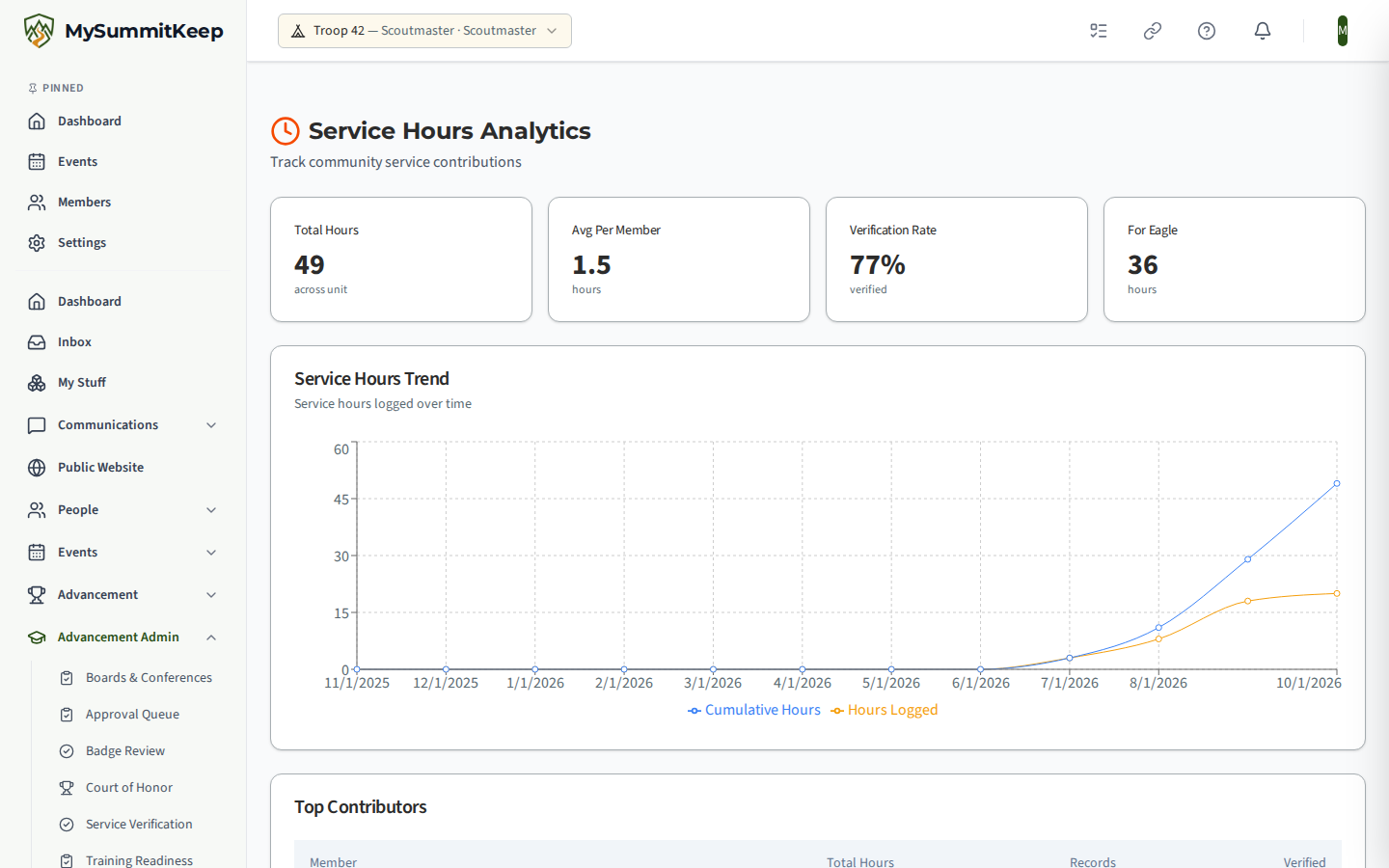
Section titled “Service hours analytics”Service Hours Analytics (/analytics/service-hours) tracks community service across the unit:
total hours, average hours per member, and the trend over time. It answers the questions that come up
at recharter and in rank conferences without anyone tallying sign-in sheets by hand.
Email analytics
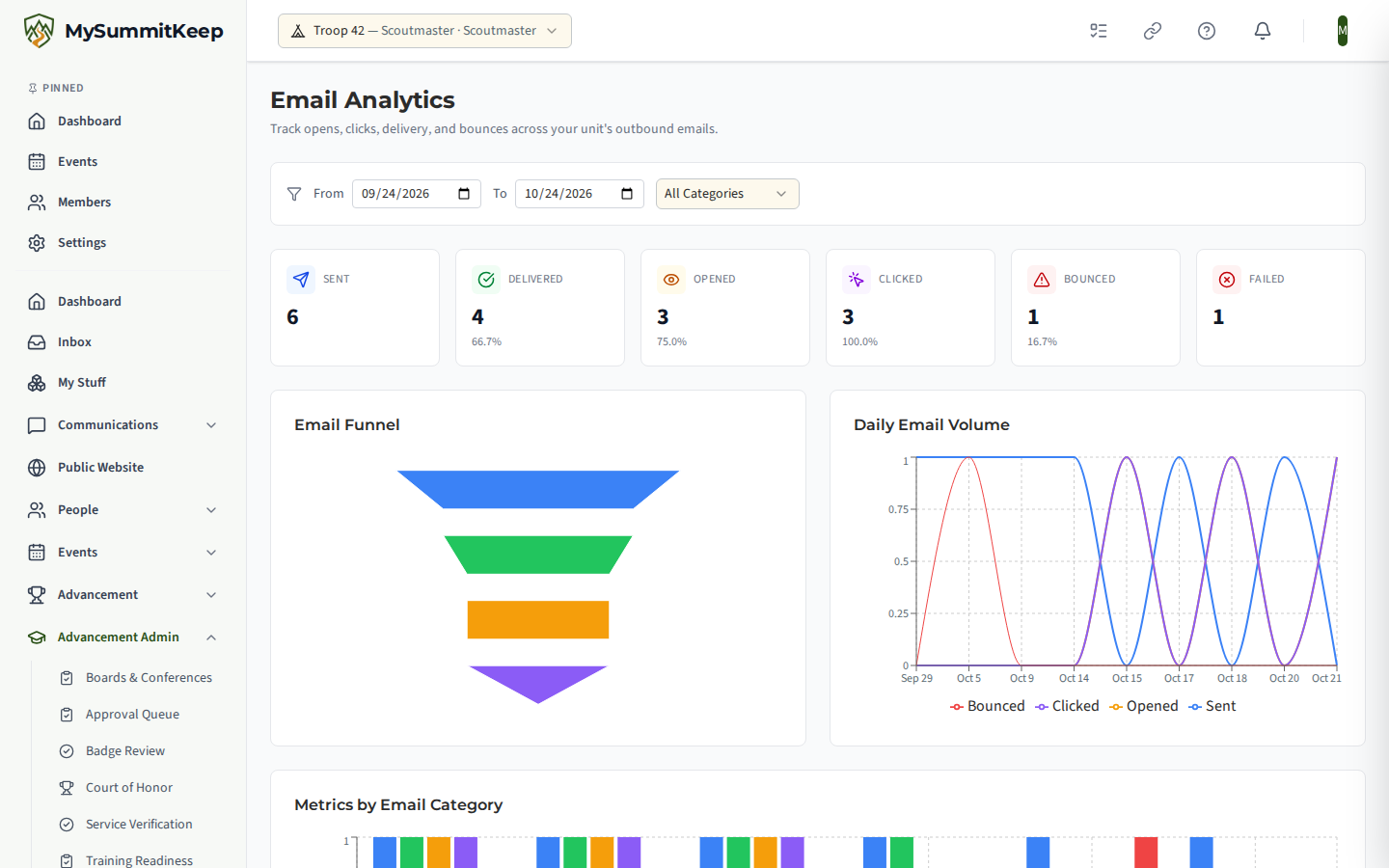
Section titled “Email analytics”Email Analytics (/analytics/email) reports on the unit’s own outbound email — sent, delivered,
open rate, click rate and bounces, with trends. Use it when an announcement seems not to have landed:
a high bounce count usually means stale addresses on the roster rather than a delivery fault.
Advancement analytics dashboard
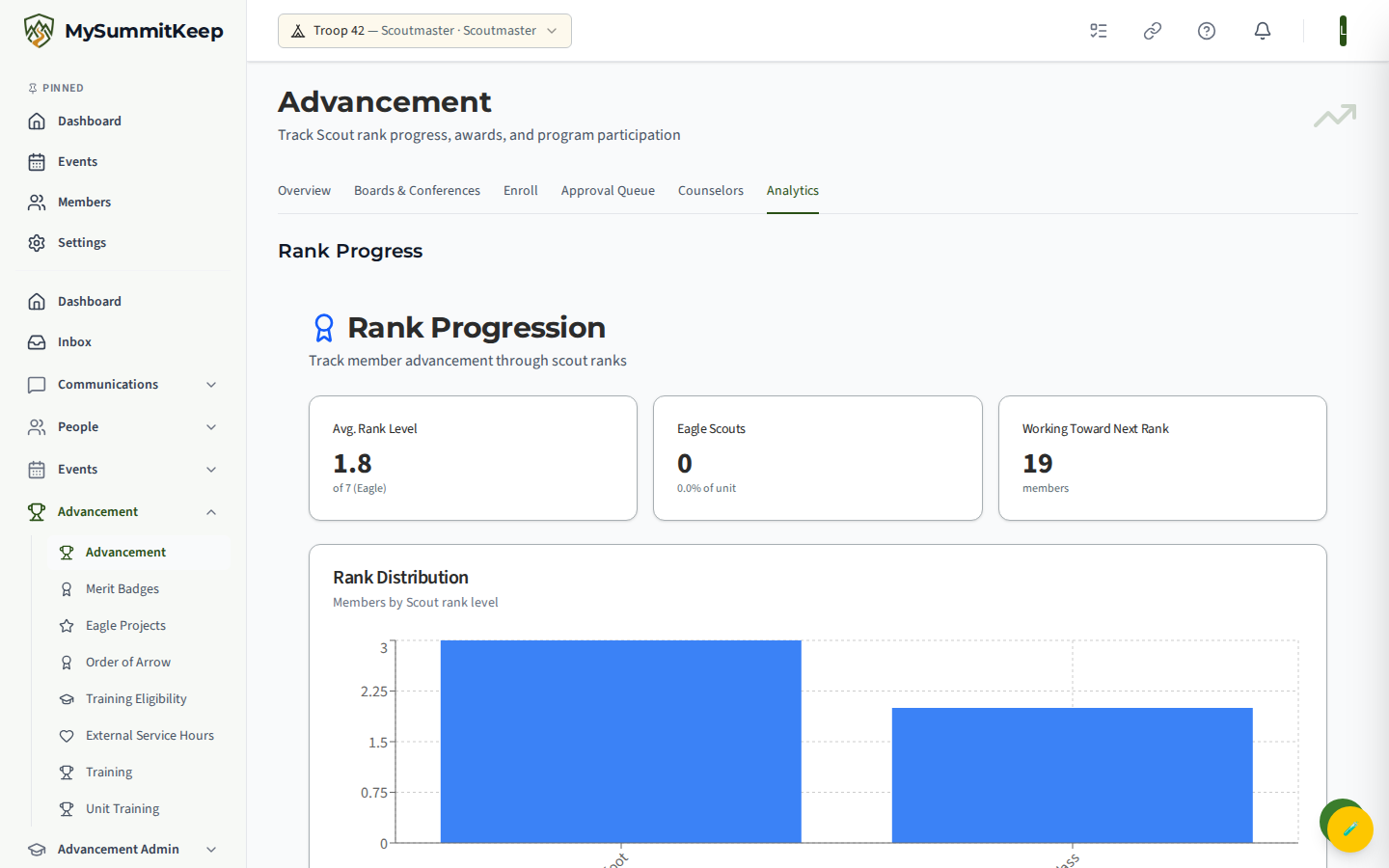
Section titled “Advancement analytics dashboard”Advancement Admin → Analytics (route /advancement/analytics) stacks the unit’s advancement charts in one place: Rank Progress, Merit Badges, Patrol Progress, and a Leaderboard. It is leader-only — Scouts and parents who navigate directly to the URL see an access-denied message.
For service hours specifically, the Service Hours Analytics page (route /analytics/service-hours) breaks out total hours, average hours per member, verification rate, hours counting toward Eagle, a trend chart over time, top contributors, and a breakdown of hours by service type.
These dashboards are for at-a-glance tracking; when you need a file to upload to the BSA, come back to the export page. For other data leaving the platform, see Exporting Your Data.
MySummitKeep is an independent product and is not affiliated with, endorsed by, or sponsored by Scouting America (formerly the Boy Scouts of America). Scouting America, Scouts BSA, Cub Scouts, Venturing, Sea Scouts, and the Order of the Arrow are trademarks of Scouting America. Official program content shown in screenshots and examples is © Scouting America; always confirm current requirements atscouting.org. SeeTerms § 7.3.