
Running a Trek or Voyage (High Adventure)
A high-adventure outing is more than a calendar entry. A Philmont trek or a Sea Scout voyage needs a crew with current health forms, a transportation plan, an emergency plan, reservation tracking, and per-scout fees — and after the trip, a logbook that turns real miles into advancement credit. MySummitKeep models a trek and a voyage as their own events so all of that lives in one place.
This guide covers the full lifecycle: from a saved template, through the publish wizard, to the post-trip logbook. Treks and voyages share the same flow; the differences are called out where they matter.
From template to event: the instantiate wizard
Section titled “From template to event: the instantiate wizard”You don’t start a trek from scratch. You start from a template in your unit’s event library, then “use” it to spin up a dated instance. Using a template fires a create-from-template handshake and drops you straight into the instantiate wizard at /events/:id/wizard, with a variant=trek or variant=voyage flag that controls which steps appear.
The trek wizard has these steps in the step rail: Dates, Crew, Transportation, Lodging, Packing list, Reservations, Emergency plan, Costs, Permission slips, Review & publish. A voyage uses the same rail but drops the Transportation step (its crew manifest is per-phase instead — see below).
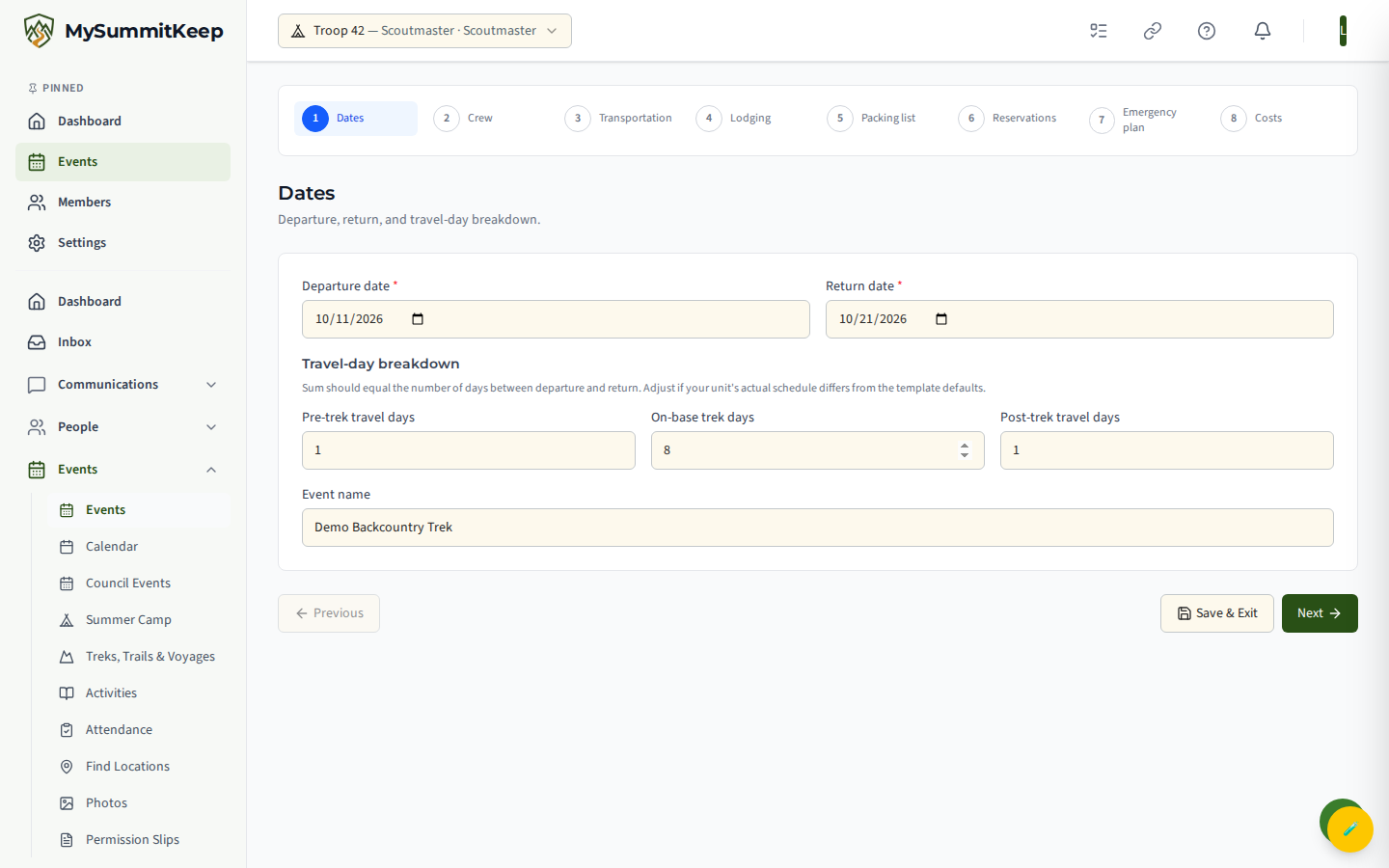
The Dates step is where you set departure and return and break the days into pre-trek travel, on-base, and post-trek travel days. You can move between steps freely, Save & Exit to come back later, and the final step’s button is Publish Event.
Crew step and the hard-gate eligibility chips
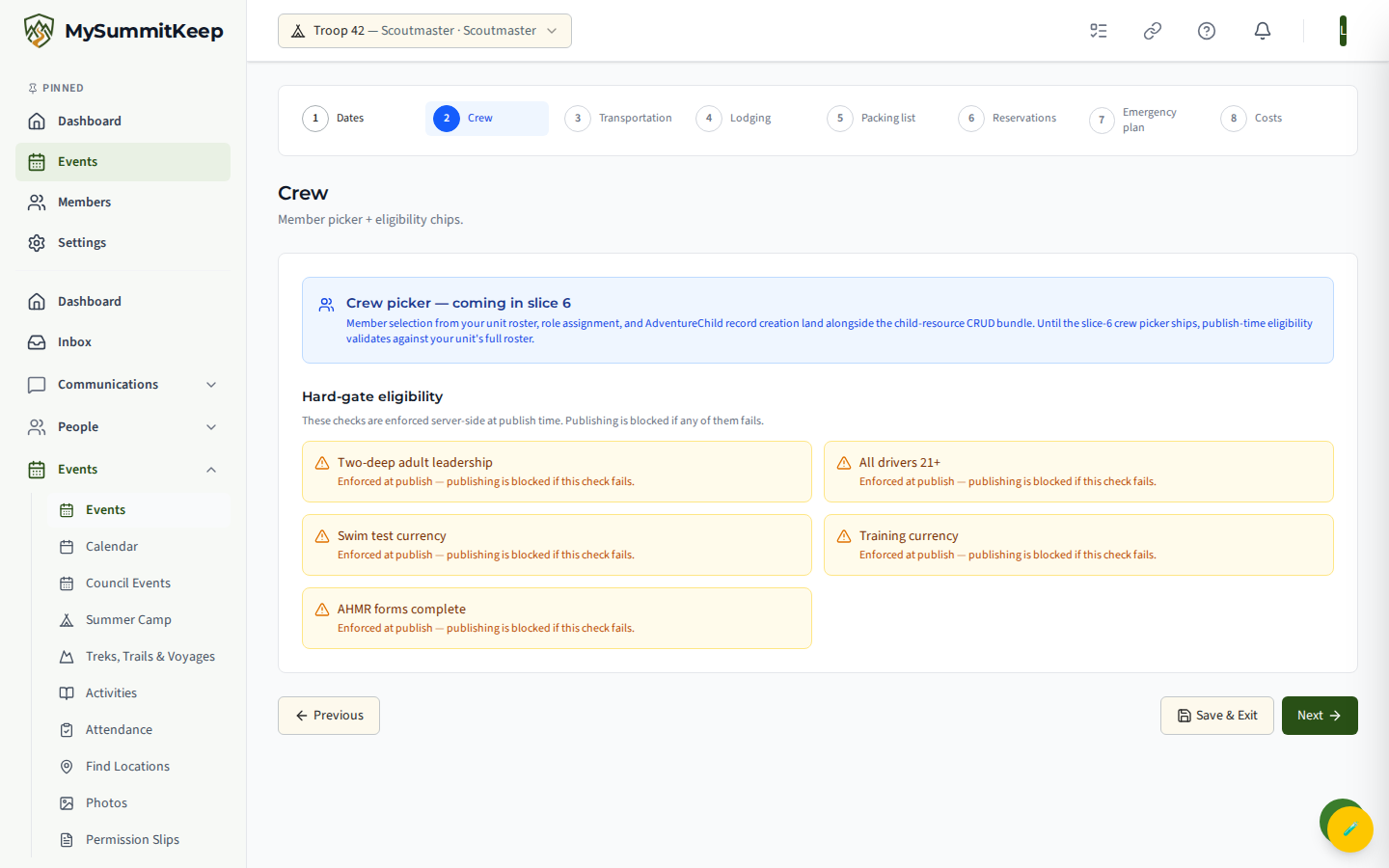
Section titled “Crew step and the hard-gate eligibility chips”The Crew step lists the hard-gate safety checks that run when you publish, as five chips: two-deep adult leadership, all drivers 21+, swim test currency, training currency, and AHMR (Annual Health & Medical Record) forms complete.
In this release these chips are placeholders — each renders in amber with the note “Will be checked on Publish — currently mocked as eligible.” The live pre-flight evaluation (so the chips can show green/amber/red before you reach Review) is still being wired in. The member picker and role assignment are not on this step yet either; for now the crew is taken as the unit’s full roster at publish time so the gates have something to validate against. The real enforcement happens server-side when you publish, where each of these checks — including per-part AHMR completeness — runs for real and can block the publish.
Transportation and the vehicle/crew manifest
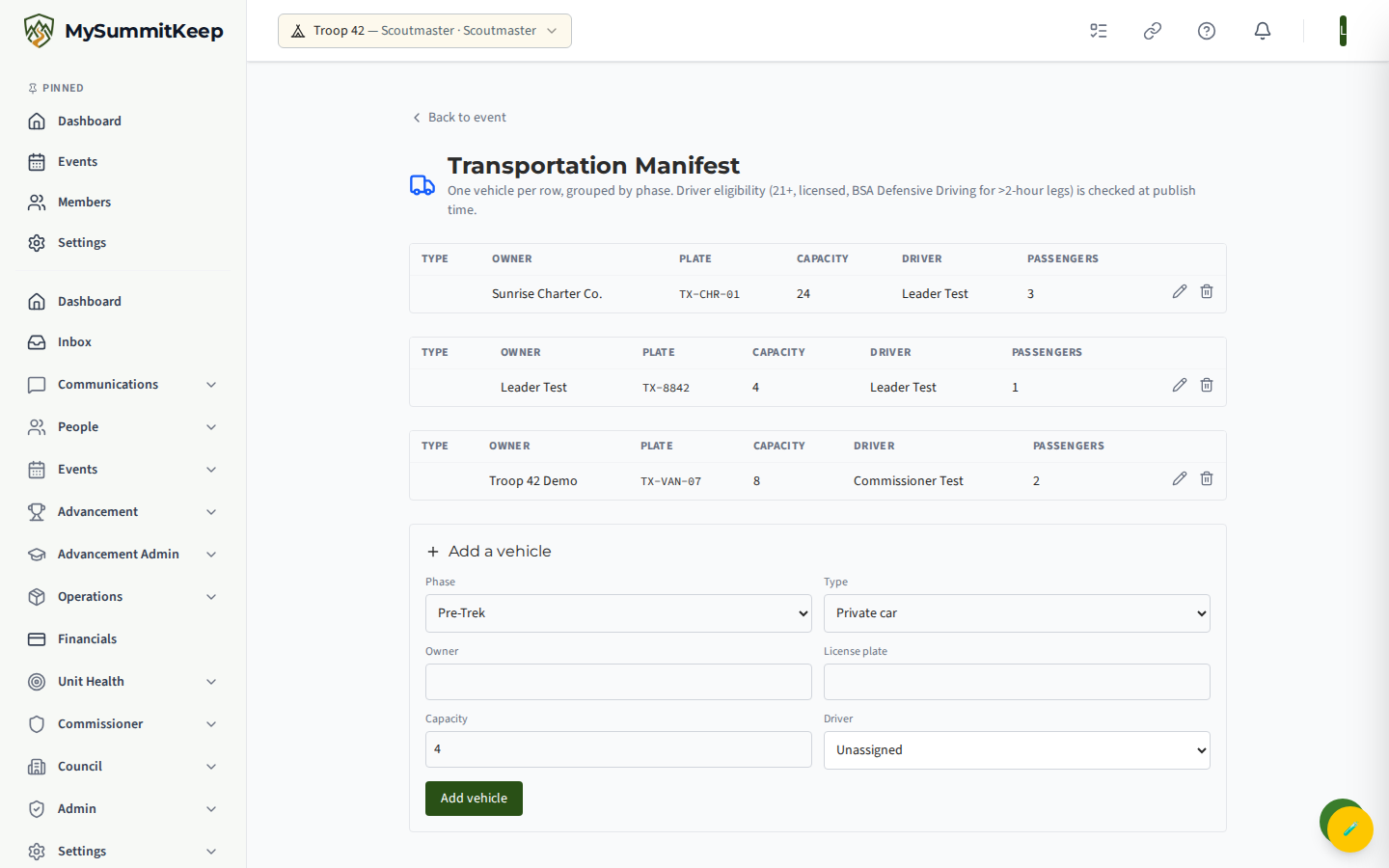
Section titled “Transportation and the vehicle/crew manifest”A trek has a transportation manifest, reached from the trek detail page. It lists one vehicle per row, grouped by phase — Pre-Trek, On Route, On Base, Return — because the cars driving to the trailhead aren’t always the cars driving home. Each row captures the vehicle type (private car, van, charter bus, trailer, other), owner, license plate, capacity, and how many passengers are assigned.
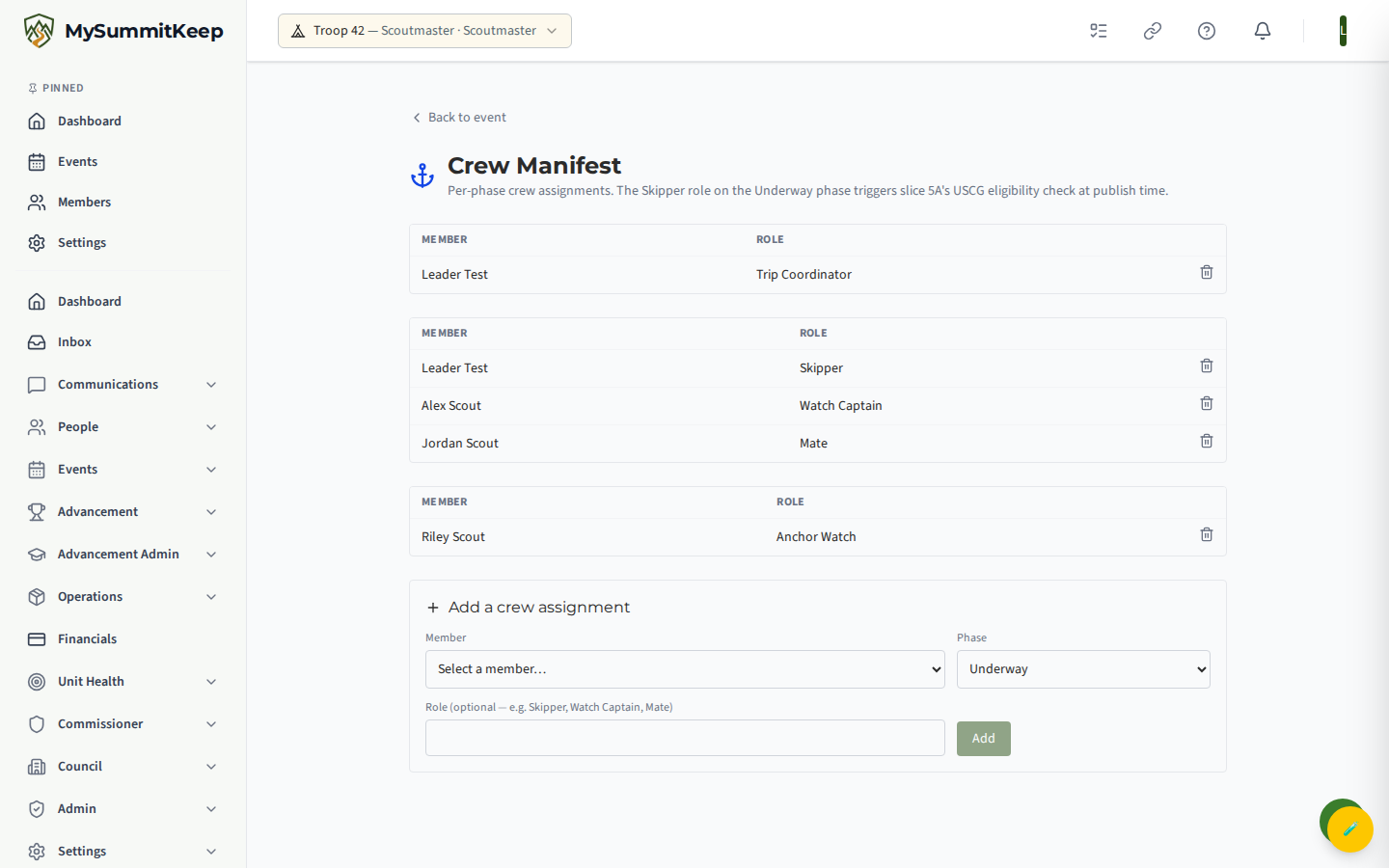
A voyage has a crew manifest instead, with per-phase assignments — Pre-Launch, Underway, Anchor — because the same Sea Scout can be Skipper underway and watch captain at anchor. Assigning the Skipper role on the Underway phase triggers the USCG eligibility check when you publish.
Emergency Plan
Section titled “Emergency Plan”Every trek and voyage carries one emergency plan. The form captures emergency contacts (parents, council line, etc.), the evacuation plan, the nearest medical facility name, phone, and address, and a rally point where the crew gathers if things go wrong. Saving is last-write-wins and stamps a “Last reviewed” timestamp so you can tell at a glance whether the plan is current.
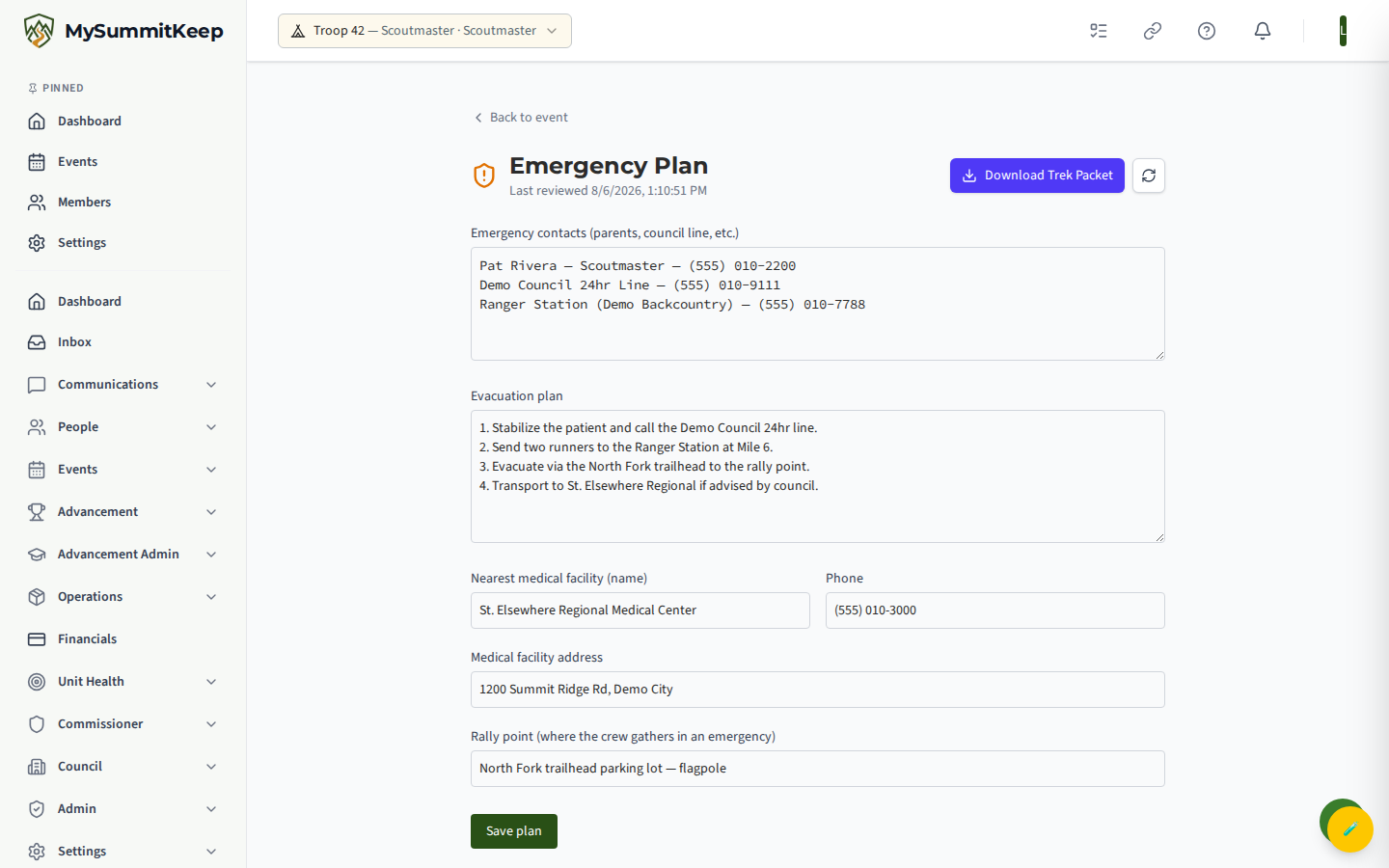
The plan, along with the manifest and roster, flows into the printed Packet PDF described below.
Reservations and deposits
Section titled “Reservations and deposits”The Reservations step tracks your high-adventure base booking: a confirmation number (Philmont, Northern Tier, Sea Base, or Summit Bechtel), a lottery status (entered, selected, not selected, or direct booking), and a free-text deposit and payment schedule so the whole committee can see what’s due and when.
Permission slips on publish
Section titled “Permission slips on publish”You don’t hand-build permission slips. The Permission slips step is a preview; the real work happens on publish. When you publish, MySummitKeep auto-generates one permission slip per youth crew member. Slip creation is idempotent, so re-publishing won’t generate duplicates or send the notices again. Adults don’t get a slip.
A slip is signed by a parent or guardian, so the notice goes to the family. It’s titled Permission slip needed for (Scout’s name) and says a parent or guardian needs to sign before departure and that the unit leader will provide the slip:
- A Scout aged 13–17 and that Scout’s own parents or guardians in the unit all get the same notice.
- For a Scout under 13, only the parents get it.
- A youth crew member who is 18 or older (by the date of birth on file) gets their own notice and signs for themselves.
- If a Scout has no parent or guardian in the unit who can receive the notice (an active adult member with their own account), you (the adult leader who published) get a notice naming that Scout, so you can link a parent on the Households page. Until then, nobody in that Scout’s family is told, whatever the Scout’s age.
For a trek, the notice links to the trek’s itinerary; for a voyage, it links to the Events page. Trek and voyage slips can’t be signed in the app yet, so plan to hand the slips out yourself. See How We Keep a Parent on Messages to Scouts.
Publishing and what it creates (child events, dues)
Section titled “Publishing and what it creates (child events, dues)”Publishing is the moment the trek becomes real for your families. On success it does several things automatically:
- Calendar fan-out: four linked child events appear on your unit calendar — Shakedown (about 30 days out), Pre-trek meeting (about 7 days out), Departure, and Return. If you later delete one, a re-publish won’t resurrect it.
- Permission slips are created for every youth crew member, and each family is told (see above).
- Dues: if you set a per-scout cost, a dues-ledger line is added for each youth and a payment checkout session is created. If payment setup can’t complete, your leaders, treasurers, and admins get an alert so the gap is visible — see Finance & Payments.
Youth proposals and the approval queue
Section titled “Youth proposals and the approval queue”Treks are youth-led, and the proposals queue makes that real. Youth crew members can suggest a change — add a logbook day, add or remove crew, edit the description, add a packing item — and it lands as a pending proposal. From the proposals page a leader reviews each one and approves (which runs the matching change automatically) or rejects it with a note the youth can see.
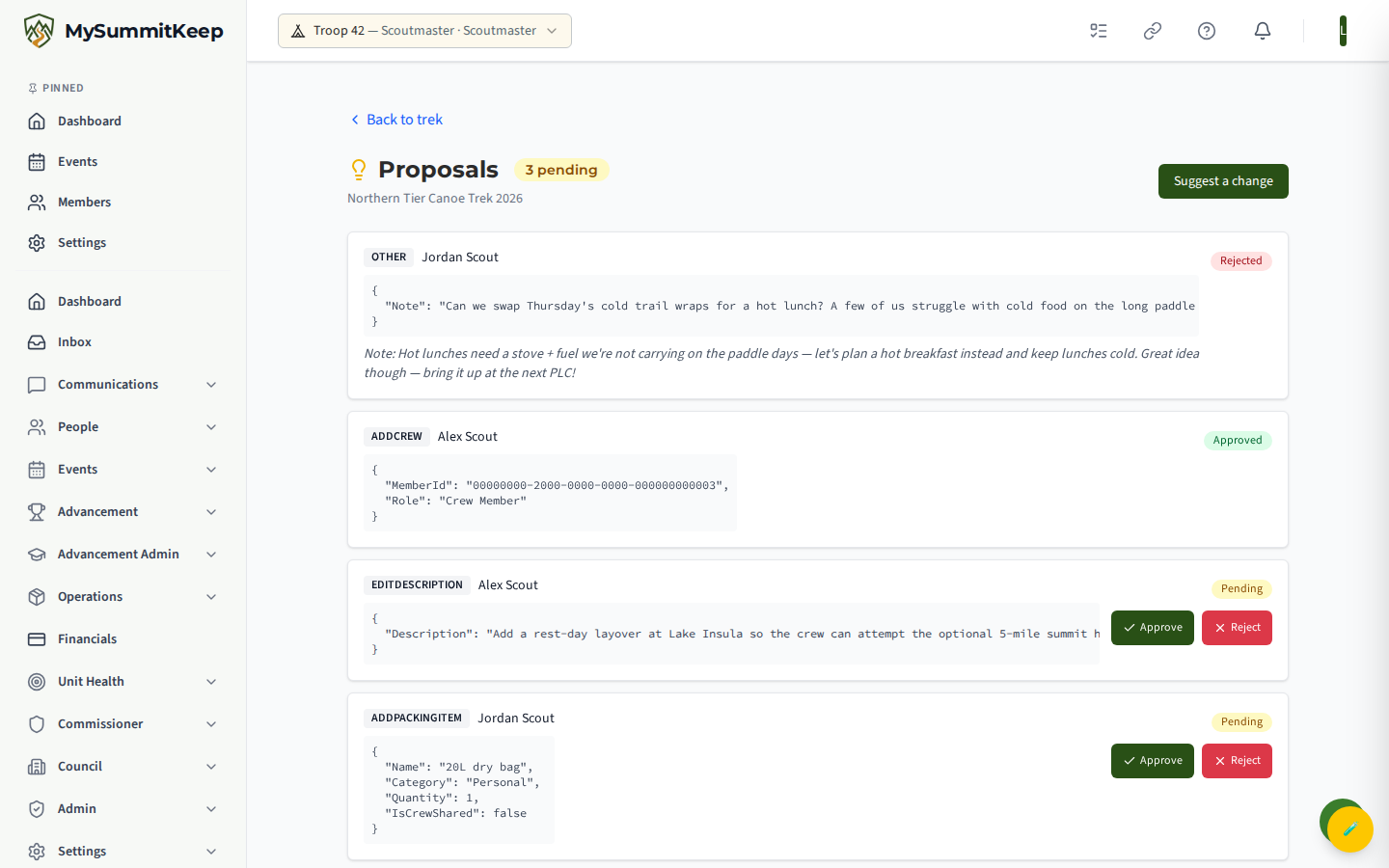
The Packet PDF
Section titled “The Packet PDF”From the trek (or voyage) you can download a Packet PDF that bundles the trip into one printable document. The first download generates it and caches a signed link; if details change, use Regenerate to render a fresh copy.
Post-trip logbook and automatic awards (50-Miler, Hiking MB, OAA)
Section titled “Post-trip logbook and automatic awards (50-Miler, Hiking MB, OAA)”After the trip, open the Logbook. You record day-by-day actuals — miles, service hours, conditions, and notes — tick off who actually attended in the participant checklist, and attach photos. A live “Trek Totals” panel sums miles, days with miles, and service hours as you type.
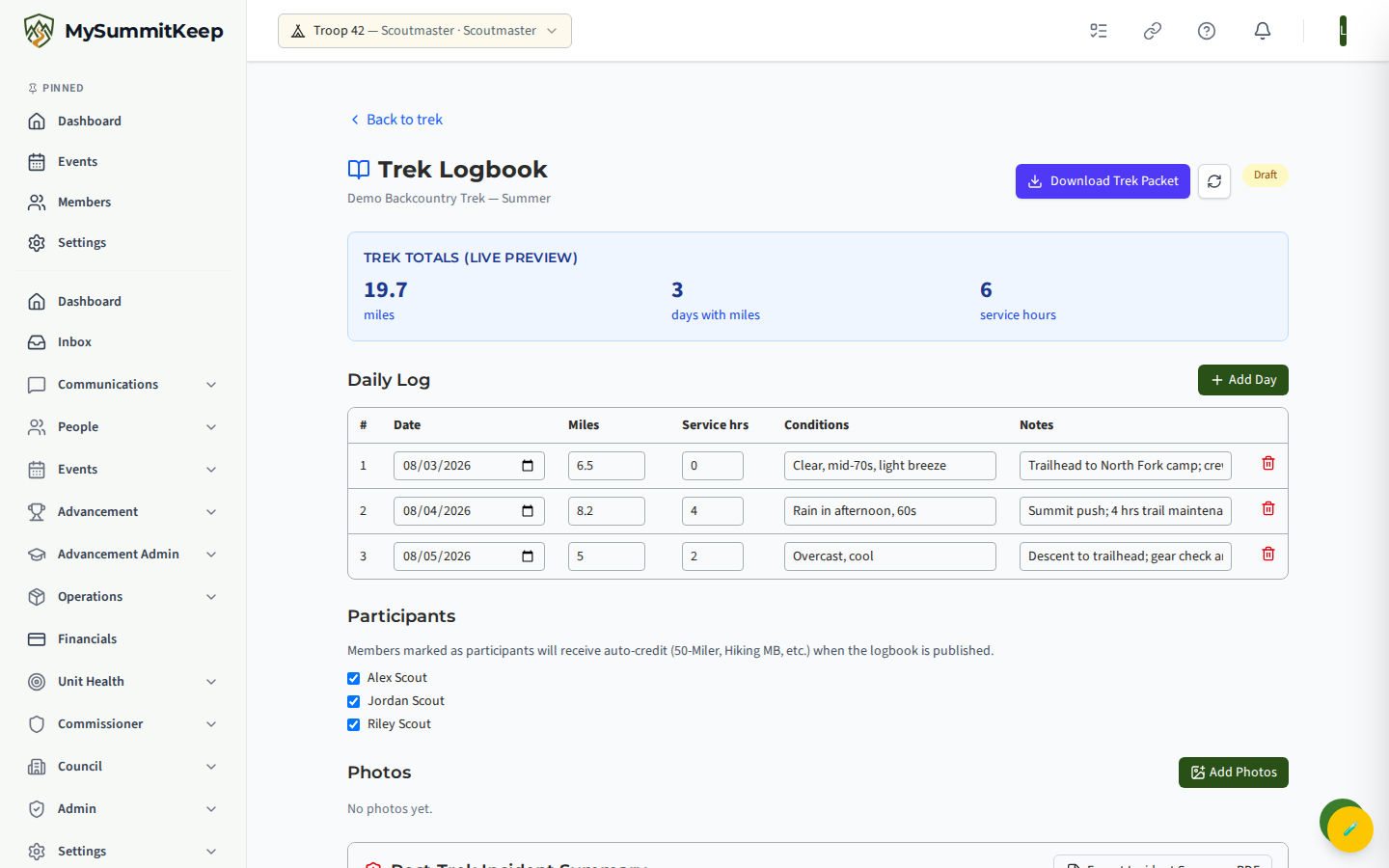
The Publish Logbook button is the trigger. It stays disabled until the trek is published, its return date has passed, you’ve logged at least one day with miles, and at least one participant is checked. Publishing is one-way: it auto-credits each participating youth toward the awards their logged miles and days earn — Hiking merit badge, the National 50-Miler Award, and Order of the Arrow camping. Crediting is idempotent, so a scout already working a badge isn’t double-started.
Participant registration (Philmont)
Section titled “Participant registration (Philmont)”For a Philmont trek, Philmont wants the same details about every participant. Participant Registration collects them from families so you stop chasing email and re-typing into the ranch’s portal. It is available to adult leaders who can see attendee personal information, and it shows on the trek’s detail page once your platform owner has switched it on.
- Open the trek and choose Participant Registration, then Open Participant Registration. Every crew member gets a profile. Adding or removing someone from the crew updates the list.
- Parents fill in their Scout’s details from My Family, and adults fill in their own. See Trek Registration.
- Watch the crew completion view. It shows the percent complete for the crew, for each participant and for each group of fields (Identity and contact, Body measurements, Religion and diet, Emergency contact, Certifications, Disclosure), and names what is still missing. A CPR or Wilderness First Aid certification that is expired, or will expire before departure, is flagged. A certification answered Yes also needs its expiration date and an uploaded copy of the certificate; CPR and Wilderness First Aid links under a participant open the copy for a few minutes (each opening is logged).
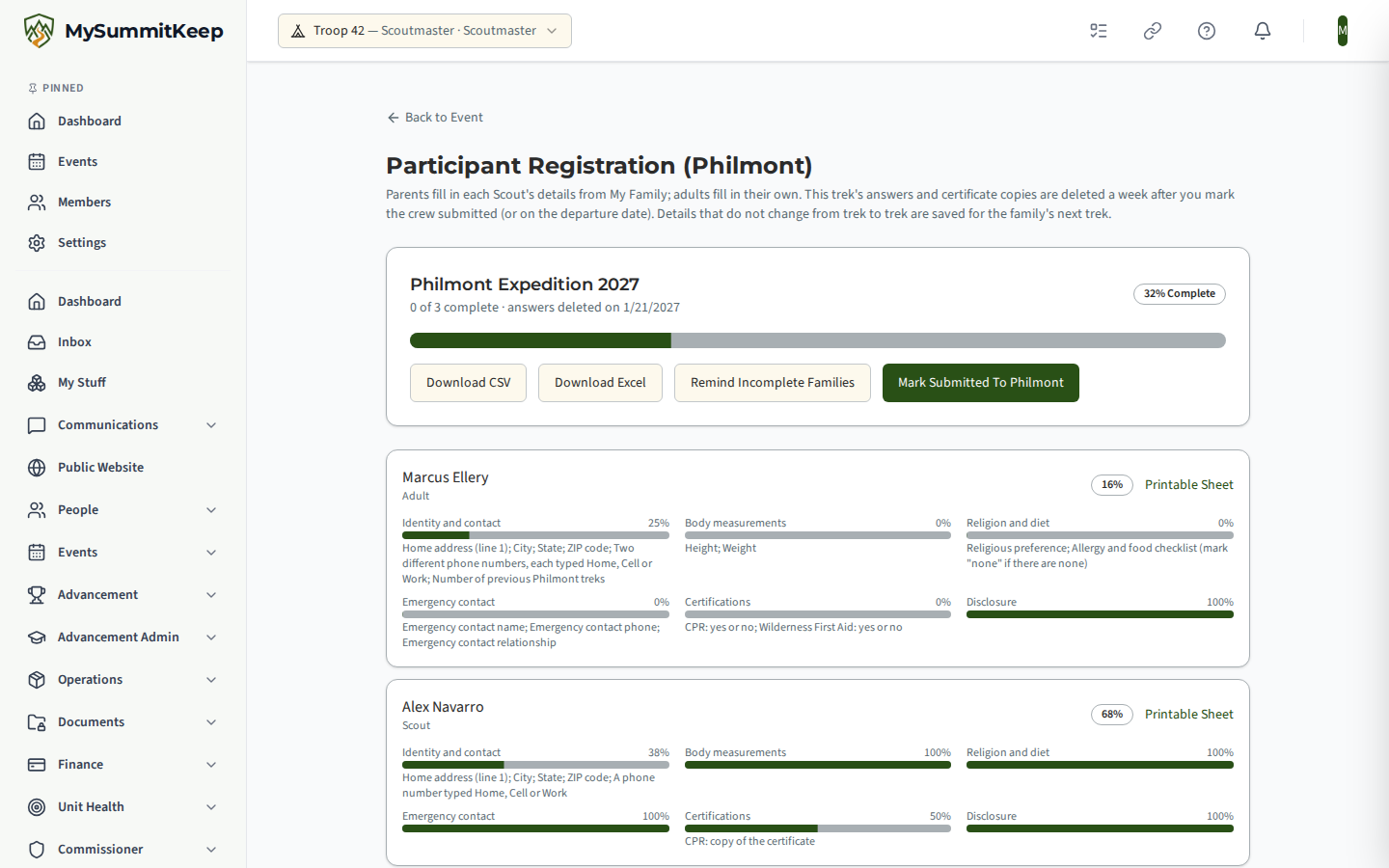
- Choose Remind Incomplete Families to email the families that have not finished. A Scout’s reminder goes to their parents, never to the Scout, and a Scout with no parent email on file is skipped and counted. The email names the person and the sections still open, never an answer. You can send one reminder to the crew an hour, and a family gets one a day.
- Download CSV or Download Excel for Philmont’s participant roster. The columns follow the roster order, religion is Philmont’s two-letter code, and each allergy is its own Yes or No column. The file is built when you ask and is not stored. Every download is logged.
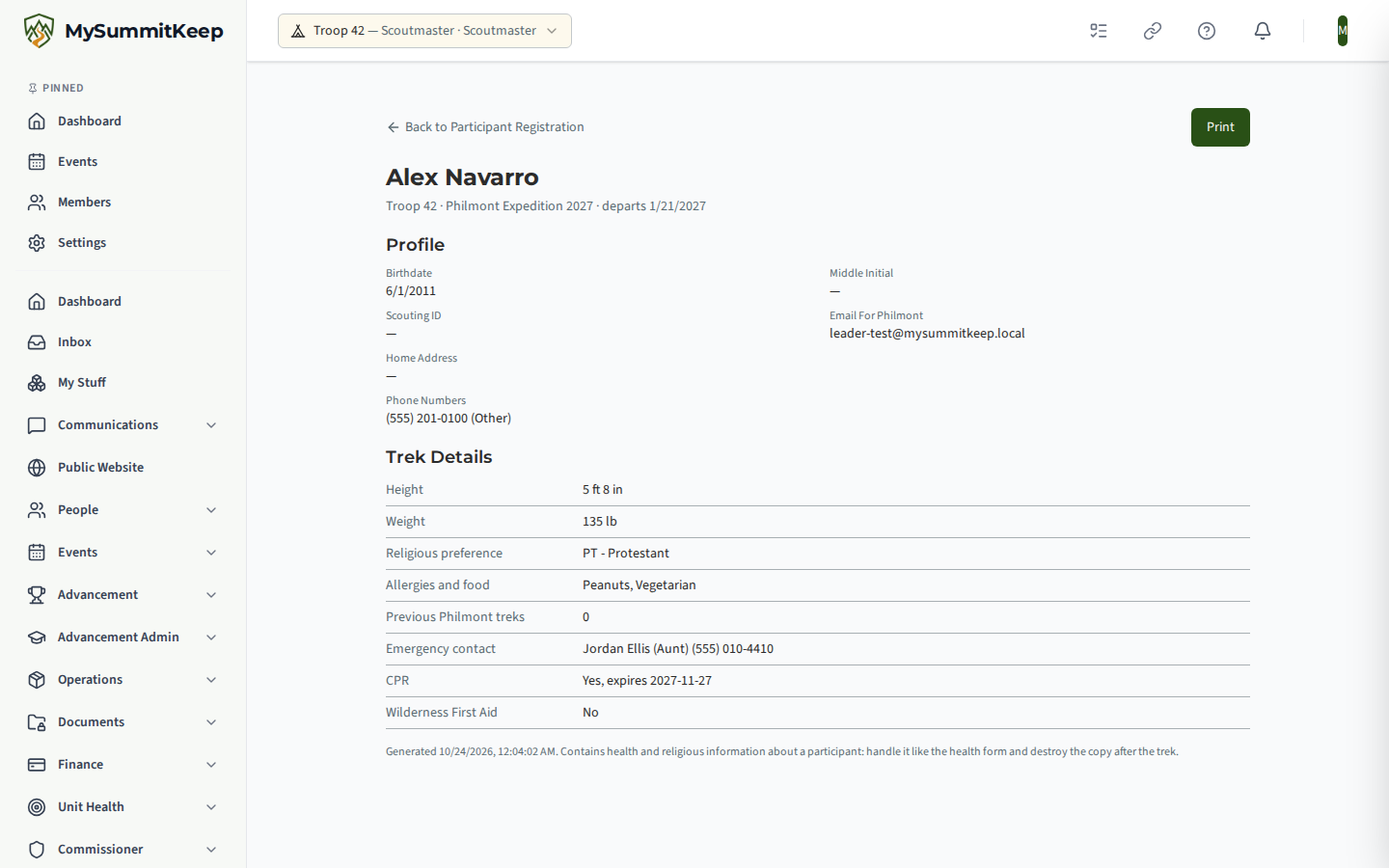
- Printable Sheet opens one participant’s details in a print-ready page for the advisor packet.
When the crew is registered with Philmont, choose Mark Submitted To Philmont. This starts a seven-day clock: this trek’s answers and the certificate copies are then deleted automatically, which gives you a week to make corrections. If you never mark it, they are deleted on the departure date. After deletion you can reopen the registration and families will be asked again; the details that do not change from trek to trek (height, weight, religion, food, emergency contact, CPR and Wilderness First Aid status) are kept for the family, who see them offered to confirm, and you never see that saved copy.
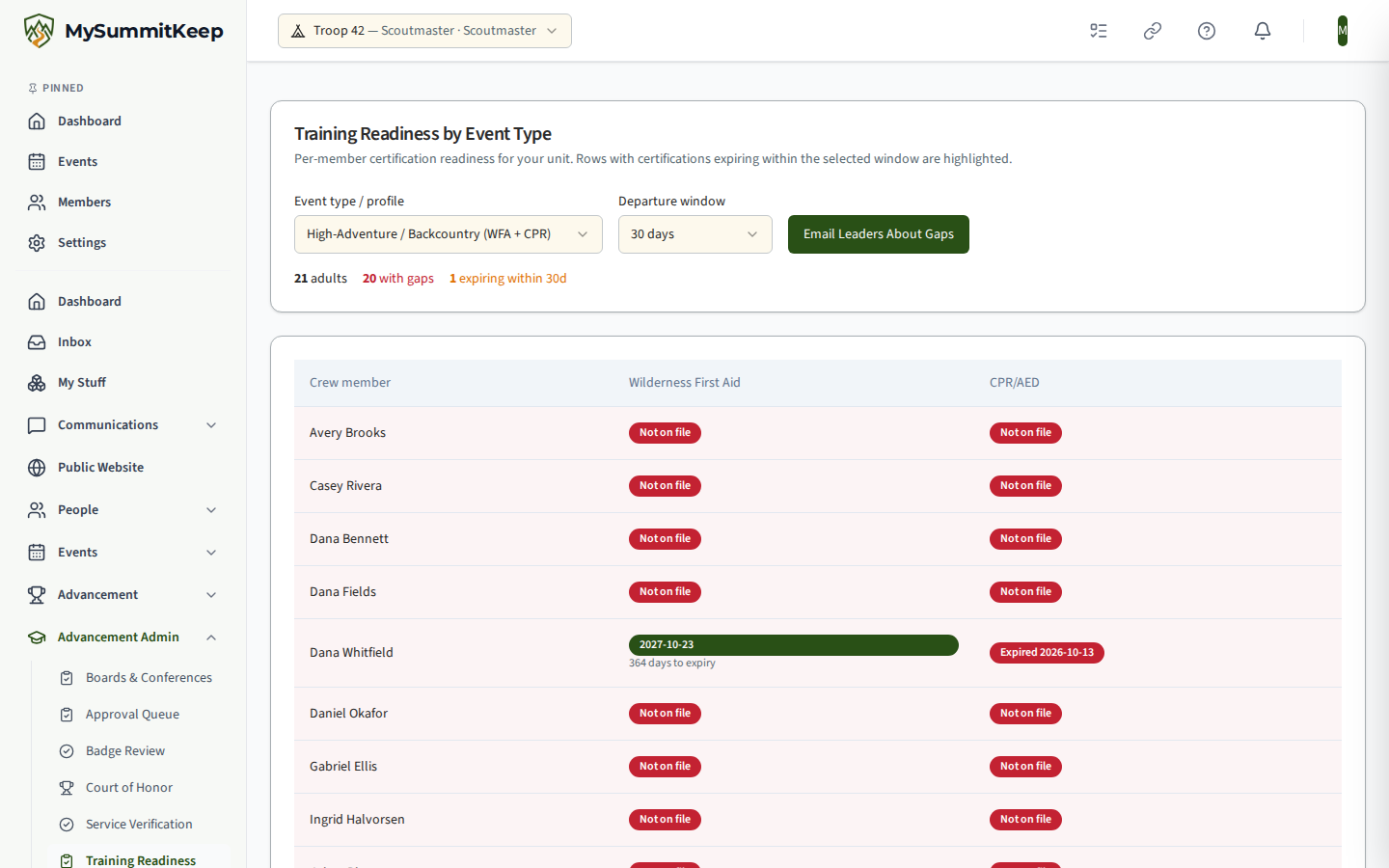
Expired, missing and unanswered CPR and Wilderness First Aid entries from open registrations also appear on Training Readiness by Event Type, below the certification table, for adult leaders who can see attendee personal information.
Training readiness by event type
Section titled “Training readiness by event type”High-adventure activities carry certification requirements, and the gap usually surfaces too late.
Training Readiness by Event Type (/health-safety/training-readiness) sets activity types against
the crew’s current certifications, so a missing qualification is visible while there is still time to
schedule the training.
Sharing trip progress with parents
Section titled “Sharing trip progress with parents”A leader can create a parent progress link for a trek. It opens a read-only page that shows the trek name and each leg with its status and an estimated arrival, and nothing about any person. Creating a new link replaces the old one. A progress link works for up to 90 days, and a parent who opens it simply sees the page: the link has no sign-in and nothing on the page can be changed. If a link has expired or been replaced, the page says “This link is no longer available” and gives no other reason, so ask the trip leader for a new one. Links you sent before this change keep working until they expire. One link is meant to be shared with every family on the trip: a parent can reload the page, bookmark it, or open it on another phone, and as many families as you like can use the same link at the same time. Anyone who has the link can see the page, so share it only with the trip’s families.
Clone, archive, and unpublish
Section titled “Clone, archive, and unpublish”When the season ends you have options. Clone as event copies the trip into a fresh draft for next year with new dates; clone as template saves it back to your library so the whole troop can reuse the plan. Archive soft-deletes a finished trek (and Restore brings it back). Unpublish retracts a published trek to draft — it soft-deletes the auto-created child calendar events and cancels unpaid dues, but it refuses if any trek payment has already been paid or refunded, so you can’t pull the rug out from under families who already paid.
MySummitKeep is an independent product and is not affiliated with, endorsed by, or sponsored by Scouting America (formerly the Boy Scouts of America). Scouting America, Scouts BSA, Cub Scouts, Venturing, Sea Scouts, and the Order of the Arrow are trademarks of Scouting America. Official program content shown in screenshots and examples is © Scouting America; always confirm current requirements atscouting.org. SeeTerms § 7.3.