
Shooting Sports Instructor Coverage
Shooting sports — rifle, shotgun, archery, and the like — can only run when a unit has a properly certified instructor on hand. The Shooting Sports Instructors roll-up gives you, as a commissioner, a single place to see who is certified across all of your assigned units, when their certifications were earned, and which ones have lapsed. It’s an early-warning tool: spot a unit that’s about to lose its only certified instructor before the season starts, not after.
Open Commissioner → Shooting Sports Instructors in the sidebar. The entry appears only if you hold an active commissioner role, and you’ll only see data for the units in your commissioner scope.
What this roll-up shows
Section titled “What this roll-up shows”The page gathers completed shooting-sports training records for every unit in your commissioner scope and groups them by unit. The units you see here are exactly the ones you serve — the same scope used elsewhere in the commissioner tools (units you’re assigned to as a Unit Commissioner, plus all units in your district or council if you serve at that level).
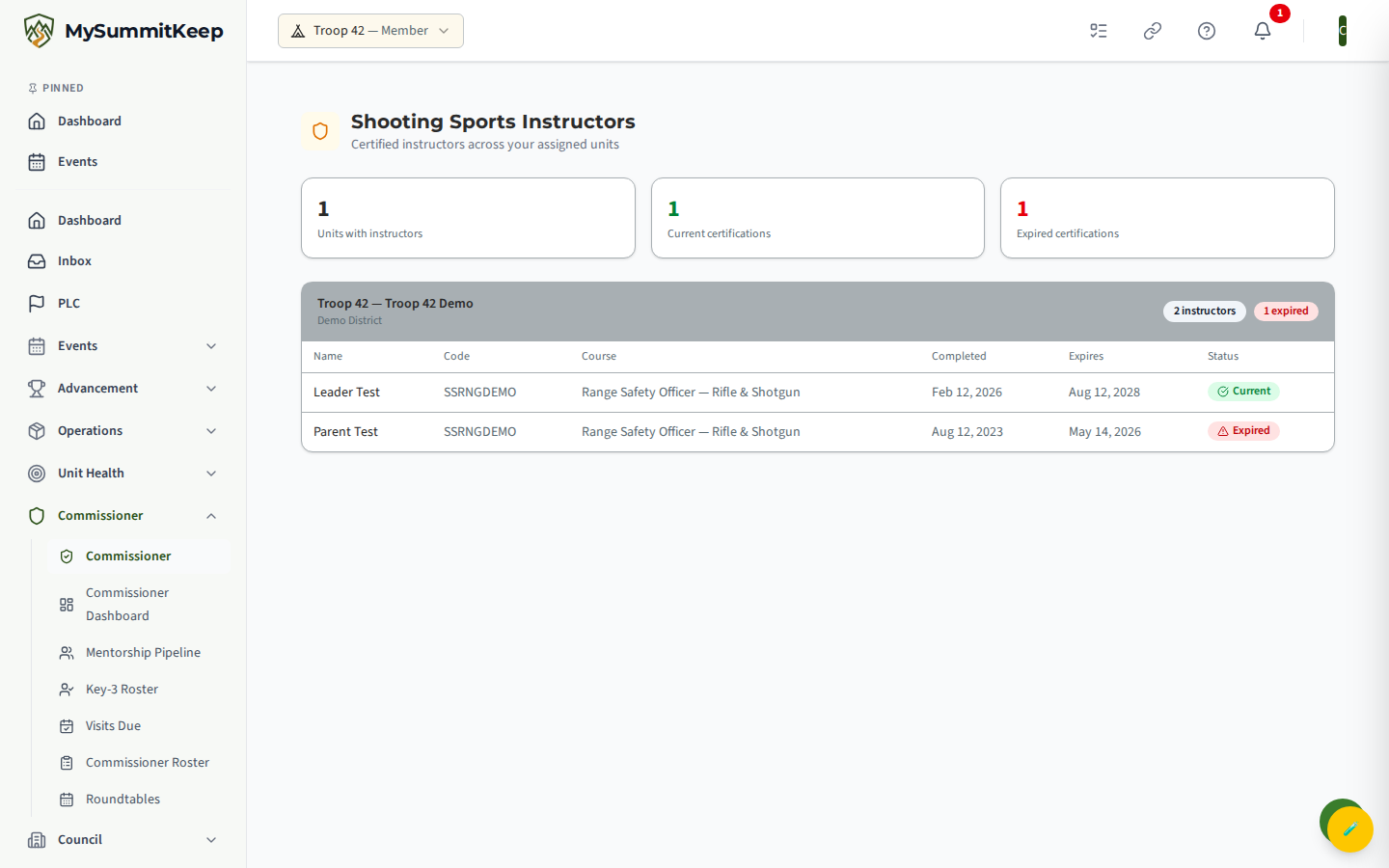
At the top, three summary cards give you the at-a-glance picture:
- Units with instructors — how many of your units have at least one certified shooting-sports instructor.
- Current certifications — the total number of instructor certifications that are still valid.
- Expired certifications — the total that have lapsed and need renewal.
Below the summary, each unit appears as its own card showing the unit name and district, an instructor count, and — if any certifications have lapsed — a red badge such as “2 expired” so problem units jump out immediately.
Reading instructor certification status
Section titled “Reading instructor certification status”Inside each unit card is a table with one row per instructor certification. The columns are:
- Name — the certified member.
- Code — the training course code (for example, the BSA course code for the discipline).
- Course — the full name of the training course.
- Completed — the date the instructor finished the training.
- Expires — the expiration date, if the course has one. Courses that never expire show a dash here.
- Status — a green Current badge or a red Expired badge.
A certification is marked Expired only when it has an expiration date and that date has already passed. If the Expires column shows a dash, the course does not expire and the status stays Current indefinitely.
Spotting expired or missing coverage
Section titled “Spotting expired or missing coverage”This is the part of the page that earns its keep. Work top-down:
- Scan the summary cards. If Expired certifications is greater than zero, you have lapses somewhere.
- Find the flagged units. Unit cards with a red “N expired” badge in their header are where the problem lives. Open those first.
- Look for thin coverage. A unit with only one current instructor is a coverage risk — if that person can’t make an event, the activity can’t run. A unit with zero current instructors (every row Expired) effectively has no shooting-sports coverage at all.
- Watch for missing units. Any unit you serve that doesn’t appear on this page has no completed shooting-sports certifications on file. If that unit runs (or wants to run) a range program, that’s a gap to raise on your next visit.
When you find a gap, the natural next steps are a unit visit and a follow-up. Log the conversation through Commissioner Visits, and use Coverage Gaps and the Commissioner Dashboard to keep the bigger picture of unit health in view.
Relationship to shooting-sports waivers
Section titled “Relationship to shooting-sports waivers”Instructor certification answers “is someone qualified to run the activity?” Waivers answer a different question: “has each participant’s required paperwork been signed before they shoot?” The two work together — a unit needs both a current instructor and signed waivers for participants to safely run a range.
This roll-up is read-only and covers the certification side only. Signing and tracking the per-participant shooting-sports waivers happens in the unit’s own Shooting Sports → Waivers area, where leaders see each waiver’s signed/pending status and capture signatures. As a commissioner, use this instructor view to confirm a unit has qualified leadership in place; the unit handles waivers for the youth and adults actually participating.
MySummitKeep is an independent product and is not affiliated with, endorsed by, or sponsored by Scouting America (formerly the Boy Scouts of America). Scouting America, Scouts BSA, Cub Scouts, Venturing, Sea Scouts, and the Order of the Arrow are trademarks of Scouting America. Official program content shown in screenshots and examples is © Scouting America; always confirm current requirements atscouting.org. SeeTerms § 7.3.