
Giving Your Teen Their Own Login
Older Scouts often want to check their own advancement, see their events, and sign in without borrowing a parent’s account. MySummitKeep lets you give a linked teen aged 13–17 their own login — but only after you, the parent or guardian, record your consent. This is a legal requirement, not a hoop: federal children’s-privacy law (COPPA) requires verifiable parental consent before we create a youth-managed account.
Everything below happens on the My Family page (People → My Family in the left menu). If you have not linked your Scout to your household yet, do that first — see Linking Scouts to Your Household.
When a teen gets their own login
Section titled “When a teen gets their own login”Until you grant access, your teen does not have a separate login. You manage their information through your own account, and a unit leader manages their roster record. Granting a login simply adds a sign-in for the teen on top of that — it does not create a new Scout record or change anything on the roster.
You would do this when your teen is old enough and responsible enough to want to follow their own Scouting progress directly. It is entirely optional, and you stay in control: you can download a copy of everything we hold for your child from the same Family page at any time, and a unit leader or our support team can turn off the youth login if you ask.
Eligibility (13–17 with a known birthdate)
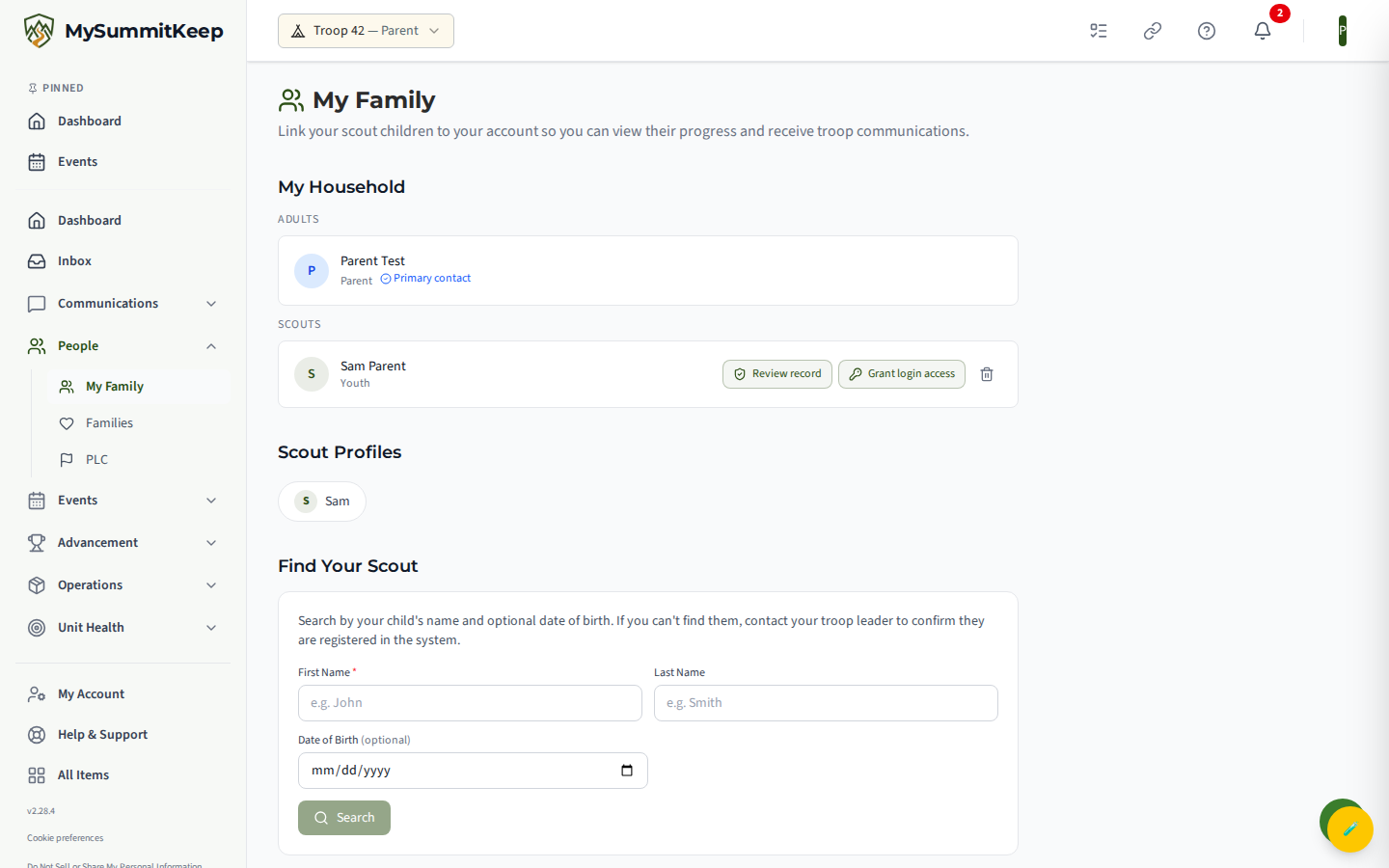
Section titled “Eligibility (13–17 with a known birthdate)”The Grant Login Access button (a key icon) appears on a youth’s card on the Family page only when:
- The Scout’s role is Youth, and
- Their date of birth on file puts them between 13 and 17 years old, and
- Your council or unit has turned the feature on (see Why this is gated).
Recording verifiable parental consent
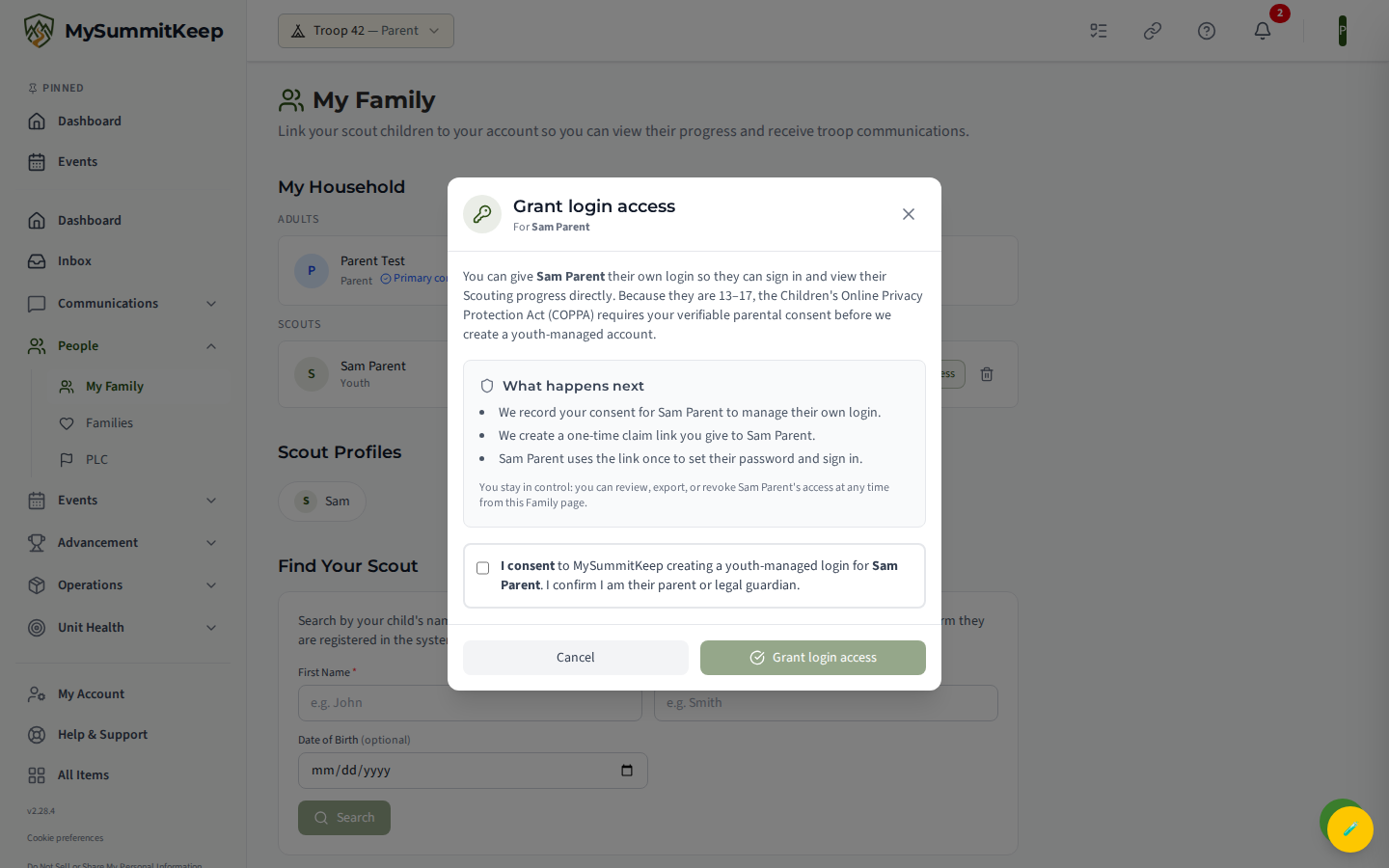
Section titled “Recording verifiable parental consent”When you click Grant Login Access, a confirmation window opens. It explains, in plain language, exactly what is about to happen:
- We record your consent for your teen to manage their own login.
- We create a one-time claim link for you to give to your teen.
- Your teen uses that link once to set their password and sign in.
To continue, tick the consent box — “I consent to MySummitKeep creating a youth-managed login for [your teen]. I confirm I am their parent or legal guardian.” — and click Grant Login Access.
Behind the scenes, MySummitKeep saves a permanent consent record (including the date and your network address) so there is a clear, auditable trail of who consented and when. It then re-checks the teen’s age on the server before granting — a deliberate safeguard so an under-13 record can never slip through.
Sending your teen their claim link
Section titled “Sending your teen their claim link”Once consent is recorded, MySummitKeep mints a single-use claim link and shows it on screen. The link is also copied to your clipboard automatically so you can paste it into a text or email to your teen.
A few important things about this link:
- It works once. As soon as your teen uses it to set a password, it stops working.
- It expires (typically about a week after you create it). The window shows the exact expiry date.
- It is shown only once. For security, MySummitKeep cannot display it again later, so copy it before you close the window. The link is not emailed automatically — handing it to your teen yourself (text, email, or in person) is the intended way to deliver it.
Your teen opens the link, lands on the /claim page, sets a password, and signs in. That’s it — they now have their own account. For their side of the experience, point them to Claiming Your Account, and encourage them to read Account Security.
What your teen can and cannot do
Section titled “What your teen can and cannot do”A youth login is exactly that — an account scoped to your teen’s own Scouting. They can sign in to see their advancement, their events, and unit news that’s shared with them. They cannot access your household’s billing, manage other family members, or take on leader-only administrative tasks. Those remain with parents and unit leaders.
Revoking or not enabling access
Section titled “Revoking or not enabling access”You are never locked in. From the Family page you can download a full copy of everything we hold for your child at any time using the data-export button on their profile. The youth login rests on the consent record you created, and that consent can be withdrawn — ask a unit leader or our support team to revoke it. Revoking the consent shuts off the youth-managed login; your teen’s Scout record stays on the roster and you continue to manage their information through your own account, exactly as before.
If you simply never grant access, nothing changes — your teen has no separate login, and you manage everything for them.
Why this is gated (COPPA/YPT)
Section titled “Why this is gated (COPPA/YPT)”This whole feature is off by default and only appears where your council or unit administrator has explicitly enabled it. That’s intentional. Giving a minor a standalone login touches both children’s-privacy law (COPPA) and Scouting’s youth-protection expectations (YPT), so MySummitKeep treats it as something a unit opts into deliberately rather than something that’s on for everyone.
When the feature is off, you won’t see the Grant Login Access button at all, and the underlying actions are blocked on the server too — so there’s no way to grant a login a unit hasn’t turned on. If your unit wants to enable youth logins, that decision sits with your council or unit administrator.
MySummitKeep is an independent product and is not affiliated with, endorsed by, or sponsored by Scouting America (formerly the Boy Scouts of America). Scouting America, Scouts BSA, Cub Scouts, Venturing, Sea Scouts, and the Order of the Arrow are trademarks of Scouting America. Official program content shown in screenshots and examples is © Scouting America; always confirm current requirements atscouting.org. SeeTerms § 7.3.