
Activity Plans (BSA Safety Plans)
Activity Plans are MySummitKeep’s home for BSA activity safety plans — the structured paperwork that keeps higher-risk outings safe and compliant. Float plans, swim plans, climbing plans, and high-adventure plans all live here, each with the right safety fields built in. You create a plan in a short guided wizard, send it for leader review, and keep a full version history of every revision.
Find it in the left menu: Operations → Activity Plans.
Open Operations → Activity Plans from the left menu to see everything your unit has on file.
What an activity plan is and when you need one
Section titled “What an activity plan is and when you need one”An activity plan documents the who, where, and how of a higher-risk activity, along with the safety requirements that apply to it. BSA Safe Swim Defense, Safety Afloat, and Climb On Safely all expect this kind of planning before the activity happens. MySummitKeep turns those checklists into guided forms so nothing gets missed.
You’ll typically create a plan any time an outing involves water, heights, firearms or archery, winter sports, horseback riding, or a multi-day trek. For an ordinary den or troop meeting you won’t need one.
The plans list and status tabs
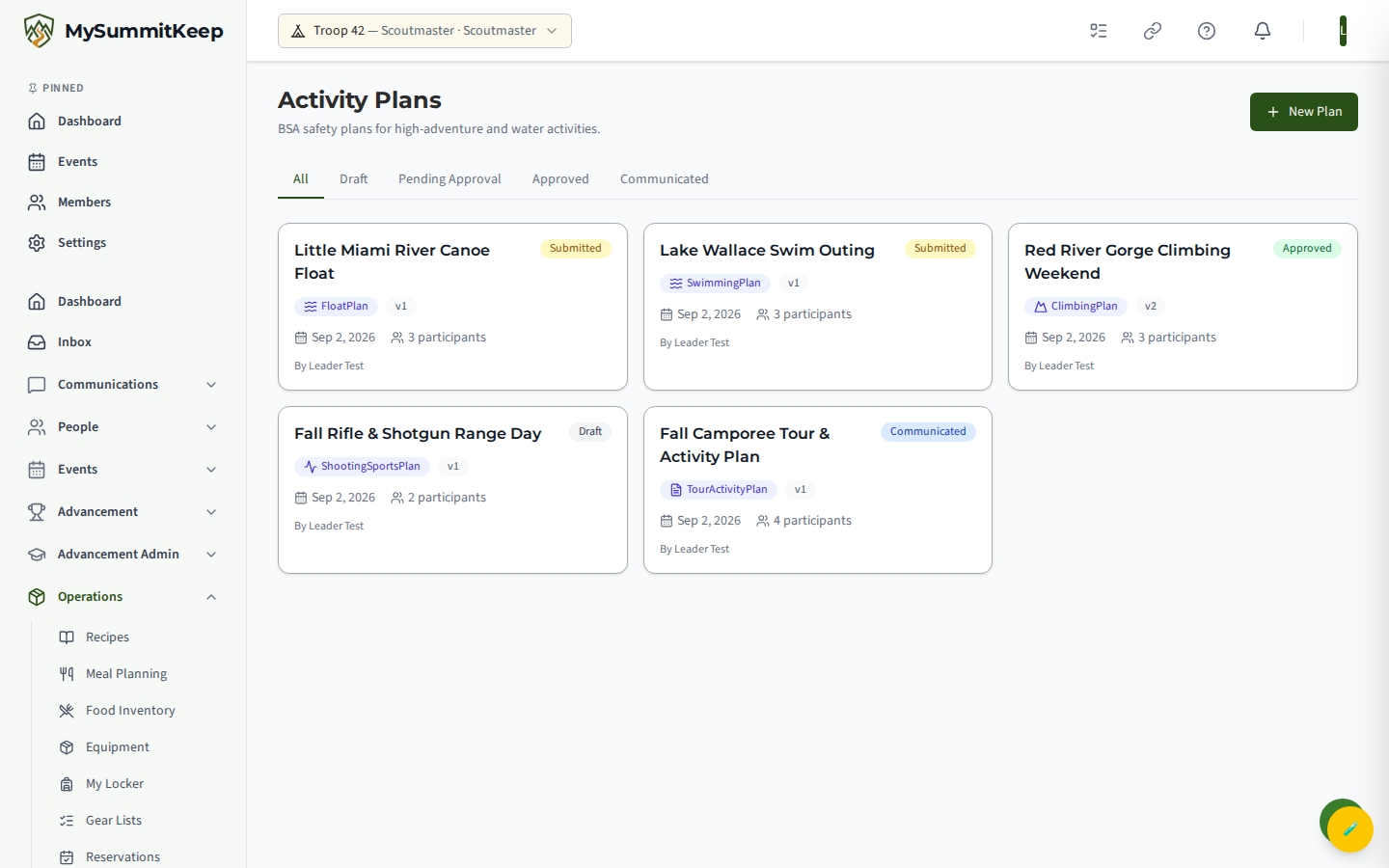
Section titled “The plans list and status tabs”The list shows every plan as a card with its type icon, version, activity date, and participant count. Tabs across the top filter by status: All, Draft, Pending Approval, Approved, and Communicated. Click any card to open its detail page; click New Plan (top right) to start the wizard.
Plan types
Section titled “Plan types”Step 1 of the wizard pulls the supported types from the platform and groups them by category — Water (Float, Swimming, Sailing, Waterskiing, Whitewater, Scuba), Land (Climbing, Shooting Sports, Archery, Cycling, Horseback, Winter Sports, Backpacking, High Adventure), and General (Tour Activity, Camping, Service Project, Pioneering). Each type carries its own safety fields and requirements. If your activity isn’t listed, choose Custom Activity under Other to build a plan from a custom template.
The 6-step plan wizard
Section titled “The 6-step plan wizard”Click New Plan to open the wizard. It walks through six steps, with a progress bar at the top:
- Activity Type — pick a type card; selecting one advances you automatically.
- Basic Info — Plan Title, an optional Linked Event (search your upcoming events), Activity Date & Time, Location (search saved locations or type an address), Responsible Leader, Location Notes, and Emergency Contact Name and Phone. Title and emergency contact are required.
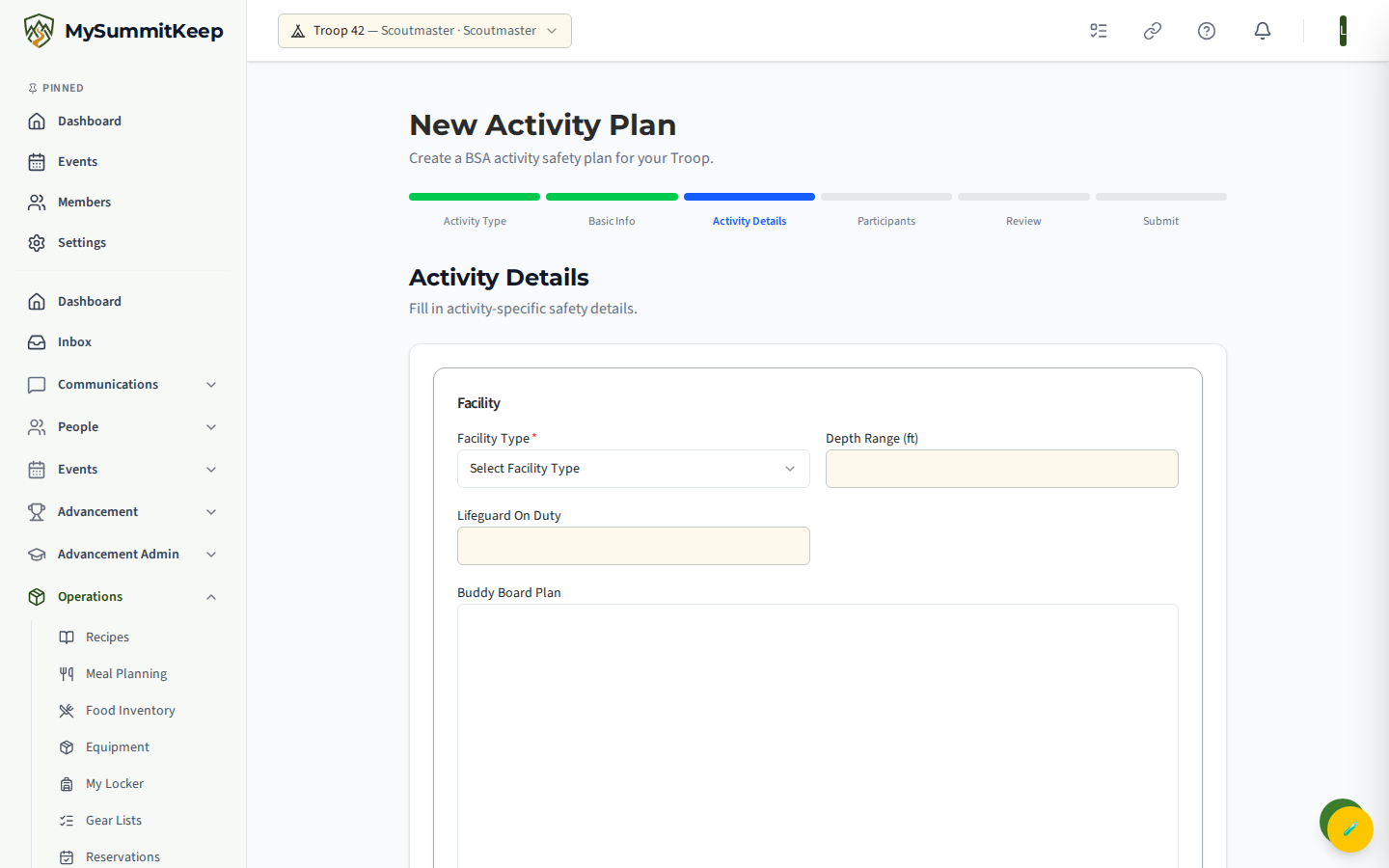
- Activity Details — the form here is dynamic: it changes based on the type you chose, showing only the fields BSA requires for that activity. Any Safety Requirements for the type (for example, the number of trained adults needed) are listed in a highlighted aside.
- Participants — add everyone going (see below).
- Review — a read-only summary of every section plus a safety-requirements checklist. You must tick the acknowledgment box confirming the information is accurate and BSA-compliant before you can submit.
- Submit — confirmation that the plan was created, with links to view it or start another.
Adding participants and qualification checks
Section titled “Adding participants and qualification checks”On the Participants step, search your unit roster by typing at least two characters, then pick a member — or type a free-form name for a guest who isn’t in the system. Assign each person a role: Participant, Leader, or Observer. If the activity type defines Participant Requirements (such as a swim classification on file), they appear in an aside so you know who must qualify. The platform tracks each member’s training and certification status against the plan’s safety requirements; those qualification checks (which adults hold the required training, and whether the minimum is met) are summarized in the exported plan PDF.
Submitting for approval
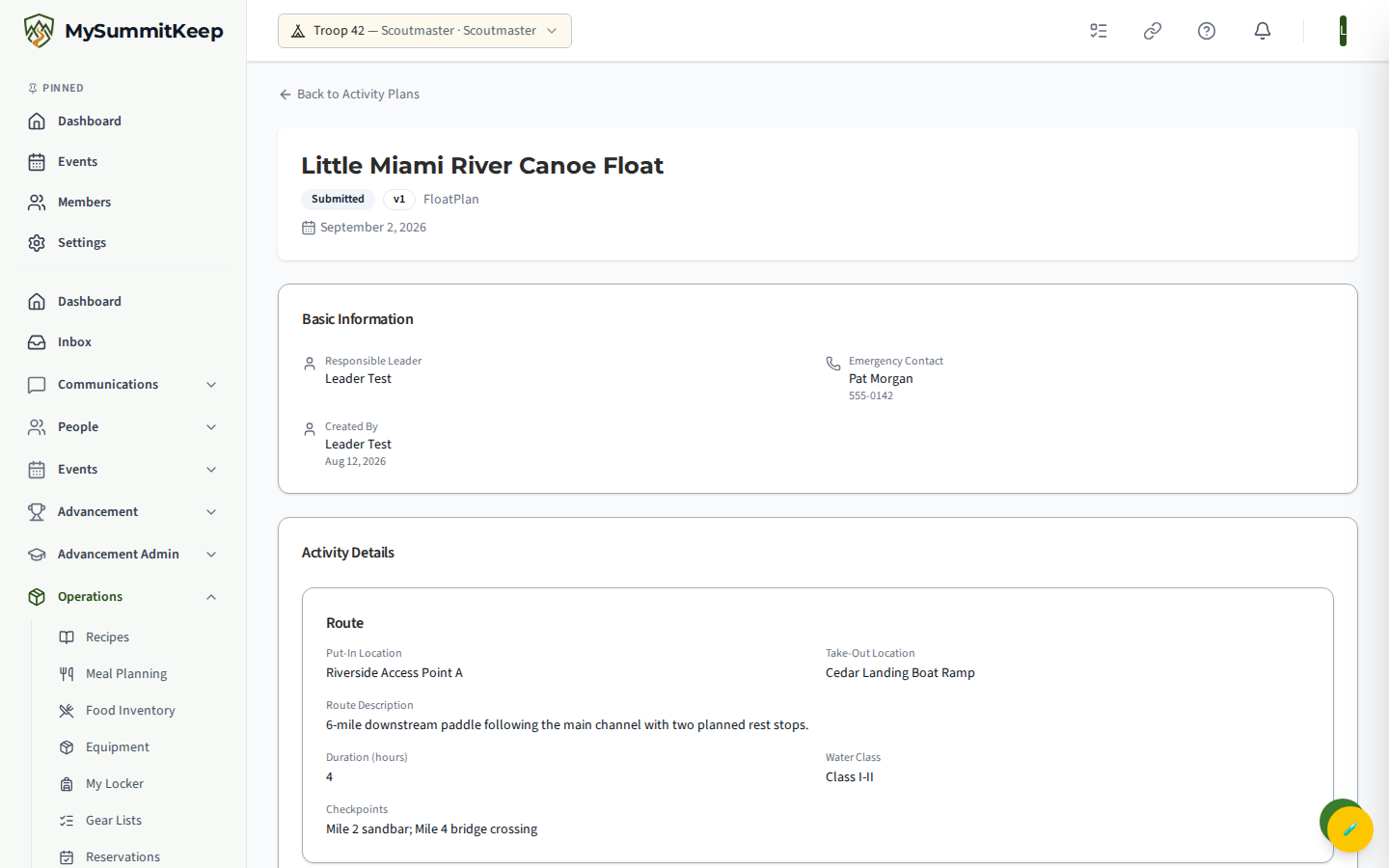
Section titled “Submitting for approval”A new plan starts as a Draft. From the plan’s detail page you can Edit it or Submit it for review. Once submitted, the plan locks for editing while a leader reviews it — its status moves to Pending Approval.
The approval queue
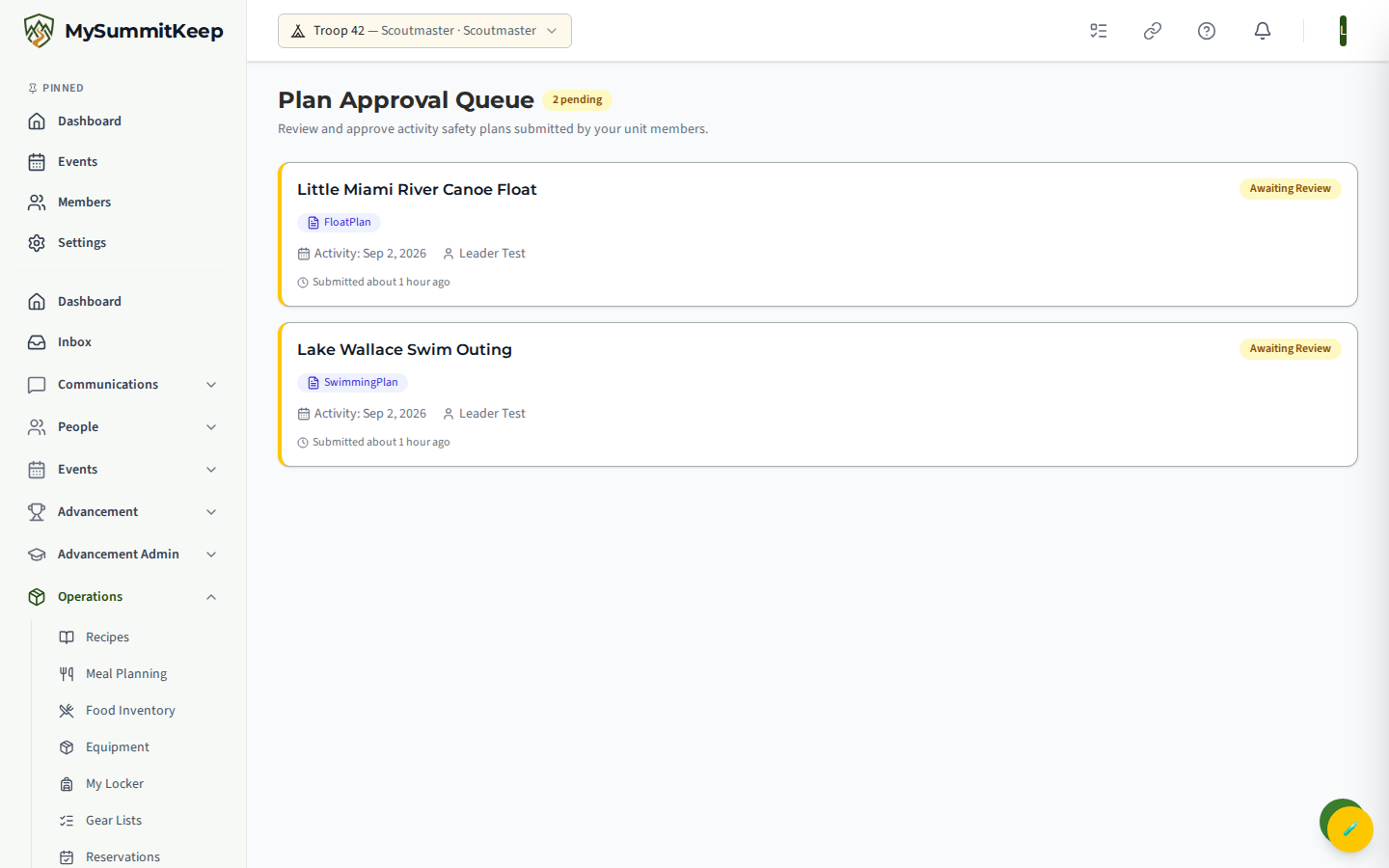
Section titled “The approval queue”Leaders review submitted plans on the Plan Approval Queue page at /activity-plans/approvals. The queue lists every plan awaiting review — each card shows the plan type, the activity date, who created it, and how long ago it was submitted, with an Awaiting Review badge and a count of how many are pending. Click a plan to open its detail page and act on it.
On the detail page a reviewer can:
- Approve — optionally add a note for the creator.
- Reject — a rejection reason is required, and it’s shown back to the creator so they know what to fix.
Revising and version history
Section titled “Revising and version history”Once a plan is Approved, you can still keep it current. Revise creates a new version that starts as a fresh draft, while the old version is kept on record. Cancel retires a plan that’s no longer happening (this can’t be undone). Every plan keeps a Version History timeline on its detail page showing each version’s status, who created it, and who approved or reviewed it — a clean audit trail for your records.
Plan templates
Section titled “Plan templates”Custom Activity plans are powered by templates. A unit can build and maintain its own templates (with their own fields and safety requirements) so recurring activities that don’t fit a standard BSA type still get a consistent, reusable safety form.
Starting from the Activities Catalog
Section titled “Starting from the Activities Catalog”Most plans do not need to be written from scratch. The Activities Catalog
(/activities-catalog) is a library of meeting plans, programs and event ideas. Activities that need a
safety plan, such as swimming or climbing, are marked in the catalog, and adding one to an event starts a
draft plan for you to finish here. See Activities Catalog.
Exporting the plan PDF
Section titled “Exporting the plan PDF”Each plan can be rendered as a print-ready PDF that pulls together the header (status, version, activity date, location), basic information, the activity-specific details, a safety-requirements table, the participant roster with qualification status, and a created-by / approved-by footer — ideal to carry on the trip or file with your council. The file is named after the plan title and version (for example, activity-plan-Summer-Lake-Swim-v2.pdf). Tour Activity plans render in a BSA Tour and Activity Plan (Form 680-014) layout; all other types use the standard MySummitKeep layout.
The day-before reminder
Section titled “The day-before reminder”Early on the day before an approved plan’s activity date, MySummitKeep emails a reminder with the plan PDF attached. It goes to the plan’s participants and to the parents or guardians of youth participants. Once the reminder has gone out, the plan moves to Communicated.
The reminder is sent as one email per family, never one email to the whole plan, so no family sees another family’s email address:
- A Scout aged 13–17 is on the same email as their own parents or guardians. Brothers and sisters with the same parents share one email.
- For a Scout under 13, only the parents get the email.
- Each adult participant gets their own email.
- A Scout whose parents have no email address on file isn’t emailed. Make sure every Scout on the plan has a parent or guardian linked in their household.
See How We Keep a Parent on Messages to Scouts for the rule behind this.
Once a plan is approved, you can also share details with families through Communications so everyone knows the plan for the day.
MySummitKeep is an independent product and is not affiliated with, endorsed by, or sponsored by Scouting America (formerly the Boy Scouts of America). Scouting America, Scouts BSA, Cub Scouts, Venturing, Sea Scouts, and the Order of the Arrow are trademarks of Scouting America. Official program content shown in screenshots and examples is © Scouting America; always confirm current requirements atscouting.org. SeeTerms § 7.3.