
Council Dashboard (Scout Executive)
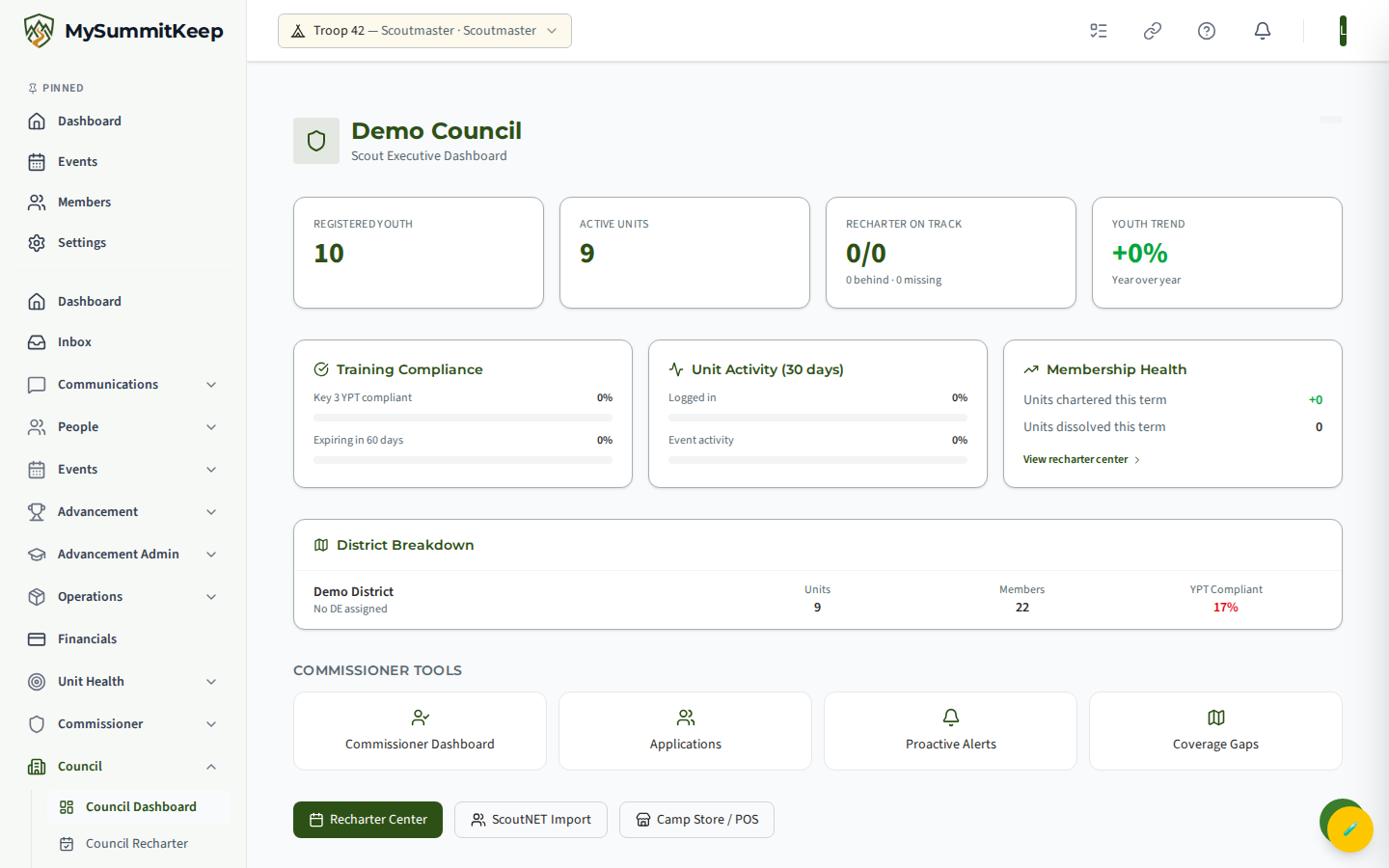
The Council Dashboard at /council/dashboard rolls your whole council up onto one screen: how many youth and units you have, how training compliance is trending, a breakdown by district, and a short list of units that need attention right now. It is the top-level “where does the council stand today” view for Scout Executives and council leadership — a tier above the unit-by-unit Commissioner Dashboard.
Find it in the left menu: Council → Council Dashboard.
Who sees the Council tier
Section titled “Who sees the Council tier”The Council Dashboard is gated to council-scope staff. You will see it only if you hold one of these roles in MySummitKeep for your council:
- Scout Executive
- District Executive
- Council Commissioner
- Council President
If you do not hold one of these roles, the page shows a “Council staff access required” message asking you to contact your council to be assigned the correct role. The dashboard automatically resolves which council you belong to from your role assignment — there is nothing to pick or switch.
Council-wide stat cards
Section titled “Council-wide stat cards”The top row gives you the council at a glance:
- Registered Youth — total registered youth across all units in the council.
- Active Units — the number of units currently active on the platform.
- Recharter On Track — shown as “on track / total,” with a sub-line breaking out how many units are behind and how many are missing their recharter work. This card turns red when any units are missing.
- Youth Trend — year-over-year change in youth membership, shown as a percentage (green for growth, red for decline).
Below the stat cards, three panels add detail:
- Training Compliance — the percentage of Key 3 leaders who are Youth Protection Training (YPT) compliant, plus the share of YPT certifications expiring in the next 60 days.
- Unit Activity (30 Days) — what percentage of units logged in and what percentage had event activity in the last 30 days.
- Membership Health — units chartered this term versus units dissolved this term, with a link straight into the recharter center.
District summaries
Section titled “District summaries”If your council is organized into districts, the District Breakdown panel lists each district with its District Executive (DE), unit count, member count, and YPT-compliant percentage. The compliance percentage is color-coded so weak districts stand out: green at 80% or above, amber in the 60–79% range, and red below 60%.
When a council has more than one district, a Filter by district dropdown appears above the breakdown so you can narrow the table to a single district.
Council alerts
Section titled “Council alerts”The Units Needing Attention panel surfaces units that have tripped a council-level alert. There are three alert types:
- InactiveOver90Days — the unit has shown no activity for more than 90 days (the row shows the days-since-activity count).
- PastRecharterDeadline — the unit has passed its recharter deadline without completing it.
- NoAdvancementIn90Days — no Scout in the unit has advanced in the last 90 days.
Each alert row shows the unit type and name and, where available, the district. The panel shows the first ten alerts; if there are more, a “View all alerts in recharter center” link takes you to the full list.
Jumping to recharter and ScoutNET import
Section titled “Jumping to recharter and ScoutNET import”Two buttons at the bottom of the dashboard hand you off to the council’s operational tools:
- Recharter Center (
/council/recharter) — the full recharter readiness tracker for every unit in the council: Key 3 status, YPT, medical-form readiness, and recharter status. The “View recharter center” link in the Membership Health panel and the “View all alerts” link both land here too. - ScoutNET Import (
/council/admin/scoutnet-import) — upload a ScoutNET CSV snapshot to reconcile your council’s units against the official registration data. The import reports how many units were created, matched, and flagged for review.
A Commissioner Tools strip also links across to the commissioner-tier pages — Commissioner Dashboard, Applications, Proactive Alerts, and Coverage Gaps — so council staff can drill into unit-level commissioner work without leaving the council view.
For retention numbers, see Council Analytics: how many youth renewed, were lost or are new, by year, district, program and age.
For the unit-level companion to this view, see the Commissioner Dashboard & Ops Overview and Recharter Tracking.
MySummitKeep is an independent product and is not affiliated with, endorsed by, or sponsored by Scouting America (formerly the Boy Scouts of America). Scouting America, Scouts BSA, Cub Scouts, Venturing, Sea Scouts, and the Order of the Arrow are trademarks of Scouting America. Official program content shown in screenshots and examples is © Scouting America; always confirm current requirements atscouting.org. SeeTerms § 7.3.