
Treasurer Handover
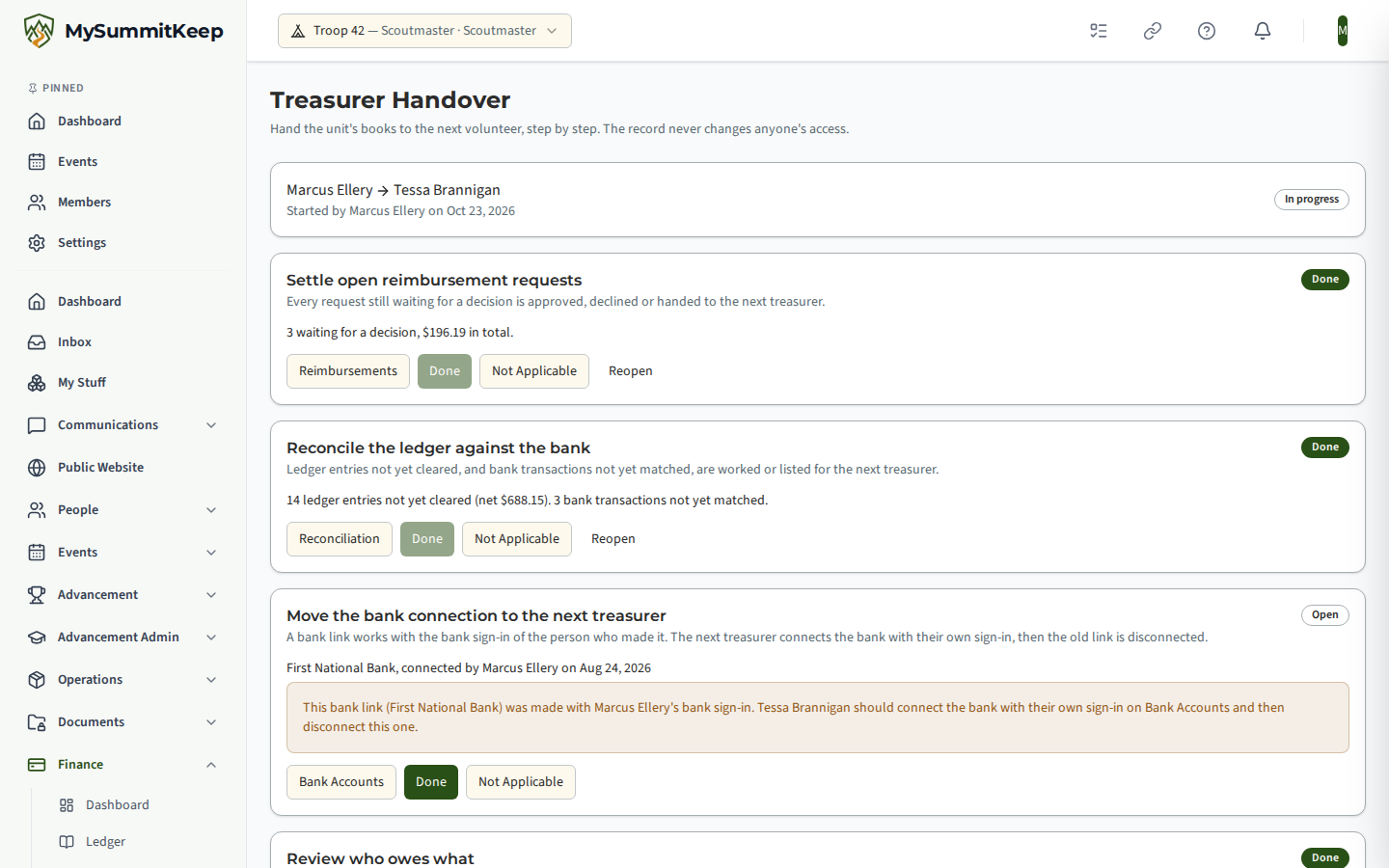
Treasurers change. Treasurer Handover (under Finance) walks the outgoing and incoming treasurer through everything that has to move, with the unit’s live figures beside each step, and ends in a permanent record of who handed the books to whom.
Find it in the left menu: Finance → Treasurer Handover.
Starting
Section titled “Starting”Choose who is handing over and who is taking over. The outgoing treasurer defaults to you, and a unit admin can name a treasurer who has already left (shown as no longer a member). The incoming treasurer must be an adult with an active seat. Only one handover can be in progress at a time.
The checklist
Section titled “The checklist”Every item must be marked Done or Not applicable before you can complete the handover.
| Step | What the page shows |
|---|---|
| Settle open reimbursement requests | How many are waiting for a decision and their total |
| Reconcile the ledger against the bank | Ledger entries not yet cleared, and bank transactions not yet matched |
| Move the bank connection | Who connected each bank link. A link made with the outgoing treasurer’s own bank sign-in is flagged: the incoming treasurer connects the bank with their own sign-in on Bank Accounts and then disconnects the old link. Nothing is disconnected automatically |
| Review who owes what | The total owed, the number of families and the aging buckets |
| Agree the unit balance | Today’s ledger balance |
| Show where the reports live | Links to the financial report, the ledger and its CSV export, the annual budget and the audit log |
| Hand over payment processor and other logins | A reminder to move each service to the next treasurer’s own sign-in. Never share one login |
| Hand over physical items | Cheque book, debit card, cash box, bank signature card |
| Ask a unit admin to change the Treasurer role | The instruction below, and whether it has happened yet |
You can reopen an item at any time before completing.
The role change
Section titled “The role change”The last card tells you exactly what a unit admin must do: give the next treasurer the adult Treasurer position on Manage Positions (or the Treasurer role on their member page) and end the previous one. The card shows live whether the incoming treasurer holds finance permission yet and whether the outgoing one still does.
Completing
Section titled “Completing”Complete Handover stores the record with a counts-and-totals snapshot of the figures (no family names), and tells the incoming and outgoing treasurer and the unit’s leaders in the app, including the role-change instruction. A completed record cannot be edited. If you started one by mistake, Cancel Handover with a reason keeps the record and frees you to start again.
The person taking over
Section titled “The person taking over”If you were named as the next treasurer and do not yet hold finance permission, Treasurer Handover shows you who named you, when, and the instruction. It shows you no figures. Choose Acknowledge to record that you have seen it; this is optional and completion never waits for it.
Every start, change, completion, cancellation and acknowledgement is written to the unit’s audit log.
MySummitKeep is an independent product and is not affiliated with, endorsed by, or sponsored by Scouting America (formerly the Boy Scouts of America). Scouting America, Scouts BSA, Cub Scouts, Venturing, Sea Scouts, and the Order of the Arrow are trademarks of Scouting America. Official program content shown in screenshots and examples is © Scouting America; always confirm current requirements atscouting.org. SeeTerms § 7.3.