
The Eagle Packet
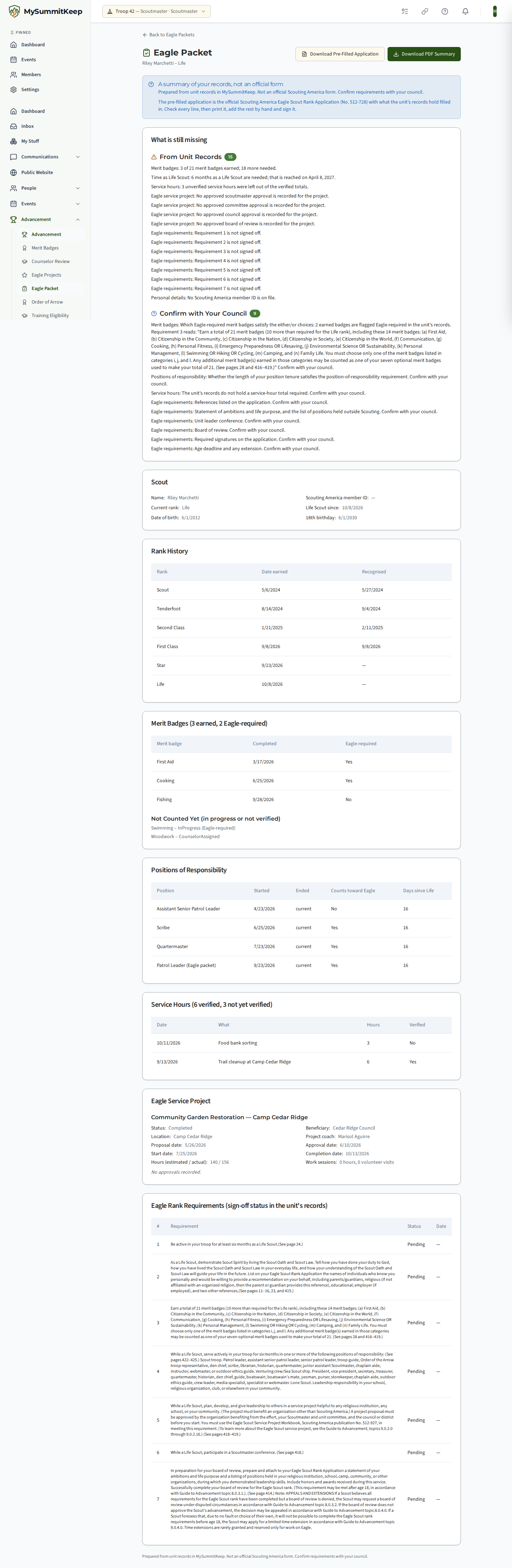
When a Scout reaches Life, the Eagle paperwork starts to depend on records that live in several places: rank dates, merit badges, positions of responsibility, service hours and the Eagle project. The Eagle Packet gathers all of it from what your unit has already recorded in MySummitKeep, lists what is still missing, and prints it as a summary you can carry to a Scoutmaster conference or a council office.
Find it under Advancement → Eagle Packet (/advancement/eagle-packet). It is part of the Summit and Peak plans, and the menu entry shows for Troops, like Eagle Scout service projects.
Who can open a packet
Section titled “Who can open a packet”A packet opens for one Scout at a time, and only when the Scout’s highest Scouts BSA rank is Life or Eagle.
- The Scout opens their own.
- A parent or guardian opens their own child’s.
- An adult leader who holds advancement recording authority opens any Life or Eagle Scout’s in the unit.
Nobody else can, and that includes a youth leader such as a Patrol Leader or Senior Patrol Leader, even if their position lets them record advancement. A leader whose access in the unit is suspended cannot open packets either; a suspended parent can still open their own child’s.
When you are not allowed to open a packet, or the Scout has not reached Life yet, the screen says Eagle packet not found. It is deliberately the same answer for both, so nobody can learn who is or is not a Life Scout by trying. The list at /advancement/eagle-packet shows only the Scouts you may open; a Scout or parent with exactly one is taken straight to it.
What is in the packet
Section titled “What is in the packet”Every section is built from records already in MySummitKeep. Nothing is typed into the packet itself.
- Rank History — the Scouts BSA ranks on file with the date each was earned and recognised. Ranks from other programs, such as Cub Scouts, are not mixed in, and the current rank is the highest Scouts BSA rank.
- Merit Badges — verified badges with their completion dates, and whether each is flagged Eagle-required. Badges that are in progress or not yet verified are listed separately and are Not Counted.
- Positions of Responsibility — each position with its start and end, whether it counts toward Eagle, and how many days fall after the Life date.
- Service hours — verified and not-yet-verified hours shown separately. Hours nobody has verified are left out of the verified total.
- Eagle Service Project — the project from the Eagle Scout Project Tracker: title, beneficiary, location, dates, estimated and actual hours, work-session hours and volunteer visits, the project coach’s name, and each approval. Project notes, approval comments and the coach’s phone number are never included.
- Eagle Rank Requirements — each requirement of the Eagle rank with its sign-off status.
The Scout’s date of birth and 18th birthday appear for the Scout and their parent. An adult leader sees them only if they can also view members’ personal details; otherwise those two lines are simply absent, and so is any note about whether a date of birth is on file.
What is still missing
Section titled “What is still missing”The first card lists the gaps in two groups.
From Unit Records are things your records show are missing, for example:
- fewer merit badges than the Eagle rank row asks for, with the shortfall;
- not enough time as a Life Scout yet, with the date the months are reached;
- fewer Eagle-counting positions since the Life date than the rank row asks for;
- an Eagle requirement that is not signed off;
- no Eagle project on file, a project that is not completed, or a project approval that has not been recorded;
- a rank missing from the Scout’s ladder, a missing Scouting America member ID, unverified service hours or badges that were left out of the totals.
Confirm with Your Council are things MySummitKeep cannot decide for you: which of your Eagle-required merit badges satisfy the either/or choices (the packet quotes the requirement wording from the database next to the number of flagged badges you have earned), whether your position tenure is long enough, references, the statement of ambitions and life purpose, the unit leader conference, the board of review, signatures, and the age deadline and any extension.
Print the summary
Section titled “Print the summary”Download PDF Summary produces a printable document with the gap list on the first page, in the same two groups, followed by each section. Missing values print as an em dash. Its footer reads Prepared from unit records in MySummitKeep. Not an official Scouting America form. Confirm requirements with your council.
Each download is recorded in the unit’s document audit trail with who generated it. The file name does not contain the Scout’s name, and the document is never cached or stored; it is generated when you ask for it.
Download the pre-filled application
Section titled “Download the pre-filled application”Download Pre-Filled Application produces the official Eagle Scout Rank Application (Scouting America form No. 512-728, January 2026 Revision) with what your unit has already recorded filled in. It is the real form, not a look-alike: MySummitKeep adds typed values to it and changes nothing else on it. The same people may download it as may open the packet, and a leader sees the member ID and date of birth lines only if they can also view members’ personal details.
What is filled in
- the Scout’s full name, on both pages, and the unit number;
- the Scouting America member ID in the council box (PID NO.) and the date of birth, only for the Scout, a parent, or a leader who can view personal details;
- the dates of the First Class and Star boards of review and the Life board of review, taken from the dates those ranks were earned;
- Requirement 3, the merit badges: for each required badge the date earned, and the electives with their names and dates. Where the form lets a Scout choose (Emergency Preparedness or Lifesaving, Environmental Science or Sustainability, Swimming, Hiking or Cycling) the badge you earned goes in that row, and you cross out the ones you did not earn. If a Scout holds more than 21 badges, the earliest 21 are placed and the rest are left off;
- Requirement 4, up to two positions of responsibility that count toward Eagle, with their start and end dates (the form has two lines; list any others on an attached sheet);
- Requirement 5, the Eagle service project’s name, beneficiary, total hours and date finished.
What is left blank for you
Signatures and their dates, the Scout’s address, phone and email, parent or guardian details, the Cub Scout, Webelos and Arrow of Light questions and the join dates, the references, the unit leader conference date, the board of review result, the council boxes and the posthumous box. MySummitKeep does not hold these, or holds them only as a “confirm with your council” line. Unit numbers beside the merit badges are also left for you, because a badge may have been earned in an earlier unit.
The file is flattened, so it prints the same on every device. Print it, check every line against the Scout’s records, add the rest by hand in ink and have it signed. A line that looks wrong means the unit’s record is wrong or missing: fix it in MySummitKeep and download again.
Each download is recorded in the unit’s document audit trail with who generated it. The file name does not contain the Scout’s name, and the document is never cached or stored.
Related pages
Section titled “Related pages”- Tracking Eagle Scout Service Projects — where the project record comes from
- Advancement Workflow — recording ranks, badges and sign-offs
- Recording & Verifying Service Hours — verifying the hours the packet counts
- Court of Honor — recognising what a Scout has earned
Need help? Contact support — we usually respond within one business day.
MySummitKeep is an independent product and is not affiliated with, endorsed by, or sponsored by Scouting America (formerly the Boy Scouts of America). Scouting America, Scouts BSA, Cub Scouts, Venturing, Sea Scouts, and the Order of the Arrow are trademarks of Scouting America. Official program content shown in screenshots and examples is © Scouting America; always confirm current requirements atscouting.org. SeeTerms § 7.3.