
Family Statements
Family Statements (under Finance) lets the treasurer email each family a personal summary. It is sent only when you press Send. Nothing is scheduled and nothing goes out automatically.
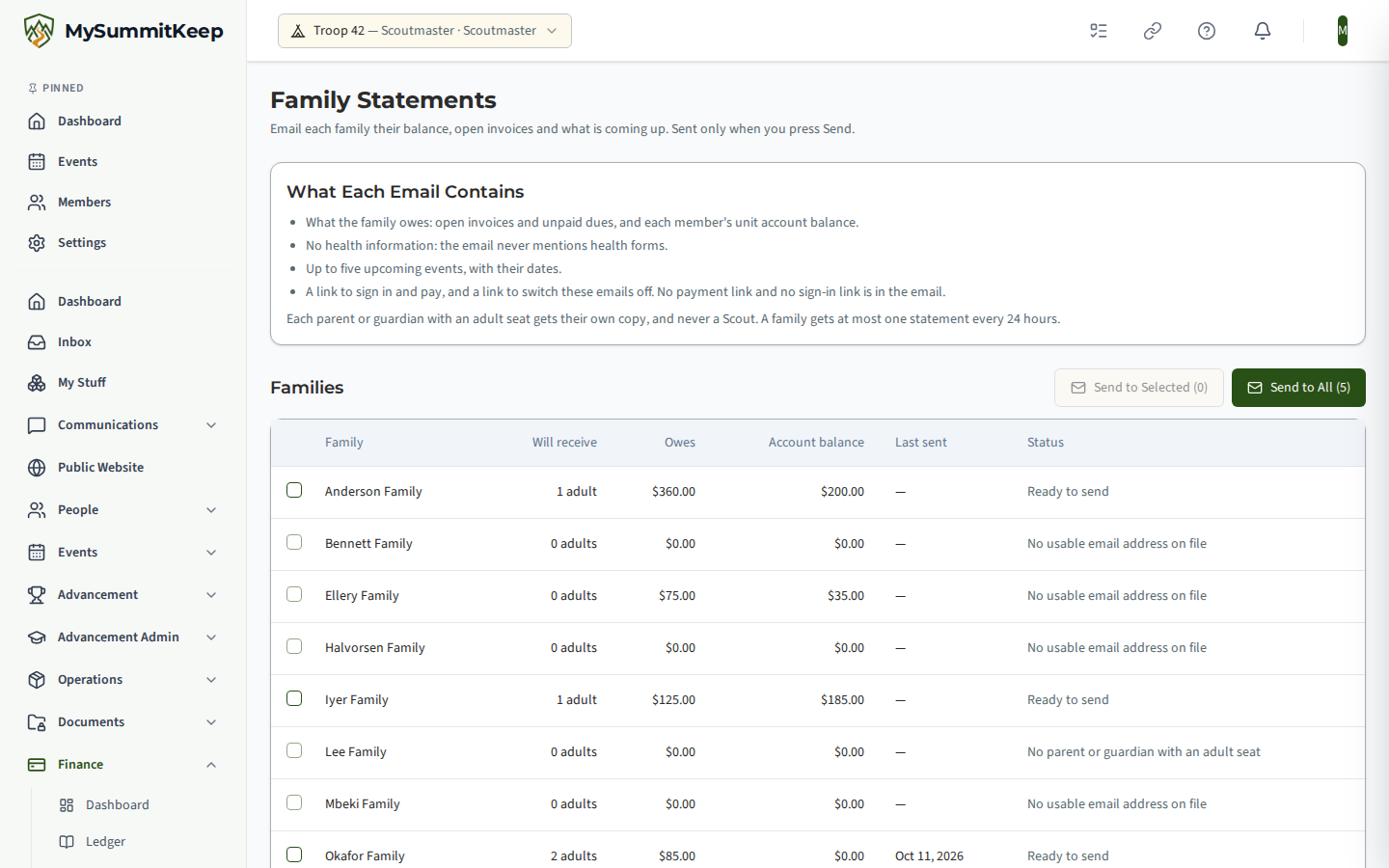
What the email says
Section titled “What the email says”- What your family owes: each open invoice with its due date and balance, and unpaid dues, with a total.
- Unit account balances: one line per member, described as the unit’s own bookkeeping balance.
- No health information. The statement never mentions health forms, in any form: it does not say whether one is on file, and the statement never reads them.
- Coming up: up to five events in the next 60 days, with their dates. Events aimed at a particular den or patrol appear only to families with a Scout in it.
- A link to sign in and pay, and a link to switch the email off.
The email carries no payment link and no sign-in link, so it cannot be mistaken for a phishing message.
Who receives it
Section titled “Who receives it”Each parent or guardian in the family who holds an active adult seat gets their own copy. Never a Scout, and never an adult who is a minor by date of birth. A parent is skipped when:
- they have no usable email address (or only a placeholder one);
- they asked not to be contacted by email;
- they switched the family statement off in Settings → Notifications;
- their address is also a Scout’s (a shared family mailbox);
- the family already received a statement in the last 24 hours.
Two parents who share one mailbox get one message. A parent whose seat is suspended still receives their own family’s statement, and can switch it off in Settings → Notifications like any other parent: turning a message off is allowed on a suspended seat.
Sending
Section titled “Sending”The list shows each family with how many adults will receive it, what they owe, their unit account balance, when a statement last went and, if a family would get nothing, why. Tick families and choose Send to Selected, or choose Send to All. A confirmation states exactly how many emails will go. Afterwards you see how many were sent and how many were skipped for each reason. Past Sends lists each send with who sent it.
Emails go out as ordinary account messages with the standard footer, and every send counts toward your daily sending allowance. Each send is written to the audit log with the families it reached (no amounts, names or addresses).
Switching it off as a parent
Section titled “Switching it off as a parent”Any adult can turn the family statement off for a unit under Settings → Notifications → Family statement. It takes effect immediately. A member whose seat is suspended is read-only, so they use their Do Not Contact preference instead, which family statements also honour.
MySummitKeep is an independent product and is not affiliated with, endorsed by, or sponsored by Scouting America (formerly the Boy Scouts of America). Scouting America, Scouts BSA, Cub Scouts, Venturing, Sea Scouts, and the Order of the Arrow are trademarks of Scouting America. Official program content shown in screenshots and examples is © Scouting America; always confirm current requirements atscouting.org. SeeTerms § 7.3.