
Your Scouts' Consents (Review, Allow, Withdraw)
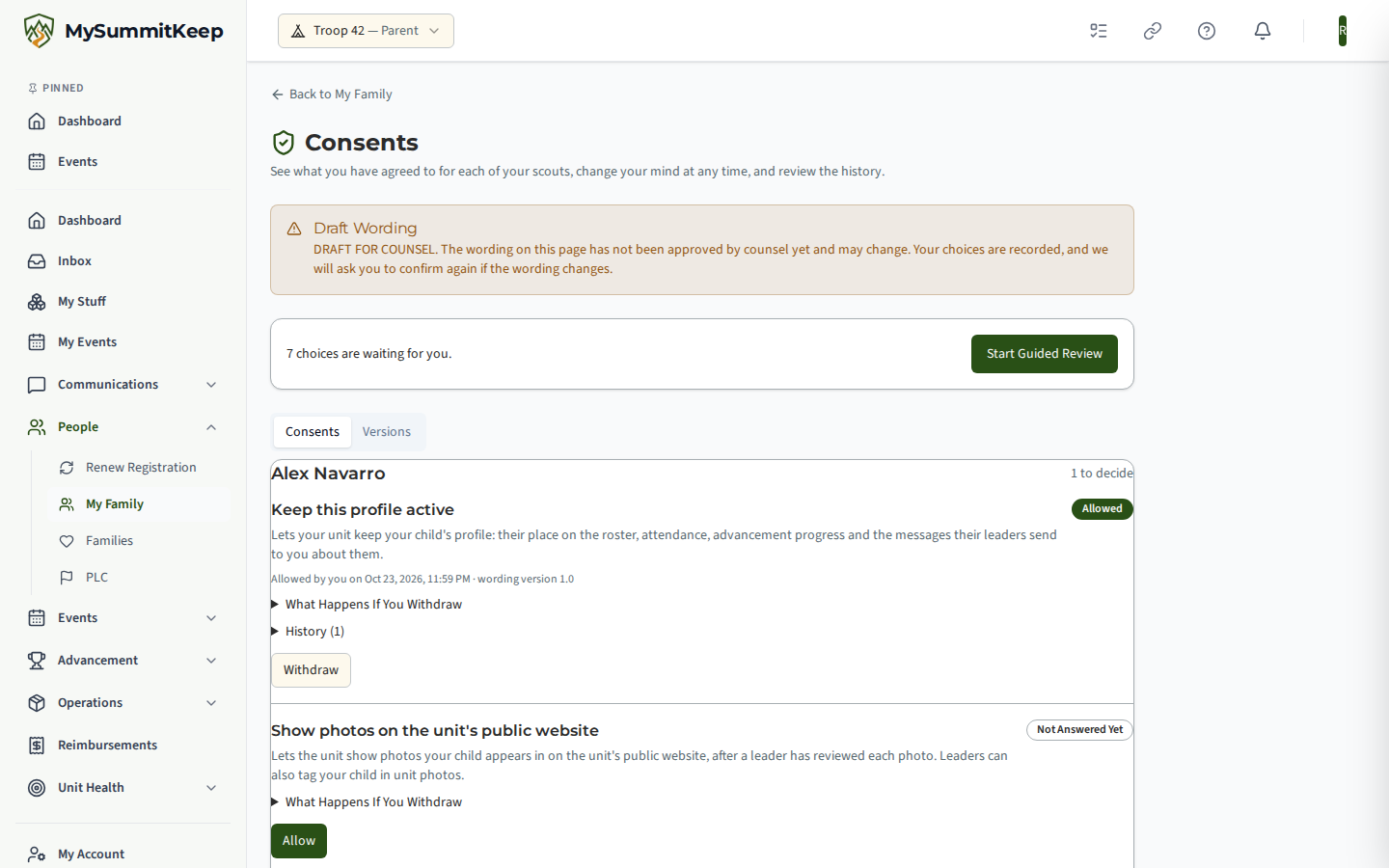
My Family, Consents is one page where you can see what you have agreed to for each of your scouts, change your mind at any time, and read the history. You only ever see and decide for scouts linked to your own account.
What you will see
Section titled “What you will see”For each scout, a list of the consents that apply to their age. Each one shows:
- What it lets us do, in plain words.
- What happens if you withdraw, so there are no surprises.
- Its state: Allowed, Not Answered Yet, Withdrawn, or Please Confirm Again.
- Who decided and when, and which version of the wording you agreed to.
- History: every time it was allowed or withdrawn.
The consents are: keeping the scout’s profile active, health and medical forms (for scouts under 13), photos on the unit’s public website, and a teen’s own login (ages 13 to 17, once teen logins are switched on).
Guided review
Section titled “Guided review”When something is waiting for you, choose Start Guided Review. It takes you through each undecided consent, one at a time. Choose Allow, or Not Now to leave it for later. Skipping never counts as a yes.
Withdraw a consent
Section titled “Withdraw a consent”Choose Withdraw next to the consent and confirm. The confirmation repeats what will change. For example:
- Keep this profile active: the profile is switched off and upcoming carpool seats, rides and duties are released. Allowing it again turns the profile back on.
- Health and medical forms: no new forms can be uploaded for your child until you allow it again. Forms already uploaded stay until you ask for them to be removed.
- Photos on the public website: photos your child is tagged in come off the unit’s public website right away. They are hidden, not deleted. A web address someone already has may keep working for a few minutes.
- A teen’s own login: the login is turned off and the profile is paused until you allow it again.
Photo withdrawal reaches photos your child is tagged in, and it does not erase copies someone has already saved. It covers the unit’s public website only, not photos inside the app.
History is permanent
Section titled “History is permanent”Every choice adds a new line to your history. Nothing is overwritten or removed, so you can always see what you agreed to and when. A withdrawal appears as a new line rather than making the old one disappear.
When the wording changes
Section titled “When the wording changes”Each consent has a wording version. If the wording changes after you agreed, the consent shows Please Confirm Again. Until you answer, your earlier choice stays in force. The Versions tab shows the version you agreed to next to the current one for each scout.
If something goes wrong
Section titled “If something goes wrong”- A scout is missing. Only scouts linked to your account in the unit you are viewing appear. Link the scout on My Family first.
- An Allow button is missing. The consent may not apply to that scout’s age, or teen logins may not be switched on yet.
- A change did not save. Refresh the page and try again. If it keeps failing, contact support.
MySummitKeep is an independent product and is not affiliated with, endorsed by, or sponsored by Scouting America (formerly the Boy Scouts of America). Scouting America, Scouts BSA, Cub Scouts, Venturing, Sea Scouts, and the Order of the Arrow are trademarks of Scouting America. Official program content shown in screenshots and examples is © Scouting America; always confirm current requirements atscouting.org. SeeTerms § 7.3.