
Counselor Sign-off by Email Link
Many merit badge counselors are registered with the council but have no MySummitKeep account. Counselor sign-off by email link lets such a counselor see one Scout’s progress on one merit badge and sign off requirements, from a link in an email, without an account. A unit leader then confirms each sign-off before it counts.
Counselors who do have an account keep using Counselor Review; this is for the ones who do not.
Sending the link
Section titled “Sending the link”Open the Scout’s badge page and use the Counselor Sign-Off by Email panel in the sidebar, then Email Sign-Off Link to Counselor.
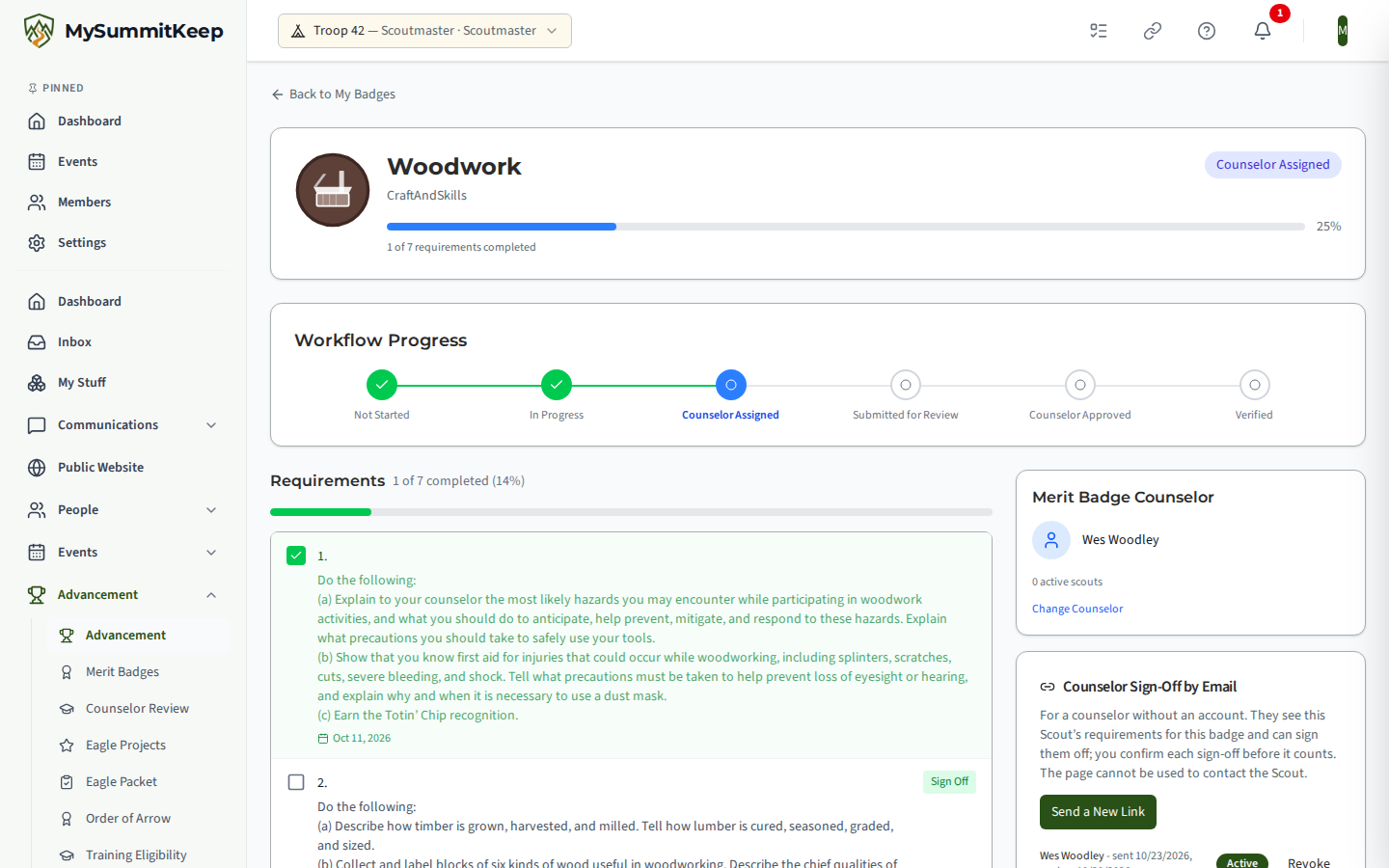
- Who can send: a leader who holds MeritBadge.Verify and is current on registration and Youth Protection. Youth cannot, whatever their position. The unit must be on Summit or Peak, and an administrator must have the counselor-signoff-links feature switched on.
- You do not type an address. The email goes to the address already on the counselor’s record, and only when the badge’s assigned counselor meets every condition below. If one fails, the panel shows the reason.
- The counselor is active and approved for this badge.
- Youth Protection training is on file with a date, and the date is current. A blank date is refused.
- Registration is not expired (if one is recorded), and there is a usable email.
- The counselor has no sign-in account (they use Counselor Review), is not linked to a youth member, and does not share an email address with a youth member.
- The counselor is not this Scout’s parent or guardian. Counselors who are parents are handled separately.
- The Scout is an active youth in your unit with any needed parental consent on file, and the badge is not already verified or withdrawn.
- A link expires after 7 days (a leader can choose 1 to 14 through the API). Sending a new one replaces the old one. A unit can send up to 50 links a day.
- The panel lists the links for this badge with their status, and Revoke stops one. Links also stop on their own when the badge is verified or withdrawn, the counselor is changed, edited, deactivated or removed, or the counselor’s email changes.
What the counselor sees
Section titled “What the counselor sees”The email names the badge and the unit, not the Scout. The page shows the Scout by First name and last initial, the badge, and the requirement checklist with each requirement’s official text and state: not started, signed off, waiting for a unit leader to confirm, or signed off.
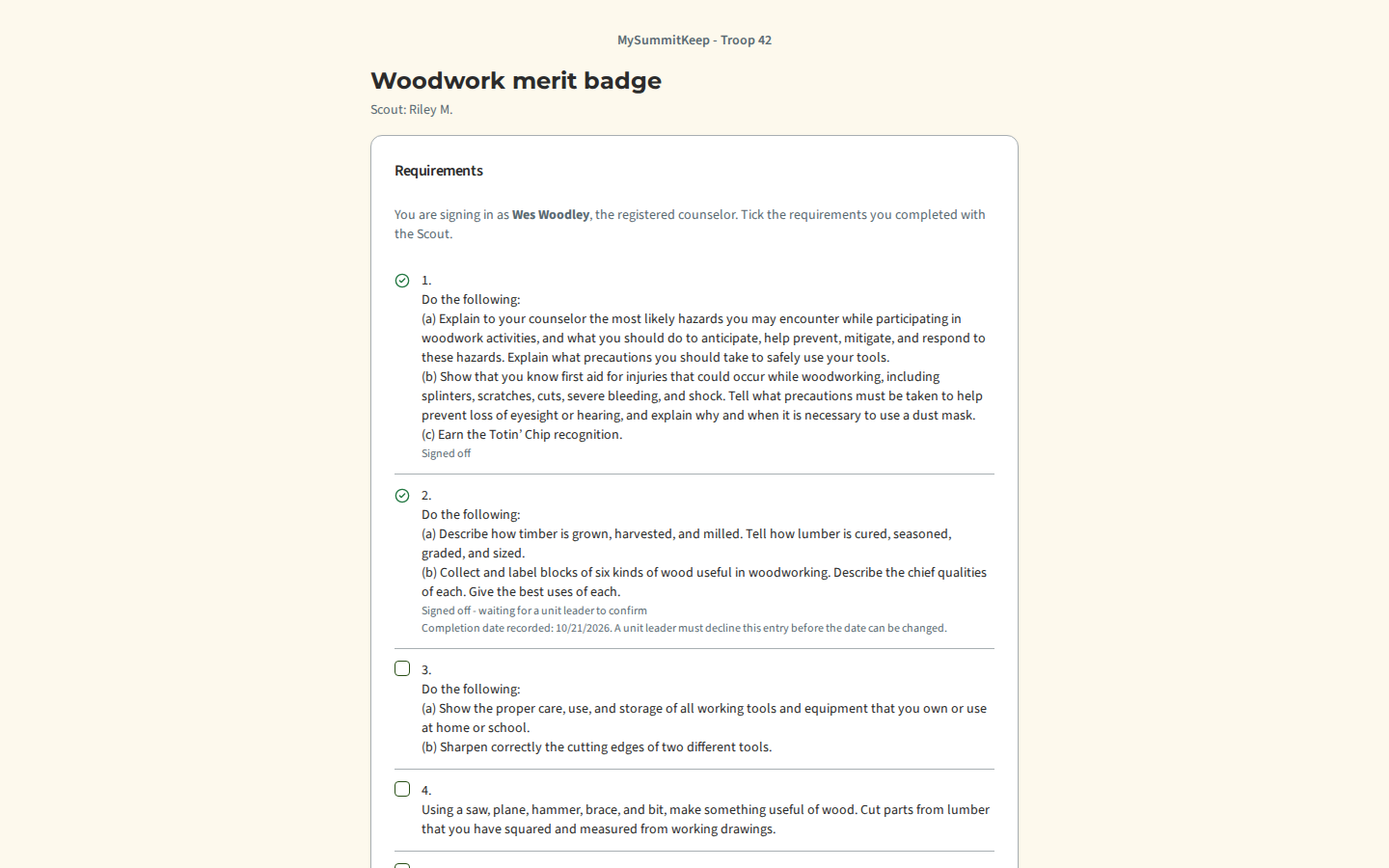
The counselor ticks the requirements they completed with the Scout, chooses one completion date (not before the Scout started the badge, not in the future) and presses Sign Off Selected, then confirms in a dialog that they are attesting as the registered counselor.
Once a requirement is signed off and waiting for a leader, its completion date is fixed. The page shows the date already recorded with a line saying a unit leader must decline the entry before the date can be changed, and submitting again from the link changes nothing and does not notify the family again. After a leader declines the entry, the counselor can sign it off again with a new date.
The page has no text boxes. It cannot be used to message the Scout, shows no contact details, birth date, rank, health information or written answers, and shows nothing about any other Scout or badge. The counselor cannot approve the badge, reject a requirement or undo a sign-off.
A link that is no longer valid, for any reason, shows one message: This link is no longer available.
If an administrator switches counselor sign-off links off for your unit, every link already sent stops working for good. Switching the feature back on does not bring them back, even a link that was sent from another server just after the switch-off; email a new link. A unit that drops to Basecamp, or the read-only period, only pauses links, and they work again when the unit recovers.
Confirming sign-offs
Section titled “Confirming sign-offs”A sign-off from a link is recorded waiting for a leader. The requirement shows “Signed off by counselor, awaiting leader confirmation”, the badge’s percentage does not move, and the badge does not change state. The Scout’s family hears about it through the usual notices (a parent is copied), and leaders who can verify badges are told once per badge.
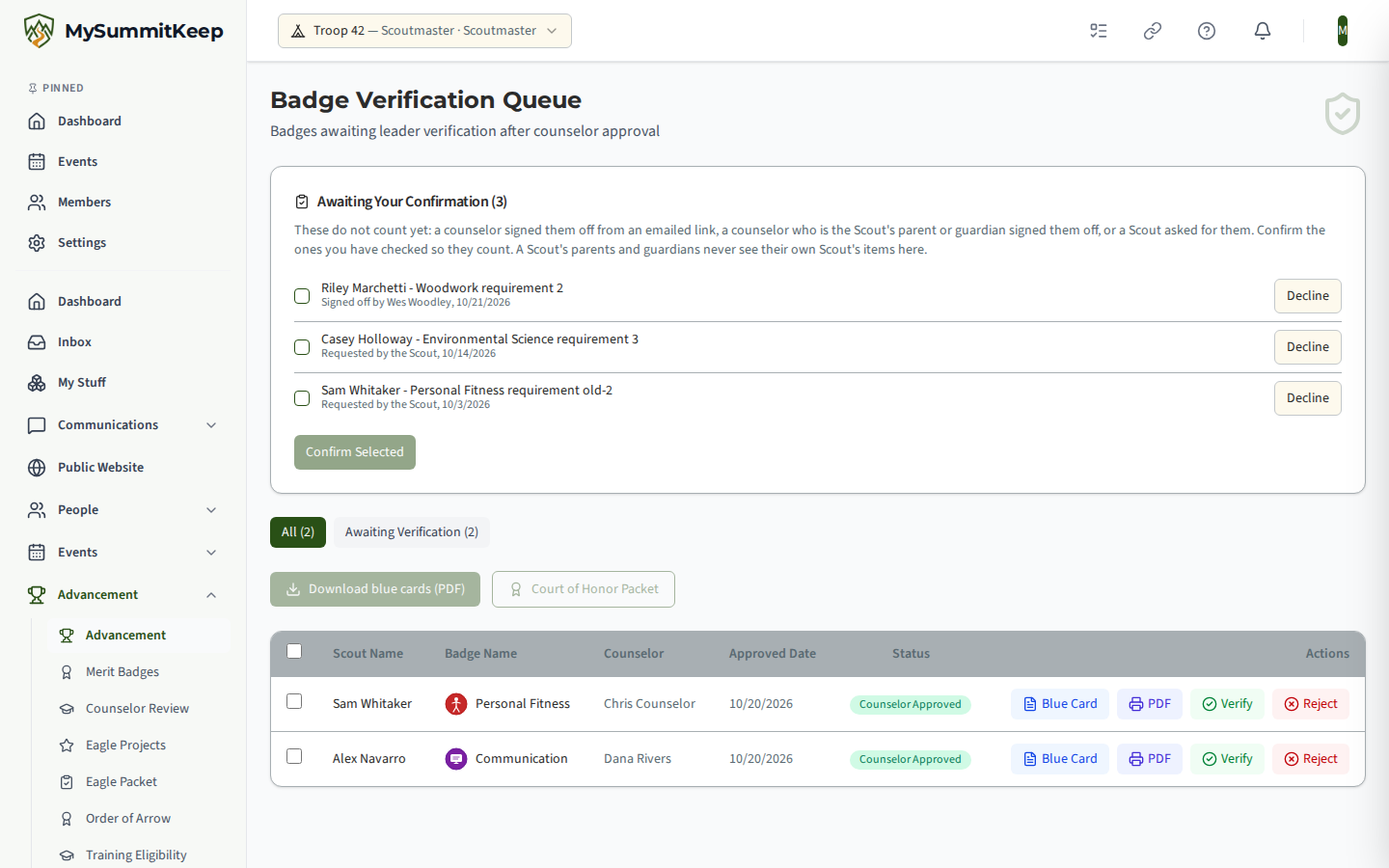
Open the Badge Verification Queue (it also counts in the Action Center). In Awaiting Your Confirmation, tick the sign-offs you have checked and press Confirm Selected: the requirements count and the percentage updates. Decline records a reason for the unit’s records; the counselor is not told.
Every link action, from sending to each sign-off, is written to the unit’s activity log with the link’s id (never the link itself).
MySummitKeep is an independent product and is not affiliated with, endorsed by, or sponsored by Scouting America (formerly the Boy Scouts of America). Scouting America, Scouts BSA, Cub Scouts, Venturing, Sea Scouts, and the Order of the Arrow are trademarks of Scouting America. Official program content shown in screenshots and examples is © Scouting America; always confirm current requirements atscouting.org. SeeTerms § 7.3.