
Expense Reimbursements
When an adult buys something for the unit (firewood for a campout, ink for the court-of-honor programs), they ask to be paid back at Reimbursements. A finance leader approves or declines the request, and an approval posts one expense to the unit ledger.
Find it in the left menu: Finance → Reimbursements.
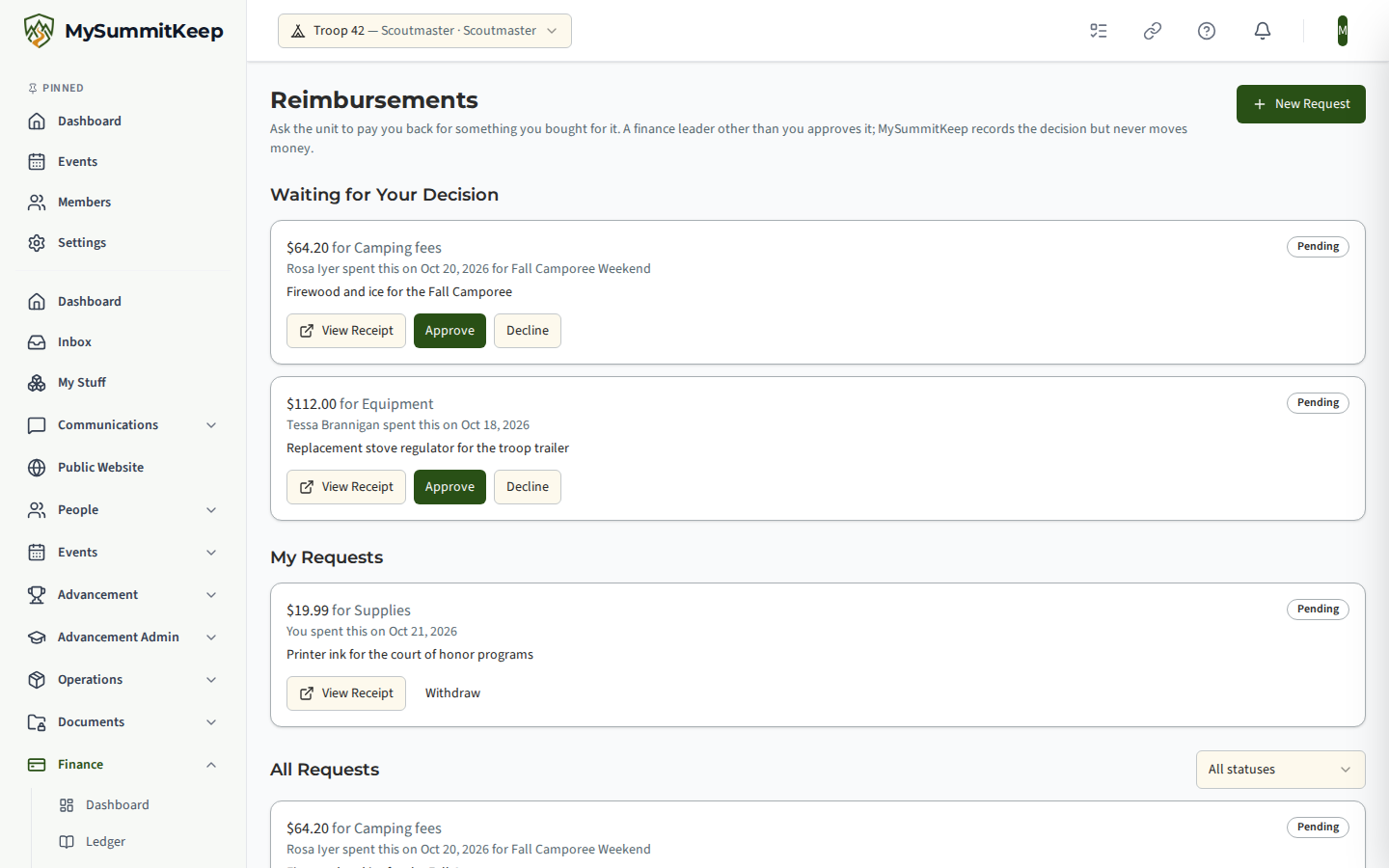
Asking to be paid back
Section titled “Asking to be paid back”Any adult with an active seat in the unit can choose New Request. Youth members cannot, and a member whose seat is suspended is read-only.
- Enter the amount (up to $25,000), a category and what it was for.
- Choose the date of the expense. It cannot be in the future or more than a year old.
- Pick the event it was for, if there is one.
- Add a photo of the receipt: JPEG, PNG or WebP, up to 10 MB. On a phone the camera opens directly.
A request cannot be edited once it is sent. To change anything, withdraw it (while it is still pending) and send a new one. You can have 10 pending requests at a time.
The unit keeps every receipt image for seven years, on the same schedule as its ledger entries (or its chartered organization’s own retention policy, whichever is longer). That includes receipts on declined and withdrawn requests: withdrawing or declining a request never deletes the receipt. A finance leader can still open it at audit time.
You see the state of each request under My Requests: Pending, Approved, Declined or Withdrawn, with the approved amount, the decision note and who decided.
Who decides
Section titled “Who decides”A request is decided by an adult with the Financials.Manage permission (the Treasurer, and unit admins) who is not:
- the person who asked, even if they have a second member record signed in with the same account, or
- anyone in the same household as the person who asked.
Everyone the rule admits is told in the app when a request arrives, and the Reimbursements to Decide row on the dashboard’s Action Center counts the requests you may decide. A button that is not available to you stays disabled and says why.
When the unit has only one finance person
Section titled “When the unit has only one finance person”If nobody else holds finance permission (or the only others are the asker’s family), a unit leader (Scoutmaster, assistant, unit admin) takes the decision instead, as second approver. That leader can approve the request as paid to the member, but cannot credit the member’s account or choose a fund. If no leader qualifies either, the request stays pending and finance leaders see a banner telling them to give a second adult the Treasurer position on Manage Positions.
Approving and declining
Section titled “Approving and declining”Approve asks for:
- the approved amount. It defaults to the requested amount; a lower amount needs a note saying why, and a higher one is never allowed;
- how it was settled: Paid to the member (the default; cash, cheque or transfer outside MySummitKeep), or Credit the member’s unit account instead;
- an optional cheque number or reference, and an optional fund.
Approving posts, in one step, a Debit on the unit ledger under the request’s category, dated today in Central time and recorded in the name of the person who approved. If you chose the account credit, it also posts one Credit to the asker’s own unit account and marks the ledger entry as already cleared, because no bank line will ever match it. The asker is told in the app.
Decline requires a reason, which the asker is shown. Declined is final: they send a new request.
Two people clicking Approve at once cannot post twice: the second is told This request was already decided. Refresh the page. and nothing is posted.
Correcting an approved request
Section titled “Correcting an approved request”There is no un-approve. If an approval was wrong, reverse its entry on the unit ledger. The request then shows a Ledger entry reversed badge so the two records agree.
Who can see what
Section titled “Who can see what”| Person | Sees |
|---|---|
| The person who asked | Their own requests and their receipt |
| A finance leader (Financials.Manage) | Every request and every receipt, plus the ones waiting for them |
| A leader acting as second approver | Only the requests they may decide, and their receipts |
| Everyone else | Nothing about other people’s requests |
Receipts are stored privately. Opening one gives a link that works for 15 minutes.
MySummitKeep is an independent product and is not affiliated with, endorsed by, or sponsored by Scouting America (formerly the Boy Scouts of America). Scouting America, Scouts BSA, Cub Scouts, Venturing, Sea Scouts, and the Order of the Arrow are trademarks of Scouting America. Official program content shown in screenshots and examples is © Scouting America; always confirm current requirements atscouting.org. SeeTerms § 7.3.