
Alumni List
People move on, and many are glad to hear about a reunion, an Eagle ceremony or a service day. The Alumni list lets your unit keep in touch with them, but only with their own yes. Nobody is added because a leader typed them in, and the list never gives anyone access to your unit.
Find it in the left menu: People → Alumni.
You will find it under People in the menu, at /members/alumni.
Who can use it
Section titled “Who can use it”Only unit admins, those who hold the unit-settings permission (Settings.Update), can see the Alumni list, invite people to it and email it. Leaders without that permission, parents and Scouts cannot see that the list exists. It needs the Summit or Peak plan.
Who can be on the list
Section titled “Who can be on the list”A person can be invited only if all of these are true:
- They left your unit (they have no active seat in it).
- They are an adult, or a former Scout who is now 18 or older. A former Scout must have a date of birth on file that shows 18 or older and must have their own account at an email address no one else uses. A parent cannot say yes for an adult child, so a shared family address does not qualify.
- They have a real email address.
- They are not under 18, not waiting on parental consent, and their address is not used by a current Scout.
These checks run again when the person answers and again every time you send, so someone who rejoined the unit, or whose date of birth was corrected to under 18, is skipped automatically. When someone cannot be added, MySummitKeep says only that “This person can’t be added to the alumni list.”, without giving a reason that would reveal anyone’s age.
What is kept
Section titled “What is kept”Only a name and one email address. There is no phone, home address, date of birth, rank, photo or note on an alumni entry. The person’s consent (the time and the version of the wording they agreed to) is kept so you can show they said yes.
People on the list have no access to your unit: no login is created, they do not appear on your roster, they do not count toward your seats and they never see your messages, events or files.
Inviting a former member
Section titled “Inviting a former member”- Open People, then Alumni.
- Click Add a Former Member.
- Search for the person and click Send Invitation.
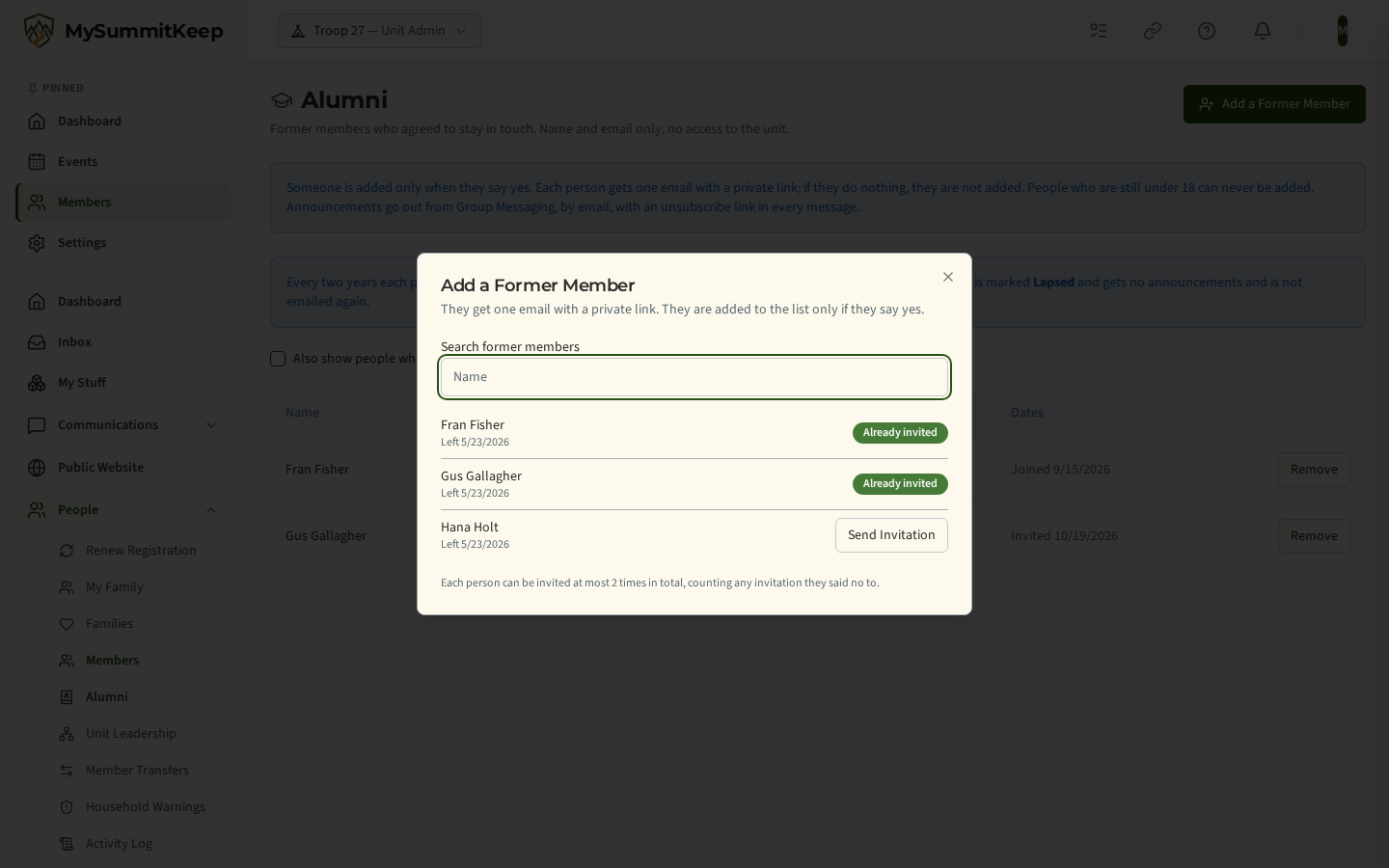
The dialog lists only former members of your unit and shows a name and whether they can be invited, never an email address or date of birth.
They get one email with a private link. It explains what the unit would keep, and doing nothing means they are not added. The email and the page the link opens say the same thing. They cover these points:
- Your unit keeps their name and email address and nothing else from their time in the unit.
- Unit leaders may send occasional announcements by email, such as reunions, Courts of Honor and service projects. No text messages.
- They get no access to your roster, calendar or records, and nobody else on the list can see their details.
- Every email has an unsubscribe link, and they can also ask a unit leader to remove them at any time.
- They are asked to confirm again every two years. If they do not answer, the emails stop.
The text also says the list is for adults only and that anyone under 18 should not accept. MySummitKeep writes this text, so you cannot edit it for your unit. The link works once and stops working after 30 days.
If you remove someone from your unit, the Members list offers Invite to Alumni List right afterwards.
The person’s answer
Section titled “The person’s answer”The link opens a page that needs no sign-in:
- Yes, keep me on the alumni list: they must first tick the box that reads “I am (their first name) and I am 18 or older”. Then they are on the list.
- No thanks: they are not added, and their name and address are erased. They will not be asked again unless a leader sends a new invitation (see below).
- If the link has expired, was already used, or can no longer apply, the page says only “This link is no longer valid.”
No admin, leader, parent or MySummitKeep staff member can answer for someone. There is no “mark as agreed” button and no bulk import.
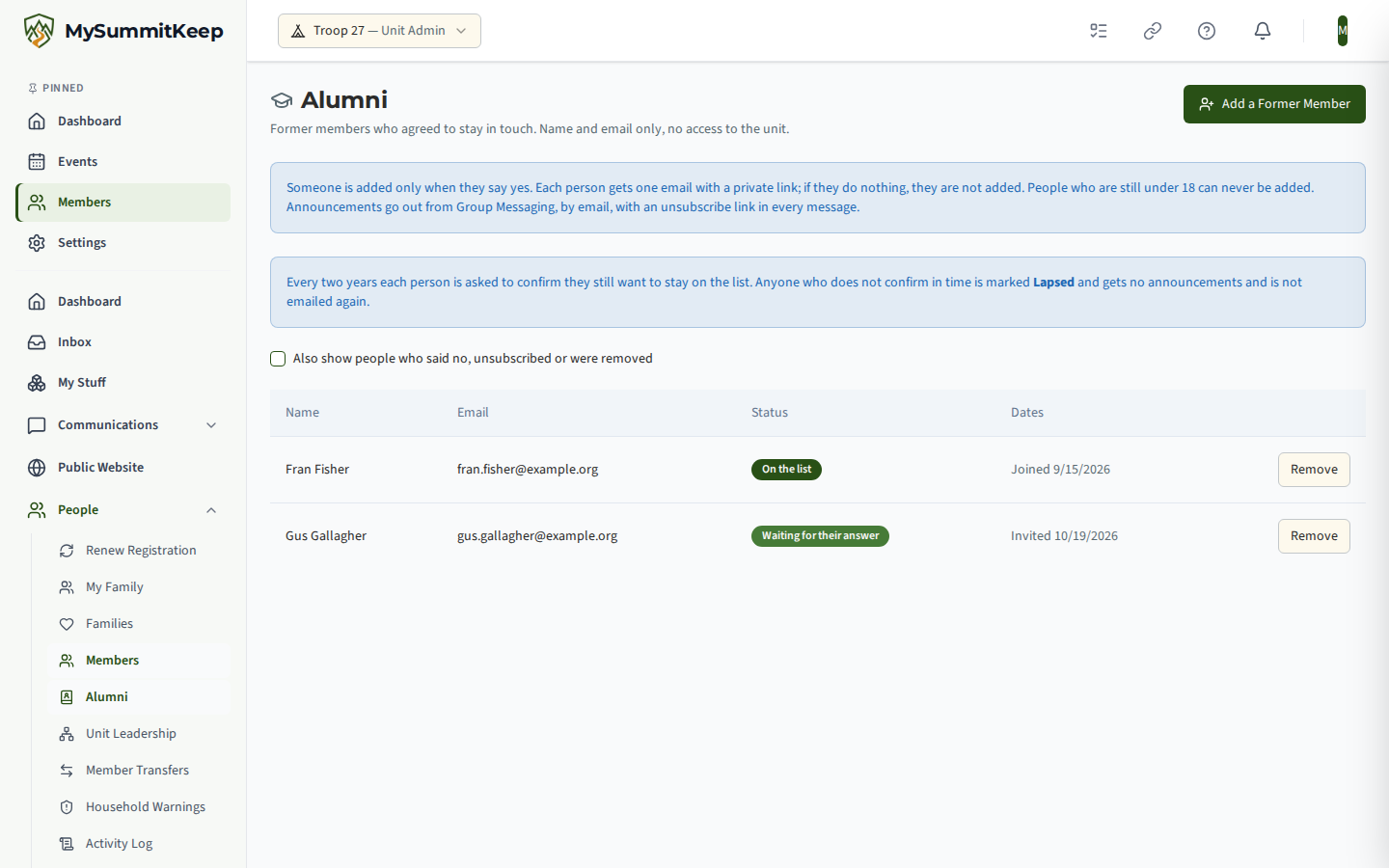
The list shows each person’s status: Waiting for their answer, On the list, and, if you tick Also show people who said no, unsubscribed or were removed, those who ended their entry. An ended entry shows no email address.
Limits that protect people from unwanted mail
Section titled “Limits that protect people from unwanted mail”- A person can be invited at most twice, at least 30 days apart.
- Someone who said no can be invited again, but only when a leader chooses to. Nothing sends it for you: no reminder, no reconfirmation round and no bulk action ever invites them. In Add a Former Member their entry shows that they said no and when, and Invite Again asks you to confirm that you know they said no before. Because their details were erased, the invitation uses what MySummitKeep holds for them as a former member, and the 30-day wait is counted from the day they said no.
- The limit of two invitations counts in total, including an invitation the person said no to. Someone who said no to two invitations cannot be invited a third time; the dialog shows Invitation limit reached.
- Someone who unsubscribed can never be invited again by your unit.
- Each time you invite someone again after a no, it is written to your unit’s change log as a re-invitation.
- Removing an entry erases the name and address but keeps a note that stops the limits from being reset.
- One admin can send only a limited number of invitations in a day.
Asking people to reconfirm every two years
Section titled “Asking people to reconfirm every two years”Consent does not last forever. Two years after a person last said yes, their entry lapses: it is marked Lapsed on the Alumni page and they get no announcements until they confirm again. Nothing is deleted when an entry lapses, and you can still see the person’s name and email. A lapsed person is not emailed again, because the consent text promises that the emails stop.
- About 60 days before an entry would lapse, MySummitKeep emails the person automatically, once, with the same kind of private link as the first invitation. Their yes renews the entry for another two years; their no ends it and erases their details.
- A banner on the Alumni page shows how many people are due or lapsed. Click Ask Everyone Who Is Due to send the request now, or Ask to Reconfirm beside one person. You can ask the same person again by hand only after 30 days, and only while their entry is due and has not yet lapsed.
- Each entry shows when it was last confirmed. Only the person’s own answer renews it. No admin can renew an entry for them.
- The same safety checks apply: someone who rejoined the unit, or whose address is now used by a current Scout, is not asked.
Emailing the list
Section titled “Emailing the list”- Open Communications, then Group Messaging.
- Choose the Alumni tab.
- Write the subject and message and click Send Message.
The tab shows how many people will get it (“3 people will get this by email”). Alumni are never mixed into a send to members.
- It goes by email only, one email per person. Nobody sees anyone else’s address.
- Every email ends with why they are receiving it and their own unsubscribe link, which works with no sign-in.
- Your message passes the same content check as other group messages. A message the check blocks is not sent at all, because email has no review queue.
- Alumni sends count toward your sending limit like any other group message.
- People whose entry has lapsed are skipped until they reconfirm.
- Anyone who turned email off or asked for no contact from your unit, or who opted out of marketing email, is skipped, whatever they agreed to earlier.
- Afterwards you see how many were not emailed because they no longer qualify, and how many could not be reached.
Unsubscribing and removing
Section titled “Unsubscribing and removing”- Unsubscribe: the person clicks the link in any message. They are taken off at once, their address is erased, and your unit cannot invite them again.
- Remove: on the Alumni page, click Remove beside the entry. Their name and email are erased and they get no more announcements.
Related
Section titled “Related”MySummitKeep is an independent product and is not affiliated with, endorsed by, or sponsored by Scouting America (formerly the Boy Scouts of America). Scouting America, Scouts BSA, Cub Scouts, Venturing, Sea Scouts, and the Order of the Arrow are trademarks of Scouting America. Official program content shown in screenshots and examples is © Scouting America; always confirm current requirements atscouting.org. SeeTerms § 7.3.