
Youth Leadership Council
The Leadership Council page is the working space for your unit’s youth-led leadership body: the roster, upcoming meetings, agendas, attendance and the action items that carry from one meeting to the next. Open it at /leadership-council.
Find it in the left menu: People → Leadership Council (labelled PLC in a Troop, Officers in a Crew or Post, Quarterdeck on a Ship).
The name depends on your unit type
Section titled “The name depends on your unit type”The page heading and the short label used on buttons follow the type of unit:
| Unit type | Heading | Short label |
|---|---|---|
| Troop | Patrol Leaders’ Council | PLC |
| Crew | Crew Officers’ Council | Officers |
| Ship | Quarterdeck | Quarterdeck |
| Post | Officers’ Council | Officers |
Packs do not have a leadership council. A Pack that opens the page sees a Leadership Council notice saying the council “isn’t available for this unit type. It applies to Troops, Crews, Ships, and Posts.”
Under the heading the page reads “Roster, meetings, agendas, attendance, and action items for your” short label. When your unit’s council has a chat channel, a PLC channel style button (named with your short label) takes you straight to it. See Channels & Group Messaging.
Layout
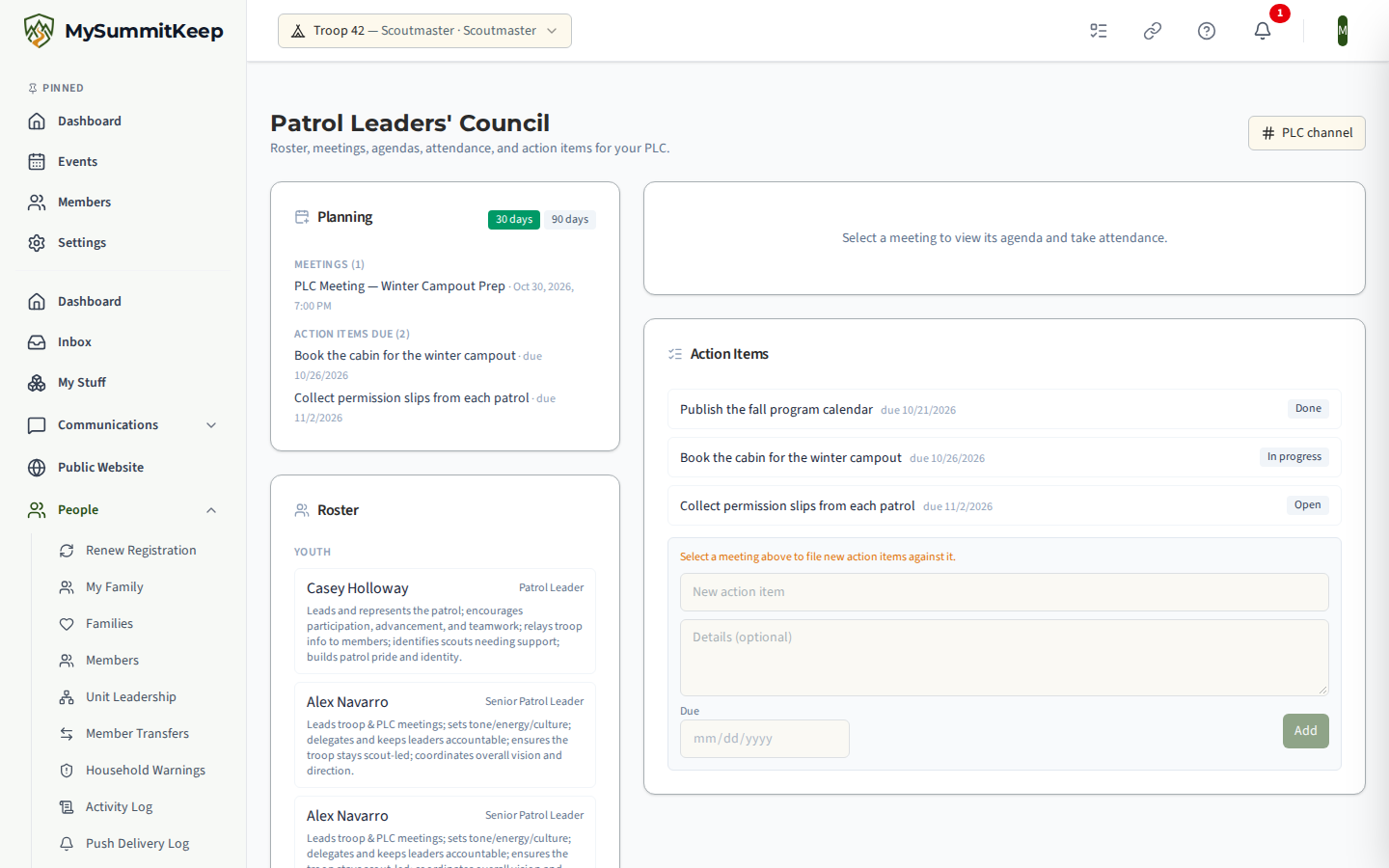
Section titled “Layout”On a wide screen the left column holds Planning, Roster and Meetings, and the right column holds the selected meeting’s detail and the Action Board. Until you pick a meeting, the right column says “Select a meeting to view its agenda and take attendance.”
Planning
Section titled “Planning”Planning looks ahead with a 30 days / 90 days switch. For the window you pick it lists Meetings scheduled and Action items due, or “None scheduled” and “None due”.
Roster
Section titled “Roster”The roster is built from positions of responsibility, so it fills in as you assign them. Members are split into Youth and Advisors, each with their role and, if set, a line describing their responsibility. If nobody holds a council position yet, the card says to assign positions of responsibility to populate the roster. See Ranks, Positions of Responsibility & Adventures.
Meetings
Section titled “Meetings”New PLC meeting (using your short label) opens a small form with Meeting title, Start and End. Create adds it to the list; click a meeting to open it.
Inside a meeting
Section titled “Inside a meeting”Agenda
Section titled “Agenda”Add an item with a title, optional details and an estimated number of minutes. Each item has a status you cycle through by clicking it: Planned, Discussed, Deferred. Open action items from earlier meetings carry forward onto the agenda automatically, marked Carried forward.
A leader can also add a Planning suggestions item from the dashboard’s Prepare The Planning Meeting card: one line listing the event types held last year that are not on this year’s calendar and the count of advancement waiting for approval, with no Scout named. It is added once per meeting and can be edited or removed like any other item. See Dashboard Recommendations.
Attendance
Section titled “Attendance”The Attendance card shows how many attendees have confirmed and notes that only confirmed attendees count toward SYT compliance.
- Each person shows Invited or Confirmed. Guests who are not on the roster are tagged Guest.
- A member confirms their own place with I’ll attend. Advisors can Confirm on someone else’s behalf.
- Mark each person Present, Absent or Excused, then click Save Attendance.
- To add someone outside the roster, choose Invite a member… from the drop-down and click Invite.
The Action Board
Section titled “The Action Board”The Action Board lists the council’s action items. Each item shows its title, due date and details, and a status button that steps it from Open to In progress to Done. Open action items carry forward onto a meeting agenda automatically.
To add one, select a meeting first (the form is disabled with a reminder until you do), then fill in New action item, optional details and a Due date and click Add.
Related: Key 3 Meetings (the adult counterpart for your unit leader, Committee Chair and Chartered Organization Representative), Patrols, Dens & Divisions, Event Roster, Roles & Attendance.
MySummitKeep is an independent product and is not affiliated with, endorsed by, or sponsored by Scouting America (formerly the Boy Scouts of America). Scouting America, Scouts BSA, Cub Scouts, Venturing, Sea Scouts, and the Order of the Arrow are trademarks of Scouting America. Official program content shown in screenshots and examples is © Scouting America; always confirm current requirements atscouting.org. SeeTerms § 7.3.