
Unit Leadership, Success Plan & Self-Assessment
Four pages help a unit see where it stands and keep its leadership paperwork honest: Unit Leadership (who holds each position), the Unit Success Plan (a lifecycle checklist), the Unit Self-Assessment (14 indicators) and Unit Key Three (the charter signatories). The org chart is for leaders; Unit Key Three is part of the Summit and Peak plans (with the Leadership Council workspace); the Unit Success Plan and Unit Self-Assessment are available on every plan, including Basecamp.
Find it in the left menu: People → Unit Leadership.
Unit Leadership org chart
Section titled “Unit Leadership org chart”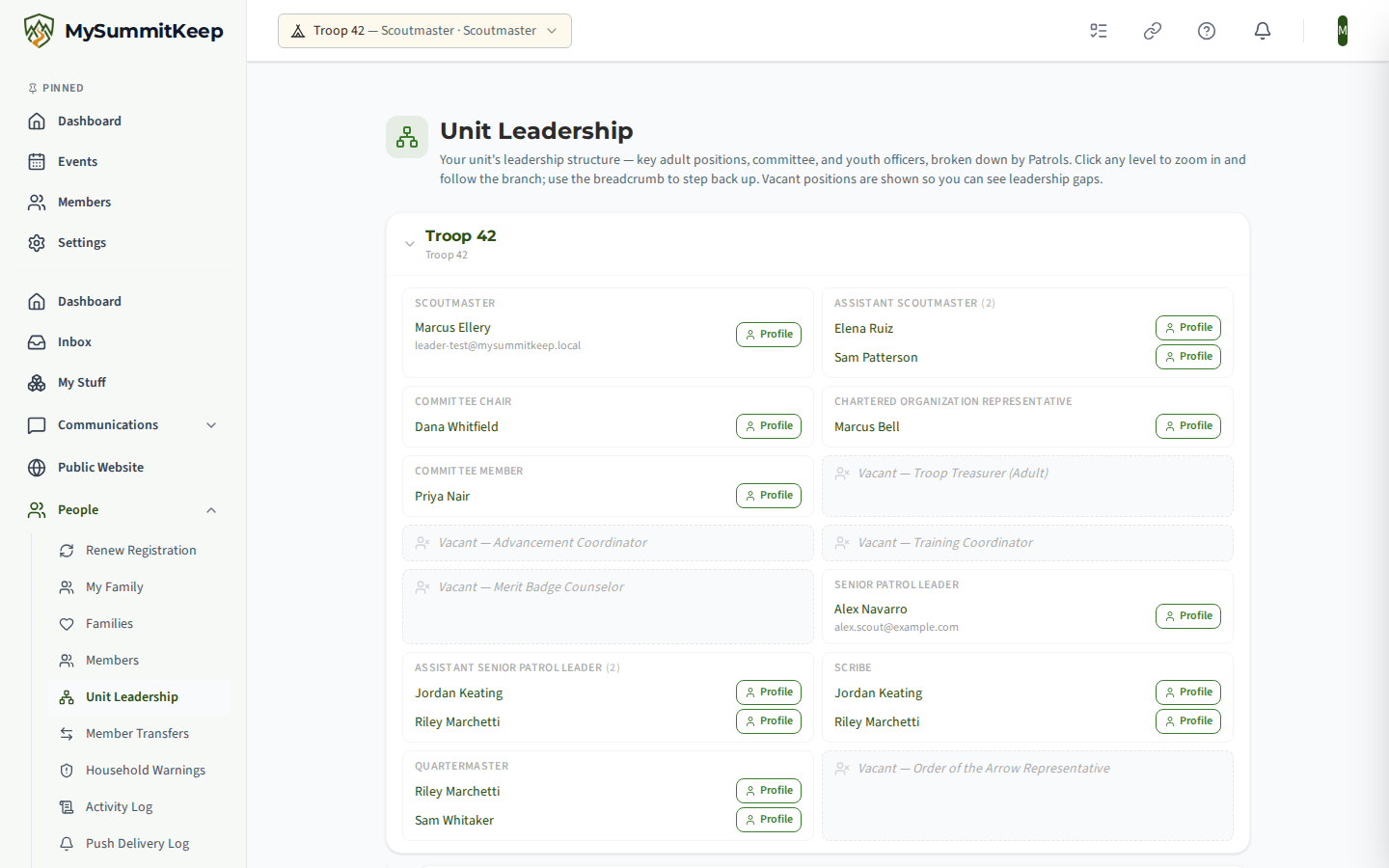
Open Unit Leadership (/unit/org-chart). It is your unit’s own chart: “key adult positions, committee, and youth officers,” broken down by your subdivisions (dens, patrols or divisions) when your unit type has them. Crews and Posts get a flat chart with officers and members directly on the unit node.
- Click any level to zoom into that branch; use the breadcrumb to step back up. The root crumb carries your unit’s name.
- Each filled position shows who holds it, with a Profile link to that member. Positions that can have several holders list them all.
- Vacant positions appear as “Vacant: Role”, so leadership gaps are visible at a glance.
- While a member’s own membership is suspended, contact details are withheld and the page says so.
If no positions are assigned yet, the page reads No leadership chart available and explains that positions will appear once they are assigned. This chart is separate from the commissioner org chart; see Commissioner Dashboard & Ops Overview for that one.
Unit Success Plan
Section titled “Unit Success Plan”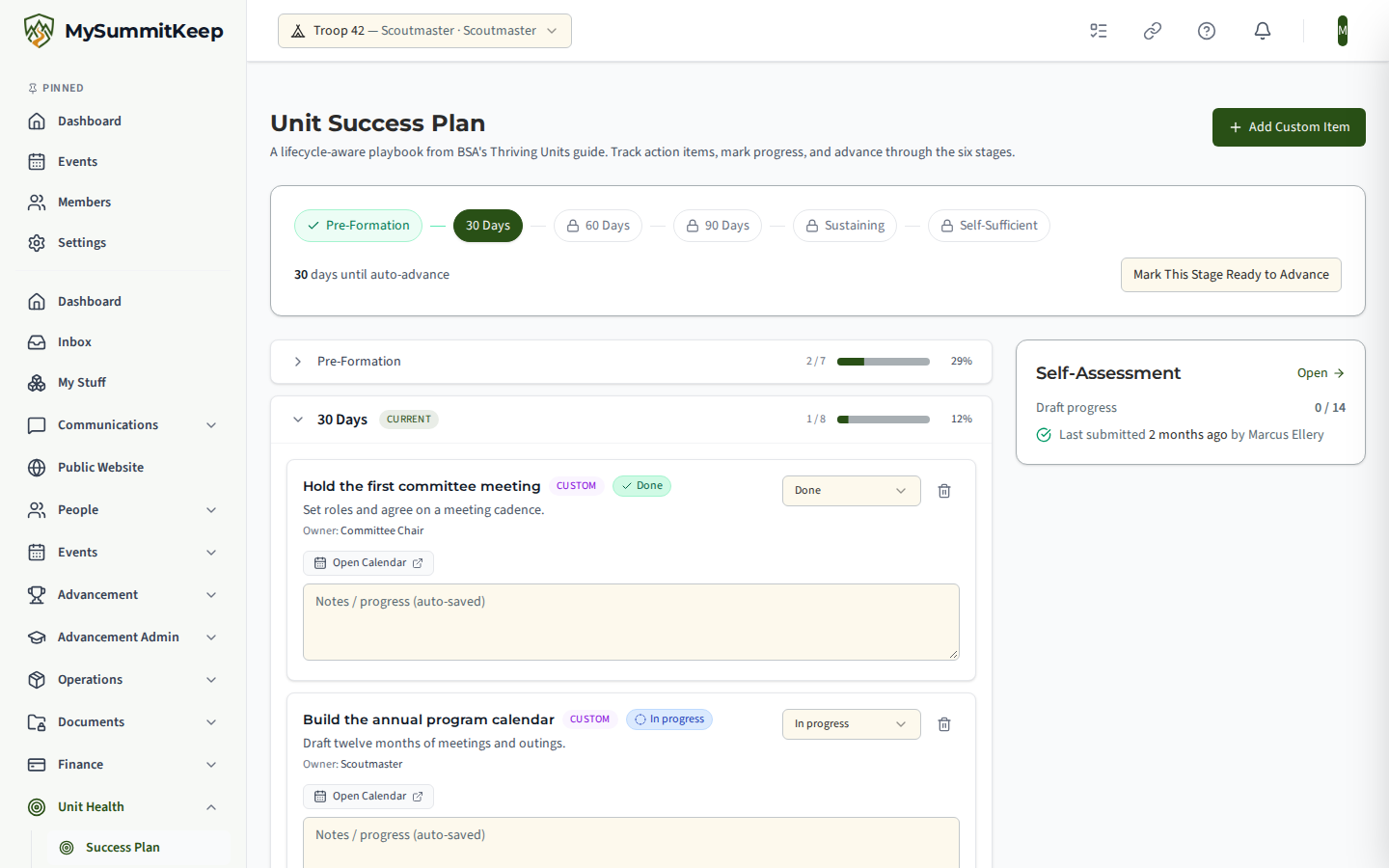
The Unit Success Plan (/unit/success-plan) is “a lifecycle-aware playbook from BSA’s Thriving Units guide. Track action items, mark progress, and advance through the six stages.”
The six stages
Section titled “The six stages”A tracker strip across the top shows where the unit is: Pre-Formation, 30 Days, 60 Days, 90 Days, Sustaining and Self-Sufficient. It also shows how many days remain until the unit auto-advances to the next stage. If a commissioner has placed a hold, the plan says Commissioner hold in place with the reason, and auto-advance is paused.
Working the checklists
Section titled “Working the checklists”Each stage is an expandable section showing completed / total items, a progress bar and a percentage. The current stage is open and marked Current. Stages that have not started yet are shown with a lock and are read-only.
For each action item, leaders can set the status to Not started, In progress or Done, and add notes, which save on their own after you stop typing. Many items include a quick link into the right part of the app, such as Open Training, Open Calendar or Open Recharter.
Advancing and customizing
Section titled “Advancing and customizing”Unit admins can:
- Mark This Stage Ready to Advance, which asks for confirmation. The previous stage is marked complete and the next stage’s action items unlock.
- Add Custom Item, which opens a form for Stage, Title (required), Description, Owner role (optional) and a Quick link. Custom items can be removed later.
Leaders can edit item status and notes; advancing and custom items need an admin.
Unit Self-Assessment
Section titled “Unit Self-Assessment”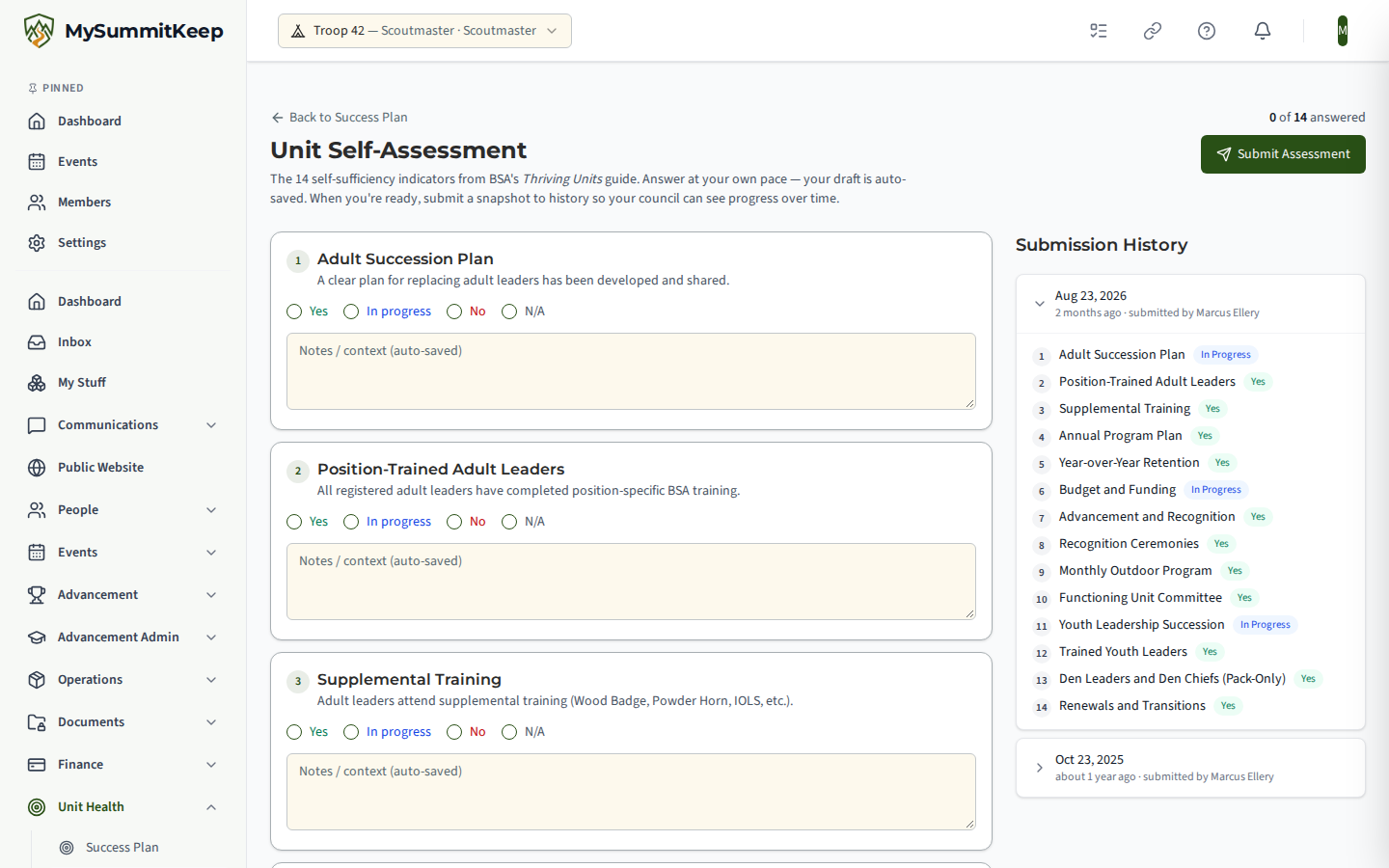
The Unit Self-Assessment (/unit/self-assessment) covers “the 14 self-sufficiency indicators from BSA’s Thriving Units guide.” The indicators are:
- Adult Succession Plan
- Position-Trained Adult Leaders
- Supplemental Training
- Annual Program Plan
- Year-over-Year Retention
- Budget and Funding
- Advancement and Recognition
- Recognition Ceremonies
- Monthly Outdoor Program
- Functioning Unit Committee
- Youth Leadership Succession
- Trained Youth Leaders
- Den Leaders and Den Chiefs (Pack-Only)
- Renewals and Transitions
Answer each one Yes, In progress, No or N/A, with optional notes. Your draft is saved automatically; the header counts how many are answered and shows who edited last and when.
When you are ready, click Submit Assessment. If any indicator is unanswered you are asked to confirm. Submitting locks a snapshot into the Submission History list on the right, and a fresh empty draft begins. The Success Plan’s Self-Assessment card links here, shows draft progress and the last submission, and nudges you when the last one is six months old or more.
Adult leaders can answer and submit; everyone else sees the draft read-only.
Unit Key Three
Section titled “Unit Key Three”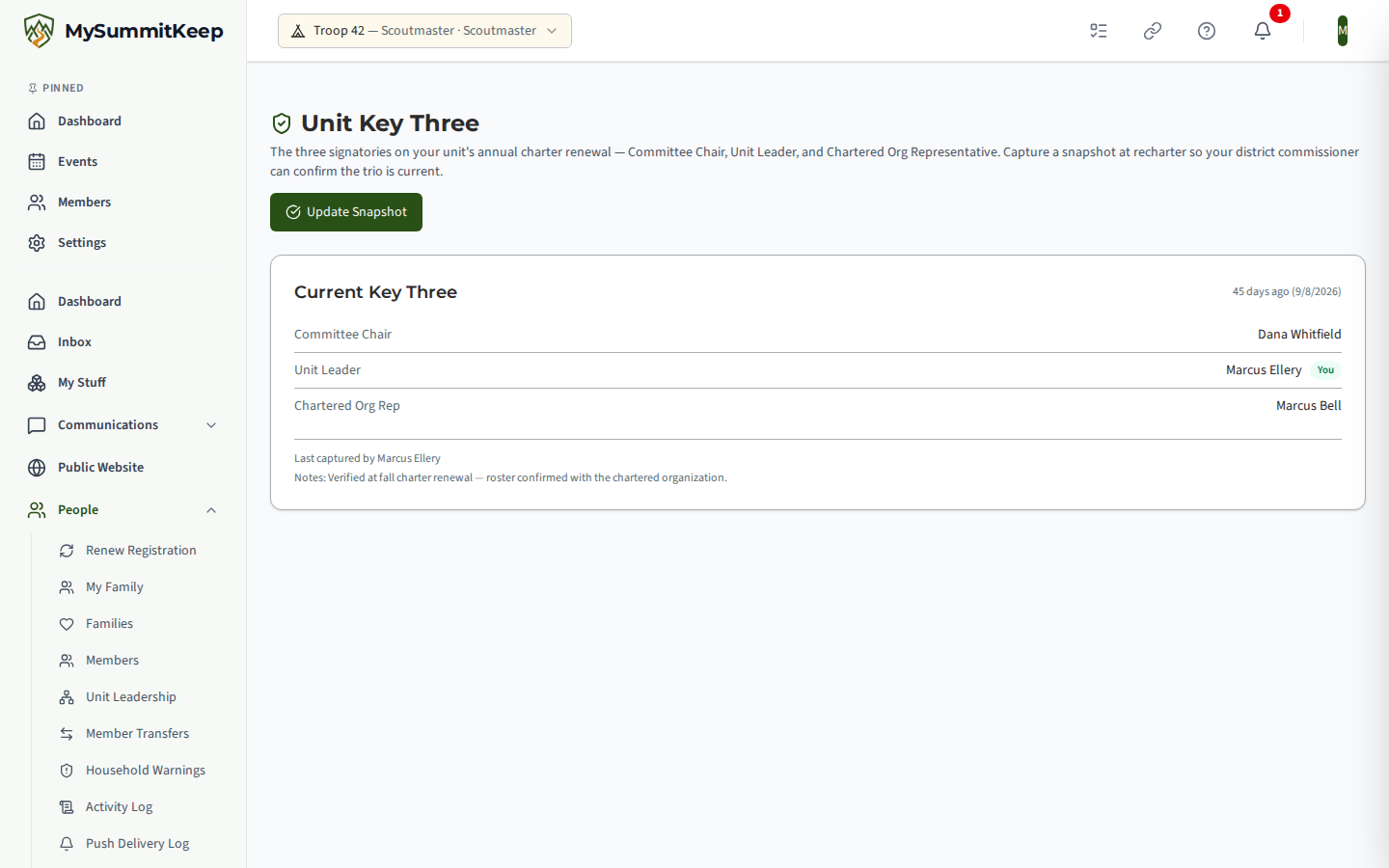
Unit Key Three (/unit/key-three) covers “the three signatories on your unit’s annual charter renewal: Committee Chair, Unit Leader, and Chartered Org Representative.”
The Current Key Three card lists the three roles with the person on file, a You tag next to yourself, and when the snapshot was last captured, plus who captured it and any verification notes. A role without a captured name reads “Vacant / not captured.”
A banner warns when a snapshot is older than a year, or when none has ever been captured, because BSA charters renew annually.
People who can capture see Capture Snapshot (or Update Snapshot once one exists). The Capture Key-3 Snapshot form has a member picker for each of the three roles and Verification notes; pick at least one person, then click Capture Snapshot. Only the unit’s Key Three, a senior unit leader or the district commissioner can capture a snapshot; everyone else sees the page read-only. See Key-3 Roster Freshness & Snapshots for the commissioner side. The people on the current snapshot also make up the roster for Key 3 Meetings.
Related: Recharter, Annual Planning & Meeting Planner.
MySummitKeep is an independent product and is not affiliated with, endorsed by, or sponsored by Scouting America (formerly the Boy Scouts of America). Scouting America, Scouts BSA, Cub Scouts, Venturing, Sea Scouts, and the Order of the Arrow are trademarks of Scouting America. Official program content shown in screenshots and examples is © Scouting America; always confirm current requirements atscouting.org. SeeTerms § 7.3.