
Document Templates & Completion Report
Document Templates let you build a form once, such as an activity consent and release, a permission slip or a health form, and then assign it to the members who need to complete it. Members fill it out in the app, you track completion, and a PDF is available afterwards. Open it from Documents → Document Templates in the left menu (/document-templates).
Find it in the left menu: Documents → Document Templates.
This is a different tool from the Document Vault. The Vault stores files you upload. Templates are fillable forms that collect answers and signatures.
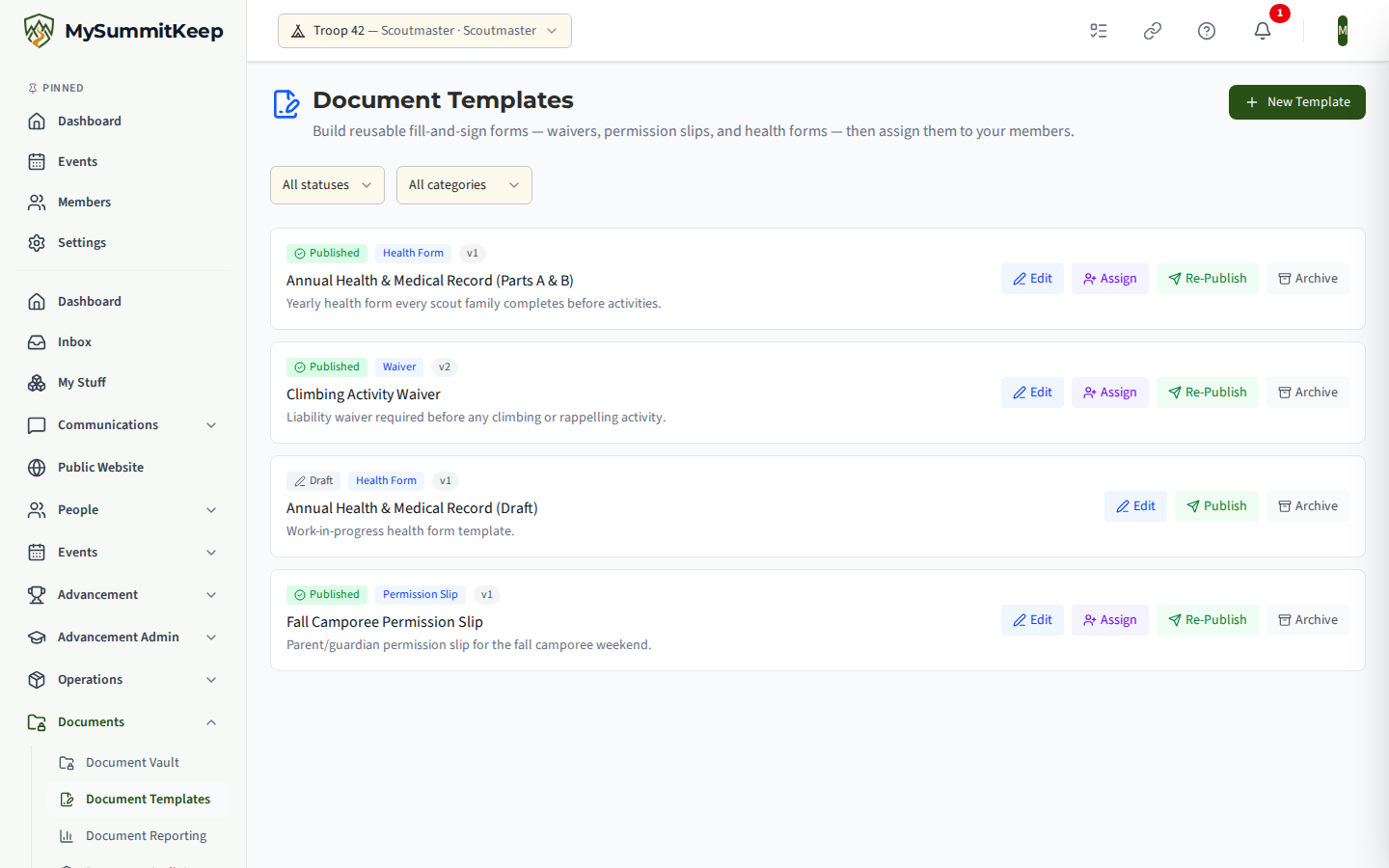
The template list
Section titled “The template list”The page header reads Document Templates: “Build reusable fill-and-sign forms, waivers, permission slips, and health forms, then assign them to your members.” Each row shows:
- a status badge: Draft, Published or Archived
- a category badge: Waiver, Permission Slip, Health Form, Media Release or Custom
- a version badge such as
v1 - the title and, if you wrote one, a short description
Two drop-downs above the list filter by status and by category. With no templates yet, the page offers Create Your First Template.
Creating a template
Section titled “Creating a template”Click New Template. The New Document Template dialog asks for a Title (required, for example “Activity Consent and Release”), a Category and an optional Description. Create Draft saves it as a draft and opens the builder.
Adding fields in the builder
Section titled “Adding fields in the builder”The builder’s Form Fields section is where you define what each assignee fills in. For every field you set:
- Field key, a short machine name such as
guardian_name - Label, what the person sees
- Field type: Short text, Paragraph text, Date, Email, Phone, Checkbox, Signature, Dropdown (single choice) or Radio buttons (single choice)
- Data classification, which marks how sensitive the answer is
- Help text, an optional hint under the field
- Required field
Dropdown and radio fields ask you to add their Choices. You can also tick Only show this field conditionally to reveal a field only when an earlier field has a given value. Fields can be moved up or down and removed.
Click Save Fields to save. Saving replaces the entire field set at once, and the builder will say Resolve errors before saving until highlighted rows are fixed.
Publishing, re-publishing and archiving
Section titled “Publishing, re-publishing and archiving”A new template is a Draft. Click Publish to make it live so it can be assigned. Re-publish bumps the version. Archive retires it: an archived template is read-only and can no longer be assigned to members.
Assigning a template
Section titled “Assigning a template”On a published template, use the Assign button. The dialog is titled Assign “your template” and has an optional Due date, a Search members box (by name or email) and a checklist of members. Drafts and archived templates cannot be assigned.
What members do
Section titled “What members do”Assigned forms appear for each member under My Documents (/documents/assignments): “Forms your unit has assigned to you.” Each shows its due date, or Overdue if it has passed. Choose Fill Out to open the form. The member can:
- Save Draft and come back later; the saved answers are filled in again when they return
- Submit Document once required answers are valid. Missing or invalid answers are highlighted
- sign by typing their name or drawing a signature, depending on the field
After submitting, the answers are read-only and Download PDF is available from My Documents. On a completed document, Email a Copy sends it to a recipient you choose, with optional BCC and an option to Require recipient sign-off, which adds a second-signature link that expires.
The Completion Report
Section titled “The Completion Report”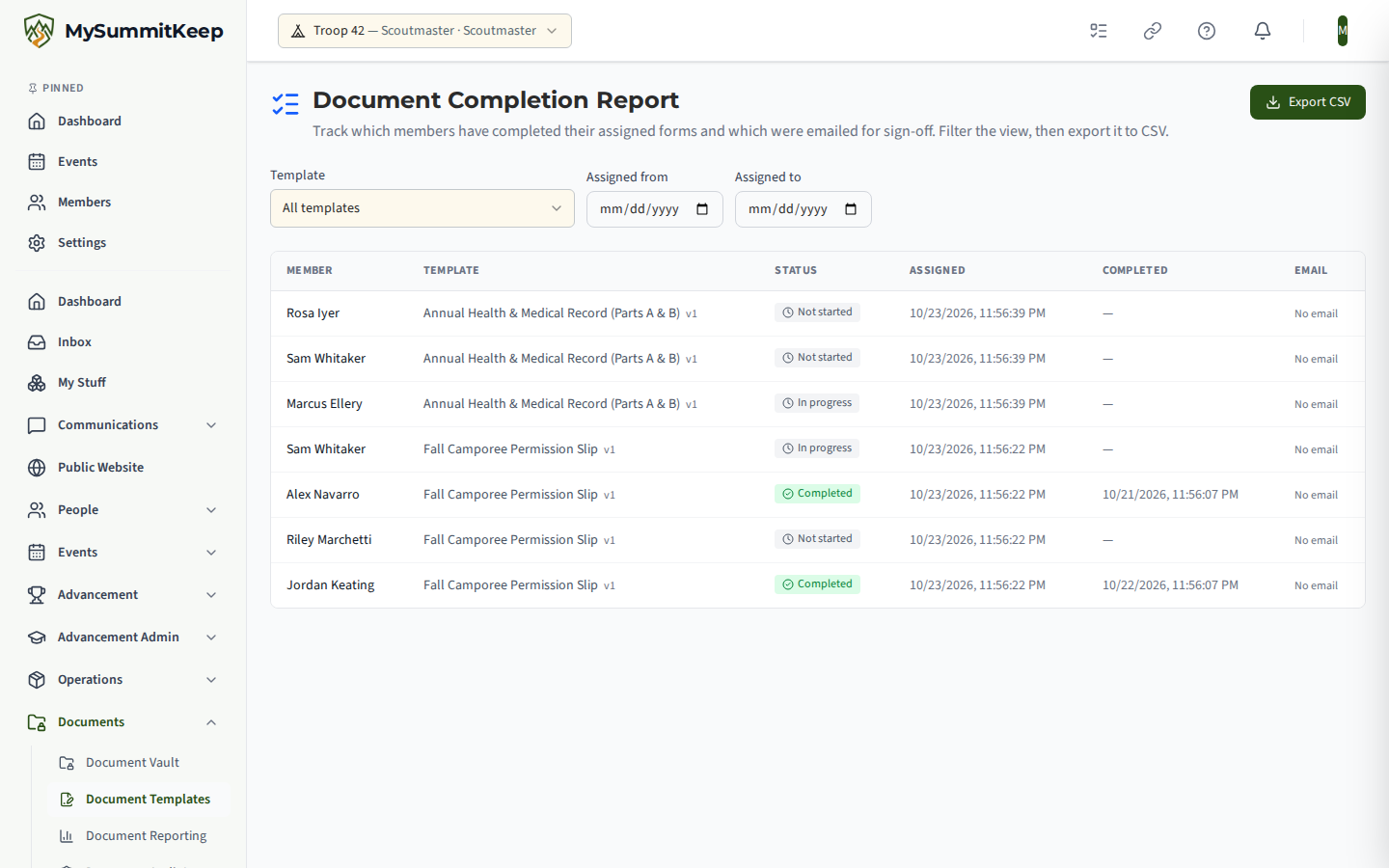
Open Document Reporting (/document-templates/admin) for a per-template summary: Templates, Assignments, Completion rate and Emails sent, with columns for assigned, completed, pending, completion and last activity. Its Completion Report link opens /document-templates/completions.
The Document Completion Report has one row per assignment, so you can see exactly who is outstanding. Columns are Member, Template, Status, Assigned, Completed and Email. The status reads Not started, In progress or Completed, and the email column reads No email, Emailed or Signed off. Filter by Template and by an Assigned from and Assigned to date range, then click Export CSV to download the filtered view.
Audit log
Section titled “Audit log”The Document Audit Log (/document-templates/audit-log) is a record of every document action in your unit: who created, edited, assigned, submitted, generated or emailed a form, and when. You can filter by event type. Details for documents about youth under 18 are hidden by default, and a Show Minor Details toggle reveals them in the app view only.
Related: Document Vault, Health & Safety, Communications.
MySummitKeep is an independent product and is not affiliated with, endorsed by, or sponsored by Scouting America (formerly the Boy Scouts of America). Scouting America, Scouts BSA, Cub Scouts, Venturing, Sea Scouts, and the Order of the Arrow are trademarks of Scouting America. Official program content shown in screenshots and examples is © Scouting America; always confirm current requirements atscouting.org. SeeTerms § 7.3.