
Closing a Scout Account
When a Scout leaves your unit or crosses over, their Scout account should end at exactly $0.00. Close Account does that with corrections you can see, and it can be undone.
Who still has a balance
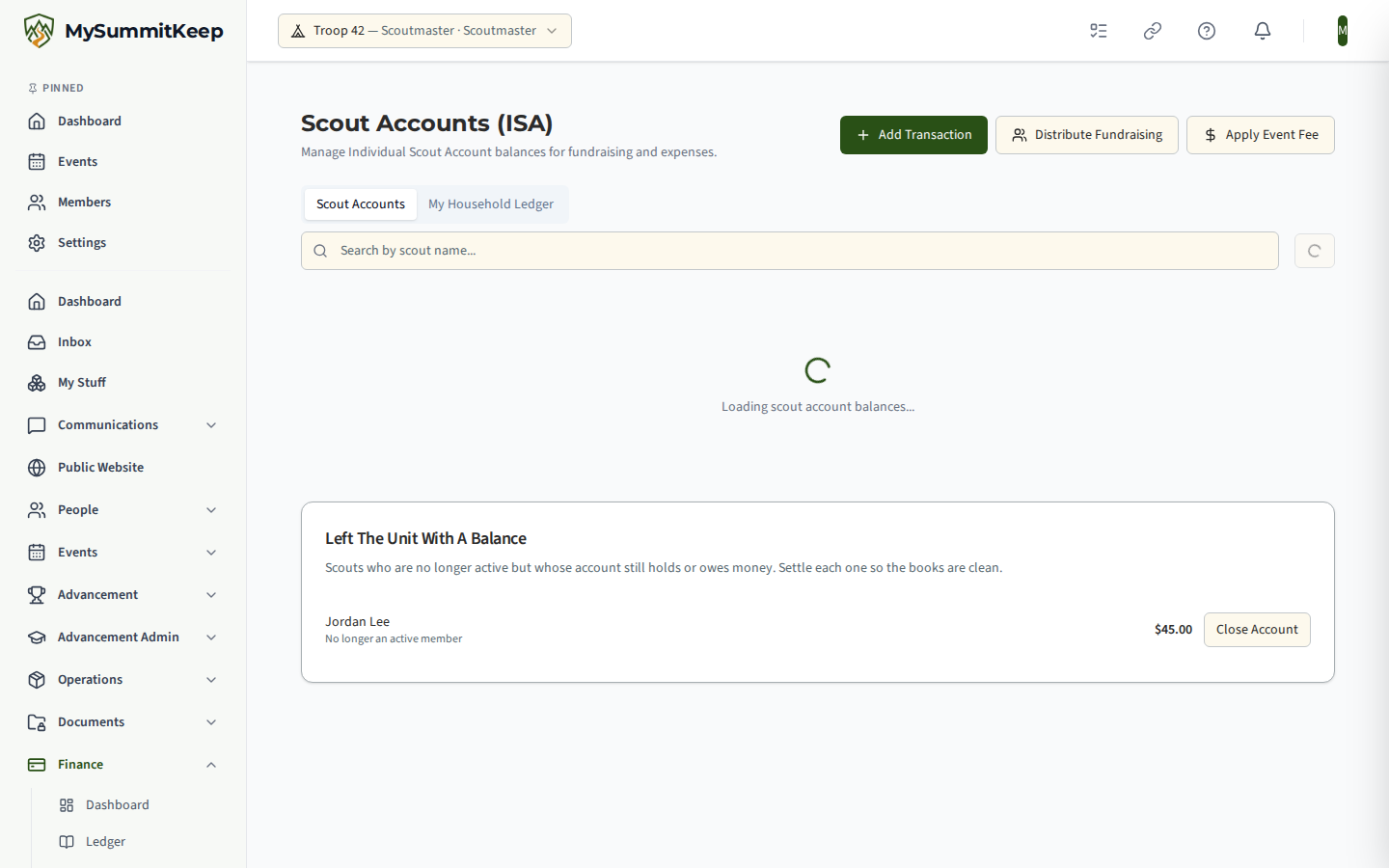
Section titled “Who still has a balance”The Scout Accounts page has a section called Left The Unit With A Balance. It lists members who are no longer active, or who transferred out, and whose account still holds or owes money. When the treasurer confirms a transfer-out in the app, the unit’s finance managers are also told in the app that an account needs settling. Nothing is moved for you.
What you can do with the balance
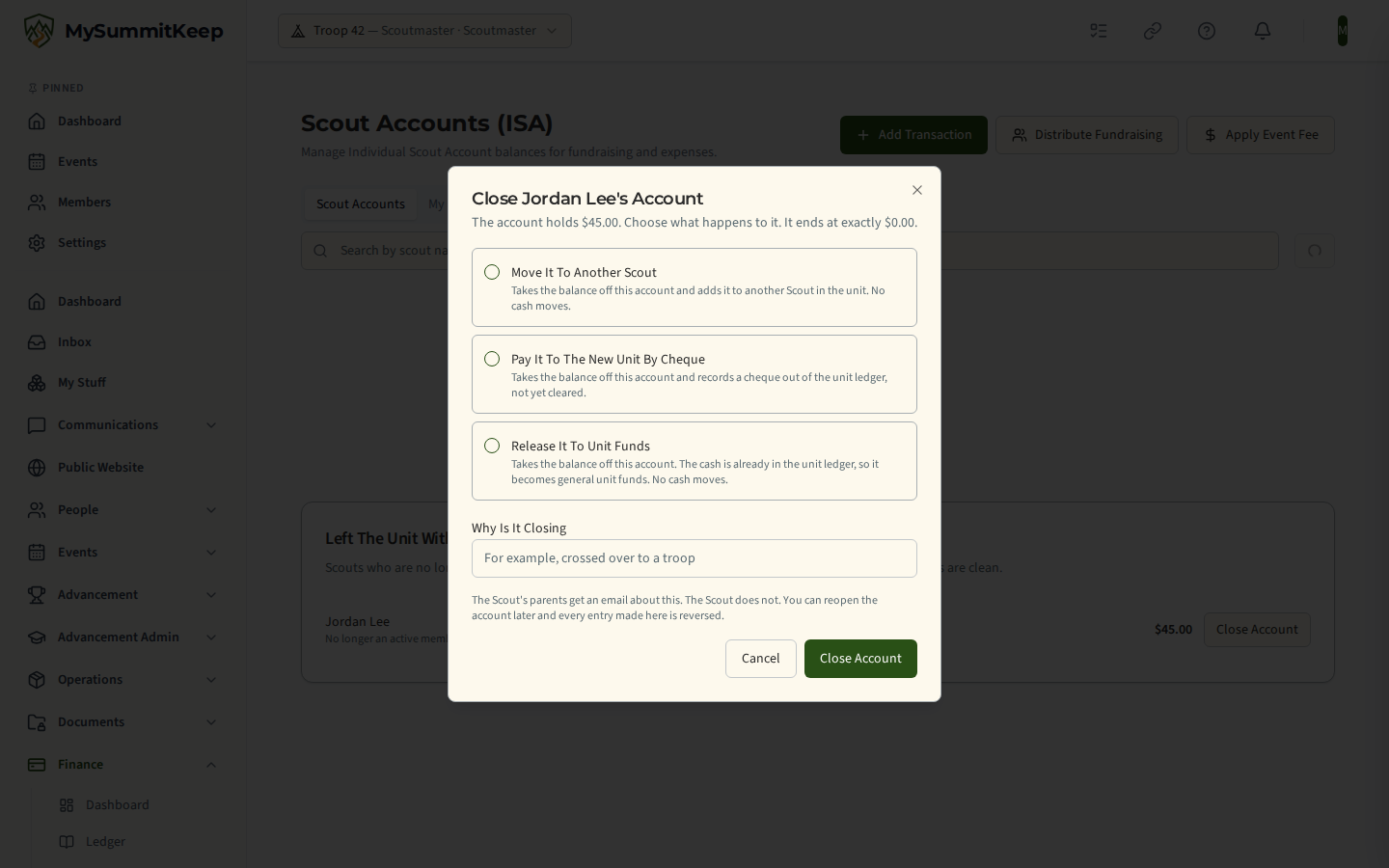
Section titled “What you can do with the balance”Only the choices that fit the balance are offered, and each says what it does to the books.
| The account | Choice | What happens |
|---|---|---|
| Holds money | Move it to another Scout | Takes it off this account and adds it to another active Scout in your unit. No cash moves. |
| Holds money | Pay it to the new unit by cheque | Takes it off this account and records a cheque out of the unit ledger, not yet cleared. You enter who the cheque is made out to and its number. |
| Holds money | Release it to unit funds | Takes it off this account. The cash is already in the unit ledger, so it becomes general unit funds. |
| Owes money | Write off what is owed | Adds the owed amount back so the account reads $0.00. No cash moves and nothing further is due. |
| Is at $0.00 | Close | Nothing is posted. |
A reason is required. MySummitKeep works out the balance itself when you confirm, and refuses a choice that does not fit it. Giving the balance back to a family is deliberately not offered here; the balance is the unit’s own bookkeeping record.
If the Scout is moving to another unit that also uses MySummitKeep, nothing is sent to that unit. Give the family a statement and the cheque; their new treasurer records it with Quick Capture.
Who is told
Section titled “Who is told”The Scout’s linked parents get an email saying the account was closed and what became of the balance. The Scout is never emailed. If no parent can be reached, no email is sent and you are told so.
While an account is closed
Section titled “While an account is closed”A closed account shows a Closed badge and refuses new entries. Choose Reopen Account to undo it: every entry made at closing is reversed, so the balance returns to what it was, and you can close it again later. Everything is on the audit trail with your name.
A treasurer cannot post to a closed account by hand, and Quick Capture refuses it.
Money that arrives after closing
Section titled “Money that arrives after closing”An online payment can still show up for an account that was closed a moment earlier, for example one a family had already started. It is never added to the closed account, so the balance stays at $0.00. The cash has really arrived, so it is recorded on the unit ledger as an Unmatched payment, and the unit’s finance managers get an alert in the app and by email asking them to reroute it. The alert does not name the Scout.
To reroute it:
- Open the unit ledger and find the entry with the category Unmatched payment. Its payment reference matches the one in the alert.
- Decide where the money belongs: back to the family, to another Scout, or to unit funds.
- Reverse the Unmatched payment entry and record a new entry in the right category, or, if the account should not have been closed, choose Reopen Account and record the amount there.
Only online card payments that arrive on their own are held this way. Bank feed lines are never posted to a Scout account, so they are matched to the unit ledger as usual.
MySummitKeep is an independent product and is not affiliated with, endorsed by, or sponsored by Scouting America (formerly the Boy Scouts of America). Scouting America, Scouts BSA, Cub Scouts, Venturing, Sea Scouts, and the Order of the Arrow are trademarks of Scouting America. Official program content shown in screenshots and examples is © Scouting America; always confirm current requirements atscouting.org. SeeTerms § 7.3.