
Key 3 Meetings
The Key 3 Meetings page is where your unit’s Key 3 (the unit leader, the Committee Chair and the Chartered Organization Representative) plans and records its meetings: agendas, attendance and the action items that carry from one meeting to the next. Open it from Key 3 Meetings in the sidebar’s People group, or go to /key-3.
Find it in the left menu: People → Key 3 Meetings.
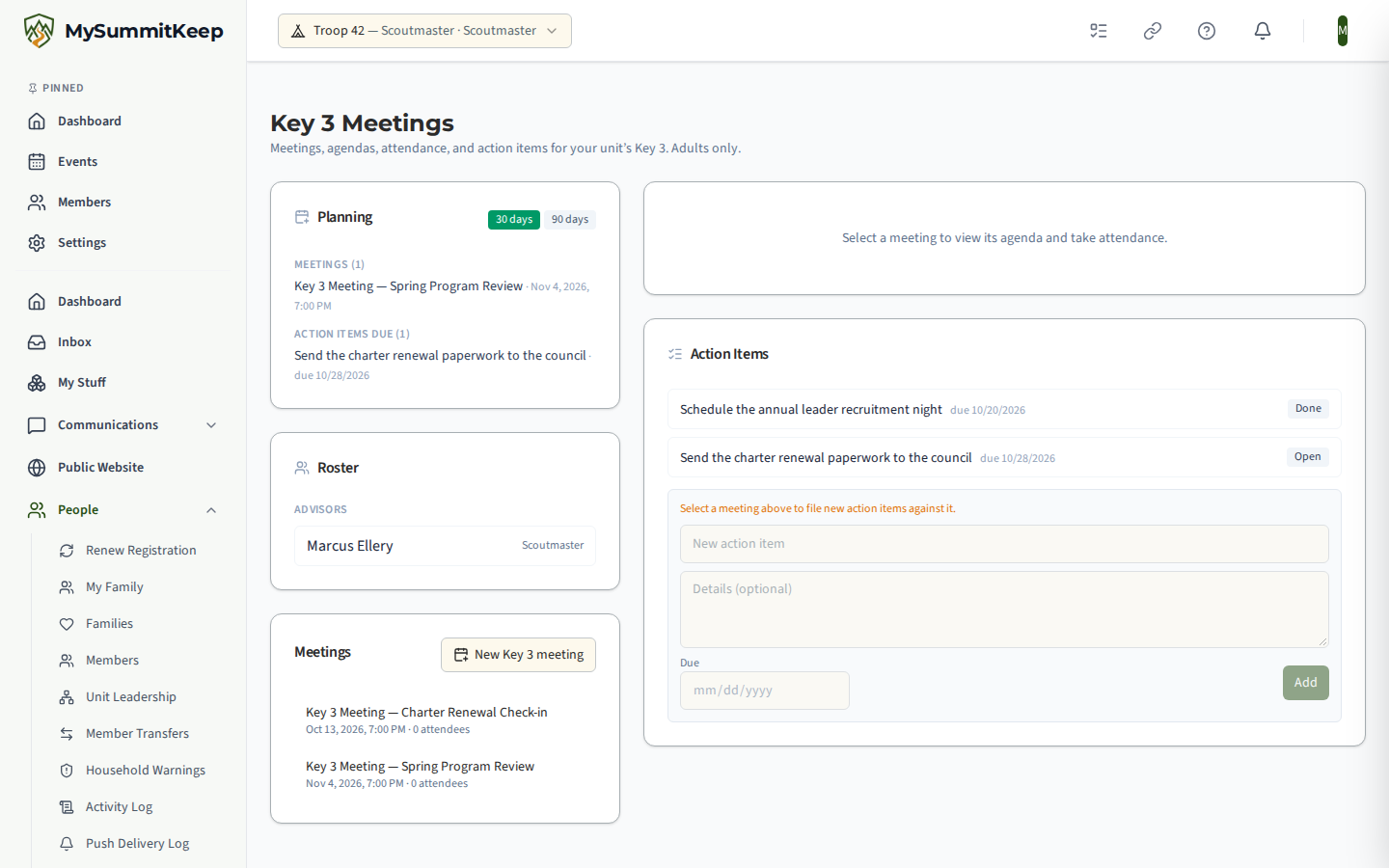
Under the heading the page reads “Meetings, agendas, attendance, and action items for your unit’s Key 3. Adults only.” Every unit type has a Key 3, so Packs, Troops, Crews, Ships and Posts all get this page.
Who can open it
Section titled “Who can open it”Key 3 meetings are private to a small adult group. The page opens for:
- The three people on your unit’s current Key 3 snapshot, as long as they are active adult members of the unit.
- Unit administrators.
- The commissioners who serve your unit: the Unit Commissioner assigned to it, your district’s District Commissioner and Assistant District Commissioners, and your council’s Council Commissioner. Commissioners can read Key 3 meetings but cannot change them. See What your commissioner sees.
Nobody else can open it. That includes other adult leaders and every youth member, whatever position they hold. Anyone outside the group who opens the page sees a notice that Key 3 meetings are open to your unit’s Key 3, unit administrators and the commissioner assigned to your unit.
Key 3 meetings also stay off the rest of the app: they do not show up on the unit calendar or in event lists.
How the roster is filled
Section titled “How the roster is filled”The Roster card is not something you edit here. It comes from your unit’s current Key 3 snapshot, the record of who holds each of the three signatory roles. Each person is listed under Advisors with their role: the unit leader’s title (Scoutmaster, Cubmaster, Skipper or Advisor, depending on unit type), Committee Chair and Chartered Organization Representative.
To change who is on the roster, capture a new snapshot on the Unit Key Three page. See Unit Leadership, Success Plan & Self-Assessment. If no snapshot has been captured yet, the roster is empty and new meetings have nobody to invite. A role left empty on the snapshot is simply missing from the roster.
Layout
Section titled “Layout”On a wide screen the left column holds Planning, Roster and Meetings, and the right column holds the selected meeting’s detail and the Action Items card. Until you pick a meeting, the right column says “Select a meeting to view its agenda and take attendance.”
Planning looks ahead with a 30 days / 90 days switch and lists the Key 3 Meetings and Action items due in that window.
Scheduling a meeting
Section titled “Scheduling a meeting”In the Meetings card, click New Key 3 meeting. Fill in Meeting title, Start and End, then click Create. The people on the Key 3 roster are invited automatically, and the new meeting opens on the right.
Each meeting in the list shows its date and time and how many attendees it has. Click a meeting to open it.
Inside a meeting
Section titled “Inside a meeting”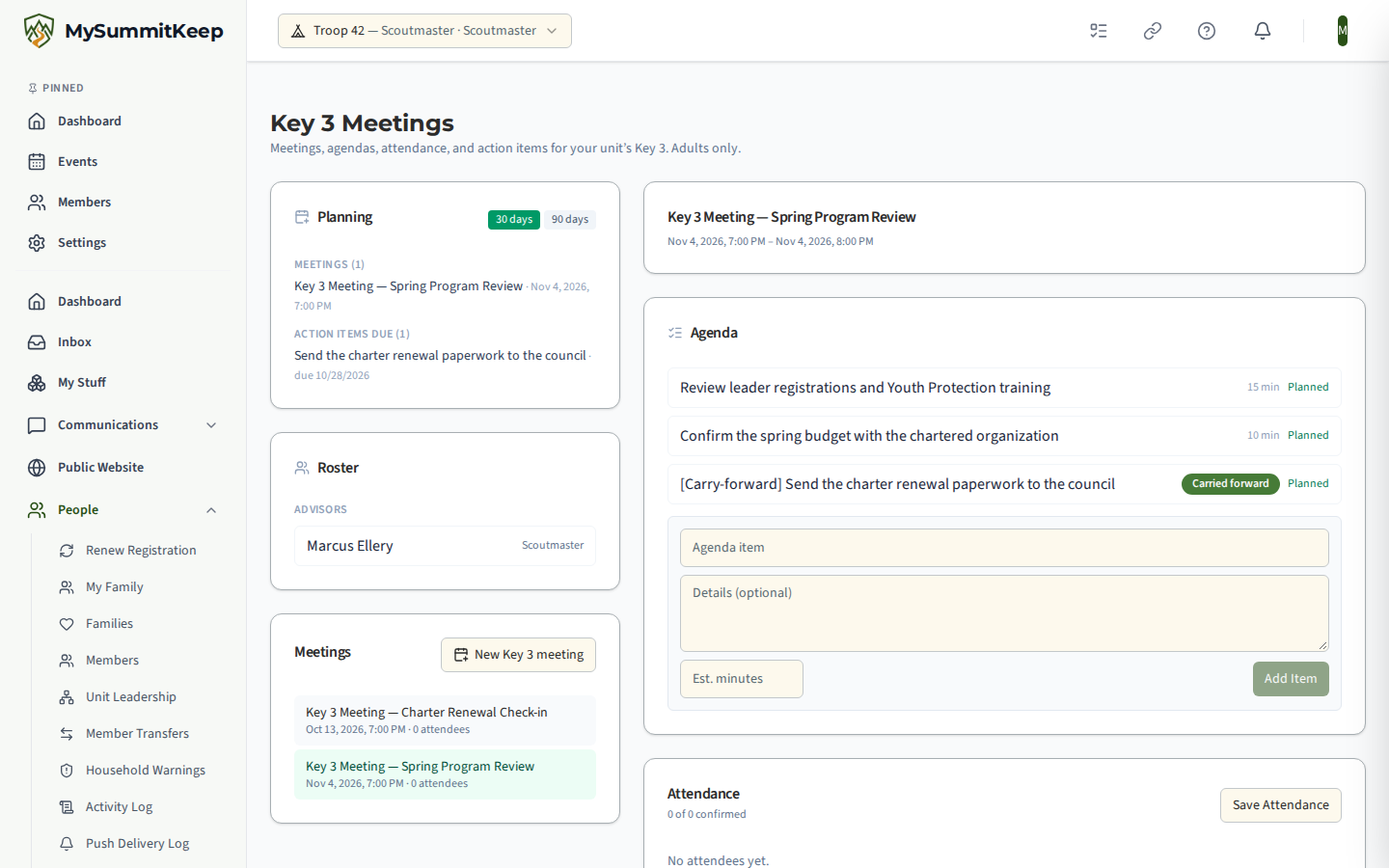
Agenda
Section titled “Agenda”Add an item with a title, optional details and an estimated number of minutes, then click Add Item. Click an item’s status to step it through Planned, Discussed and Deferred. Open action items from earlier Key 3 meetings carry forward onto the agenda, marked Carried forward.
A Planning suggestions item can also be added from the dashboard’s Prepare The Planning Meeting card: one line listing the event types held last year that are not on this year’s calendar and the count of advancement waiting for approval, with no Scout named. It is added once per meeting and can be edited or removed like any other item. See Dashboard Recommendations.
Attendance
Section titled “Attendance”Each invited person shows Invited until they confirm, then Confirmed. Confirm your own place with I’ll attend, or click Confirm for someone else. Mark each person Present, Absent or Excused, then click Save Attendance.
Key 3 meetings have no guests. Unlike the Youth Leadership Council, the Attendance card has no invite control, and only the people on the Key 3 roster are ever invited.
Action items
Section titled “Action items”The Action Items card lists the Key 3’s action items, kept separate from your youth leadership council’s. Each item has a status button that steps it from Open to In progress to Done.
To add one, select a meeting first (the form is disabled with a reminder until you do), then fill in New action item, optional details and a Due date, and click Add.
What your commissioner sees
Section titled “What your commissioner sees”Your commissioners normally follow Key 3 meetings from their own view of your unit rather than from this page. There they see a read-only summary: each meeting with its date, how many of those invited attended, the number of open and closed action items, and the agenda item titles. They cannot add, edit or record anything. See Unit Health Scores for the commissioner side.
Key 3 meetings are not chat channels. Unlike the youth leadership council, the Key 3 has no group channel.
Related: Youth Leadership Council, Key-3 Roster Freshness & Snapshots.
MySummitKeep is an independent product and is not affiliated with, endorsed by, or sponsored by Scouting America (formerly the Boy Scouts of America). Scouting America, Scouts BSA, Cub Scouts, Venturing, Sea Scouts, and the Order of the Arrow are trademarks of Scouting America. Official program content shown in screenshots and examples is © Scouting America; always confirm current requirements atscouting.org. SeeTerms § 7.3.