
My Events Across Your Units
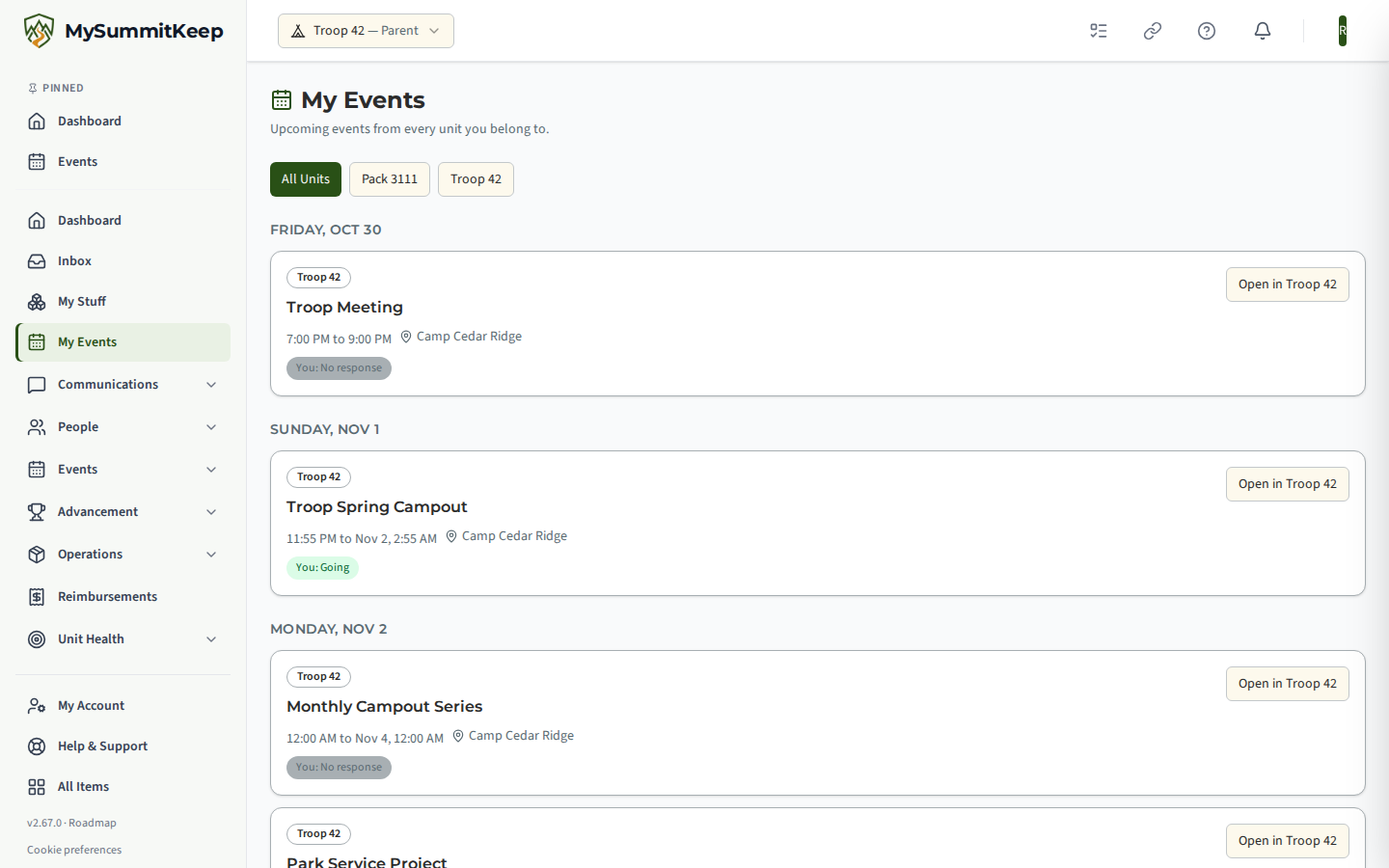
If you belong to more than one unit, for example a parent with a Scout in a Pack and another in a Troop, or a leader who serves in two units, My Events shows the upcoming events of all of them in one place. Open it from the sidebar under Home, from My Stuff, or go to /my-events.
Find it in the left menu: Home → My Events.
Who sees it
Section titled “Who sees it”- Anyone signed in with a seat in at least one unit, including a Scout. There is no role or position to hold, and no plan to buy: it is available on every plan, because the calendar is open at every tier.
- The menu entry only appears when you belong to two or more units. With one unit, the same events are on your unit’s calendar and Events page. The page itself also opens by its address if you have one unit.
- It is switched on for the whole platform by MySummitKeep. If you do not see My Events in the menu, it has not been turned on yet.
What each event shows
Section titled “What each event shows”Events are listed in date order, grouped by day.
- A unit badge, such as
Troop 42orPack 3111, so you can tell at a glance which unit the event belongs to. - The title, the time and the location. Times are shown exactly as the unit entered them. They are not converted to another time zone.
- A Cancelled badge on an event the unit has cancelled, so a family notices rather than turning up.
- Your own RSVP, as
You: Going,You: Pending approval,You: Waitlisted,You: Not goingorYou: No response. - No chips for your children. For now this page shows only your own RSVP. Your children’s names and RSVP status are not sent to this page at all. To see or change a child’s RSVP, open the event in its unit with Open in.
- No RSVP needed instead of the chips, for an open event that does not ask anyone to register.
Draft events are not listed. A Scout signed in on their own sees their own RSVP only.
When you belong to two or more units, a row of unit buttons above the list lets you narrow it to one unit. This only filters what is already on the page.
Opening an event
Section titled “Opening an event”Select Open in followed by the unit name. If the event is in the unit you already have open, it opens straight away. If it is in another unit, MySummitKeep switches to that unit first and then opens the event, so the page, your permissions and the RSVP buttons are those of that unit. You can switch back from the unit switcher as usual. Registering, changing an RSVP and everything else you can do on the event page is decided there, by that unit’s own rules; My Events itself is read-only.
Why a unit may be “not shown here”
Section titled “Why a unit may be “not shown here””If your seat in a unit is suspended, that unit contributes nothing to My Events: no events and no RSVP information. Instead a short note says Events from {unit} are not shown here. Open that unit to see its calendar. A unit you no longer belong to, or one that has been deactivated, is simply not listed.
A unit’s own rules still decide what you see inside it. For example, a leadership council meeting only appears if you are on that unit’s council roster or have been invited to it.
Limits
Section titled “Limits”To keep the page quick, it looks up to 60 days ahead, shows up to 50 events from each unit and covers up to 25 units. If there is more, a line at the bottom says Showing the next events only. Open a unit's calendar for more.
Privacy
Section titled “Privacy”My Events never shows another person’s details. It reads only your own seats and your own RSVP, one unit at a time, using the same unit boundaries as the rest of MySummitKeep. It sends no email or text messages and does not add any new way for an adult to reach a Scout.
Related
Section titled “Related”MySummitKeep is an independent product and is not affiliated with, endorsed by, or sponsored by Scouting America (formerly the Boy Scouts of America). Scouting America, Scouts BSA, Cub Scouts, Venturing, Sea Scouts, and the Order of the Arrow are trademarks of Scouting America. Official program content shown in screenshots and examples is © Scouting America; always confirm current requirements atscouting.org. SeeTerms § 7.3.