
Annual Budget & Year-End
A written annual budget is something your unit’s self-assessment asks about, and something Journey to Excellence expects. This is where you write one and then watch it against reality.
Before you start: set your fiscal year
Section titled “Before you start: set your fiscal year”The budget is scoped to your unit’s fiscal year, which you define once under Finance → Fundraising, then Fiscal Calendar. The same year is used by fundraising and by year-end close, so everything agrees about when your year runs. If no fiscal year exists yet, the budget page will tell you and point you there.
Writing the budget
Section titled “Writing the budget”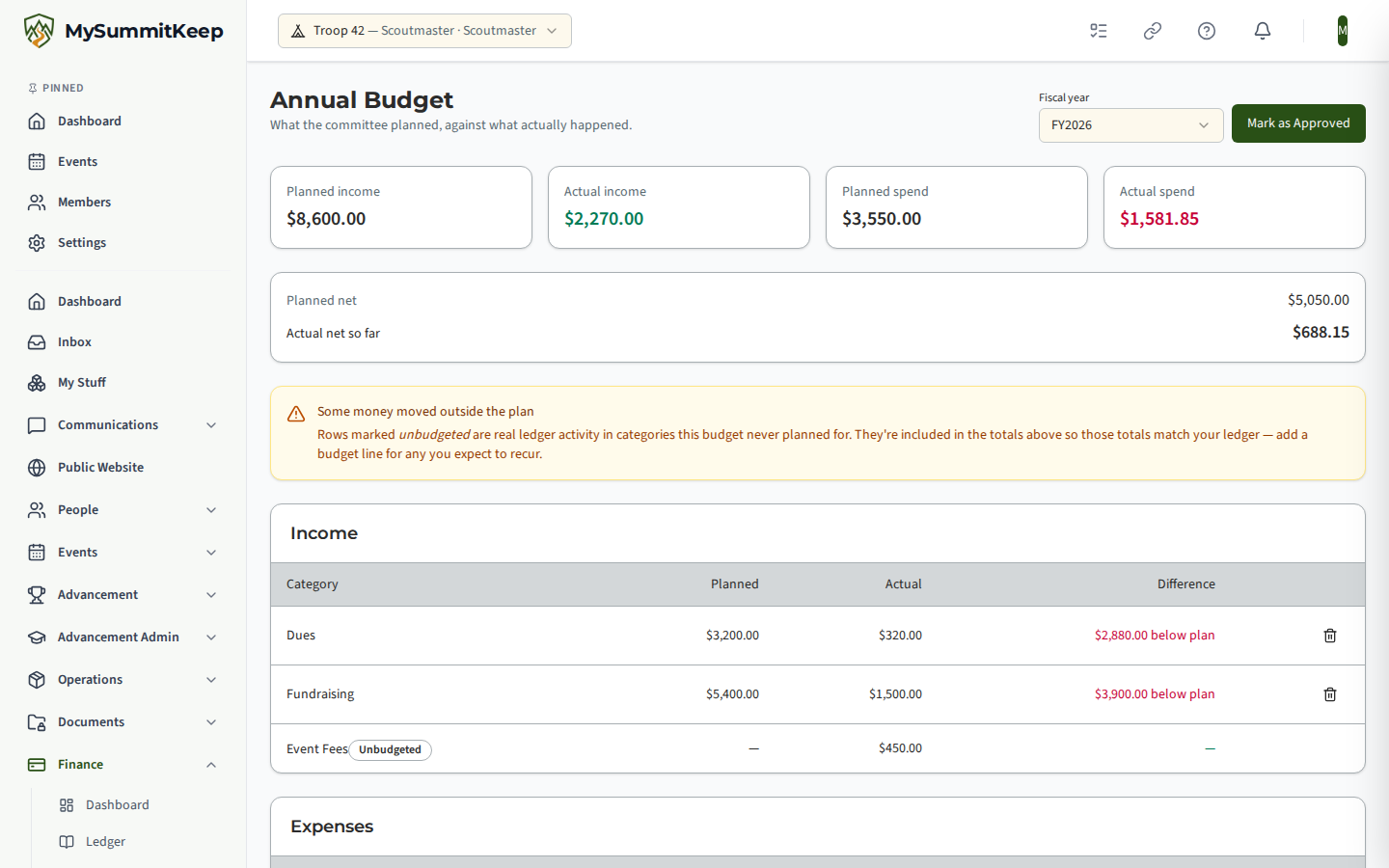
Open Finance → Annual Budget in the left menu and add a line for each thing you expect money to come from or go to:
- Category — use the same words you use on ledger entries (“Camping”, “Dues”, “Insurance”). That’s how the budget knows what actually happened.
- Planned amount — always positive.
- Type — Income or Expense.
- Fund — optional, for restricted money such as a campership fund.
Capitalisation doesn’t matter. “Camping” and “camping” are the same category, so a typo in case won’t split your spending across two lines.
The same category can appear on both sides — a troop both spends on camping and gets reimbursed for it — so Income and Expense lines are kept separate.
Reading planned against actual
Section titled “Reading planned against actual”As the year runs, each line shows what you planned, what actually happened, and the difference.
The difference is written so that positive is always good news: under budget on an expense, or above plan on income. You don’t have to work out which direction is favourable for each row.
Rows you didn’t plan for
Section titled “Rows you didn’t plan for”If money moved in a category your budget never mentioned — or in entries with no category at all — it still appears, marked Unbudgeted.
This is deliberate and it matters. A budget that showed only what you planned would quietly leave real money out, and your totals wouldn’t match your ledger. Instead the totals always reconcile to the ledger, and anything you didn’t anticipate is visible. If an unbudgeted row is something that will recur, add a budget line for it.
Approving the budget
Section titled “Approving the budget”Mark as Approved records that the committee adopted the plan, along with the date. You can’t approve an empty budget — “we have a written annual budget” ought to mean something.
You can still revise an approved budget; troops do this mid-year. If you delete the last line of an approved budget it goes back to draft, because an empty plan can’t stay approved.
Who still owes
Section titled “Who still owes”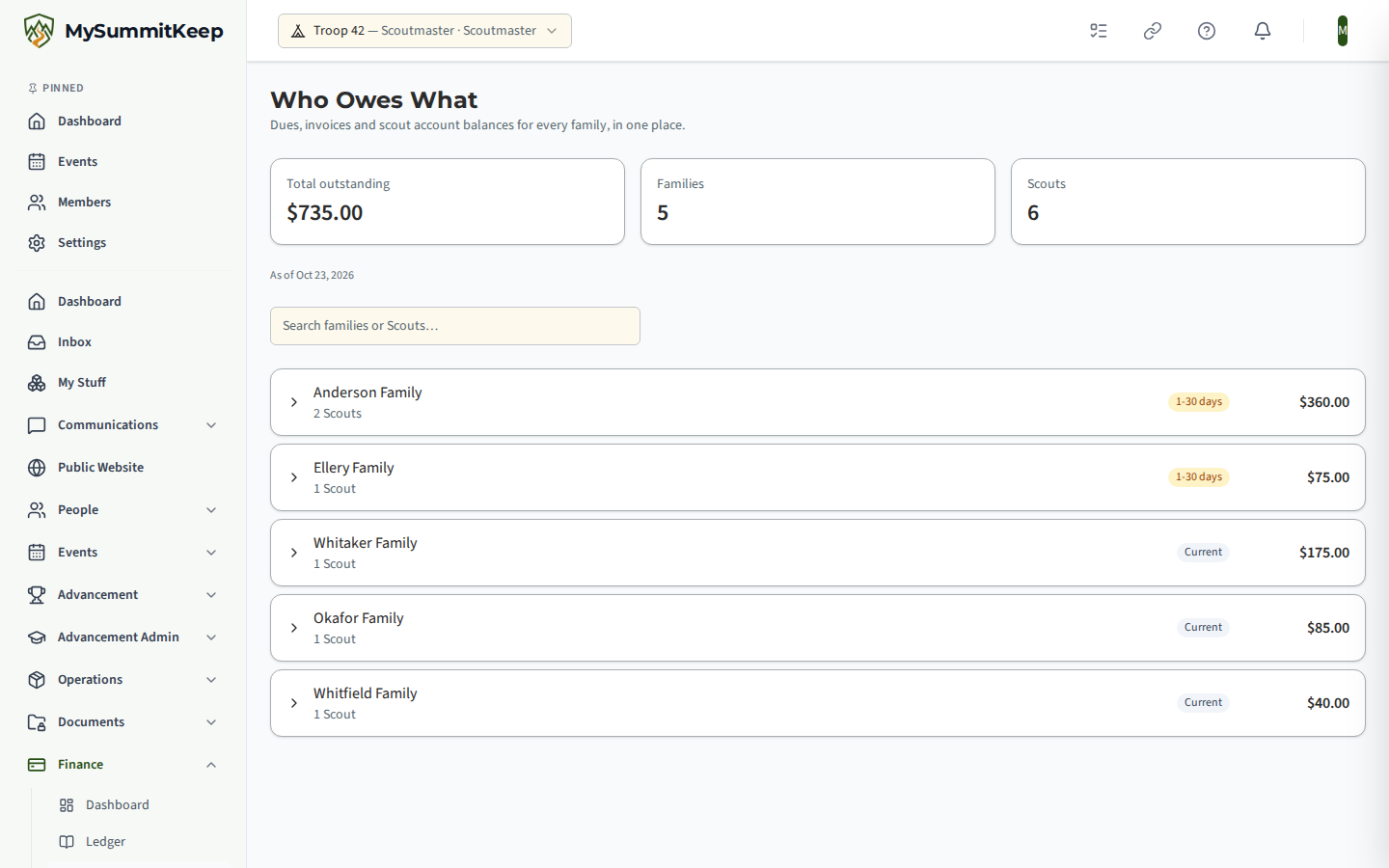
Finance → Who Owes What adds up dues, invoices and Scout account balances for every family in one view, so you’re not opening three screens and doing sums.
Families are listed together rather than per Scout — you chase a household, not three children separately. Expand a family to see the split per Scout and which of the three sources each amount comes from. An aging badge shows how overdue the oldest item is.
If your unit hasn’t set up dues or invoices yet, the page says so rather than reporting a cheerful zero.
Closing the year
Section titled “Closing the year”When the fiscal year ends, close the books. That records a snapshot: the closing balance, total money in, total money out, and your notes for the committee and the chartered organization.
Two things worth understanding:
The closing balance is the money in the account — your opening balance plus everything ever recorded, up to the year end. It is not the same as the year’s income minus expenses, which is shown separately as the year’s net.
Closing doesn’t lock the ledger. If you find an error in February, you correct it the normal way — a reversing entry — and the year-end screen will show you that the books have moved since you closed. You can close again to bring the snapshot up to date. The chartered organization keeps a stable figure, and you keep the ability to fix genuine mistakes.
Related
Section titled “Related”- The Unit Ledger — where the actual money is recorded.
- Financial Dashboard & Unit Payments — the overview and collecting from families.
- Event Budgets — budgets for a single event, which roll up beneath the annual plan.
MySummitKeep is an independent product and is not affiliated with, endorsed by, or sponsored by Scouting America (formerly the Boy Scouts of America). Scouting America, Scouts BSA, Cub Scouts, Venturing, Sea Scouts, and the Order of the Arrow are trademarks of Scouting America. Official program content shown in screenshots and examples is © Scouting America; always confirm current requirements atscouting.org. SeeTerms § 7.3.