
Council Analytics
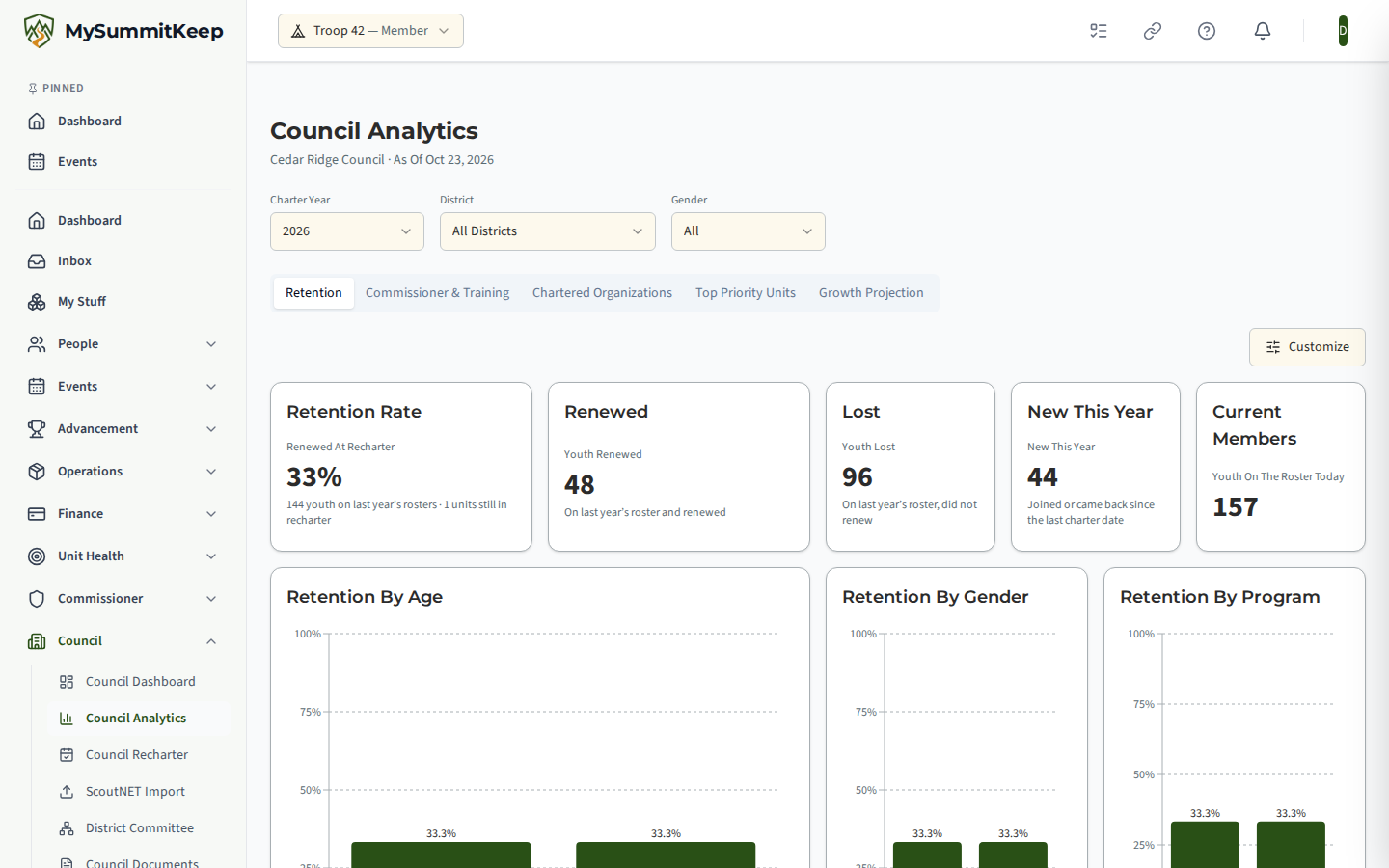
Council Analytics answers one question for council and district staff: of the youth who were on our rosters a year ago, how many are still with us? Open it from Council → Council Analytics in the left menu, or go to /council/analytics.
Who Can See It
Section titled “Who Can See It”Council Analytics shows in the menu for these roles in your council:
- Scout Executive
- District Executive
- Council Commissioner
- District Commissioner
- Assistant District Commissioner
Scout Executives, District Executives and Council Commissioners see the whole council and can narrow the page to one district. District Commissioners and Assistant District Commissioners see only their own district, and the District filter is locked to it. Anyone else who opens the page sees Council Staff Access Required; contact your council to be given the right role.
The Filters
Section titled “The Filters”- Charter Year — the year you are looking at. The page opens on the latest year in which at least half of your dated units have finished their recharter, including any grace period.
- District — all districts, or one. Locked for District Commissioners.
- Gender — on the Retention tab only. Choose All, Male or Female.
The line under the page title shows your council, the district if one is chosen, and the date the numbers are As Of.
The Five Tabs
Section titled “The Five Tabs”- Retention — how many youth renewed, were lost or are new. The tiles are explained below, followed by charts of retention by age, gender, program and district, a trend over recent charter years, and the youth whose registration has lapsed or expires within 90 days.
- Commissioner & Training — how many units have a unit commissioner and trained leaders, and how retention differs between those units and the rest.
- Chartered Organizations — the organizations that charter units, which programs they are missing, and how organization size relates to retention.
- Top Priority Units — the units that most need attention, with the warning signs that put them on the list. You can print the list or save it as a PDF.
- Growth Projection — a month-by-month projection of the roster. Set a growth goal, how many youth you plan to recruit and how much retention improves. Reset Plan puts the assumptions back.
Reading the Retention Tiles
Section titled “Reading the Retention Tiles”The first tiles count youth who were on a roster one year before the unit’s charter date, and what happened to them. Each of those youth ends up in exactly one of two groups:
- Youth Renewed — renewed their registration, including during the grace period after the charter date, where there is one. Renewed At Recharter shows this as a percentage of last year’s roster.
- Youth Lost — did not renew. A youth who did not renew counts as lost for that charter year, even if they come back later.
Renewed plus Lost is the whole of last year’s roster.
Two more tiles are not part of that split:
- New This Year — youth who joined after last year’s charter date. A youth who left and comes back, to the same unit or a different one, counts as new in the charter year they rejoin.
- Youth On The Roster Today — everyone on a roster at the As Of date.
So a youth who lapses and returns shows up twice over the years: as lost in the year they did not renew, and as new in the year they came back.
Small Groups Are Hidden
Section titled “Small Groups Are Hidden”To protect young people’s privacy, a number is hidden when the group is a small one, or when showing it would let someone work out a small group by subtraction. A hidden tile reads Hidden to protect privacy with the reason underneath. It is not an error and nothing is missing from your data. Choosing a district, a gender or a single program makes groups smaller, so more of the page can be hidden than when you look at the whole council.
Arranging the Page
Section titled “Arranging the Page”Every tab is a dashboard you can rearrange. Choose Customize to drag or resize tiles, remove the ones you do not need, and use Add Widget to bring any back. Reset To Default returns the original layout, and Done saves your arrangement. Each person’s layout is saved for their own sign-in.
Related Pages
Section titled “Related Pages”- Council Dashboard — the council-wide summary, district breakdown and alerts.
- Retention Pipeline — new members in your units over the last 90 days, for commissioners.
- Council Recharter Command Center — recharter readiness, unit by unit.
MySummitKeep is an independent product and is not affiliated with, endorsed by, or sponsored by Scouting America (formerly the Boy Scouts of America). Scouting America, Scouts BSA, Cub Scouts, Venturing, Sea Scouts, and the Order of the Arrow are trademarks of Scouting America. Official program content shown in screenshots and examples is © Scouting America; always confirm current requirements atscouting.org. SeeTerms § 7.3.