
Letting Scouts Sign Off Requirements
Scouting is youth-led, and a Scout who has already done a skill is often the best person to see another Scout do it. Your troop can now let Scouts you choose sign off Scout through First Class requirements for other Scouts. It is off until you turn it on, and you decide who qualifies, whether a leader must confirm each sign-off, and which requirements stay with adults.
In short
Section titled “In short”- A Scout can sign off requirements for any other Scout in your troop, never for themselves.
- Only the Scout through First Class requirements can be signed this way. Star, Life, Eagle and merit badges stay with adults.
- The Scoutmaster conference and the board of review are always adult-only, and you can mark any other requirement adult-only too.
- By default a leader confirms each Scout sign-off before it counts. You can turn that off.
- Every sign-off records which Scout signed it, and a leader can reopen it at any time.
- Parents are told when a Scout marks something done for their Scout.
Turn it on
Section titled “Turn it on”Open Settings → Unit Profile, on the General tab (you need permission to change unit settings, which the Scoutmaster and unit admins have) and find Scouts Signing Off Other Scouts.
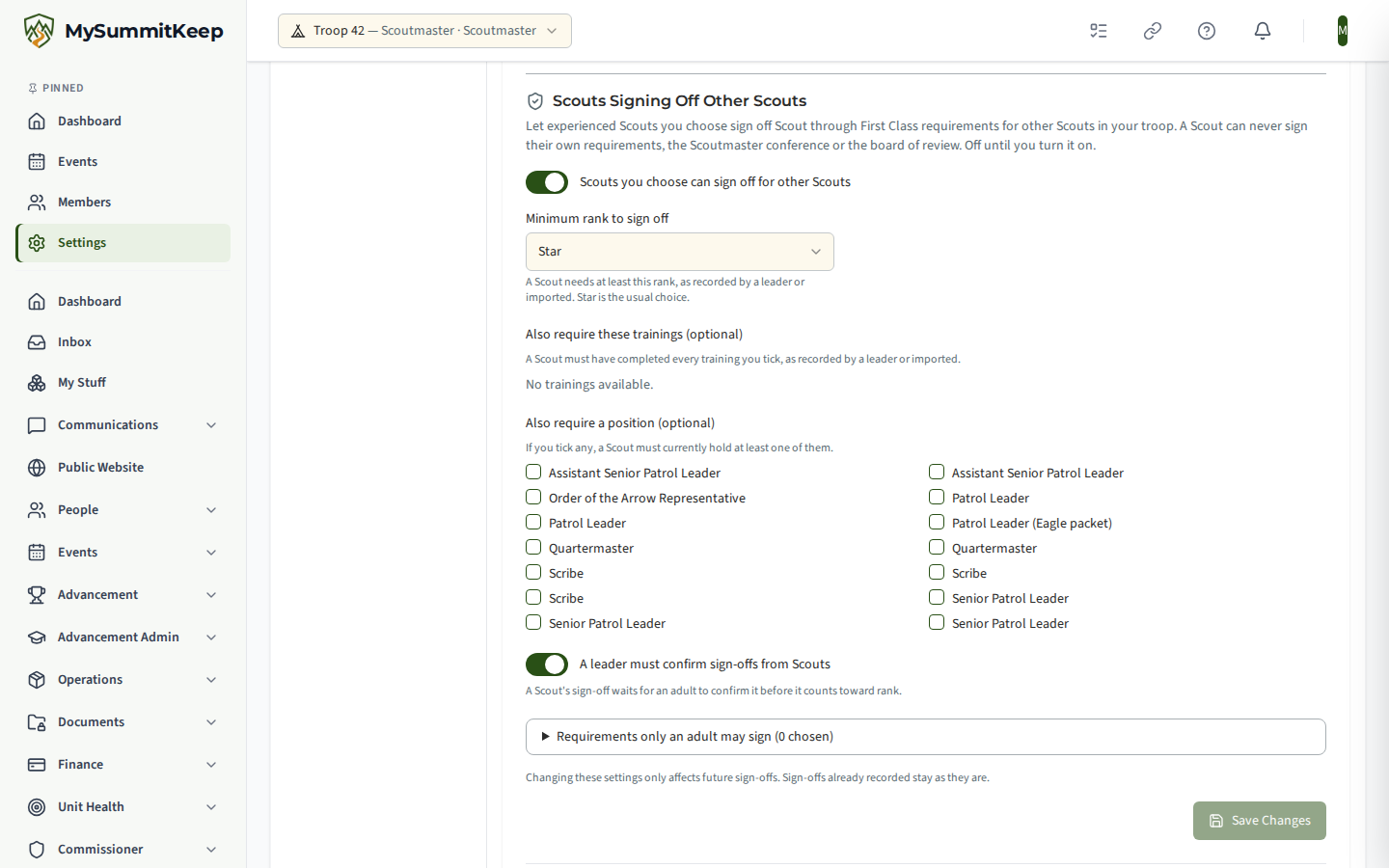
- Turn on Let Scouts sign off requirements for other Scouts.
- Choose who qualifies (next section).
- Decide whether A leader must confirm sign-offs from Scouts (on by default).
- Press Save Changes.
Changes only affect sign-offs from then on. Sign-offs already recorded stay exactly as they are, including when you turn the feature back off.
Who can sign: you set the rule
Section titled “Who can sign: you set the rule”A Scout qualifies only when they meet every condition you set:
| Condition | How it works |
|---|---|
| Minimum rank to sign off | Always on. The default is Star. Pick any rank from Scout up to Eagle. |
| Also require these trainings (optional) | Tick the trainings a Scout must have completed, for example NYLT, ILST or the Advancement online training. A Scout needs all the ones you tick, and an expired training does not count. |
| Also require a position (optional) | Tick the Scout positions you accept, for example Patrol Leader, Troop Guide, Instructor or Senior Patrol Leader. If you tick any, a Scout must currently hold at least one of them. |
Leave the optional lists empty and only the rank matters.
A Scout’s rank and trainings count when a leader recorded or imported them. A rank or training a Scout entered for themselves never makes them eligible. A Scout who is suspended, or who is no longer a member of the troop, cannot sign.
What stays with adults
Section titled “What stays with adults”Even for a qualified Scout, these are never available to sign:
- Their own requirements.
- The Scoutmaster conference and the board of review requirements.
- Any requirement above First Class, and every merit badge requirement.
- Any requirement you mark as adult-only.
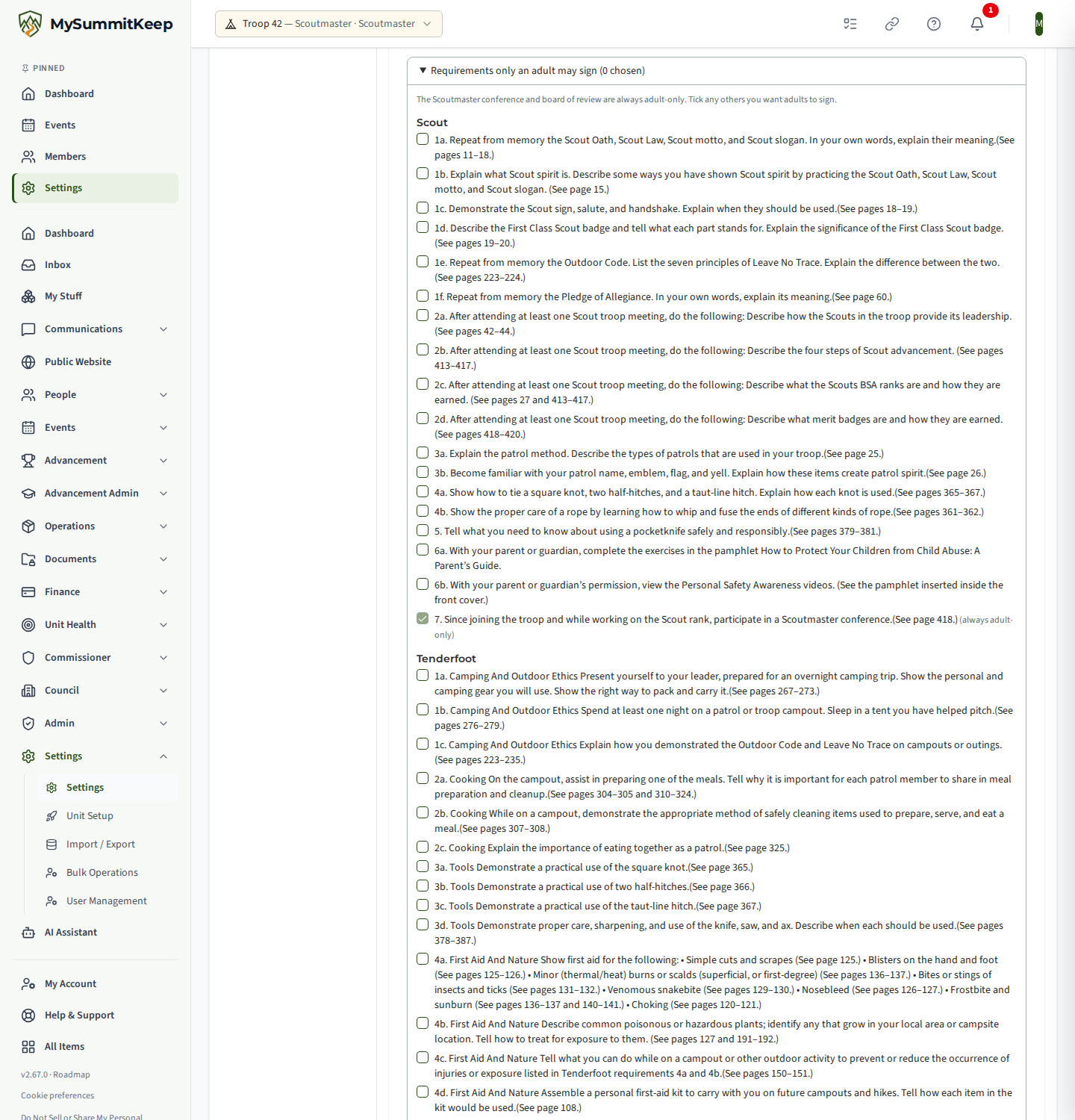
To mark more requirements adult-only, open Requirements only an adult may sign on the same card and tick them. The conference and board of review rows are already ticked and cannot be changed. The change takes effect straight away: a Scout can no longer sign a requirement the moment you save it as adult-only.
What a Scout sees
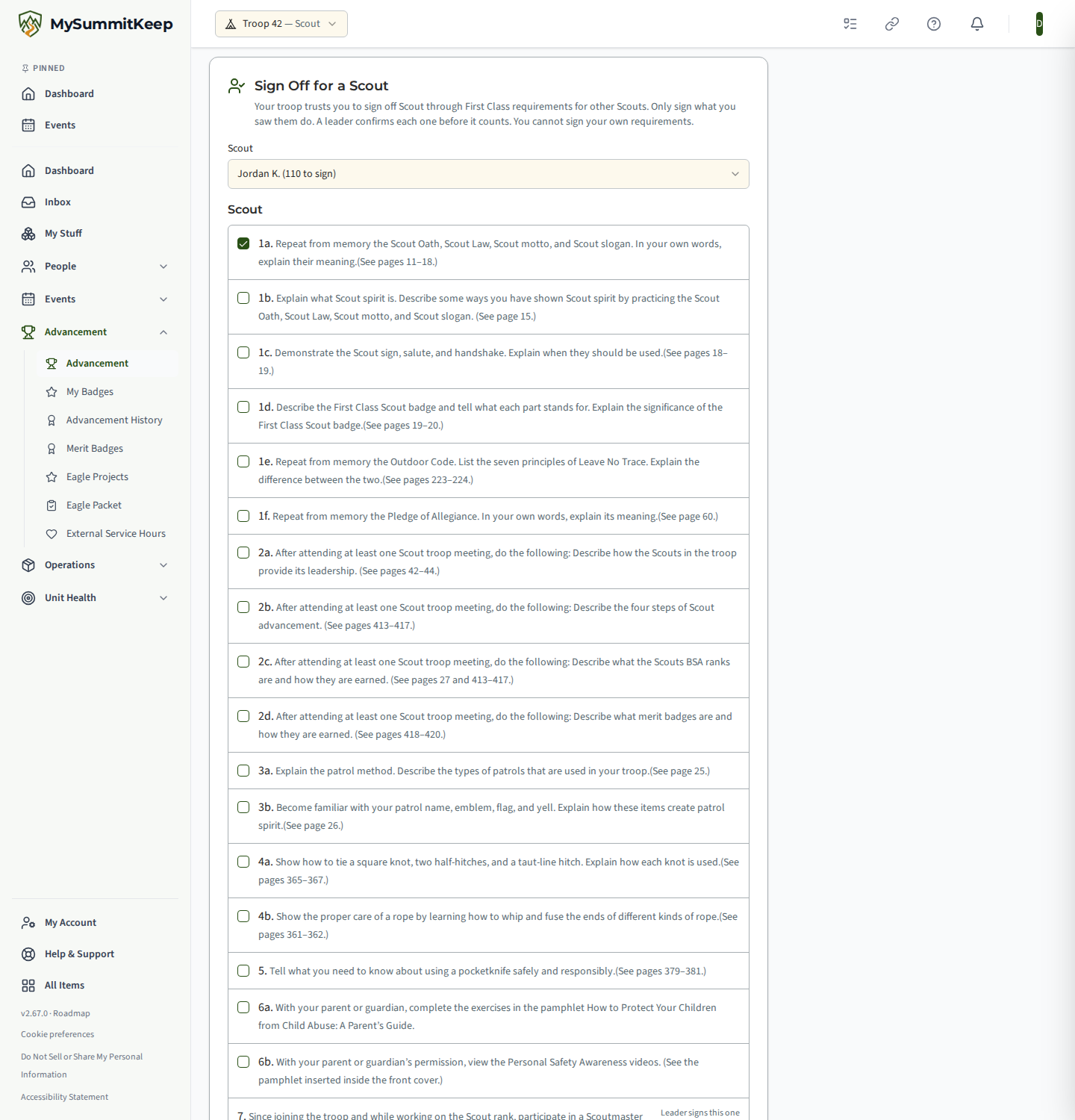
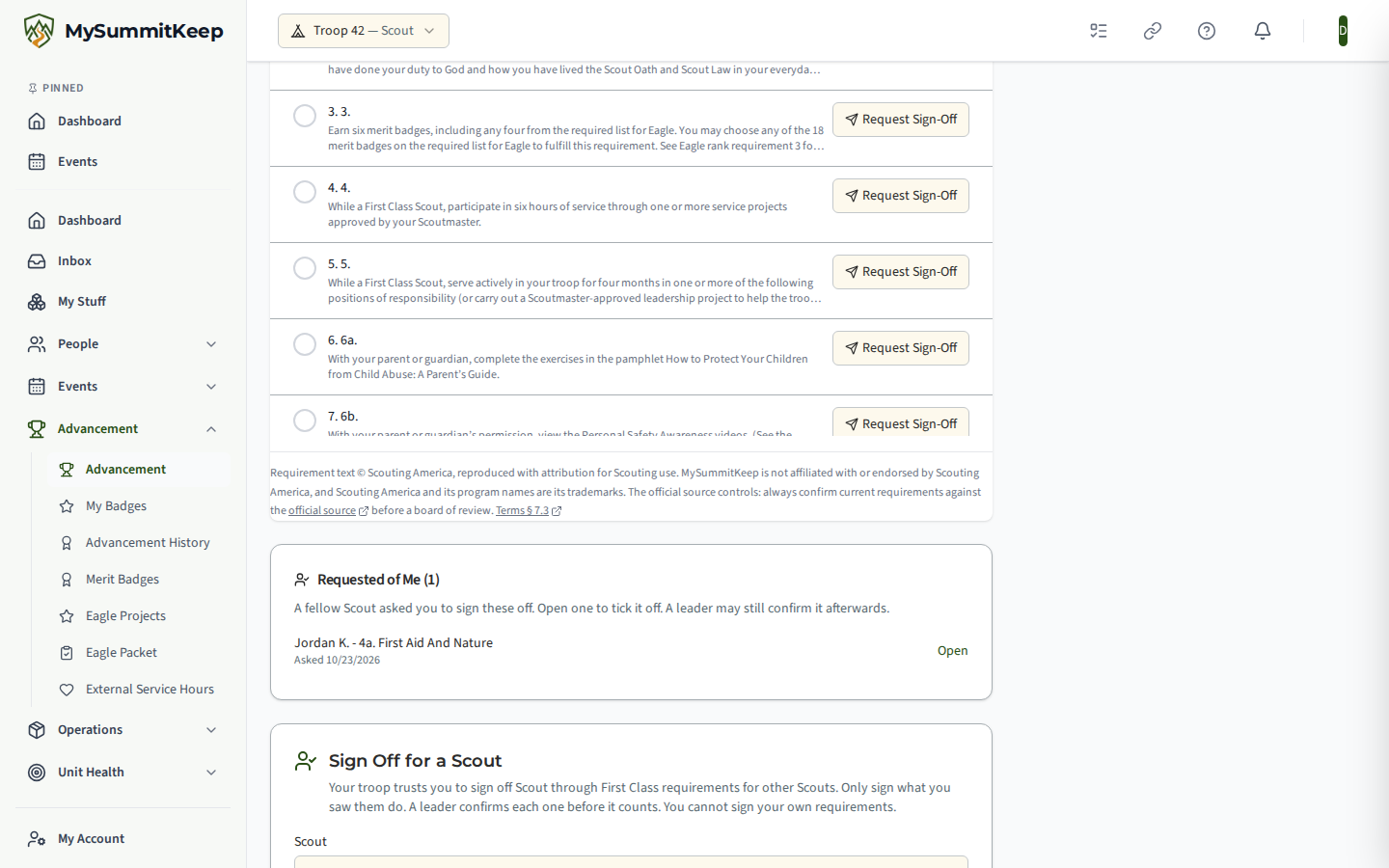
Section titled “What a Scout sees”A Scout who qualifies sees Sign Off for a Scout on their Scout Rank Progress page (open Advancement and click the Progress card). They pick a fellow Scout, tick the requirements they watched that Scout complete, choose the date and add a note if they like, then press the button. They can sign up to 25 requirements at once, and it is all or nothing. The list only shows what that Scout can actually sign. Requirements that are adult-only, already recorded or waiting show a label instead of a box.
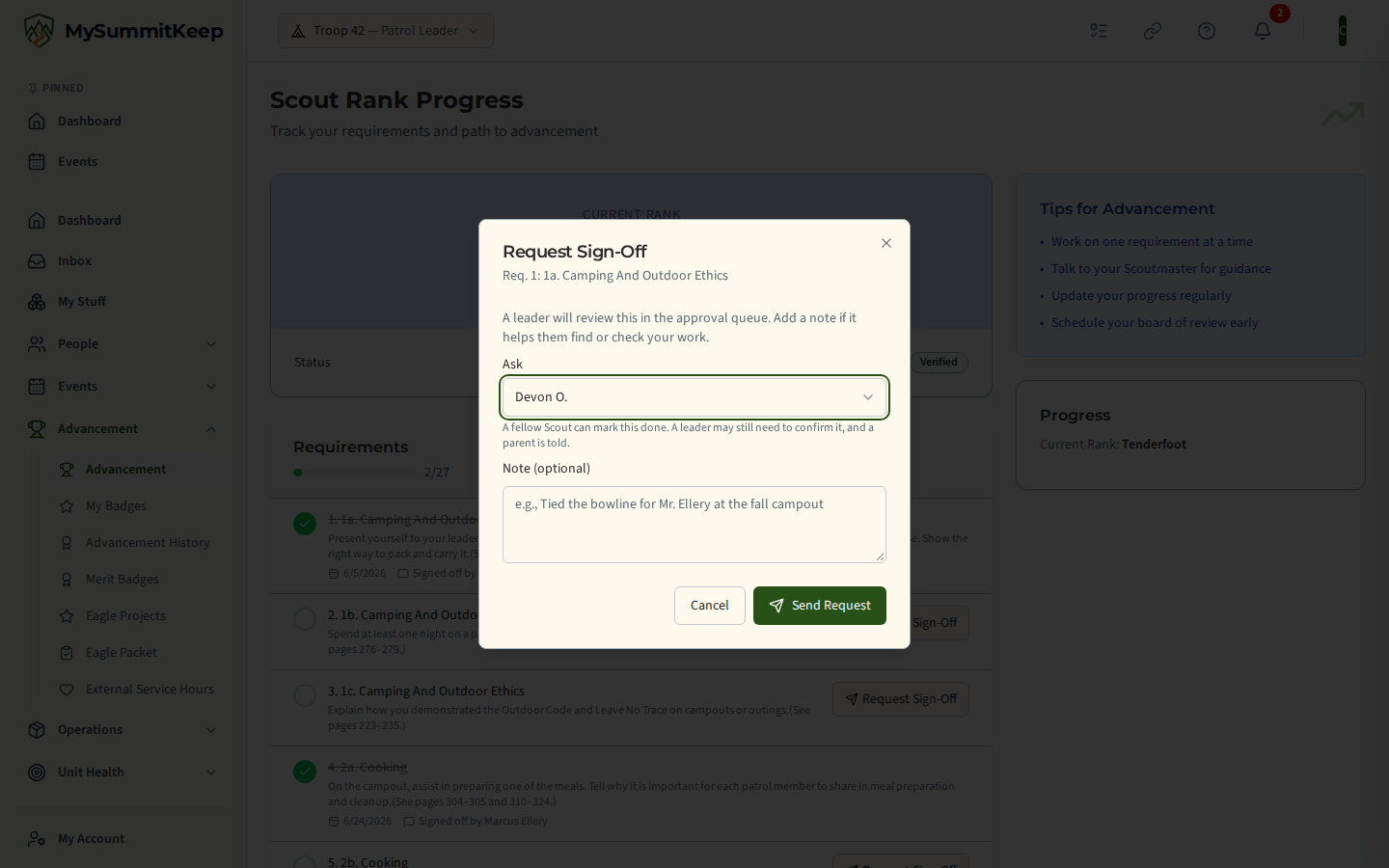
A Scout who does not qualify sees nothing, and is never told which condition they are missing. A qualifying Scout can also be asked for a sign-off: a Scout can pick a fellow Scout from the Fellow Scouts group when requesting a sign-off, and the request appears under Requested of me on the Scout Rank Progress page.
Leader confirmation
Section titled “Leader confirmation”A leader must confirm sign-offs from Scouts controls what happens after a Scout signs.
| Setting | What happens |
|---|---|
| On (default for every troop) | The sign-off waits in the Approval Queue as Signed off by a fellow Scout; waiting for a leader to confirm it. It does not count toward rank until a leader approves it. A leader can also reject it. |
| Off | The sign-off counts toward rank right away and reads Signed by Sam K., no leader review wherever it appears. Nothing waits in the queue. |
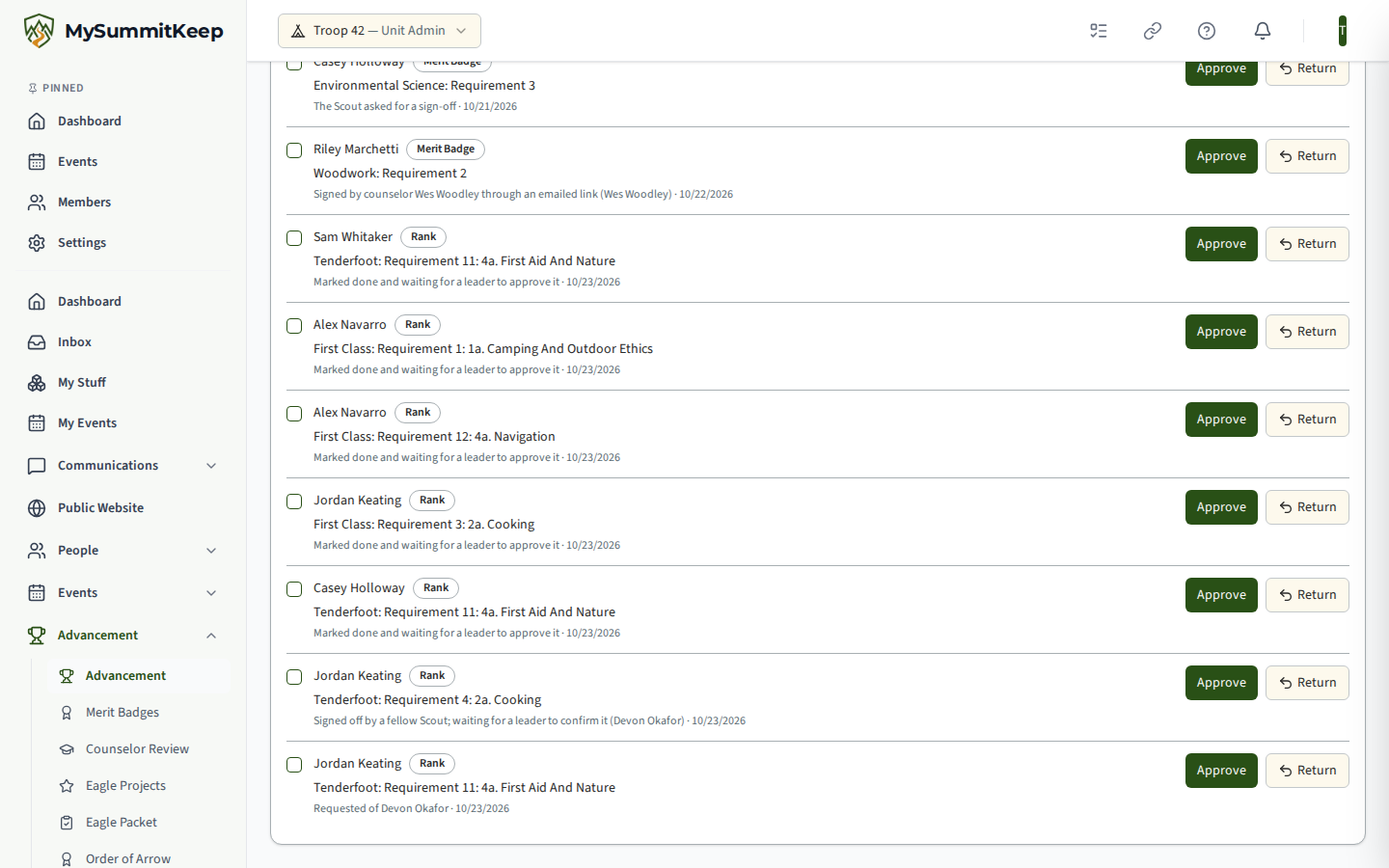
Whichever you pick, the Scout who signed is recorded on the requirement, and the leader who later approves keeps that record (Signed off by Ms. Rivera (first signed by Sam K.)). The setting is read at the moment the Scout signs. Flipping it later never rewrites earlier sign-offs.
Reopening a sign-off
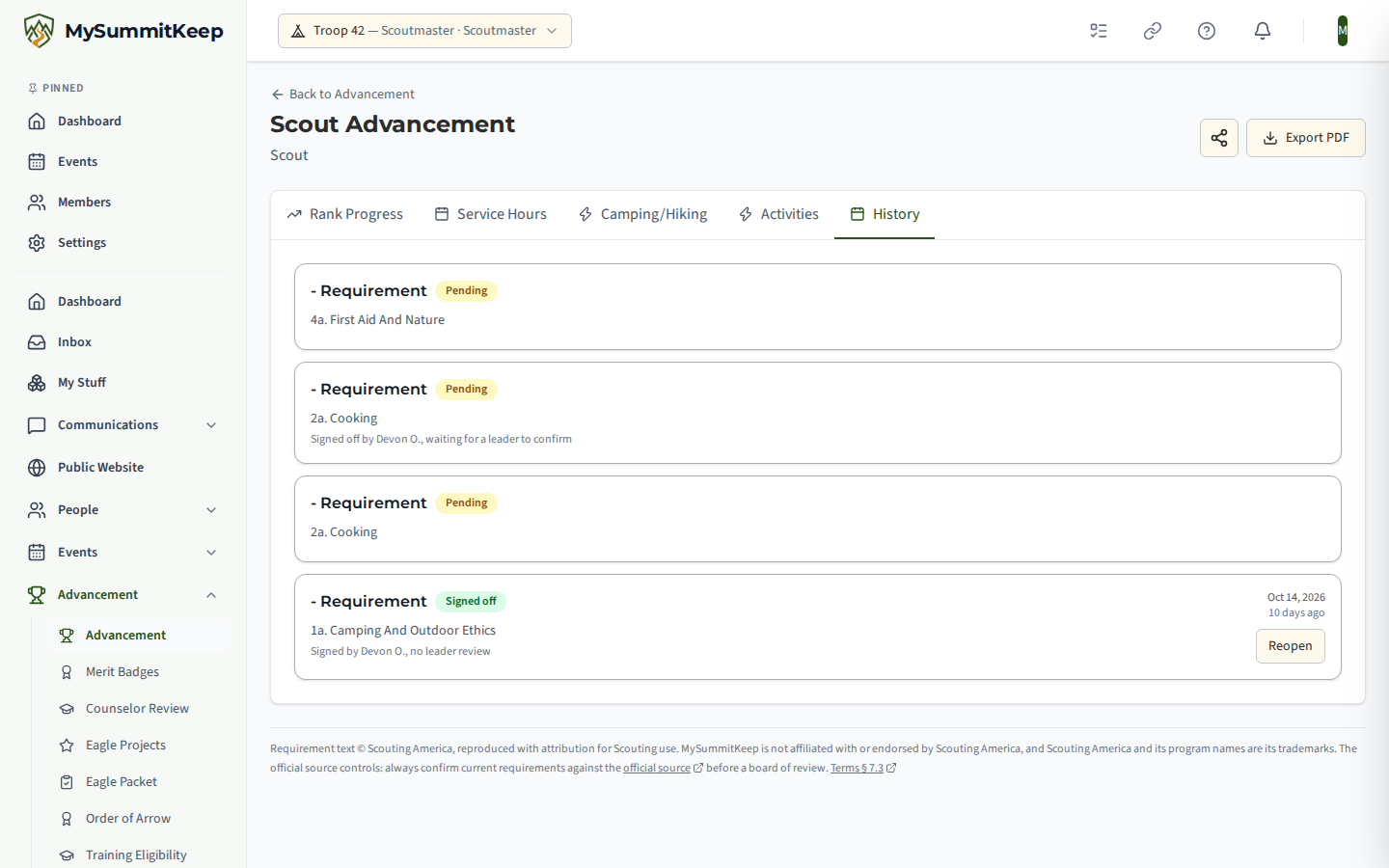
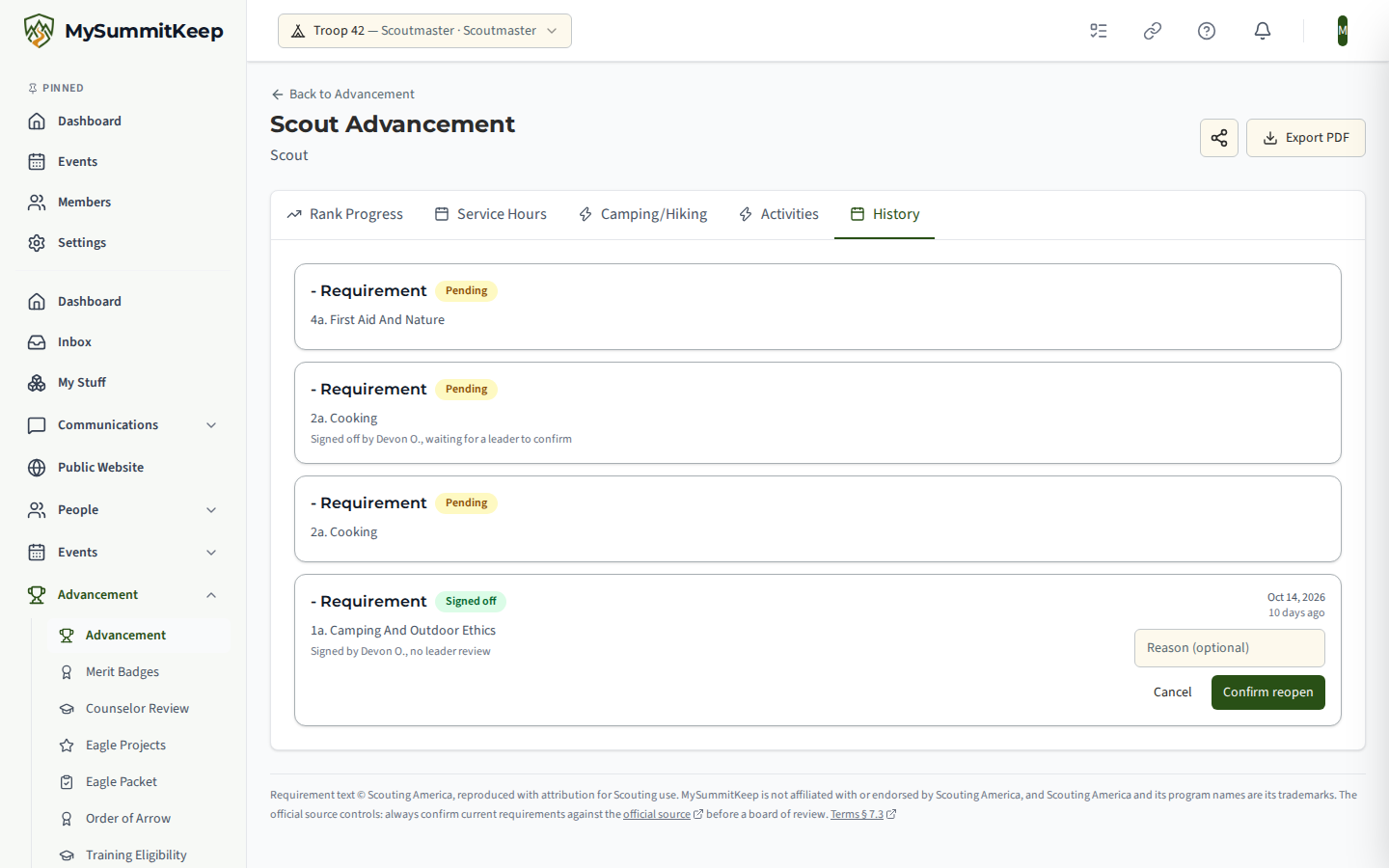
Section titled “Reopening a sign-off”A leader can reopen any counted requirement from the Scout’s Advancement page, on the Rank Progress list or the History tab. Press Reopen, add a reason if you want, and confirm. The requirement goes back to waiting for a leader and appears in the Approval Queue, where you can approve or reject it. Reopen is for adult leaders who can approve advancement. A Scout, including a Patrol Leader who records advancement, never sees it and cannot reopen a sign-off, so a Scout can never undo an adult’s approval.
The Scoutmaster conference and board of review are not affected by any of this. They are still recorded by adults.
What parents see
Section titled “What parents see”When a Scout marks a requirement done for another Scout, that Scout’s parents are notified first, and the Scout is told after them. The message says a fellow Scout marked it done and, depending on your setting, that a leader will confirm it or that it was recorded without a leader review. If a Scout has no linked parent, the Scout is not messaged directly.
The same goes when a Scout asks a fellow Scout for a sign-off: the asked Scout’s parents are notified first, and the asked Scout after them (not at all if no parent can be reached). That notice never names the Scout who asked.
Where names appear to Scouts and parents they are a first name and last initial only. A Scout never sees another Scout’s contact details, health information or family details.
Questions
Section titled “Questions”Can a Scout sign for a Scout in another troop? No. Signing is limited to Scouts in the same unit.
Can a Scout approve the sign-off of another Scout? No. Approving always needs an adult leader.
What if I turn the feature off while Scouts have sign-offs waiting? Waiting sign-offs stay in the Approval Queue for a leader to approve or reject, and counted sign-offs keep counting.
Where did the Scout’s sign-off go after I reopened it? Back to Pending in the Approval Queue, with the Scout still recorded as the person who first signed it.
Related pages
Section titled “Related pages”- Advancement Workflow for the Approval Queue and per-Scout advancement
- What Youth Leaders Can and Cannot See
- Unit Settings
- For Scouts: My Advancement & Rank Progress
Need help? Contact support — we usually respond within one business day.
MySummitKeep is an independent product and is not affiliated with, endorsed by, or sponsored by Scouting America (formerly the Boy Scouts of America). Scouting America, Scouts BSA, Cub Scouts, Venturing, Sea Scouts, and the Order of the Arrow are trademarks of Scouting America. Official program content shown in screenshots and examples is © Scouting America; always confirm current requirements atscouting.org. SeeTerms § 7.3.