
Your Public Website
Every unit has a public page that families can visit without logging in. The Public Website page is the one place to find its address, share it, and manage it.
Who can do this: People with the Settings permission (Scoutmaster, Committee Chair, Cubmaster, and equivalents). The Public Website link only shows in the menu for them. They can see the address and QR code and change the Unit URL or the custom domain. A leader without the permission who opens the page by its web address sees the address read-only.
Where to find it: Public Website in the left menu, below Communications. It is available on every plan.
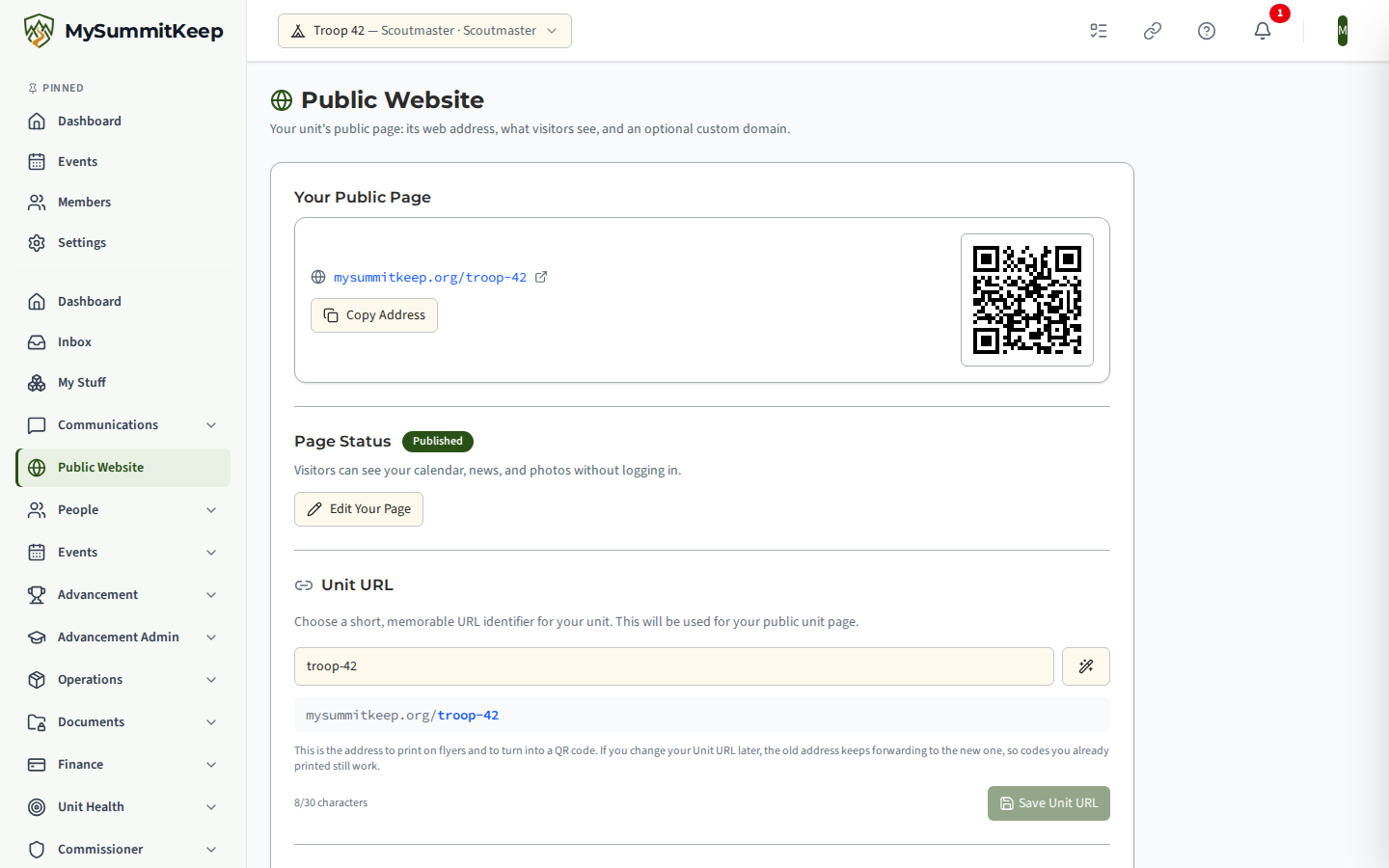
Your public page
Section titled “Your public page”The first card shows your unit’s public address, for example mysummitkeep.org/troop68.
- Select the address to open your page in a new tab.
- Select Copy Address to copy the full link for an email or a social post.
- Print the QR code on flyers and banners. It points at the same address, so a phone camera opens your page directly.
If your unit does not have an address yet, the card asks you to choose a Unit URL first (see below).
Page status
Section titled “Page status”Page Status says whether your page is Published or Not Published. When it is not published, visitors see nothing at your address.
Select Edit Your Page (or Set Up Your Page) to open Unit Settings, where you switch on Public Sub-Site and build the page with the Site Builder. The full walkthrough is in Your Public Unit Website.
Unit URL
Section titled “Unit URL”The Unit URL is the short identifier at the end of your address. Choose something short and memorable. A live preview shows the address as you type, and the wand button suggests one from your unit name. Select Save Unit URL when you are happy with it.
If you change it later, the old address keeps forwarding to the new one, so printed QR codes keep working. Pick a Unit URL you expect to keep anyway.
Custom domain
Section titled “Custom domain”Your free mysummitkeep.org/yourslug address works out of the box. If you would rather serve your page from a domain you already own, such as scouts.yourdomain.com, use the Custom Domain (BYOD) section. “BYOD” means bring your own domain.
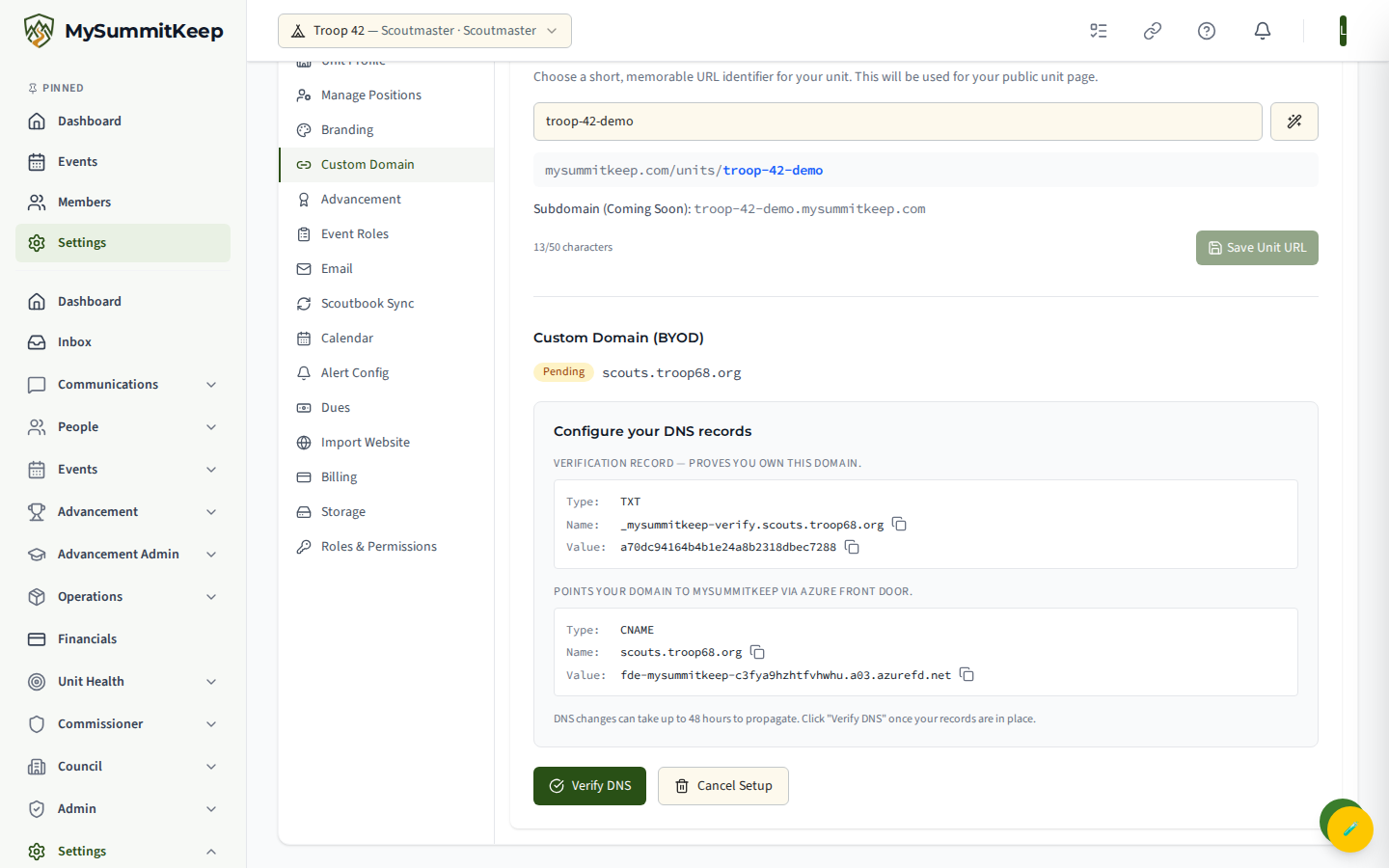
To start, type your domain into the Domain Name field and select Set Up Domain. You need access to your registrar’s DNS settings to finish. MySummitKeep checks the format first (it must be a real domain like scouts.yourdomain.com), then generates the DNS records to add.
Verifying DNS records
Section titled “Verifying DNS records”Once setup starts, a Configure Your DNS Records panel lists each record’s Type, Name, and Value in a copy-friendly block. Use the copy icon next to Name and Value to avoid typos.
Add those records exactly as shown at your registrar, return to MySummitKeep, and select Verify DNS. Cancel Setup removes the pending domain if you decide not to proceed.
After verification succeeds, the page shows DNS Verified and starts provisioning an SSL certificate so your domain loads securely over HTTPS. This takes a few minutes, and the page refreshes by itself. When the certificate shows Active, select Activate Domain to take it live. Later you can Deactivate the domain (keeping the configuration) or Remove Domain entirely.
Troubleshooting domain verification
Section titled “Troubleshooting domain verification”If verification does not succeed, the page shows Verification Failed or Verification Expired with any error details found.
- Re-check the records. Compare the Type, Name, and Value against what you entered at your registrar. A trailing dot, an extra label in the name, or a typo in the value is the most common cause.
- Give it time. An “expired” status means the verification window passed before the records were found.
- Avoid conflicting records. If an old A, AAAA, or CNAME record already points the same name elsewhere, remove or update it to match the value MySummitKeep provided.
- Retry. After correcting the records, select Retry Verification. To start over, Remove Domain clears the configuration.
Still stuck? Reach out through the in-app support tools and include your domain name and registrar so the team can check propagation for you.
Related: Your Public Unit Website · Unit Settings · Branding and Appearance
Need help? Contact support — we usually respond within one business day.
MySummitKeep is an independent product and is not affiliated with, endorsed by, or sponsored by Scouting America (formerly the Boy Scouts of America). Scouting America, Scouts BSA, Cub Scouts, Venturing, Sea Scouts, and the Order of the Arrow are trademarks of Scouting America. Official program content shown in screenshots and examples is © Scouting America; always confirm current requirements atscouting.org. SeeTerms § 7.3.