
Chipmunk Ranger
A Chipmunk Ranger is a district or council volunteer who supports Scurries. A Scurry is a weekly group for children aged 4 and 5 in the Scouting America Chipmunks pilot. A Scurry is its own unit type, not a pack, and has no ranks, badges or advancement. Chipmunks is a pilot: the program is run in a small number of councils, so check with your council about how it works locally.
Find it in the left menu: Council → My Scurries.
The Ranger role is built for support, not for oversight of individual children. A Ranger sees totals for the Scurries assigned to them and nothing that identifies a child or a family.
What a Ranger sees
Section titled “What a Ranger sees”Open Council → My Scurries from the left menu. The page lists each Scurry assigned to you.
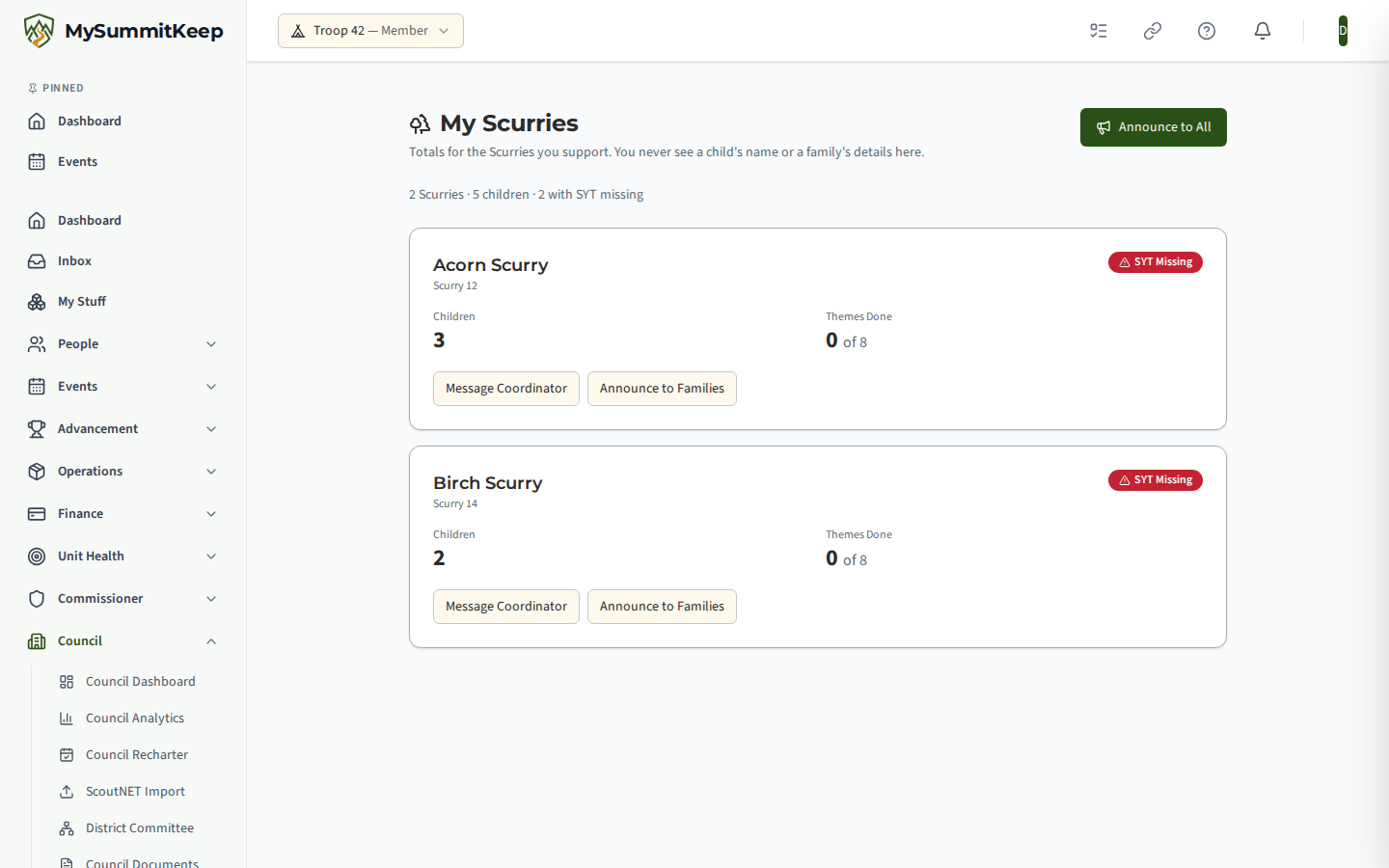
For each Scurry you see:
- Children: how many children currently have a seat.
- Themes Done: how many of the eight weekly themes have had at least one sticker awarded, out of eight.
- SYT Missing: a red badge when the Scurry has no leader, or any leader has no current Safeguarding Youth Training on record. A Scurry Coordinator can set up right away without it; the badge is a prompt for you to follow up, not a block.
You never see a child’s name, a date of birth, a parent’s name or an email address on this page, in any message, or in any list.
Message a Scurry Coordinator
Section titled “Message a Scurry Coordinator”Choose Message Coordinator on a Scurry card, write a subject and a message, and send. The message goes by email to the Scurry’s adult coordinators, and their replies come straight back to you. You are told how many coordinators were written to, not who they are.
Announce to families
Section titled “Announce to families”Choose Announce to Families on one Scurry, or Announce to All at the top of the page to reach every Scurry assigned to you.
- The announcement goes by email to the parents and guardians of the children in those Scurries. A child is never emailed.
- MySummitKeep works out who the parents are. You do not choose, see or download recipients. After you send, you see only how many families it was queued for.
- The message does not include any child’s name, and replies are not routed to you. Parents are told to contact their Scurry Coordinator with questions.
- Announcements do not appear in the Sent Messages list, because that list shows recipients.
Assigning Rangers to Scurries
Section titled “Assigning Rangers to Scurries”A council or district admin who can grant roles does this on the Manage Roles page.
- Give the person the Chipmunk Ranger role. Pick a district for a district Ranger, or a council for a Ranger who supports every Scurry in the council.
- In the Chipmunk Ranger Scurries section, pick the Ranger and a Scurry in the same district or council, and choose Assign.
- To remove a Scurry from a Ranger, choose End next to the assignment. The history is kept.
A Ranger sees a Scurry only while all of these are true: the Ranger role is active, the assignment is open, and the Scurry is still inside the Ranger’s district or council. A Chipmunk Ranger has no access to commissioner tools, council dashboards or any unit’s roster.
Related
Section titled “Related”MySummitKeep is an independent product and is not affiliated with, endorsed by, or sponsored by Scouting America (formerly the Boy Scouts of America). Scouting America, Scouts BSA, Cub Scouts, Venturing, Sea Scouts, and the Order of the Arrow are trademarks of Scouting America. Official program content shown in screenshots and examples is © Scouting America; always confirm current requirements atscouting.org. SeeTerms § 7.3.