
Urgent Texts for Leaders
When something changes today and people need to know now, you can add an urgent text to a group message. The message still goes out the usual way (in the app, by notification and by email). The text is an extra, short nudge to adults who agreed to get texts.
What urgent texts are for
Section titled “What urgent texts are for”Texts are for urgent same-day changes only, never routine announcements. Choose one of three kinds:
| Kind | Sent at night? |
|---|---|
| Same-day event cancellation or change | No |
| Safety or weather alert | Yes, at any hour |
| Pickup or arrival change | No |
Quiet hours. Between 9pm and 8am in your unit’s time zone (Central time if none is set), a same-day change or a pickup or arrival change is not sent as a text. MySummitKeep tells you so in the composer, and you can still send: your message goes out by email, push and in the app as always, the text is skipped (it shows as “quiet hours” on the job’s recipient list, and no texts are used from your allowance), and the result tells you the text was not sent. Send the text in the morning, or rely on the email. A safety or weather alert can always be texted.
Who can send one
Section titled “Who can send one”An adult who can already send group messages in your unit and holds a current Safeguarding Youth Training certificate. Youth leaders, such as a Senior Patrol Leader, cannot send urgent texts. Urgent texts go with members and roles; they are not available for contact groups or the alumni list.
Send one
Section titled “Send one”- Open Send Group Message and choose who the message is for.
- Write the subject and the message as usual.
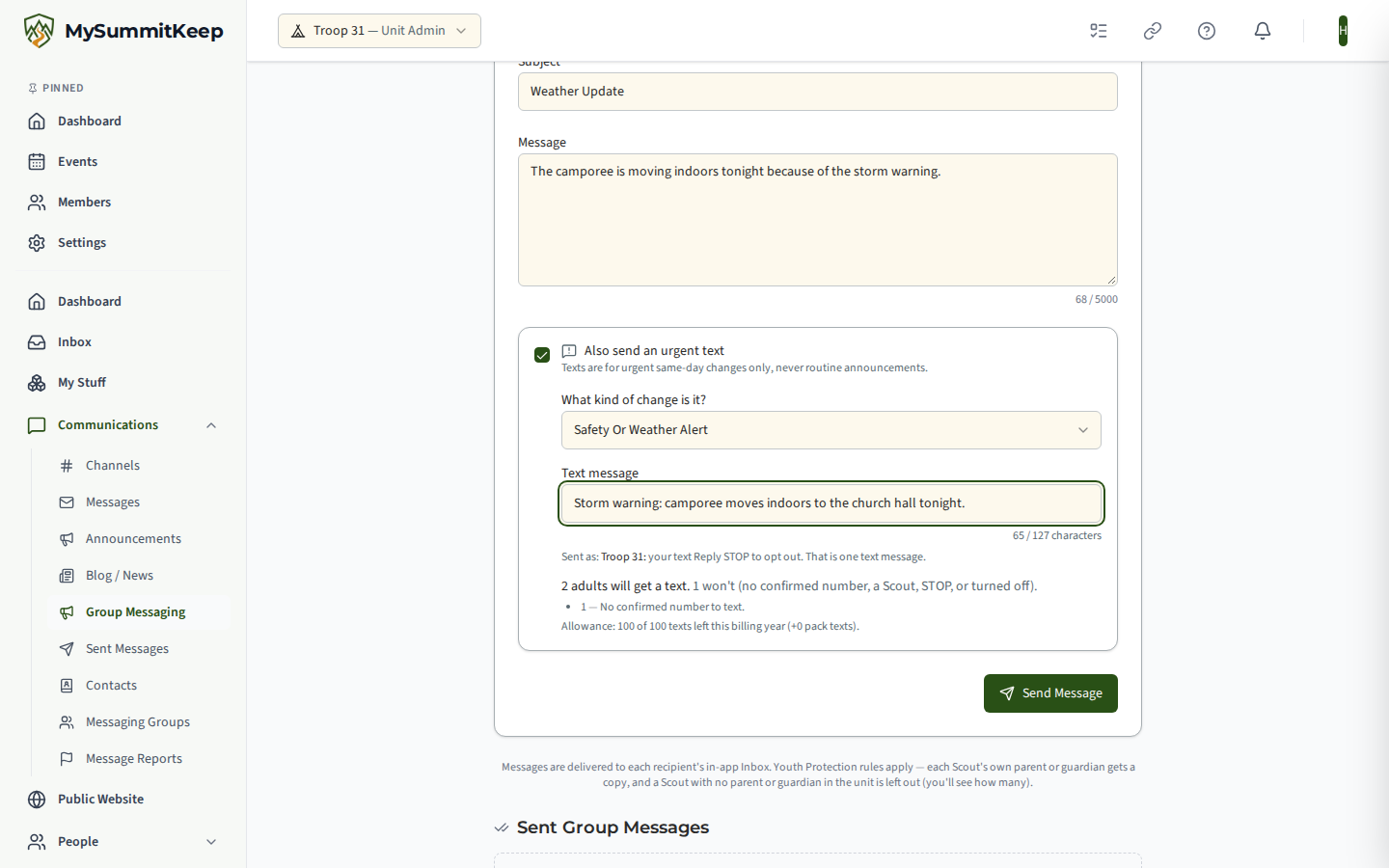
- Tick Also send an urgent text, pick the kind, and type the text.
- Check the preview, then send.
One text message, no more
Section titled “One text message, no more”Every urgent text begins with your unit’s name (for example “Troop 68:”) and ends with “Reply STOP to opt out.” The whole text must fit one text message, so the box counts the characters you have left after those two parts. One urgent text counts as one text against your unit’s allowance.
Who gets the text
Section titled “Who gets the text”- Adults with a confirmed number. Only an adult who replied YES to the confirmation text for their number. Adults can turn off urgent texts for themselves under Settings, Notifications, Alerts Sent by Text (“Urgent unit alerts”), and anyone can reply STOP.
- Never a Scout. A Scout is never texted, and neither is a number a Scout also lists, unless it is the family number of that Scout’s own parent or guardian. When a message is for a Scout, that Scout’s parent or guardian gets a copy, and they get the text as well if they have a confirmed number.
- One text per number. If two adults share a number, that number gets one text.
Everyone in the group still gets the message itself, whether or not they get the text. The preview counts the adults who will get a text, and lists why the others will not.
Your unit’s texts
Section titled “Your unit’s texts”Each plan includes a number of texts for each billing year (Summit 100, Peak 300). You can buy packs of 500 texts for $10 that never expire; see Settings, Billing. The preview shows how many texts are left. If the group is larger than what is left, the people the texts do not reach get the email instead, and the preview says how many. A text pack is used after the plan’s own texts.
After you send
Section titled “After you send”The send runs in the background. Open Sent Messages to follow each person: Sent, or the reason there was no text (a Scout, no confirmed number, turned off, STOP, or out of texts).
MySummitKeep is an independent product and is not affiliated with, endorsed by, or sponsored by Scouting America (formerly the Boy Scouts of America). Scouting America, Scouts BSA, Cub Scouts, Venturing, Sea Scouts, and the Order of the Arrow are trademarks of Scouting America. Official program content shown in screenshots and examples is © Scouting America; always confirm current requirements atscouting.org. SeeTerms § 7.3.